Whac a Mole
Note
🌟 Welcome to the SunFounder Facebook Community! Whether you’re into Raspberry Pi, Arduino, or ESP32, you’ll find inspiration, help ideas here.
✅ Be the first to get free learning resources.
✅ Stay updated on new products & exclusive giveaways.
✅ Share your creations and get real feedback.
Kit purchase
Looking for parts? Check out our all-in-one kits below — packed with components, beginner-friendly guides, and tons of fun.

Name |
Includes Arduino board |
PURCHASE LINK |
|---|---|---|
Elite Explorer Kit |
Arduino Uno R4 WiFi |
|
3 in 1 Ultimate Starter Kit |
Arduino Uno R4 Minima |
Course Introduction
In this lesson, we’ll build a Whac-A-Mole game using LEDs, buttons, an LCD display, and a buzzer, where players hit lit targets to score points before time runs out.
Note
If this is your first time working with an Arduino project, we recommend downloading and reviewing the basic materials first.
Required Components
In this project, we need the following components:
SN |
COMPONENT INTRODUCTION |
QUANTITY |
PURCHASE LINK |
|---|---|---|---|
1 |
Arduino UNO R4 Minima |
1 |
|
2 |
USB Type-C cable |
1 |
|
3 |
Breadboard |
1 |
|
4 |
Wires |
Several |
|
5 |
Passive Buzzer |
1 |
|
6 |
Button |
4 |
|
7 |
LED |
4 |
|
8 |
220Ω resistor |
4 |
|
9 |
I2C LCD 1602 |
1 |
Wiring
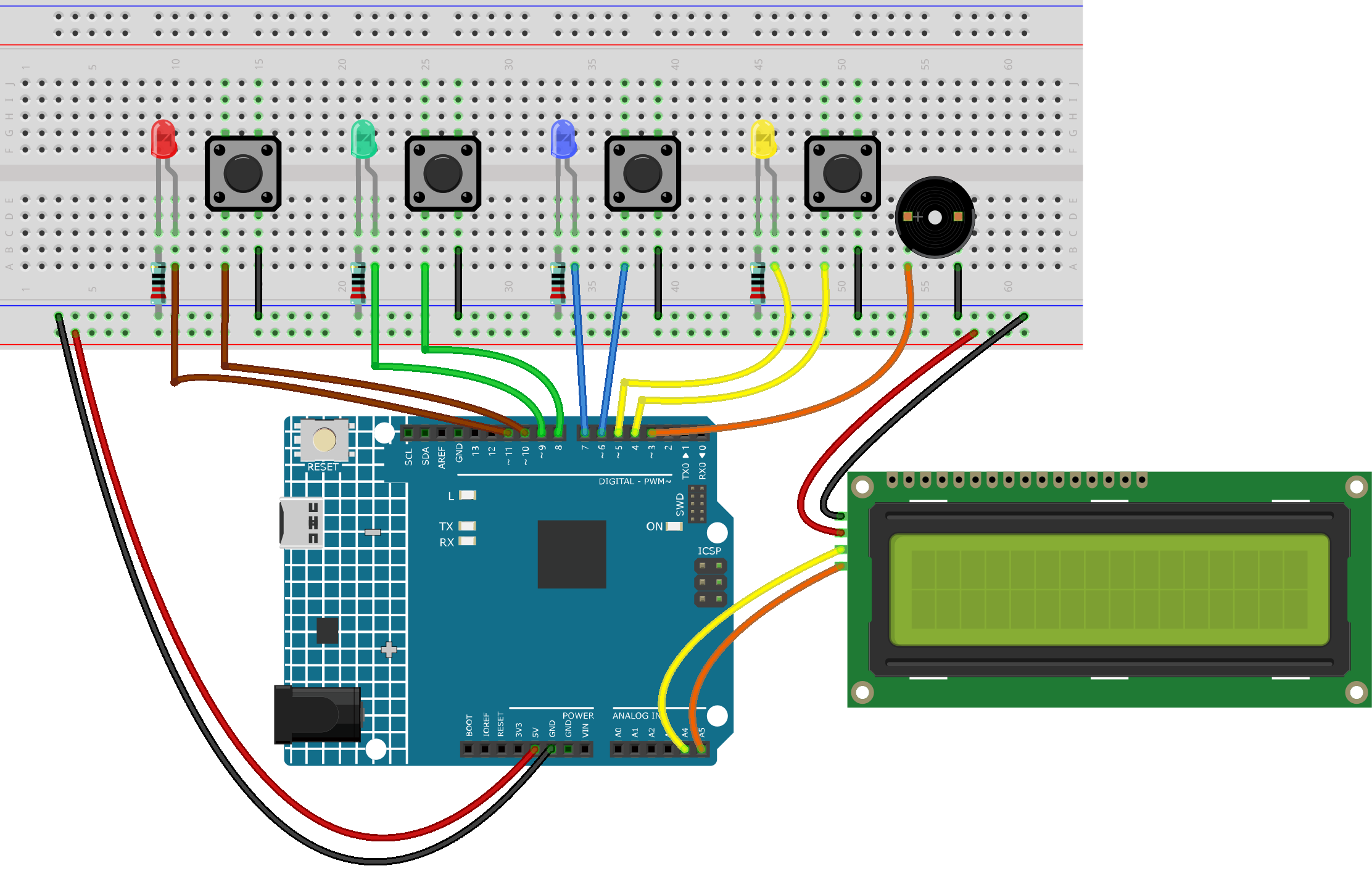
Common Connections:
I2C LCD 1602
SDA: Connect to A4 on the Arduino.
SCL: Connect to A5 on the Arduino.
GND: Connect to breadboard’s negative power bus.
VCC: Connect to breadboard’s red power bus.
LEDS
Blue: Connect the LED anode to 7 on the Arduino, and the cathode to a 220Ω resistor, then to the negative power bus on the breadboard.
Green: Connect the LED anode to 9 on the Arduino, and the cathode to a 220Ω resistor, then to the negative power bus on the breadboard.
Yellow: Connect the LED anode to 5 on the Arduino , and the cathode to a 220Ω resistor, then to the negative power bus on the breadboard.
Red: Connect the LED anode to 11 on the Arduino, and the cathode to a 220Ω resistor, then to the negative power bus on the breadboard.
Passive Buzzer
+: Connect to 3 on the Arduino.
-: Connect to breadboard’s negative power bus.
Buttons
Blue Button: Connect to the negative power bus on the breadboard, and the other end to 6 on the Arduino board.
Green Button: Connect to the negative power bus on the breadboard, and the other end to 8 on the Arduino board.
Yellow Button: Connect to the negative power bus on the breadboard, and the other end to 4 on the Arduino board.
Red Button: Connect to the negative power bus on the breadboard, and the other end to 10 on the Arduino board.
Writing the Code
Note
You can copy this code into Arduino IDE.
To install the library, use the Arduino Library Manager and search for LiquidCrystal I2C and install it.
Don’t forget to select the board(Arduino UNO R4 Minima) and the correct port before clicking the Upload button.
#include <Wire.h>
#include <LiquidCrystal_I2C.h>

#define BUZZER_PIN 3
#define NUM_HOLES 4
#define GAME_DURATION 30000  // 30 seconds

// Updated pin mapping
const int ledPins[NUM_HOLES] = {5, 7, 9, 11};
const int btnPins[NUM_HOLES] = {4, 6, 8, 10};

LiquidCrystal_I2C lcd(0x27, 16, 2);

bool gameRunning = false;
int score = 0;
int hits = 0;

unsigned long gameStartTime;
unsigned long lastMoleTime = 0;
unsigned long lastLcdUpdate = 0;
unsigned long moleInterval = 1000; // initial spawn interval
bool activeMoles[NUM_HOLES];

void setup() {
  for (int i = 0; i < NUM_HOLES; i++) {
    pinMode(ledPins[i], OUTPUT);
    pinMode(btnPins[i], INPUT_PULLUP);
  }
  pinMode(BUZZER_PIN, OUTPUT);

  lcd.init();
  lcd.backlight();
  showStartMessage();
}

void loop() {
  if (!gameRunning) {
    if (digitalRead(btnPins[0]) == LOW) { // long press to start
      delay(500);
      if (digitalRead(btnPins[0]) == LOW) startGame();
    }
  } else {
    unsigned long now = millis();
    unsigned long elapsed = now - gameStartTime;

    // spawn moles
    if (now - lastMoleTime > moleInterval) {
      spawnMoles();
    }

    // check hits
    checkHit();

    // difficulty scaling
    if (elapsed > 20000) moleInterval = 400;
    else if (elapsed > 10000) moleInterval = 600;

    // update LCD every 200ms
    if (now - lastLcdUpdate > 200) {
      updateGameLCD(elapsed);
      lastLcdUpdate = now;
    }

    // game end
    if (elapsed > GAME_DURATION) {
      endGame();
    }
  }
}

void showStartMessage() {
  lcd.clear();
  lcd.setCursor(0, 0);
  lcd.print("Hold Btn1");
  lcd.setCursor(0, 1);
  lcd.print("to start game");
}

void startGame() {
  gameRunning = true;
  score = 0;
  hits = 0;
  gameStartTime = millis();
  moleInterval = 1000;
  clearAllMoles();
  lcd.clear();
  lcd.setCursor(0, 0);
  lcd.print("Game Started!");
  delay(1000);
  lcd.clear();
}

void updateGameLCD(unsigned long elapsed) {
  int timeLeft = (GAME_DURATION - elapsed) / 1000;
  lcd.setCursor(0, 0);
  lcd.print("Score:");
  lcd.print(score);
  lcd.print("    ");
  lcd.setCursor(0, 1);
  lcd.print("Time:");
  lcd.print(timeLeft);
  lcd.print("s   ");
}

void spawnMoles() {
  clearAllMoles();
  int numMoles = random(1, 3); // 1 or 2 moles
  if (millis() - gameStartTime > 20000) numMoles = random(2, 4); // late game more moles

  for (int i = 0; i < numMoles; i++) {
    int hole;
    do {
      hole = random(NUM_HOLES);
    } while (activeMoles[hole]);
    activeMoles[hole] = true;
    digitalWrite(ledPins[hole], HIGH);
  }
  lastMoleTime = millis();
}

void clearAllMoles() {
  for (int i = 0; i < NUM_HOLES; i++) {
    activeMoles[i] = false;
    digitalWrite(ledPins[i], LOW);
  }
}

void checkHit() {
  for (int i = 0; i < NUM_HOLES; i++) {
    if (digitalRead(btnPins[i]) == LOW) {
      delay(20); // debounce
      if (activeMoles[i]) {
        score += 10;
        hits++;
        tone(BUZZER_PIN, 1500, 100);
        activeMoles[i] = false;
        digitalWrite(ledPins[i], LOW);
      } else {
        score -= 5;
        tone(BUZZER_PIN, 500, 100);
      }
      delay(150);
    }
  }
}

void endGame() {
  gameRunning = false;
  clearAllMoles();

  lcd.clear();
  lcd.setCursor(0, 0);
  lcd.print("Score:");
  lcd.print(score);
  lcd.setCursor(0, 1);
  lcd.print("Hits:");
  lcd.print(hits);

  tone(BUZZER_PIN, 1000, 300);
  delay(300);
  tone(BUZZER_PIN, 1500, 300);
  delay(300);
  noTone(BUZZER_PIN);

  delay(3000);
  showStartMessage();
}