Mini Fan 1.0
Note
🌟 Welcome to the SunFounder Facebook Community! Whether you’re into Raspberry Pi, Arduino, or ESP32, you’ll find inspiration, help ideas here.
✅ Be the first to get free learning resources.
✅ Stay updated on new products & exclusive giveaways.
✅ Share your creations and get real feedback.
👉 Need faster updates or support? Click [here] join our Facebook community
👉 Or join our WhatsApp group: Click [here]
🎁 Looking for parts?Check out our all-in-one kits below — packed with components, beginner-friendly guides, and tons of fun.
Name |
Includes Arduino board |
PURCHASE LINK |
|---|---|---|
Elite Explorer Kit |
Arduino Uno R4 WiFi |
|
Universal Maker Sensor Kit |
× |
|
3 in 1 Ultimate Starter Kit |
Arduino Uno R3 |
Course Introduction
This Arduino project controls a DC motor using a TA6586 motor driver and three push buttons. The blue button runs the motor at full speed in reverse, the yellow button runs it at half speed in reverse, and the red button stops the motor. The system uses PWM control to adjust speed and responds immediately to button input.
Note
If this is your first time working with an Arduino project, we recommend downloading and reviewing the basic materials first.
Required Components
In this project, we need the following components:
SN |
COMPONENT INTRODUCTION |
QUANTITY |
PURCHASE LINK |
|---|---|---|---|
1 |
Arduino UNO R4 Minima/Arduino UNO R4 WIFI |
1 |
|
2 |
USB Cable |
1 |
|
3 |
Breadboard |
1 |
|
4 |
Wires |
Several |
|
5 |
DC Motor |
1 |
|
6 |
TA6586 - Motor Driver Chip |
1 |
|
7 |
Button |
3 |
|
7 |
Power Module |
1 |
Wiring
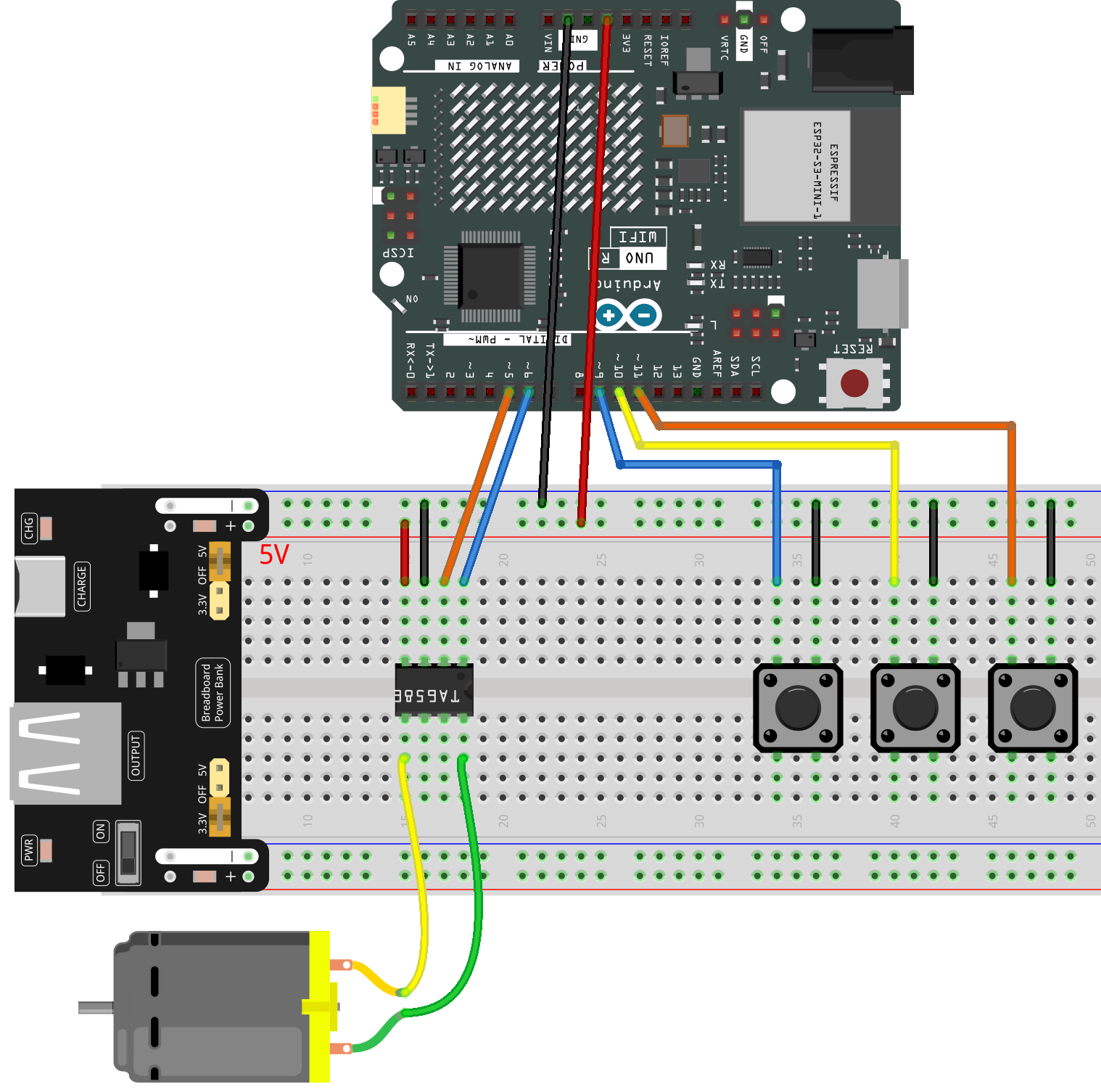
Common Connections:
TA6586 - Motor Driver Chip
BI: Connect to 6 on the Arduino.
FI: Connect to 5 on the Arduino.
GND: Connect to breadboard’s negative power bus.
VCC: Connect to breadboard’s red power bus.
DC Motor
GND: Connect to TA6586 B0.
VCC: Connect to TA6586 F0.
Button1
Connect to breadboard’s negative power bus.
Connect to 9 on the Arduino.
Button2
Connect to breadboard’s negative power bus.
Connect to 10 on the Arduino.
Button3
Connect to breadboard’s negative power bus.
Connect to 11 on the Arduino.
Writing the Code
Note
You can copy this code into Arduino IDE.
Don’t forget to select the board(Arduino UNO R4) and the correct port before clicking the Upload button.
// Control a motor using TA6586 driver and three buttons
// Blue button: full speed (reverse direction)
// Yellow button: half speed (reverse direction)
// Red button: stop

const int fiPin = 5;     // Forward Input pin of TA6586
const int biPin = 6;     // Backward Input pin of TA6586

const int blueBtn = 9;   // Blue button pin - full speed
const int yellowBtn = 10;// Yellow button pin - half speed
const int redBtn = 11;   // Red button pin - stop

void setup() {
  // Set motor control pins as outputs
  pinMode(fiPin, OUTPUT);
  pinMode(biPin, OUTPUT);

  // Set button pins as inputs with internal pull-up resistors
  // (HIGH when not pressed, LOW when pressed)
  pinMode(blueBtn, INPUT_PULLUP);
  pinMode(yellowBtn, INPUT_PULLUP);
  pinMode(redBtn, INPUT_PULLUP);
}

void loop() {
  // When the blue button is pressed: full speed reverse
  if (digitalRead(blueBtn) == LOW) {
    analogWrite(biPin, 255);  // Full speed reverse
    analogWrite(fiPin, 0);    // Stop forward output
  }
  // When the yellow button is pressed: half speed reverse
  else if (digitalRead(yellowBtn) == LOW) {
    analogWrite(biPin, 128);  // Half speed reverse
    analogWrite(fiPin, 0);
  }
  // When the red button is pressed: stop the motor
  else if (digitalRead(redBtn) == LOW) {
    analogWrite(biPin, 0);
    analogWrite(fiPin, 0);
  }
}