Stacker Blocks 3.0
Note
🌟 Welcome to the SunFounder Facebook Community! Whether you’re into Raspberry Pi, Arduino, or ESP32, you’ll find inspiration, help ideas here.
✅ Be the first to get free learning resources.
✅ Stay updated on new products & exclusive giveaways.
✅ Share your creations and get real feedback.
👉 Need faster updates or support? Click [here] join our Facebook community
👉 Or join our WhatsApp group: Click [here]
🎁 Looking for parts?Check out our all-in-one kits below — packed with components, beginner-friendly guides, and tons of fun.
Name |
Includes Arduino board |
PURCHASE LINK |
|---|---|---|
Elite Explorer Kit |
Arduino Uno R4 WiFi |
|
Ultimate Sensor Kit |
Arduino Uno R4 Minima |
|
Electronic Kit |
× |
|
Universal Maker Sensor Kit |
× |
Course Introduction
In this lesson, you’ll learn how to use a MAX7219 Dot Matrix Module, a button, an active buzzer, I2C LCD with the Arduino R4 UNO to create a stacker blocks game.
The MAX7219 Dot Matrix Module will display the game, and players can use the button to control the gameplay in the stacker blocks game.
Note
If this is your first time working with an Arduino project, we recommend downloading and reviewing the basic materials first.
Required Components
In this project, we need the following components:
SN |
COMPONENT INTRODUCTION |
QUANTITY |
PURCHASE LINK |
|---|---|---|---|
1 |
Arduino UNO R4 Minima |
1 |
|
2 |
USB Type-C cable |
1 |
|
3 |
Breadboard |
1 |
|
4 |
Wires |
Several |
|
5 |
MAX7219 Dot Matrix Module |
1 |
|
6 |
Button |
1 |
|
7 |
I2C LCD 1602 |
1 |
|
8 |
Active Buzzer |
1 |
Wiring
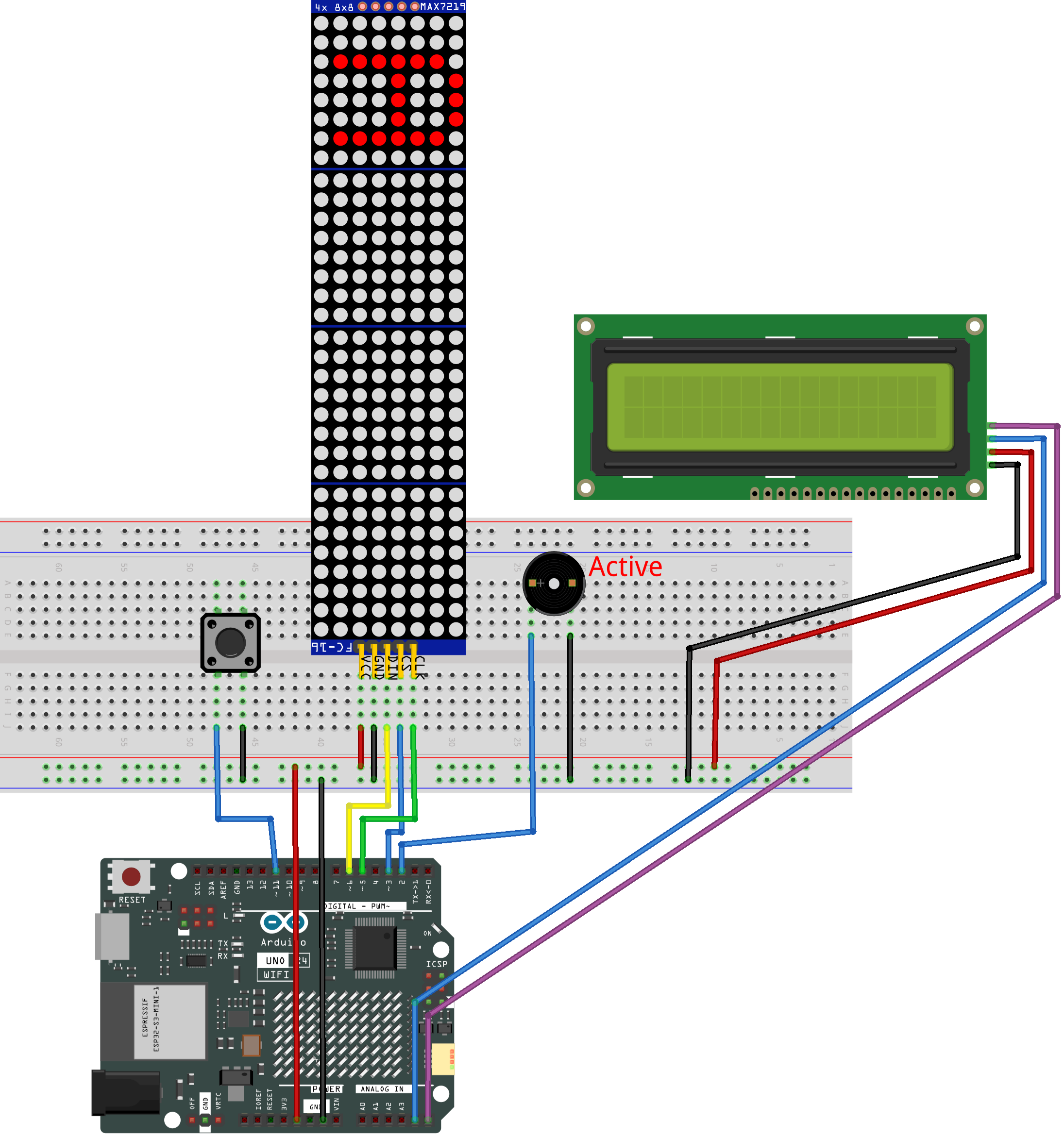
Common Connections:
MAX7219 Dot Matrix Module
CLK: Connect to 5 on the Arduino.
CS: Connect to 3 on the Arduino.
DIN: Connect to 6 on the Arduino.
GND: Connect to breadboard’s negative power bus.
VCC: Connect to breadboard’s red power bus.
Button
Connect to breadboard’s negative power bus.
Connect to 11 on the Arduino.
I2C LCD 1602
SDA: Connect to A5 on the Arduino.
SCL: Connect to A4 on the Arduino.
GND: Connect to breadboard’s negative power bus.
VCC: Connect to breadboard’s red power bus.
Active Buzzer
Connect to breadboard’s negative power bus.
Connect to 2 on the Arduino.
Writing the Code
Note
You can copy this code into Arduino IDE.
To install the library, use the Arduino Library Manager and search for LiquidCrystal_I2C and LedControl and install it.
Don’t forget to select the board(Arduino UNO R4 Minima) and the correct port before clicking the Upload button.
#include "LedControl.h"
#include <Wire.h>
#include <LiquidCrystal_I2C.h>

// ==== LED matrices ====
// DIN=6, CLK=5, CS=3, using 4 MAX7219 modules
LedControl lc = LedControl(6, 5, 3, 4);

// ==== LCD ====
// I2C LCD, address may be 0x27 or 0x3F
LiquidCrystal_I2C lcd(0x27, 16, 2);

// ==== Pins ====
const int buttonPin = 11;   // Button (INPUT_PULLUP, active LOW)
const int buzzerPin = 2;    // Active buzzer
const int blockColumns = 2; // Each layer uses 2 columns

// ==== Game state ====
int currentWidth = 4;        // Height of moving block
int currentPos = -4;         // Current top position (can be off-screen)
int direction = 1;           // Moving direction: 1=down, -1=up
int moveDelay = 150;         // Speed of movement
bool gameOver = false;
bool gameWon = false;
unsigned long lastMoveTime = 0;
int maxPosition = 0;         // Movement limit
int buttonPressCount = 0;
int currentLayerCount = 0;

bool systemReady = false;

// ==== Block structure ====
// Stores each placed layer
struct BlockLayer {
  int position;   // top row
  int width;      // height
  int startCol;   // column position
  int colWidth;   // width in columns
};

BlockLayer layers[32];

// ==== LCD helper ====
// Print text centered on LCD
void lcdPrintCentered(uint8_t row, const char* msg) {
  int len = 0;
  while (msg[len] != '\0') len++;
  int col = (16 - len) / 2;
  if (col < 0) col = 0;
  lcd.setCursor(col, row);
  lcd.print(msg);
}

// =======================
// 🔊 Sound system
// =======================

// Short beep for successful placement
void playSuccessSound() {
  digitalWrite(buzzerPin, HIGH);
  delay(60);
  digitalWrite(buzzerPin, LOW);
}

// Two-step sound for game over
void playGameOverSound() {
  digitalWrite(buzzerPin, HIGH);
  delay(250);
  digitalWrite(buzzerPin, LOW);

  delay(100);

  digitalWrite(buzzerPin, HIGH);
  delay(300);
  digitalWrite(buzzerPin, LOW);
}

// Three short beeps for winning
void playWinSound() {
  for (int i = 0; i < 3; i++) {
    digitalWrite(buzzerPin, HIGH);
    delay(80);
    digitalWrite(buzzerPin, LOW);
    delay(60);
  }
}

// Flash LED display when player wins
void playWinAnimation() {
  for (int i = 0; i < 3; i++) {
    for (int j = 0; j < 4; j++) lc.clearDisplay(j);
    delay(120);

    updateDisplay();
    delay(120);
  }
}

// ==== Display ====
void updateDisplay() {
  // Clear all modules first
  for (int i = 0; i < 4; i++) lc.clearDisplay(i);

  // Draw placed blocks
  for (int i = 0; i < currentLayerCount; i++) {
    int startCol = layers[i].startCol;

    for (int colOffset = 0; colOffset < blockColumns; colOffset++) {
      int currentCol = startCol + colOffset;
      int module = currentCol / 8;
      int col = 7 - (currentCol % 8);
      if (module >= 4) continue;

      for (int j = 0; j < layers[i].width; j++) {
        int row = layers[i].position + j;
        if (row >= 0 && row < 8)
          lc.setLed(module, row, col, true);
      }
    }
  }

  // Draw moving block
  if (!gameOver) {
    int startCol = currentLayerCount * blockColumns;

    for (int colOffset = 0; colOffset < blockColumns; colOffset++) {
      int currentCol = startCol + colOffset;
      int module = currentCol / 8;
      int col = 7 - (currentCol % 8);
      if (module >= 4) continue;

      for (int j = 0; j < currentWidth; j++) {
        int row = currentPos + j;
        if (row >= 0 && row < 8)
          lc.setLed(module, row, col, true);
      }
    }
  }
}

// ==== Button ====
// Detect single press (no repeat while holding)
bool checkButton() {
  static bool buttonPressed = false;

  if (!systemReady) return false;

  // Button pressed
  if (digitalRead(buttonPin) == LOW && !buttonPressed) {
    delay(20);  // debounce
    if (digitalRead(buttonPin) == LOW) {
      buttonPressed = true;
      return true;
    }
  }

  // Button released
  if (digitalRead(buttonPin) == HIGH) {
    buttonPressed = false;
  }

  return false;
}

// ==== Movement ====
void updateMaxPosition() {
  maxPosition = 7 + currentWidth;
}

// ==== LCD ====
void updateLCD() {
  lcd.clear();

  if (gameOver) {
    if (gameWon) {
      lcdPrintCentered(0, "YOU WIN!");
      lcdPrintCentered(1, "Perfect Stack!");
    } else {
      lcdPrintCentered(0, "GAME OVER");
      lcdPrintCentered(1, "Try Again!");
    }
    return;
  }

  lcd.setCursor(0, 0);
  lcd.print("Stack: ");
  lcd.print(currentLayerCount);

  lcd.setCursor(0, 1);
  lcd.print("Size: ");
  lcd.print(currentWidth);
}

// ==== Place block logic ====
void placeBlock() {

  buttonPressCount++;

  // Increase speed gradually
  if (buttonPressCount == 4) moveDelay = 120;
  else if (buttonPressCount == 8) moveDelay = 90;
  else if (buttonPressCount == 12) moveDelay = 60;

  // First block (no overlap needed)
  if (currentLayerCount == 0) {
    layers[0] = {currentPos, currentWidth, 0, blockColumns};
    currentLayerCount = 1;

    updateMaxPosition();
    currentPos = random(-currentWidth, maxPosition + 1);

    playSuccessSound();
    updateLCD();
    return;
  }

  // Calculate overlap with previous block
  int prevPos = layers[currentLayerCount - 1].position;
  int prevWidth = layers[currentLayerCount - 1].width;

  int overlapTop = max(prevPos, currentPos);
  int overlapBottom = min(prevPos + prevWidth - 1,
                          currentPos + currentWidth - 1);

  // No overlap → game over
  if (overlapBottom < overlapTop) {
    gameOver = true;
    gameWon = false;
    playGameOverSound();
    updateLCD();
    return;
  }

  // Save new trimmed block
  layers[currentLayerCount] = {
    overlapTop,
    overlapBottom - overlapTop + 1,
    currentLayerCount * blockColumns,
    blockColumns
  };

  currentWidth = overlapBottom - overlapTop + 1;
  currentLayerCount++;

  // Win condition
  if (currentLayerCount * blockColumns >= 32) {
    gameOver = true;
    gameWon = true;

    playWinSound();
    playWinAnimation();

    updateLCD();
    return;
  }

  playSuccessSound();

  updateMaxPosition();
  currentPos = random(-currentWidth, maxPosition + 1);

  updateLCD();
}

// ==== Setup ====
void setup() {
  delay(300);

  pinMode(buttonPin, INPUT_PULLUP);
  pinMode(buzzerPin, OUTPUT);
  digitalWrite(buzzerPin, LOW);

  Wire.begin();
  lcd.init();
  lcd.backlight();

  // Initialize LED modules
  for (int i = 0; i < 4; i++) {
    lc.shutdown(i, false);
    lc.setIntensity(i, 8);
    lc.clearDisplay(i);
  }

  randomSeed(analogRead(0));

  updateMaxPosition();
  updateDisplay();
  updateLCD();

  systemReady = true;
}

// ==== Loop ====
void loop() {

  // Game over blinking effect
  if (gameOver) {
    static bool blink = false;
    static unsigned long lastBlink = 0;

    if (millis() - lastBlink > 500) {
      lastBlink = millis();
      blink = !blink;
      if (blink) updateDisplay();
      else for (int i = 0; i < 4; i++) lc.clearDisplay(i);
    }

    // Restart game
    if (checkButton()) {
      gameOver = false;
      gameWon = false;
      currentLayerCount = 0;
      currentWidth = 4;
      currentPos = -currentWidth;
      moveDelay = 150;
      direction = 1;
      buttonPressCount = 0;

      updateMaxPosition();
      updateDisplay();
      updateLCD();
    }
    return;
  }

  // Block movement
  unsigned long currentTime = millis();
  if (currentTime - lastMoveTime > moveDelay) {
    lastMoveTime = currentTime;

    currentPos += direction;

    // Reflect at boundaries
    if (currentPos < -currentWidth) {
      currentPos = -currentWidth;
      direction = -direction;
    }

    if (currentPos > maxPosition) {
      currentPos = maxPosition;
      direction = -direction;
    }

    updateDisplay();
  }

  // Place block
  if (checkButton()) {
    placeBlock();
  }
}