PIN Lock 2.0
Note
🌟 Welcome to the SunFounder Facebook Community! Whether you’re into Raspberry Pi, Arduino, or ESP32, you’ll find inspiration, help ideas here.
✅ Be the first to get free learning resources.
✅ Stay updated on new products & exclusive giveaways.
✅ Share your creations and get real feedback.
Kit purchase
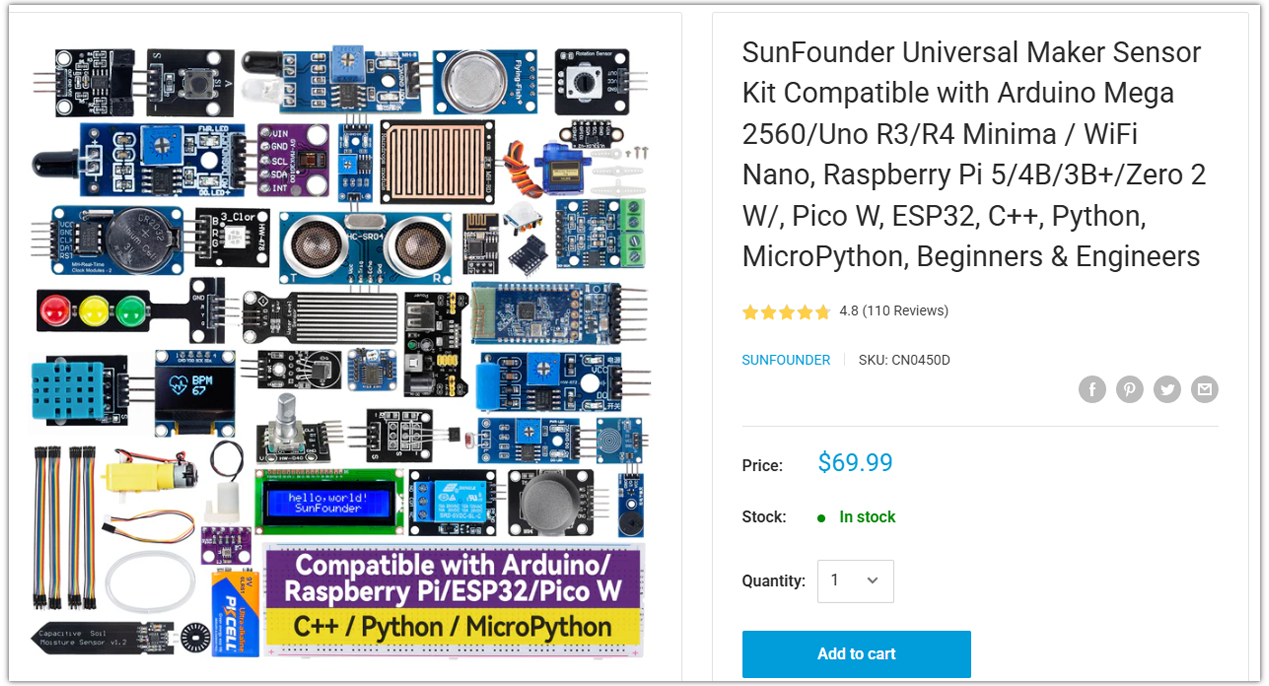
Looking for parts? Check out our all-in-one kits below — packed with components, beginner-friendly guides, and tons of fun.
Name |
Includes Arduino board |
PURCHASE LINK |
|---|---|---|
Ultimate Sensor Kit |
Arduino Uno R4 Minima |
|
Universal Maker Sensor Kit |
× |
Course Introduction
This project creates a PIN lock system using an Arduino, a 4×4 keypad, an I2C LCD, a servo, and a buzzer.
Users press * to enter PIN mode, input digits, and confirm with #. A correct PIN smoothly opens and closes the servo lock, with status shown on the LCD and audio feedback from the buzzer.
Note
If this is your first time working with an Arduino project, we recommend downloading and reviewing the basic materials first.
Required Components
In this project, we need the following components:
SN |
COMPONENT INTRODUCTION |
QUANTITY |
PURCHASE LINK |
|---|---|---|---|
1 |
Arduino UNO R4 Minima/Arduino UNO R4 WIFI |
1 |
|
2 |
USB Type-C cable |
1 |
|
3 |
Breadboard |
1 |
|
4 |
Wires |
Several |
|
5 |
Passive buzzer |
1 |
|
6 |
KeyPad |
1 |
|
7 |
I2C LCD 1602 |
1 |
|
8 |
Digital Servo Motor |
1 |
Wiring
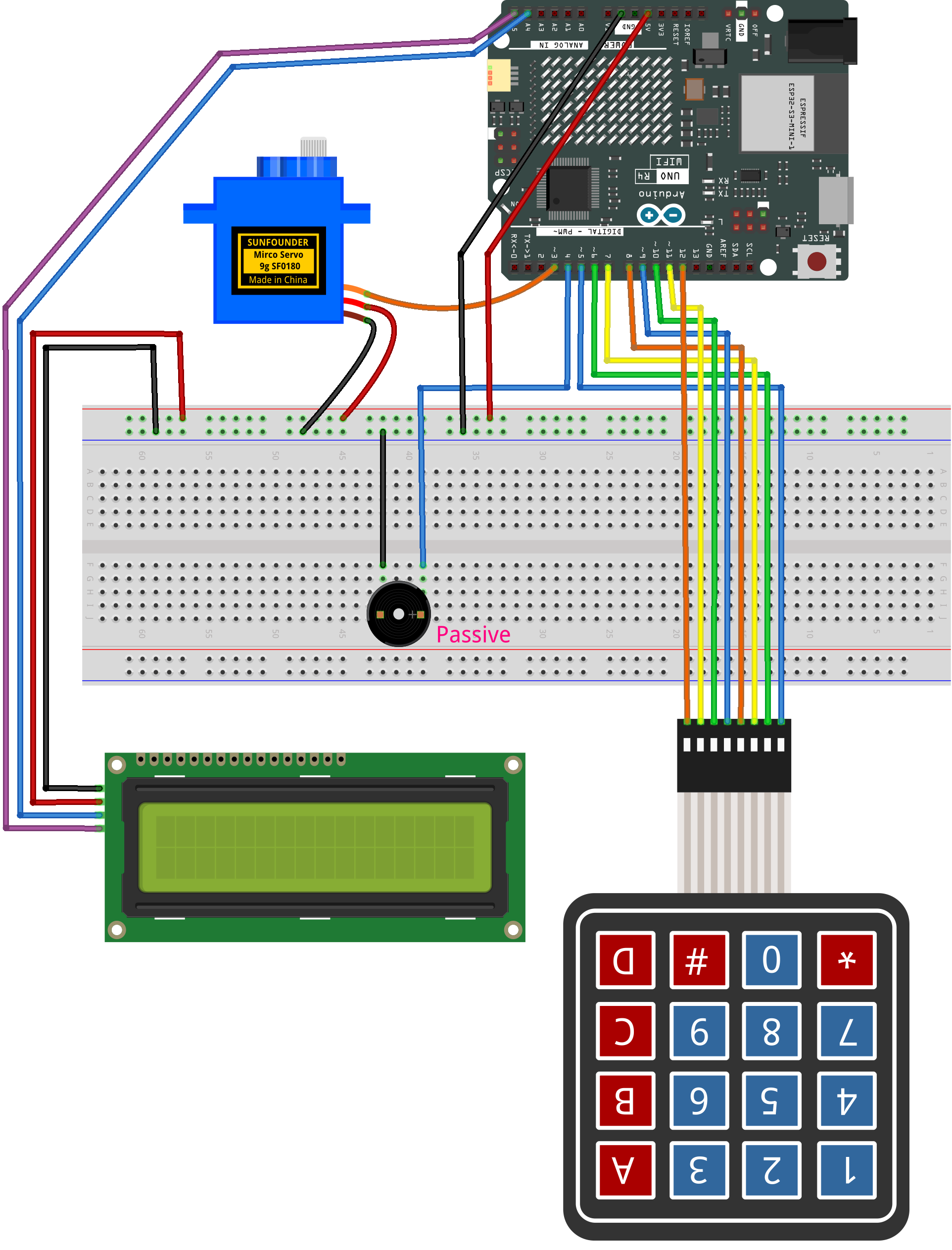
Common Connections:
Keypad
RowPins: Connect to 5 to 8 on the Arduino.
ColPins: Connect to 9 to 12 on the Arduino.
I2C LCD 1602
SDA: Connect to A4 on the Arduino.
SCL: Connect to A5 on the Arduino.
GND: Connect to breadboard’s negative power bus.
VCC: Connect to breadboard’s red power bus.
Passive buzzer
+: Connect to 4 on the Arduino.
-: Connect to breadboard’s negative power bus.
Digital Servo Motor
Connect to breadboard’s positive power bus.
Connect to breadboard’s negative power bus.
Connect to 3 on the Arduino.
Writing the Code
Note
You can copy this code into Arduino IDE.
To install the library, use the Arduino Library Manager and search for LiquidCrystal I2C and Adafruit_Keypad install it.
Don’t forget to select the board(Arduino UNO R4 WIFI) and the correct port before clicking the Upload button.
#include <Adafruit_Keypad.h>
#include <LiquidCrystal_I2C.h>
#include <Servo.h>

// ---------------- Pins ----------------
const int PIN_BUZZER = 4;
const int PIN_SERVO  = 3;   // keep D3 to avoid conflict with keypad cols (9,10,11,12)

// ---------------- Keypad ----------------
const byte ROWS = 4, COLS = 4;
// If pressing physical '#' shows 'D' at LCD bottom-right, switch to VARIANT 1.
#define KEYPAD_VARIANT 0
#if KEYPAD_VARIANT == 0
char keys[ROWS][COLS] = {
  {'1','2','3','A'},
  {'4','5','6','B'},
  {'7','8','9','C'},
  {'*','0','#','D'}
};
#else
char keys[ROWS][COLS] = {
  {'1','2','3','A'},
  {'4','5','6','B'},
  {'7','8','9','C'},
  {'*','0','D','#'}
};
#endif
byte rowPins[ROWS] = {5, 6, 7, 8};
byte colPins[COLS] = {9, 10, 11, 12};
Adafruit_Keypad keypad = Adafruit_Keypad(makeKeymap(keys), rowPins, colPins, ROWS, COLS);

LiquidCrystal_I2C lcd(0x27, 16, 2);
Servo door;

// ---------------- State ----------------
// LOCKED: waiting for '*' to enter PIN input
// INPUT: entering PIN
// ACTION: after correct PIN, run sequence: 90->0, wait 1s, 0->90, then return to LOCKED
enum State { STATE_LOCKED, STATE_INPUT, STATE_ACTION };
State state = STATE_LOCKED;

// ---------------- Config ----------------
String pinCode = "1234";
const byte PIN_LEN = (byte)pinCode.length(); // auto follow pinCode length

// We define "locked" display posture at 90°
const int lockAngle   = 90;   // idle/locked posture at 90°
const int openAngle   = 0;    // open posture at 0°
String inputBuf = "";

unsigned long lastLcdRefresh = 0;
const unsigned long lcdRefreshMs = 120;

char lastKey = ' ';      // last pressed key (debug)

// ------- Smooth servo move --------
int currentAngle = lockAngle;
int targetAngle  = lockAngle;
unsigned long lastStepAt = 0;
const unsigned long stepInterval = 15; // 1° every 15 ms

// Attach/detach control to reduce brownout and avoid attach-jump
bool servoIsAttached = false;

// ---------------- Beeps ------------------
void beepKey()    { tone(PIN_BUZZER, 1200, 40); }
void beepOK()     { tone(PIN_BUZZER, 900, 120); delay(20); tone(PIN_BUZZER, 1400, 120); } // tiny delay is OK
void beepError()  { tone(PIN_BUZZER, 300, 220); }

// ---- Servo helpers ----
void servoAttachOnce() {
  if (!servoIsAttached) {
    // Attach and IMMEDIATELY write the currentAngle to prevent the "jump to 90°" default
    door.attach(PIN_SERVO);
    servoIsAttached = true;
    door.write(currentAngle);   // sync pulse to currentAngle right away
    delay(10);                  // tiny settle to ensure the first pulse is applied
  }
}
void servoDetachIfIdle() {
  if (servoIsAttached) {
    door.detach();
    servoIsAttached = false;
  }
}
void setTarget(int ang) {
  targetAngle = constrain(ang, 0, 180);
  if (currentAngle != targetAngle) {
    // Attach and immediately sync to current angle; start stepping next ticks
    servoAttachOnce();
    lastStepAt = millis();  // no artificial waiting; step scheduler starts now
  }
}
bool atTarget() {
  return currentAngle == targetAngle;
}
void tickServo(unsigned long now) {
  if (currentAngle == targetAngle) {
    // detach when idle to save power and avoid jitter/reset
    servoDetachIfIdle();
    return;
  }
  if ((long)(now - lastStepAt) >= (long)stepInterval) {
    lastStepAt = now;
    currentAngle += (currentAngle < targetAngle) ? 1 : -1;
    door.write(currentAngle);
  }
}

// ---- UI helpers ----
void putLastKeyDebug() {
  // Show the bottom-right last key ONLY in INPUT state to avoid overwriting "enter"
  if (state != STATE_INPUT) return;
  lcd.setCursor(14,1); lcd.print(' ');
  lcd.setCursor(15,1); lcd.print(lastKey);
}

void drawLocked() {
  lcd.setCursor(0,0); lcd.print("Status: LOCKED  ");
  lcd.setCursor(0,1); lcd.print("Press * to enter");
  putLastKeyDebug(); // safe: function returns early if not INPUT
}
void drawInput() {
  lcd.setCursor(0,0); lcd.print("Enter PIN       ");
  lcd.setCursor(0,1);
  // draw masked PIN (stars) followed by underscores
  for (byte i=0; i<PIN_LEN; i++) lcd.print(i < inputBuf.length() ? '*' : '_');

  // tail hint fits 16x2; ensure we don't overflow the line
  int used = PIN_LEN;
  if (used < 16) {
    lcd.setCursor(used, 1);
    // —— 根据你的要求:只显示  "  #=OK"
    String hint = F("  #=OK");
    int remain = 16 - used;
    if ((int)hint.length() > remain) hint.remove(remain);
    lcd.print(hint);
  }
  putLastKeyDebug(); // visible only in INPUT
}
void drawAction() {
  // During action sequence show English message as required
  lcd.setCursor(0,0); lcd.print("Unlock Success  ");
  lcd.setCursor(0,1); lcd.print("Please wait ... ");
  putLastKeyDebug(); // safe: not shown outside INPUT
}

// ---------------- Action Phases ----------------
// After correct PIN: PHASE_TO_ZERO -> PHASE_WAIT_1S -> PHASE_BACK_TO_90
enum ActionPhase { PHASE_IDLE, PHASE_TO_ZERO, PHASE_WAIT_1S, PHASE_BACK_TO_90 };
ActionPhase actionPhase = PHASE_IDLE;
unsigned long actionPhaseStart = 0;

void startActionSequence() {
  actionPhase = PHASE_TO_ZERO;
  actionPhaseStart = millis();
  setTarget(openAngle); // 90 -> 0
}

void updateActionSequence(unsigned long now) {
  switch (actionPhase) {
    case PHASE_TO_ZERO:
      if (atTarget()) {
        actionPhase = PHASE_WAIT_1S;
        actionPhaseStart = now;
      }
      break;
    case PHASE_WAIT_1S:
      if ((long)(now - actionPhaseStart) >= 1000) { // wait 1 second
        actionPhase = PHASE_BACK_TO_90;
        setTarget(lockAngle); // 0 -> 90
      }
      break;
    case PHASE_BACK_TO_90:
      if (atTarget()) {
        // Sequence done: return to LOCKED UI/state
        actionPhase = PHASE_IDLE;
        enterState(STATE_LOCKED);
      }
      break;
    default: break;
  }
}

// ---------------- State transitions ----------------
void enterState(State s) {
  state = s;
  if (s == STATE_LOCKED) {
    inputBuf = "";
    setTarget(lockAngle);    // ensure posture returns to 90°
    lastKey = ' ';           // clear debug char so bottom-right stays blank
  } else if (s == STATE_INPUT) {
    inputBuf = "";
  } else if (s == STATE_ACTION) {
    // Show action UI and kick off sequence
    startActionSequence();
  }
  lcd.clear();
  lastLcdRefresh = 0;
}

// ---------------- Key handling ----------------
void handleKey(char k) {
  lastKey = k;
  beepKey();

  if (state == STATE_LOCKED) {
    if (k == '*') enterState(STATE_INPUT);
  }
  else if (state == STATE_INPUT) {
    if (k >= '0' && k <= '9') {
      if (inputBuf.length() < PIN_LEN) inputBuf += k;
    } else if (k == 'D') {
      if (inputBuf.length() > 0) inputBuf.remove(inputBuf.length()-1);
    } else if (k == 'C') {
      inputBuf = "";
    } else if (k == '#' || k == 'A') {  // A also works for confirm (helps during mapping debug)
      if (inputBuf.length() == PIN_LEN) {
        if (inputBuf == pinCode) {
          beepOK();
          enterState(STATE_ACTION);  // run 90->0->(1s)->90 then return to LOCKED
        } else {
          beepError();
          inputBuf = "";
        }
      } else {
        beepError();
      }
    }
  }
  else if (state == STATE_ACTION) {
    // During action we ignore keys; uncomment below to allow abort.
    // if (k == '#') enterState(STATE_LOCKED);
  }
}

// ---------------- LCD refresh ----------------
void refreshLCD(unsigned long now) {
  if ((long)(now - lastLcdRefresh) < (long)lcdRefreshMs) return;
  lastLcdRefresh = now;

  if (state == STATE_LOCKED) drawLocked();
  else if (state == STATE_INPUT) drawInput();
  else if (state == STATE_ACTION) drawAction();
}

// ---------------- Setup & Loop ----------------
void setup() {
  keypad.begin();
  lcd.init(); lcd.backlight();
  pinMode(PIN_BUZZER, OUTPUT);

  // Initialize servo at locked posture (90°)
  currentAngle = lockAngle;
  targetAngle  = lockAngle;

  // Attach -> immediately sync to currentAngle -> 给足时间真正回到 90° -> detach
  door.attach(PIN_SERVO);
  servoIsAttached = true;
  door.write(currentAngle);

  // —— 关键优化:上电时保持一段时间的脉冲,让舵机真的回到 90° —— //
  // 固定等待:根据常见舵机速度,600~800ms 较稳;这里取 700ms
  delay(700);

  servoDetachIfIdle();

  enterState(STATE_LOCKED);
}

void loop() {
  unsigned long now = millis();

  // keypad events (non-blocking)
  keypad.tick();
  while (keypad.available()) {
    keypadEvent e = keypad.read();
    if (e.bit.EVENT == KEY_JUST_PRESSED) handleKey((char)e.bit.KEY);
  }

  // smooth servo movement
  tickServo(now);

  // if in ACTION, update sequence sub-phases
  if (state == STATE_ACTION) {
    updateActionSequence(now);
  }

  // LCD refresh
  refreshLCD(now);
}