Radar Guard 9.0
Note
🌟 Welcome to the SunFounder Facebook Community! Whether you’re into Raspberry Pi, Arduino, or ESP32, you’ll find inspiration, help ideas here.
✅ Be the first to get free learning resources.
✅ Stay updated on new products & exclusive giveaways.
✅ Share your creations and get real feedback.
Kit purchase
Looking for parts? Check out our all-in-one kits below — packed with components, beginner-friendly guides, and tons of fun.

Name |
Includes Arduino board |
PURCHASE LINK |
|---|---|---|
Ultimate Sensor Kit |
Arduino Uno R4 Minima |
|
Elite Explorer Kit |
Arduino Uno R4 WiFi |
|
3 in 1 Ultimate Starter Kit |
Arduino Uno R4 Minima |
|
Universal Maker Sensor Kit |
× |
Course Introduction
In this lesson, we’ll build a Radar Warning System using an ultrasonic sensor, a servo, an I²C LCD, LEDs, and a buzzer.
The servo sweeps the ultrasonic sensor across the area, measuring distances in real time. When an object comes within 50 cm, the system enters ALERT mode: the LCD shows a warning, the green LED turns off while the red LED turns on, and the buzzer beeps with a frequency that increases as the target gets closer. Once the object moves away, the system resets to normal mode, showing “Area is Empty” and restoring the green LED.
Note
If this is your first time working with an Arduino project, we recommend downloading and reviewing the basic materials first.
Required Components
In this project, we need the following components:
SN |
COMPONENT INTRODUCTION |
QUANTITY |
PURCHASE LINK |
|---|---|---|---|
1 |
Arduino UNO R4 Minima/Arduino UNO R4 WIFI |
1 |
|
2 |
USB Type-C cable |
1 |
|
3 |
Breadboard |
1 |
|
4 |
Wires |
Several |
|
5 |
Ultrasonic Sensor Module |
1 |
|
6 |
I2C LCD 1602 |
1 |
|
7 |
Digital Servo Motor |
1 |
|
8 |
Active Buzzer |
1 |
|
9 |
1kΩ resistor |
4 |
|
10 |
LED |
4 |
Wiring
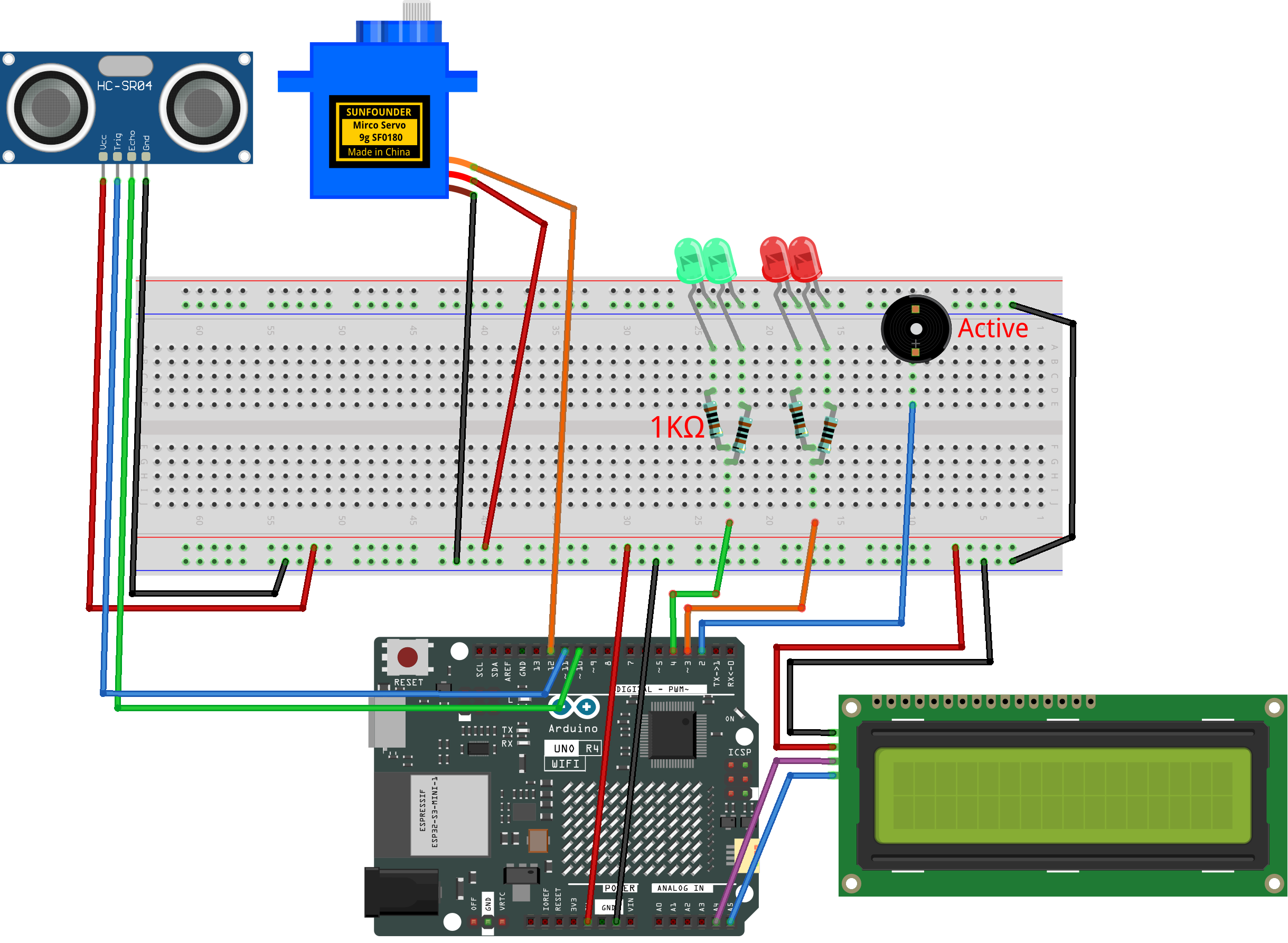
Common Connections:
LED
Red LED: Connect the LEDs anode to a 1kΩ resistor then to the 3 on Arduino, and the LEDs cathode to negative power bus on the breadboard.
Green LED: Connect the LEDs anode to a 1kΩ resistor then to the 4 on Arduino, and the LEDs cathode to negative power bus on the breadboard.
Digital Servo Motor
Connect to breadboard’s positive power bus.
Connect to breadboard’s negative power bus.
Connect to 7 on the Arduino.
Buzzer
Connect to breadboard’s negative power bus.
Connect to 2 on the Arduino.
Ultrasonic Sensor Module
Trig: Connect to 11 on the Arduino.
Echo: Connect to 10 on the Arduino.
GND: Connect to breadboard’s negative power bus.
VCC: Connect to breadboard’s red power bus.
I2C LCD 1602
SDA: Connect to A4 on the Arduino.
SCL: Connect to A5 on the Arduino.
GND: Connect to breadboard’s negative power bus.
VCC: Connect to breadboard’s red power bus.
Writing the Code
Note
Build the circuit.
Upload the code to the Arduino board using Arduino IDE.
In the Arduino IDE, check the current Arduino port(COMx).
To install the library, use the Arduino Library Manager and search for LiquidCrystal_I2C and install it.
The
ArduinoRadarGUIis used here. You can click hereRadar_Guard9.0.zipto download it.Open ArduinoLidarGUI.pde in the Processing IDE .
Modify the code in line 35 to ensure the correct port number(COMx).
Run the Processing sketch to visualize the radar data.
#include <Servo.h>
#include <Wire.h>
#include <LiquidCrystal_I2C.h>

// ---------- Pin Mapping ----------
const int trigPin   = 11;   // ultrasonic trig
const int echoPin   = 10;   // ultrasonic echo
const int servoPin  = 12;   // servo motor
const int buzzerPin = 2;    // buzzer
const int redLED    = 3;    // red LED
const int greenLED  = 4;    // green LED

// ---------- Config ----------
const long BAUD_RATE     = 9600;
const int  thresholdCM   = 50;          // base threshold
const int  minAngle      = 0;           // servo min angle
const int  maxAngle      = 180;         // servo max angle
const int  stepAngle     = 1;           // step size
const uint16_t servoMs   = 20;          // step interval
const uint32_t echoTOus  = 20000UL;     // ultrasonic timeout

// --- Hysteresis & stability ---
const int  thresholdEnterCM = 50;       // enter alert
const int  thresholdExitCM  = 55;       // exit alert
const byte stableN          = 3;        // stable count
byte enterCnt = 0, exitCnt = 0;

// ---------- LCD ----------
LiquidCrystal_I2C lcd(0x27, 16, 2);

// ---------- Globals ----------
Servo scanner;
int  angleCur = minAngle;
int  dir      = +1;

bool alertNow  = false;
bool lastAlert = false;

uint32_t tServoNext  = 0;

// Buzzer scheduler
bool      buzzOn      = false;
uint32_t  tBuzzNext   = 0;
uint16_t  buzzOnMs    = 20;
uint16_t  buzzOffMs   = 200;

long lastDistCM = 9999;

// ---------- Helpers ----------
// Measure distance (cm)
long measureDistanceCM() {
  digitalWrite(trigPin, LOW);
  delayMicroseconds(2);
  digitalWrite(trigPin, HIGH);
  delayMicroseconds(10);
  digitalWrite(trigPin, LOW);

  unsigned long dur = pulseIn(echoPin, HIGH, echoTOus);
  if (dur == 0) return 9999;
  long cm = (long)(dur / 58.0f);
  if (cm <= 0) cm = 9999;
  return cm;
}

// Send data to Serial
void sendData(int angle, long dist) {
  Serial.print(angle);
  Serial.print(",");
  Serial.print(dist);
  Serial.print(".");
}

// LED state
void setIdleIndicators() {
  digitalWrite(greenLED, HIGH);
  digitalWrite(redLED, LOW);
}
void setAlertIndicators() {
  digitalWrite(redLED, HIGH);
  digitalWrite(greenLED, LOW);
}

// LCD messages
void lcdSetEmpty() {
  lcd.clear();
  lcd.setCursor(1, 0);
  lcd.print("Area is Empty");
  lcd.setCursor(0, 1);
  lcd.print("                ");
}
void lcdSetWarning() {
  lcd.clear();
  lcd.setCursor(4, 0);
  lcd.print("WARNING!!");
  lcd.setCursor(2, 1);
  lcd.print("Foreign Body");
}

// Update LCD only when state changes
void updateLCDIfChanged(bool state) {
  if (state != lastAlert) {
    if (state) lcdSetWarning();
    else       lcdSetEmpty();
    lastAlert = state;
  }
}

// Stable alert decision
bool computeStableAlert(long dist) {
  static bool state = false;
  if (!state) {
    if (dist <= thresholdEnterCM) {
      if (++enterCnt >= stableN) { state = true; enterCnt = 0; exitCnt = 0; }
    } else enterCnt = 0;
  } else {
    if (dist >= thresholdExitCM || dist == 9999) {
      if (++exitCnt >= stableN) { state = false; exitCnt = 0; enterCnt = 0; }
    } else exitCnt = 0;
  }
  return state;
}

// Buzzer timing
void updateBuzzerScheduler(bool state, long dist) {
  if (!state) {
    digitalWrite(buzzerPin, LOW);
    buzzOn = false;
    return;
  }
  int mapped = map((int)dist, 5, thresholdCM, 60, 300);
  mapped = constrain(mapped, 40, 400);
  buzzOffMs = (uint16_t)mapped;
}

// ---------- Setup ----------
void setup() {
  pinMode(trigPin, OUTPUT);
  pinMode(echoPin, INPUT);
  pinMode(buzzerPin, OUTPUT);
  pinMode(redLED, OUTPUT);
  pinMode(greenLED, OUTPUT);

  Serial.begin(BAUD_RATE);

  scanner.attach(servoPin);
  scanner.write(angleCur);

  lcd.init();
  lcd.backlight();
  lcd.clear();
  lcdSetEmpty();

  setIdleIndicators();

  uint32_t now = millis();
  tServoNext = now + servoMs;
  tBuzzNext  = now;
}

// ---------- Loop ----------
void loop() {
  uint32_t now = millis();

  // Servo & distance update
  if ((int32_t)(now - tServoNext) >= 0) {
    tServoNext += servoMs;

    // move servo
    angleCur += dir * stepAngle;
    if (angleCur >= maxAngle) { angleCur = maxAngle; dir = -1; }
    else if (angleCur <= minAngle) { angleCur = minAngle; dir = +1; }
    scanner.write(angleCur);

    // distance
    long d = measureDistanceCM();
    lastDistCM = d;

    // alert state
    alertNow = computeStableAlert(d);
    if (alertNow) setAlertIndicators();
    else          setIdleIndicators();

    updateLCDIfChanged(alertNow);
    updateBuzzerScheduler(alertNow, d);
    sendData(angleCur, d);
  }

  // Buzzer update
  if (alertNow) {
    if ((int32_t)(now - tBuzzNext) >= 0) {
      if (!buzzOn) {
        digitalWrite(buzzerPin, HIGH);
        buzzOn    = true;
        tBuzzNext = now + buzzOnMs;
      } else {
        digitalWrite(buzzerPin, LOW);
        buzzOn    = false;
        tBuzzNext = now + buzzOffMs;
      }
    }
  } else {
    if (buzzOn) {
      digitalWrite(buzzerPin, LOW);
      buzzOn = false;
    }
  }
}