Rain Alarm 1.0
Note
🌟 Welcome to the SunFounder Facebook Community! Whether you’re into Raspberry Pi, Arduino, or ESP32, you’ll find inspiration, help ideas here.
✅ Be the first to get free learning resources.
✅ Stay updated on new products & exclusive giveaways.
✅ Share your creations and get real feedback.
👉 Need faster updates or support? Click [here] join our Facebook community
👉 Or join our WhatsApp group: Click [here]
🎁 Looking for parts?Check out our all-in-one kits below — packed with components, beginner-friendly guides, and tons of fun.
Name |
Includes Arduino board |
PURCHASE LINK |
|---|---|---|
Electronic Kit |
× |
|
Elite Explorer Kit |
Arduino Uno R4 WiFi |
|
3 in 1 Ultimate Starter Kit |
Arduino Uno R4 Minima |
Course Introduction
In this lesson, you’ll build a simple raindrop alarm system using a raindrop sensor, a buzzer, and LEDs with the Arduino UNO R4.
When rain is detected, the sensor triggers the buzzer to beep and the LEDs to blink as a warning. When the surface is dry, all indicators turn off automatically.
Note
If this is your first time working with an Arduino project, we recommend downloading and reviewing the basic materials first.
Required Components
In this project, we need the following components:
SN |
COMPONENT INTRODUCTION |
QUANTITY |
PURCHASE LINK |
|---|---|---|---|
1 |
Arduino UNO R4 Minima |
1 |
|
2 |
USB Type-C cable |
1 |
|
3 |
Breadboard |
1 |
|
4 |
Wires |
Several |
|
5 |
Passive Buzzer |
1 |
|
6 |
Raindrop Detection Sensor Module |
1 |
|
7 |
LED |
2 |
|
8 |
1kΩ resistor |
2 |
Wiring
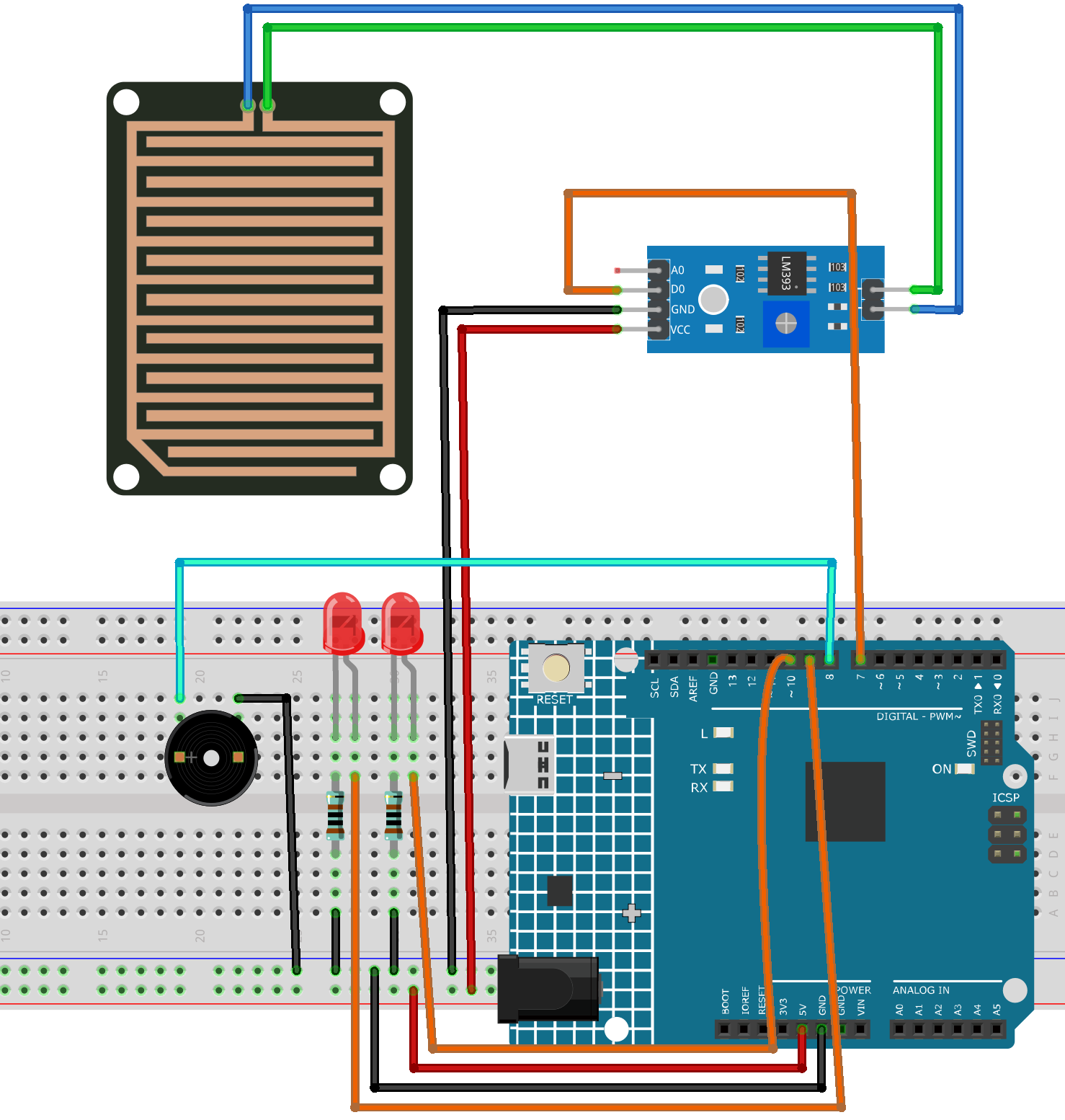
Common Connections:
LEDS
Red: Connect the LED anode to 9,10 on the Arduino, and the cathode to a 1kΩ resistor, then to the negative power bus on the breadboard.
Passive Buzzer
+: Connect to 8 on the Arduino.
-: Connect to breadboard’s negative power bus.
Raindrop Detection Sensor Module
D0: Connect to 7 on the Arduino.
GND: Connect to breadboard’s negative power bus.
VCC: Connect to breadboard’s passive power bus.
Writing the Code
Note
You can copy this code into Arduino IDE.
Don’t forget to select the board(Arduino UNO R4 Minima) and the correct port before clicking the Upload button.
/*
  Raindrop Alarm System
  - Reads digital output (DO) from a raindrops detection sensor module.
  - When rain is detected (DO = LOW), a 3-pin buzzer beeps and two LEDs blink.
  - When no rain (DO = HIGH), buzzer and LEDs stay OFF.

  Board: Arduino Uno R4 (or R3)
  Components: Raindrops Detection Sensor Module + 3-pin Active Buzzer Module + 2 LEDs
*/

// -------- Pin Definitions --------
const int RAIN_DO_PIN = 7;   // Raindrops sensor DO pin (LOW when rain detected)

const int BUZZER_PIN  = 8;   // 3-pin buzzer module signal pin (S/IN)
const int LED1_PIN    = 9;   // LED1 pin
const int LED2_PIN    = 10;  // LED2 pin

// -------- Blink / Beep Timing (ms) --------
const unsigned long BLINK_INTERVAL_MS = 150;  // LED blink speed
const unsigned long BEEP_INTERVAL_MS  = 150;  // buzzer beep speed

// -------- State Variables --------
unsigned long lastBlinkMs = 0;
unsigned long lastBeepMs  = 0;
bool ledState = false;
bool buzzerState = false;

void setup() {
  pinMode(RAIN_DO_PIN, INPUT);     // DO is a digital output from the sensor
  pinMode(BUZZER_PIN, OUTPUT);     // buzzer module control
  pinMode(LED1_PIN, OUTPUT);       // LED1 control
  pinMode(LED2_PIN, OUTPUT);       // LED2 control

  // Ensure everything is OFF at startup
  digitalWrite(BUZZER_PIN, LOW);
  digitalWrite(LED1_PIN, LOW);
  digitalWrite(LED2_PIN, LOW);

  Serial.begin(9600);
  Serial.println("Raindrop Alarm System Ready (DO LOW = Rain Detected).");
}

void loop() {
  // Read raindrop sensor digital output
  int rainDO = digitalRead(RAIN_DO_PIN);

  // Print raw DO value for debugging
  Serial.println(rainDO);

  // If rain detected (DO is LOW)
  if (rainDO == LOW) {
    unsigned long now = millis();

    // ---- LED blinking ----
    if (now - lastBlinkMs >= BLINK_INTERVAL_MS) {
      lastBlinkMs = now;
      ledState = !ledState;
      digitalWrite(LED1_PIN, ledState ? HIGH : LOW);
      digitalWrite(LED2_PIN, ledState ? LOW : HIGH); // opposite blink for nicer effect
    }

    // ---- Buzzer beeping ----
    if (now - lastBeepMs >= BEEP_INTERVAL_MS) {
      lastBeepMs = now;
      buzzerState = !buzzerState;
      digitalWrite(BUZZER_PIN, buzzerState ? HIGH : LOW);
    }
  }
  else {
    // No rain: turn everything OFF
    digitalWrite(BUZZER_PIN, LOW);
    digitalWrite(LED1_PIN, LOW);
    digitalWrite(LED2_PIN, LOW);

    // Reset states so the next rain starts cleanly
    ledState = false;
    buzzerState = false;
  }

  // Small delay to reduce serial spam (optional)
  delay(20);
}