Trash Can 2.0
Note
🌟 Welcome to the SunFounder Facebook Community! Whether you’re into Raspberry Pi, Arduino, or ESP32, you’ll find inspiration, help ideas here.
✅ Be the first to get free learning resources.
✅ Stay updated on new products & exclusive giveaways.
✅ Share your creations and get real feedback.
Kit purchase
Looking for parts? Check out our all-in-one kits below — packed with components, beginner-friendly guides, and tons of fun.

Name |
Includes Arduino board |
PURCHASE LINK |
|---|---|---|
Ultimate Sensor Kit |
Arduino Uno R4 Minima |
|
Elite Explorer Kit |
Arduino Uno R4 WiFi |
|
3 in 1 Ultimate Starter Kit |
Arduino Uno R4 Minima |
|
Universal Maker Sensor Kit |
× |
Course Introduction
In this lesson, you’ll learn how to use an ultrasonic sensor module, a digital servo motor, led, an active buzzer and an Arduino board to build a smart trash can.
When the ultrasonic sensor module detects trash being thrown in, the digital servo motor opens the lid of the trash can.
Note
If this is your first time working with an Arduino project, we recommend downloading and reviewing the basic materials first.
Required Components
In this project, we need the following components:
SN |
COMPONENT INTRODUCTION |
QUANTITY |
PURCHASE LINK |
|---|---|---|---|
1 |
Arduino UNO R4 Minima/Arduino UNO R4 WIFI |
1 |
|
2 |
USB Type-C cable |
1 |
|
3 |
Breadboard |
1 |
|
4 |
Wires |
Several |
|
5 |
1kΩ resistor |
4 |
|
6 |
Ultrasonic Sensor Module |
1 |
|
7 |
LED |
4 |
|
8 |
Digital Servo Motor |
1 |
|
9 |
Active Buzzer |
1 |
Wiring
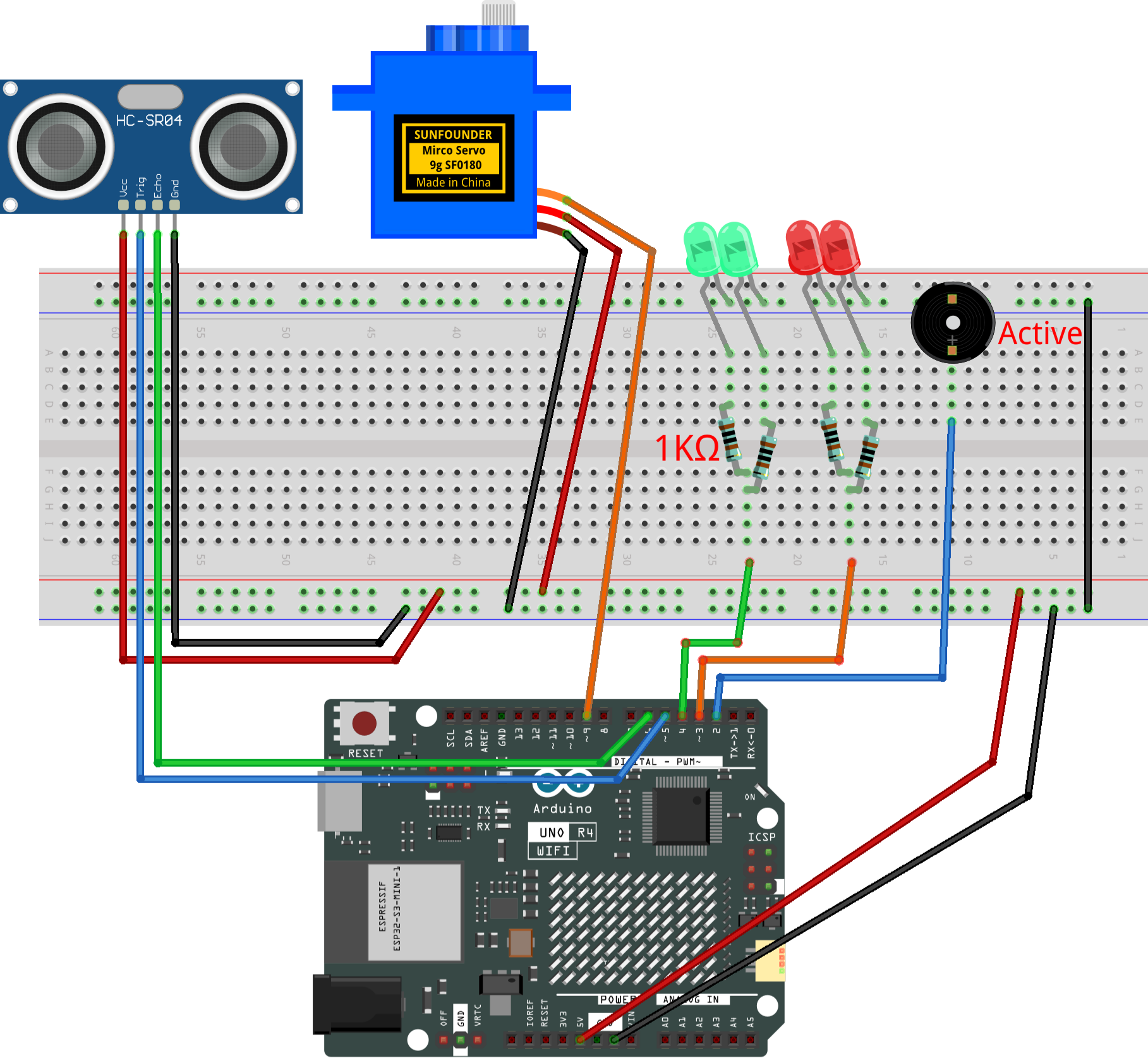
Common Connections:
Digital Servo Motor
Connect to breadboard’s positive power bus.
Connect to breadboard’s negative power bus.
Connect to 9 on the Arduino.
Ultrasonic Sensor Module
Trig: Connect to 5 on the Arduino.
Echo: Connect to 6 on the Arduino.
GND: Connect to breadboard’s negative power bus.
VCC: Connect to breadboard’s red power bus.
LED
Red LED: Connect the LEDs anode to a 1kΩ resistor then to the 3 on Arduino, and the LEDs cathode to negative power bus on the breadboard.
Green LED: Connect the LEDs anode to a 1kΩ resistor then to the 4 on Arduino, and the LEDs cathode to negative power bus on the breadboard.
Active Buzzer
+: Connect to 2 on the Arduino.
-: Connect to breadboard’s negative power bus.
Writing the Code
Note
You can copy this code into Arduino IDE.
Don’t forget to select the board(Arduino UNO R4 Minima/WIFI) and the correct port before clicking the Upload button.
#include <Servo.h>

// ---- Servo motor setup ----
Servo servo;
const int servoPin = 9;       // Servo control pin
const int openAngle = 0;      // Angle when the lid is open
const int closeAngle = 90;    // Angle when the lid is closed

// ---- Ultrasonic sensor setup ----
const int trigPin = 5;        // Trigger pin of ultrasonic sensor
const int echoPin = 6;        // Echo pin of ultrasonic sensor
float distance, averageDistance;

// ---- Buzzer and LEDs ----
const int buzzerPin = 2;      // Buzzer pin
const int redLedPin = 3;      // Red LED pin
const int greenLedPin = 4;    // Green LED pin

// ---- Distance threshold ----
const int distanceThreshold = 20;  // Distance (cm) to open the lid

// ---- Lid open time ----
unsigned long lidOpenTime = 0;
const unsigned long holdOpenMs = 2000;  // Lid stays open for 2 seconds
bool isLidOpen = false;

// ---- Beep/flash timing ----
const unsigned long beepInterval = 200; // Interval for buzzer and red LED (200 ms = fast beep/blink)
unsigned long lastBeepTime = 0;
bool beepState = false;

void setup() {
  Serial.begin(9600);

  // Set up ultrasonic sensor pins
  pinMode(trigPin, OUTPUT);
  pinMode(echoPin, INPUT);

  // Set up buzzer and LEDs
  pinMode(buzzerPin, OUTPUT);
  pinMode(redLedPin, OUTPUT);
  pinMode(greenLedPin, OUTPUT);

  // Initialize servo to closed position
  servo.attach(servoPin);
  servo.write(closeAngle);
  delay(100);
  servo.detach();

  // Initial LED state: green ON means closed
  digitalWrite(buzzerPin, LOW);
  digitalWrite(redLedPin, LOW);
  digitalWrite(greenLedPin, HIGH);
}

void loop() {
  // Measure distance from ultrasonic sensor
  averageDistance = readDistance();

  // If lid is closed and someone is close, open it
  if (!isLidOpen && averageDistance > 0 && averageDistance <= distanceThreshold) {
    servo.attach(servoPin);
    delay(1);
    servo.write(openAngle);   // Move servo to open position
    isLidOpen = true;
    lidOpenTime = millis();

    digitalWrite(greenLedPin, LOW);  // Turn off green LED when open
  }

  // If lid is open, keep it open for a while
  if (isLidOpen) {
    unsigned long now = millis();

    // Make buzzer and red LED blink/beep quickly
    if (now - lastBeepTime >= beepInterval) {
      lastBeepTime = now;
      beepState = !beepState;
      digitalWrite(buzzerPin, beepState ? HIGH : LOW);
      digitalWrite(redLedPin, beepState ? HIGH : LOW);
    }

    // After holdOpenMs, close the lid
    if (millis() - lidOpenTime >= holdOpenMs) {
      servo.write(closeAngle);   // Move servo to closed position
      delay(200);
      servo.detach();
      isLidOpen = false;

      // Reset buzzer and LEDs
      digitalWrite(buzzerPin, LOW);
      digitalWrite(redLedPin, LOW);
      digitalWrite(greenLedPin, HIGH); // Green LED ON means closed
    }
  }

  delay(50); // Small delay to avoid too many sensor reads
}

// ---- Function to measure distance with ultrasonic sensor ----
float readDistance() {
  // Send a short pulse to trigger pin
  digitalWrite(trigPin, LOW);  delayMicroseconds(2);
  digitalWrite(trigPin, HIGH); delayMicroseconds(10);
  digitalWrite(trigPin, LOW);

  // Measure how long echo pin stays HIGH
  unsigned long duration = pulseIn(echoPin, HIGH, 25000UL); // Timeout after ~4 meters
  if (duration == 0) return -1.0; // If no signal, return invalid
  return duration / 58.0;         // Convert to centimeters
}