Trash Can 3.0
Note
🌟 Welcome to the SunFounder Facebook Community! Whether you’re into Raspberry Pi, Arduino, or ESP32, you’ll find inspiration, help ideas here.
✅ Be the first to get free learning resources.
✅ Stay updated on new products & exclusive giveaways.
✅ Share your creations and get real feedback.
Kit purchase
Looking for parts? Check out our all-in-one kits below — packed with components, beginner-friendly guides, and tons of fun.

Name |
Includes Arduino board |
PURCHASE LINK |
|---|---|---|
Ultimate Sensor Kit |
Arduino Uno R4 Minima |
|
Elite Explorer Kit |
Arduino Uno R4 WiFi |
|
3 in 1 Ultimate Starter Kit |
Arduino Uno R4 Minima |
|
Universal Maker Sensor Kit |
× |
Course Introduction
In this lesson, you’ll learn how to use an ultrasonic sensor module, a digital servo motor, and an Arduino board to build a smart trash can.
When the ultrasonic sensor module detects trash being thrown in, the digital servo motor opens the lid of the trash can.
Note
If this is your first time working with an Arduino project, we recommend downloading and reviewing the basic materials first.
Required Components
In this project, we need the following components:
SN |
COMPONENT INTRODUCTION |
QUANTITY |
PURCHASE LINK |
|---|---|---|---|
1 |
Arduino UNO R4 Minima/Arduino UNO R4 WIFI |
1 |
|
2 |
USB Type-C cable |
1 |
|
3 |
Breadboard |
1 |
|
4 |
Wires |
Several |
|
5 |
Traffic Light LED |
1 |
|
6 |
Ultrasonic Sensor Module |
1 |
|
7 |
Buzzer Modudle |
1 |
|
8 |
Digital Servo Motor |
1 |
Wiring
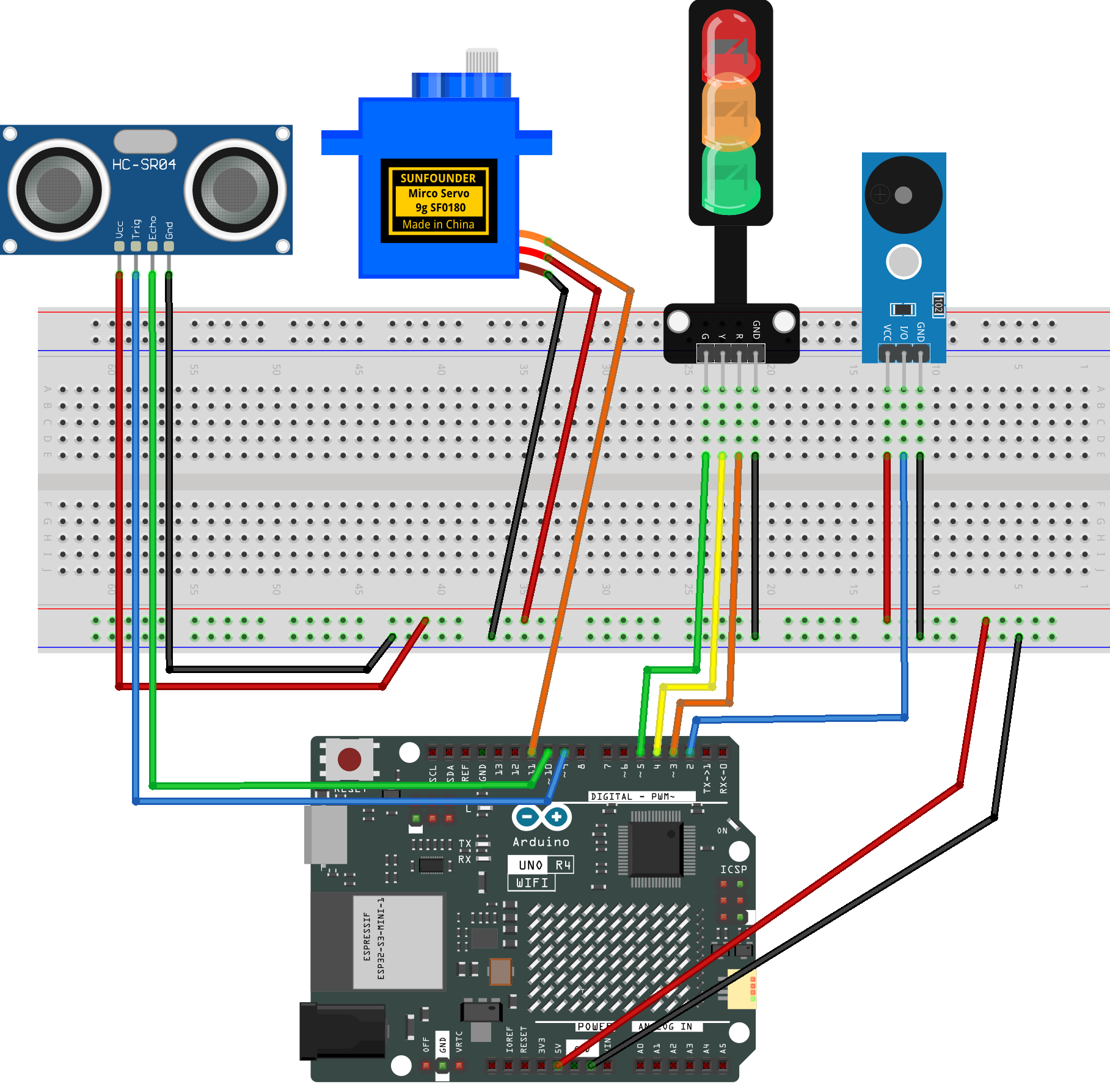
Common Connections:
Digital Servo Motor
Connect to breadboard’s positive power bus.
Connect to breadboard’s negative power bus.
Connect to 11 on the Arduino.
Ultrasonic Sensor Module
Trig: Connect to 9 on the Arduino.
Echo: Connect to 10 on the Arduino.
GND: Connect to breadboard’s negative power bus.
VCC: Connect to breadboard’s red power bus.
Buzzer Module
I/0: Connect to 2 on the Arduino.
+: Connect to breadboard’s red power bus.
-: Connect to breadboard’s negative power bus.
Traffic light LED
R: Connect to 3 on the Arduino.
Y: Connect to 4 on the Arduino.
G: Connect to 5 on the Arduino.
GND: Connect to breadboard’s negative power bus.
Writing the Code
Note
You can copy this code into Arduino IDE.
Don’t forget to select the board(Arduino UNO R4 Minima/WIFI) and the correct port before clicking the Upload button.
#include <Servo.h>

// Smart Trash Can (Upgraded)
// - Ultrasonic triggers lid opening
// - Servo opens slowly, closes quickly
// - Traffic light shows status (G=idle, Y=moving, R=alarm)
// - Passive buzzer beeps while lid is fully open

// ---- Pins (your wiring) ----
const int PIN_BUZZER = 2;   // Passive buzzer: use tone()/noTone()
const int PIN_RED    = 3;   // Traffic light R
const int PIN_YELLOW = 4;   // Traffic light Y
const int PIN_GREEN  = 5;   // Traffic light G
const int PIN_TRIG   = 9;   // Ultrasonic Trig
const int PIN_ECHO   = 10;  // Ultrasonic Echo
const int PIN_SERVO  = 11;  // Servo signal

// ---- Parameters you may adjust ----
const int openAngle  = 0;     // lid open position
const int closeAngle = 90;    // lid closed position
const int distanceThreshold = 20;        // cm: trigger open when <= this
const unsigned long holdOpenMs = 2000;   // keep open time
const unsigned long cooldownMs = 800;    // ignore triggers after closing

// Alarm (while OPEN)
const unsigned long beepInterval = 200;  // ms: beep/blink toggle
const unsigned int  beepFreq = 2000;     // Hz: buzzer tone

// Slow opening
const int openStep = 1;                 // degrees per step
const unsigned long openStepDelay = 15; // ms per step

// Quick closing
const unsigned long closeSettleMs = 250;

// Sensor reading rate
const unsigned long sensorInterval = 50;

// ---- State machine ----
// CLOSED -> OPENING(slow) -> OPEN(alarm) -> CLOSING(quick) -> CLOSED
enum LidState { CLOSED, OPENING, OPEN, CLOSING };
LidState state = CLOSED;

Servo servo;
int currentAngle = closeAngle;  // always keep this synced with the servo

unsigned long lidFullyOpenTime = 0;
unsigned long lastBeepTime = 0;
bool beepState = false;

unsigned long lastSensorTime = 0;
unsigned long lastServoStepTime = 0;
unsigned long lastCloseTime = 0;
unsigned long closingStartTime = 0;

// Turn traffic light LEDs on/off
void setTrafficLight(bool r, bool y, bool g) {
  digitalWrite(PIN_RED,    r ? HIGH : LOW);
  digitalWrite(PIN_YELLOW, y ? HIGH : LOW);
  digitalWrite(PIN_GREEN,  g ? HIGH : LOW);
}

// Read ultrasonic distance (cm). Returns -1 if timeout/no echo.
float readDistanceCm() {
  digitalWrite(PIN_TRIG, LOW);
  delayMicroseconds(2);
  digitalWrite(PIN_TRIG, HIGH);
  delayMicroseconds(10);
  digitalWrite(PIN_TRIG, LOW);

  unsigned long duration = pulseIn(PIN_ECHO, HIGH, 25000UL);
  if (duration == 0) return -1.0;
  return duration / 58.0;
}

// Stop passive buzzer
void stopBeep() {
  noTone(PIN_BUZZER);
  beepState = false;
}

// Attach servo and output the last known angle (prevents jump/bug)
void attachAndSyncServo() {
  servo.attach(PIN_SERVO);
  servo.write(currentAngle);
  delay(20);
}

void setup() {
  Serial.begin(9600);

  pinMode(PIN_BUZZER, OUTPUT);
  pinMode(PIN_RED, OUTPUT);
  pinMode(PIN_YELLOW, OUTPUT);
  pinMode(PIN_GREEN, OUTPUT);

  pinMode(PIN_TRIG, OUTPUT);
  pinMode(PIN_ECHO, INPUT);

  // Start closed
  attachAndSyncServo();
  currentAngle = closeAngle;
  servo.write(currentAngle);
  delay(150);
  servo.detach();

  stopBeep();
  setTrafficLight(false, false, true); // Green: idle
}

void loop() {
  unsigned long now = millis();

  // Read sensor periodically (keeps loop smooth)
  float dist = -1.0;
  if (now - lastSensorTime >= sensorInterval) {
    lastSensorTime = now;
    dist = readDistanceCm();
  }

  if (state == CLOSED) {
    setTrafficLight(false, false, true); // Green
    stopBeep();

    bool inCooldown = (now - lastCloseTime < cooldownMs);

    // Trigger: close object detected
    if (!inCooldown && dist > 0 && dist <= distanceThreshold) {
      attachAndSyncServo();
      lastServoStepTime = now;
      setTrafficLight(false, true, false); // Yellow
      state = OPENING;
    }
  }

  else if (state == OPENING) {
    setTrafficLight(false, true, false); // Yellow

    // Slow move toward openAngle
    if (now - lastServoStepTime >= openStepDelay) {
      lastServoStepTime = now;

      if (currentAngle > openAngle) {
        currentAngle -= openStep;
        if (currentAngle < openAngle) currentAngle = openAngle;
        servo.write(currentAngle);
      } else {
        lidFullyOpenTime = now;
        lastBeepTime = now;
        beepState = false;
        state = OPEN;
      }
    }
  }

  else if (state == OPEN) {
    // Red blink + beep
    setTrafficLight(beepState, false, false);

    if (now - lastBeepTime >= beepInterval) {
      lastBeepTime = now;
      beepState = !beepState;
      if (beepState) tone(PIN_BUZZER, beepFreq);
      else noTone(PIN_BUZZER);
    }

    // After hold time, close quickly
    if (now - lidFullyOpenTime >= holdOpenMs) {
      stopBeep();
      servo.write(closeAngle);
      currentAngle = closeAngle;     // IMPORTANT: keep synced for next cycle
      closingStartTime = now;
      state = CLOSING;
    }
  }

  else if (state == CLOSING) {
    setTrafficLight(false, true, false); // Yellow

    if (now - closingStartTime >= closeSettleMs) {
      servo.detach();
      lastCloseTime = now;
      state = CLOSED;
    }
  }
}