Smart Coaster
Note
🌟 Welcome to the SunFounder Facebook Community! Whether you’re into Raspberry Pi, Arduino, or ESP32, you’ll find inspiration, help ideas here.
✅ Be the first to get free learning resources.
✅ Stay updated on new products & exclusive giveaways.
✅ Share your creations and get real feedback.
Kit purchase
Looking for parts? Check out our all-in-one kits below — packed with components, beginner-friendly guides, and tons of fun.
Name |
Includes Arduino board |
PURCHASE LINK |
|---|---|---|
Ultimate Sensor Kit |
Arduino Uno R4 Minima |
|
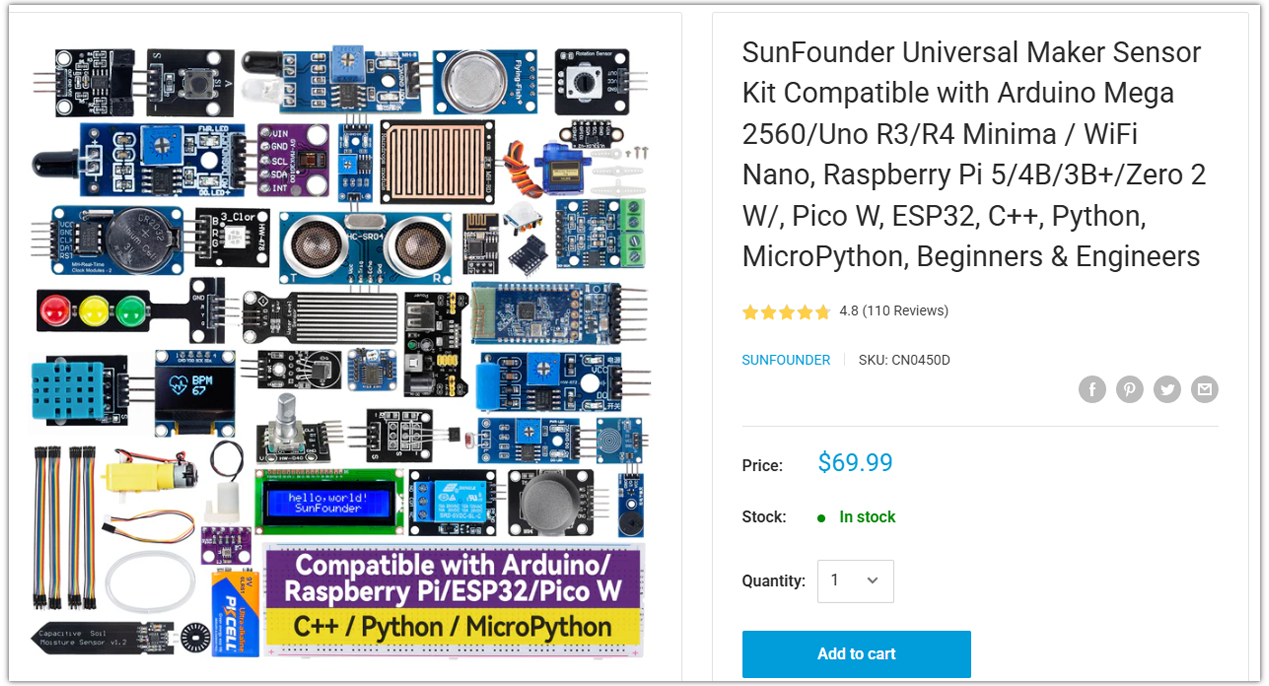
Universal Maker Sensor Kit |
× |
Course Introduction
In this lesson, you’ll learn how to build a smart reminder coaster using an Arduino, an IR sensor, a TM1637 4-digit display, and a buzzer.
This experiment detects when a cup is placed, starts a 15-minute countdown, and triggers an alarm to remind you to drink water.
Note
If this is your first time working with an Arduino project, we recommend downloading and reviewing the basic materials first.
Required Components
In this project, we need the following components:
SN |
COMPONENT INTRODUCTION |
QUANTITY |
PURCHASE LINK |
|---|---|---|---|
1 |
Arduino UNO R4 Minima/Arduino UNO R4 WIFI |
1 |
|
2 |
USB Type-C cable |
1 |
|
3 |
Breadboard |
1 |
|
4 |
Wires |
Several |
|
5 |
4-Digit Segment Display Module |
1 |
|
6 |
IR Obstacle Avoidance Sensor Module |
1 |
|
7 |
Buzzer Modudle |
1 |
Wiring
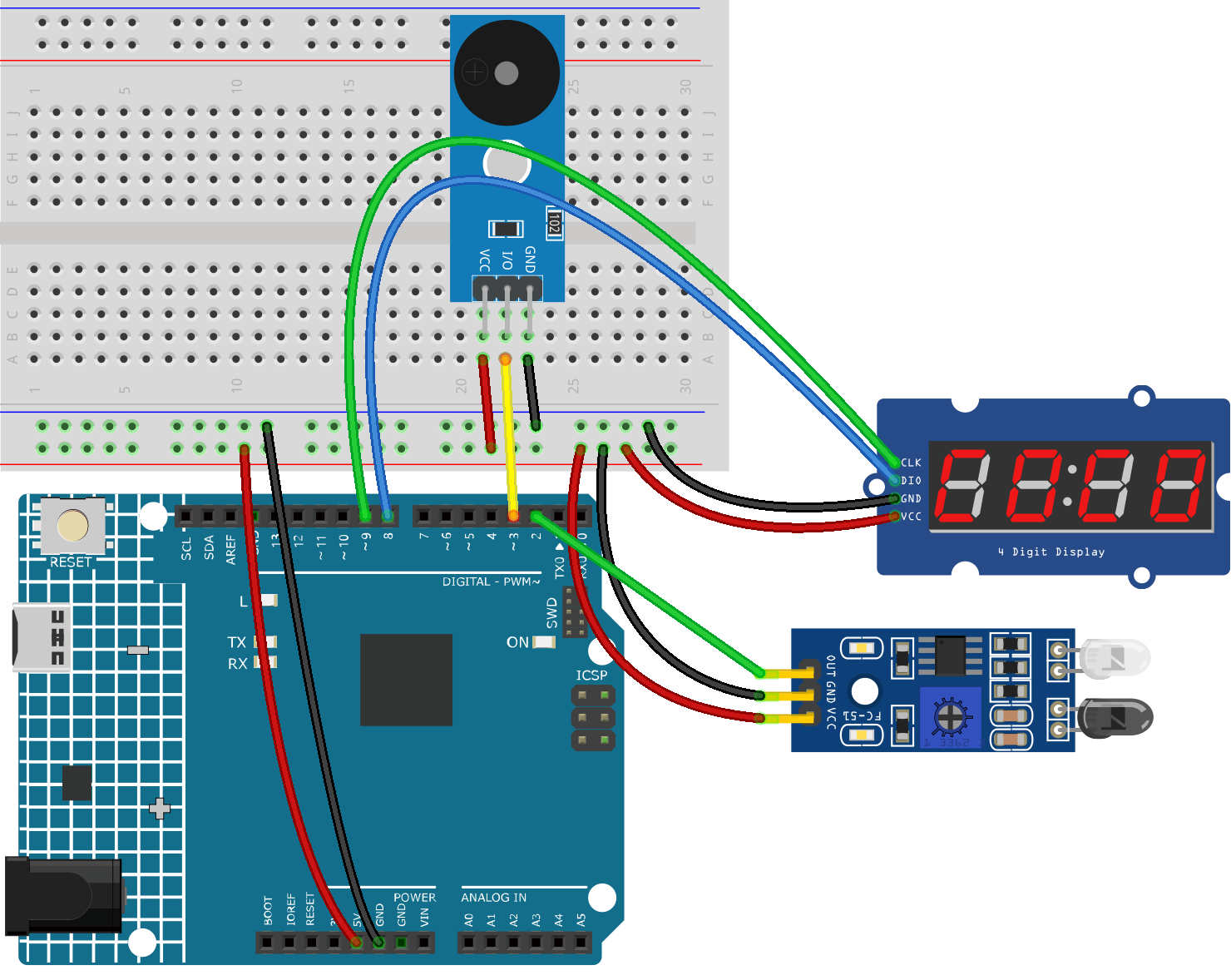
Common Connections:
IR Obstacle Avoidance Sensor Module
OUT: Connect to 2 on the Arduino.
GND: Connect to breadboard’s negative power bus.
VCC: Connect to breadboard’s red power bus.
4-Digit Segment Display Module
CLK: Connect to 9 on the Arduino.
DIO: Connect to 8 on the Arduino.
GND: Connect to breadboard’s negative power bus.
VCC: Connect to breadboard’s red power bus.
Buzzer Module
I/0: Connect to 3 on the Arduino.
+: Connect to breadboard’s red power bus.
-: Connect to breadboard’s negative power bus.
Writing the Code
Note
You can copy this code into Arduino IDE.
To install the library, use the Arduino Library Manager and search for TM1637Display and install it.
Don’t forget to select the board(Arduino UNO R4 Minima/WIFI) and the correct port before clicking the Upload button.
#include <TM1637Display.h>

// ---------------------- Pin Definitions ----------------------
const int CLK_PIN = 9;
const int DIO_PIN = 8;
const int IR_PIN = 2;
const int BUZZER_PIN = 3;

// ---------------------- Display Object -----------------------
TM1637Display display(CLK_PIN, DIO_PIN);

// ---------------------- Timer Settings -----------------------
const unsigned long COUNTDOWN_TIME = 15UL * 60UL * 1000UL;  // 15 minutes
const unsigned long LOST_DELAY = 1000;  // ignore very short signal loss (1 second)

// ---------------------- State Variables ----------------------
bool cupPresent = false;
bool lastCupPresent = false;
bool timerRunning = false;
bool alarmActive = false;

unsigned long startTime = 0;
unsigned long remainingTime = COUNTDOWN_TIME;
unsigned long lostStartTime = 0;
bool lostTiming = false;

// ---------------------- Buzzer Settings ----------------------
unsigned long lastBeepToggle = 0;
bool beepState = false;
const unsigned long beepInterval = 300;

// ---------------------- IR Logic -----------------------------
// Most IR obstacle avoidance modules output LOW when an object is detected.
// If your module behaves the opposite way, change LOW to HIGH.
const int IR_ACTIVE_STATE = LOW;

// -------------------------------------------------------------
// Show time in MM:SS format
void showTime(unsigned long timeMs) {
  unsigned long totalSeconds = timeMs / 1000;
  int minutes = totalSeconds / 60;
  int seconds = totalSeconds % 60;

  int displayValue = minutes * 100 + seconds;
  display.showNumberDecEx(displayValue, 0b01000000, true);  // show colon
}

// -------------------------------------------------------------
void showIdleDisplay() {
  display.showNumberDec(0, true);  // 0000
}

// -------------------------------------------------------------
void stopBuzzer() {
  noTone(BUZZER_PIN);
  beepState = false;
}

// -------------------------------------------------------------
void handleAlarmBuzzer() {
  unsigned long currentMillis = millis();

  if (currentMillis - lastBeepToggle >= beepInterval) {
    lastBeepToggle = currentMillis;
    beepState = !beepState;

    if (beepState) {
      tone(BUZZER_PIN, 2000);
    } else {
      noTone(BUZZER_PIN);
    }
  }
}

// -------------------------------------------------------------
void startNewCountdown() {
  timerRunning = true;
  alarmActive = false;
  remainingTime = COUNTDOWN_TIME;
  startTime = millis();
  stopBuzzer();
  showTime(remainingTime);
}

// -------------------------------------------------------------
void resetSystem() {
  timerRunning = false;
  alarmActive = false;
  remainingTime = COUNTDOWN_TIME;
  stopBuzzer();
  showIdleDisplay();
}

// -------------------------------------------------------------
void setup() {
  pinMode(IR_PIN, INPUT);
  pinMode(BUZZER_PIN, OUTPUT);

  display.setBrightness(7);
  showIdleDisplay();
}

// -------------------------------------------------------------
void loop() {
  int irState = digitalRead(IR_PIN);
  bool currentDetected = (irState == IR_ACTIVE_STATE);

  // ---------------- Cup detection with brief-loss tolerance ----------------
  if (currentDetected) {
    cupPresent = true;
    lostTiming = false;
  } else {
    // Start timing only if cup was previously present
    if (cupPresent && !lostTiming) {
      lostTiming = true;
      lostStartTime = millis();
    }

    // If object is gone long enough, treat as removed
    if (cupPresent && lostTiming && (millis() - lostStartTime >= LOST_DELAY)) {
      cupPresent = false;
      lostTiming = false;
    }
  }

  // ---------------- Cup placed ----------------
  if (cupPresent && !lastCupPresent) {
    startNewCountdown();
  }

  // ---------------- Cup removed ----------------
  if (!cupPresent && lastCupPresent) {
    resetSystem();
  }

  // ---------------- Countdown ----------------
  if (cupPresent && timerRunning && !alarmActive) {
    unsigned long elapsed = millis() - startTime;

    if (elapsed >= COUNTDOWN_TIME) {
      remainingTime = 0;
      timerRunning = false;
      alarmActive = true;
      showTime(0);
    } else {
      remainingTime = COUNTDOWN_TIME - elapsed;
      showTime(remainingTime);
    }
  }

  // ---------------- Alarm ----------------
  if (cupPresent && alarmActive) {
    showTime(0);
    handleAlarmBuzzer();
  }

  lastCupPresent = cupPresent;
}