Heart rate Light 1.0
Note
🌟 Welcome to the SunFounder Facebook Community! Whether you’re into Raspberry Pi, Arduino, or ESP32, you’ll find inspiration, help ideas here.
✅ Be the first to get free learning resources.
✅ Stay updated on new products & exclusive giveaways.
✅ Share your creations and get real feedback.
Kit purchase
Looking for parts? Check out our all-in-one kits below — packed with components, beginner-friendly guides, and tons of fun.

Name |
Includes Arduino board |
PURCHASE LINK |
|---|---|---|
Ultimate Sensor Kit |
Arduino Uno R4 Minima |
|
Elite Explorer Kit |
Arduino Uno R4 WiFi |
|
3 in 1 Ultimate Starter Kit |
Arduino Uno R4 Minima |
|
Universal Maker Sensor Kit |
× |
Course Introduction
This Arduino project builds a heartbeat-synchronized LED lighting system using a MAX30102 heart rate sensor and 11 LEDs. The code detects heartbeats and calculates the time interval between beats to determine the heart rate. Based on the detected heartbeat, the LEDs perform a smooth breathing-style light animation, gradually brightening and dimming to match the pulse rhythm. If no finger is detected on the sensor, the LEDs slowly fade out automatically.
Note
If this is your first time working with an Arduino project, we recommend downloading and reviewing the basic materials first.
Required Components
In this project, we need the following components:
SN |
COMPONENT INTRODUCTION |
QUANTITY |
PURCHASE LINK |
|---|---|---|---|
1 |
Arduino UNO R4 Minima |
1 |
|
2 |
USB Type-C cable |
1 |
|
3 |
Breadboard |
1 |
|
4 |
Wires |
Several |
|
5 |
1kΩ resistor |
Several |
|
6 |
LED |
Several |
|
7 |
Pulse Oximeter and Heart Rate Sensor Module (MAX30102) |
1 |
Wiring
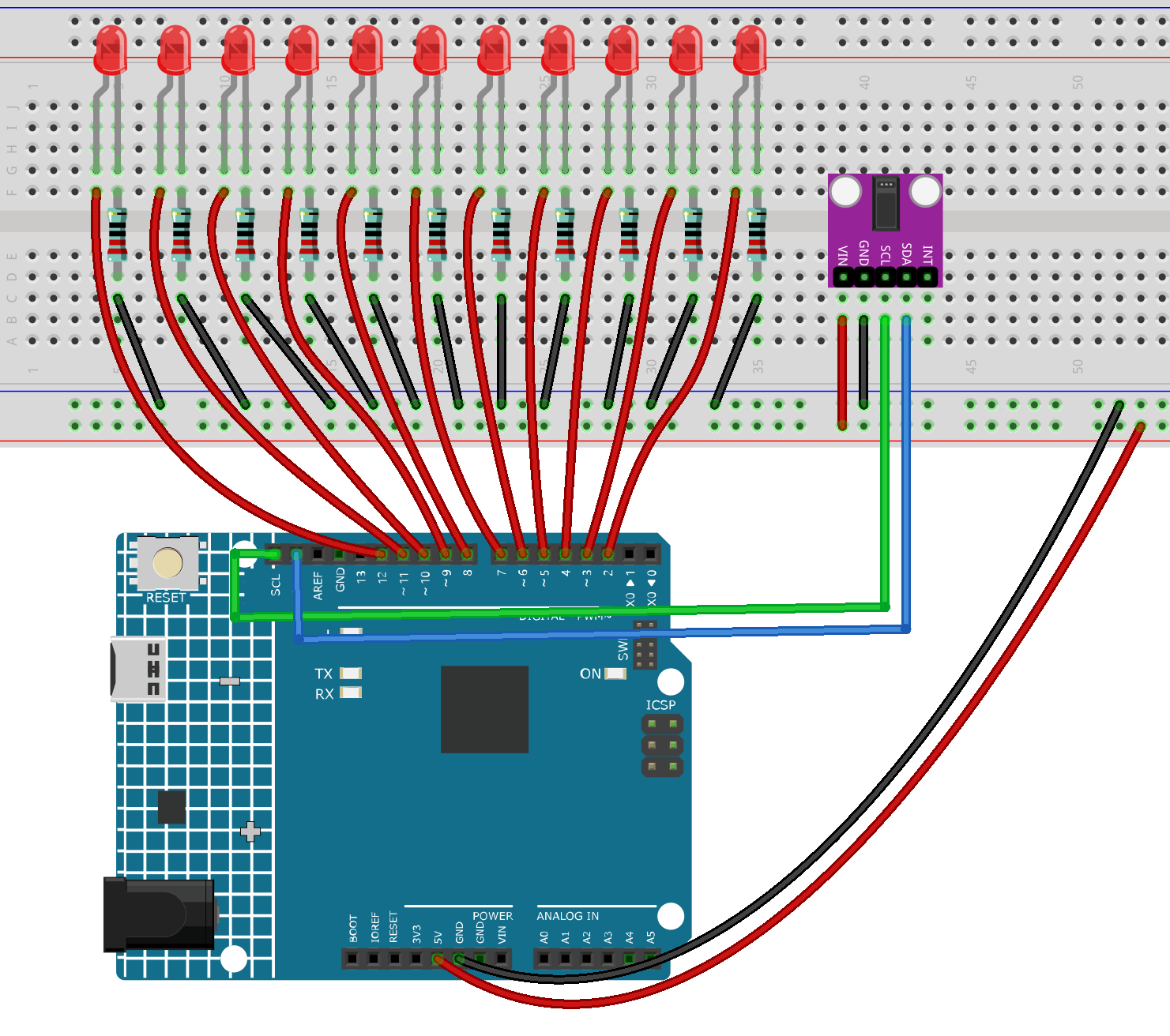
Common Connections:
Pulse Oximeter and Heart Rate Sensor Module (MAX30102)
SDA: Connect to SDA on the Arduino.
SCL: Connect to SCL on the Arduino.
GND: Connect to breadboard’s negative power bus.
VIN: Connect to breadboard’s red power bus.
LED
Connect the LEDs cathode to the negative power bus on the breadboard, and the LEDs anode to 1kΩ resistor then to 2 to 12 on the Arduino.
Writing the Code
Note
You can copy this code into Arduino IDE.
To install the library, use the Arduino Library Manager and search for MAX30105 and heartRate and install it.
Don’t forget to select the board(Arduino UNO R4 WIFI) and the correct port before clicking the Upload button.
#include <Wire.h>
#include "MAX30105.h"
#include "heartRate.h"

MAX30105 particleSensor;

// LED pins
const int ledPins[11] = {2,3,4,5,6,7,8,9,10,11,12};

// Heartbeat timing
unsigned long lastBeat = 0;
float bpm = 60;
float beatIntervalMs = 1000;

// Breathing animation timing
unsigned long breathStartMs = 0;

// Software PWM variables
uint8_t ledTarget[11];
uint8_t pwmPhase = 0;
const uint8_t MAX_BRIGHTNESS = 255;

void setup() {
  Serial.begin(115200);
  Wire.begin();

  // LED pins setup
  for(int i=0;i<11;i++){
    pinMode(ledPins[i], OUTPUT);
    digitalWrite(ledPins[i], LOW);
  }

  // Initialize MAX30102
  if (!particleSensor.begin(Wire, I2C_SPEED_FAST)) {
    Serial.println("MAX30102 not found");
    while (1);
  }

  particleSensor.setup();
  particleSensor.setPulseAmplitudeRed(0x0A);
  particleSensor.setPulseAmplitudeIR(0x1F);

  Serial.println("Heart Rate Breathing LED System Ready");
}

void updateBreathingLEDs() {
  unsigned long now = millis();
  float interval = beatIntervalMs;

  // Clamp breathing speed
  if(interval < 500) interval = 500;
  if(interval > 2000) interval = 2000;

  float t = (now - breathStartMs) / interval;
  if(t > 1.0) t = 1.0;

  // Smooth breathing curve (0 → 1 → 0)
  float brightness = sin(PI * t);
  if(brightness < 0) brightness = 0;

  int base = brightness * MAX_BRIGHTNESS;

  // LED wave spread effect
  for(int i=0;i<11;i++){
    float scale = 1.0 - abs(i - 5) * 0.08; // center LEDs brighter
    if(scale < 0.3) scale = 0.3;
    ledTarget[i] = base * scale;
  }
}

void softwarePWM() {
  pwmPhase++;

  for(int i=0;i<11;i++){
    if(ledTarget[i] > pwmPhase) digitalWrite(ledPins[i], HIGH);
    else digitalWrite(ledPins[i], LOW);
  }
}

void loop() {
  long irValue = particleSensor.getIR();

  // Detect heartbeat
  if (checkForBeat(irValue)) {
    unsigned long now = millis();
    beatIntervalMs = now - lastBeat;
    lastBeat = now;
    bpm = 60000.0 / beatIntervalMs;

    breathStartMs = now; // restart breathing animation

    Serial.print("BPM: ");
    Serial.println(bpm);
  }

  // If no finger detected, fade out slowly
  if (irValue < 50000) {
    for(int i=0;i<11;i++){
      if(ledTarget[i] > 0) ledTarget[i]--;
    }
  }
  else {
    updateBreathingLEDs();
  }

  softwarePWM();
  delayMicroseconds(200); // smooth PWM
}