Servo Control 4.0
Note
🌟 Welcome to the SunFounder Facebook Community! Whether you’re into Raspberry Pi, Arduino, or ESP32, you’ll find inspiration, help ideas here.
✅ Be the first to get free learning resources.
✅ Stay updated on new products & exclusive giveaways.
✅ Share your creations and get real feedback.
Kit purchase
Looking for parts? Check out our all-in-one kits below — packed with components, beginner-friendly guides, and tons of fun.

Name |
Includes Arduino board |
PURCHASE LINK |
|---|---|---|
Elite Explorer Kit |
Arduino Uno R4 WiFi |
|
Inventor Lab Kit |
Arduino Uno R3 |
Course Introduction
This project uses two touch sensors to control a servo motor. Press and hold a sensor to move the servo toward 0° or 180° in 5° steps. Both pressed = no movement. Initial angle: 90°.
Note
If this is your first time working with an Arduino project, we recommend downloading and reviewing the basic materials first.
Required Components
In this project, we need the following components:
SN |
COMPONENT INTRODUCTION |
QUANTITY |
PURCHASE LINK |
|---|---|---|---|
1 |
Arduino UNO R4 WIFI |
1 |
|
2 |
USB Type-C cable |
1 |
|
3 |
Breadboard |
1 |
|
4 |
Wires |
Several |
|
5 |
Touch Sensor Module |
1 |
|
6 |
Rotary Encoder Module |
1 |
Wiring
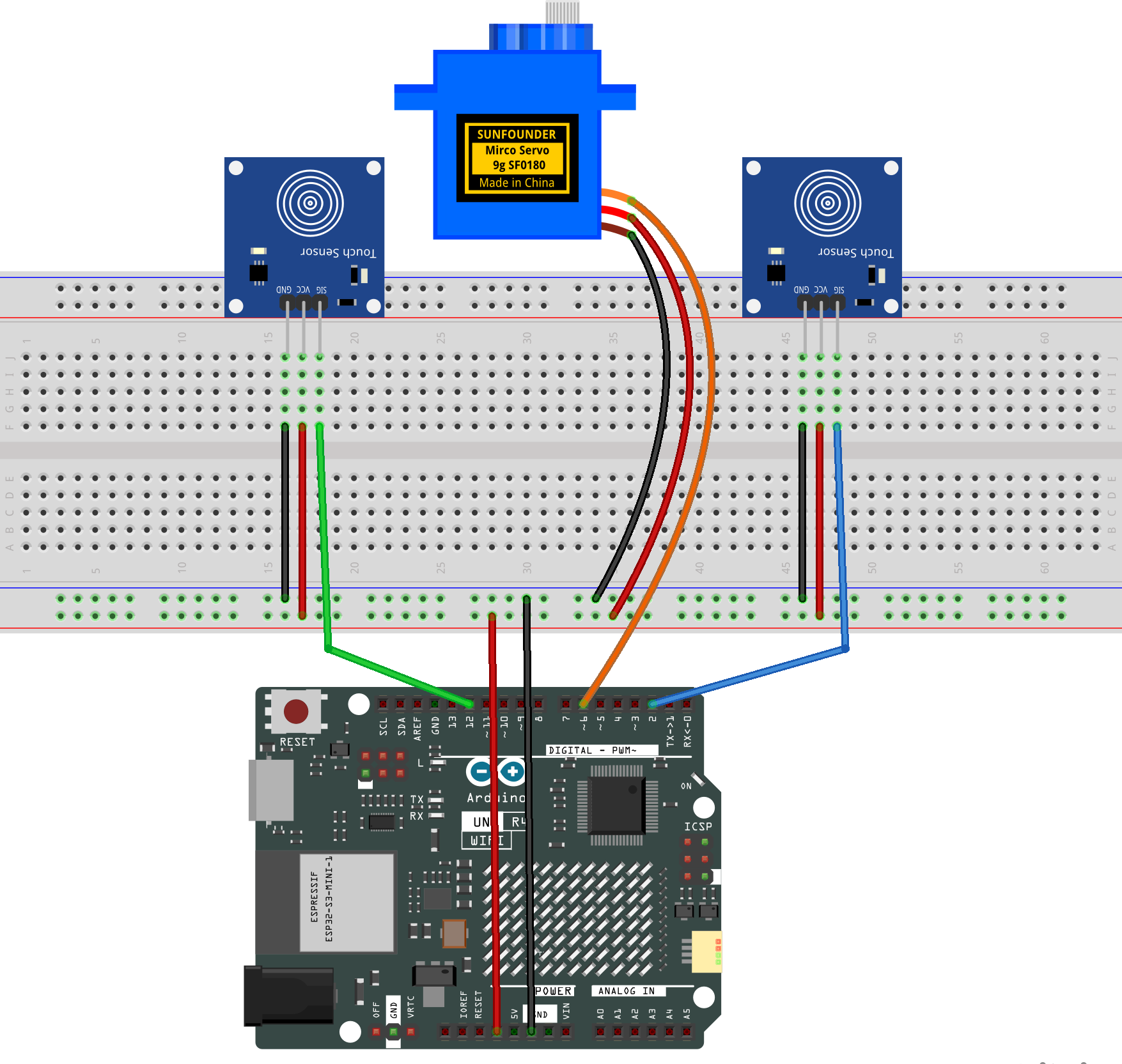
Common Connections:
Digital Servo Motor
Connect to breadboard’s positive power bus.
Connect to breadboard’s negative power bus.
Connect to 6 on the Arduino.
Touch Sensor Module 1
SIG: Connect to 2 on the Arduino.
GND: Connect to breadboard’s negative power bus.
VCC: Connect to breadboard’s red power bus.
Touch Sensor Module 2
SIG: Connect to 12 on the Arduino.
GND: Connect to breadboard’s negative power bus.
VCC: Connect to breadboard’s red power bus.
Writing the Code
Note
You can copy this code into Arduino IDE.
Don’t forget to select the board(Arduino UNO R4 Minima/WIFI) and the correct port before clicking the Upload button.
/* Two Touch Sensors -> Servo (press-and-hold auto-repeat)
* Pins:
*   Touch #1 (toward 0°):  D2
*   Touch #2 (toward 180°): D12
*   Servo: D6
*
* Behavior:
*   - Initial angle = 90°
*   - On press: move immediately by 3°
*   - While holding: keep stepping every REPEAT_MS by 3°
*   - If both held: neutral (no move). You can change to priority if desired.
*
* Note:
*   Most capacitive touch modules output HIGH when touched.
*   If your module is ACTIVE-LOW, flip the read logic as commented below.
*/

#include <Servo.h>

const int PIN_TOUCH_01 = 2;     // toward 0°
const int PIN_TOUCH_02 = 12;    // toward 180°
const int PIN_SERVO    = 6;

const int  STEP_DEG       = 5;      // degrees per step
const unsigned long REPEAT_MS = 80;  // step interval while holding
const unsigned long FIRST_STEP_DELAY_MS = 0; // 0 = immediate first step

Servo servo;
int angleDeg = 90;  // start at 90°

enum Dir { STOP = 0, TO_0 = -1, TO_180 = +1 };

// state for auto-repeat
Dir currentDir = STOP;
unsigned long holdStartMs = 0;   // when the currentDir started
unsigned long lastStepMs  = 0;   // last time we stepped

void setup() {
  pinMode(PIN_TOUCH_01, INPUT);  // HIGH when touched (typical)
  pinMode(PIN_TOUCH_02, INPUT);
  // If ACTIVE-LOW modules, you can keep INPUT but invert reads below.

  servo.attach(PIN_SERVO);
  servo.write(angleDeg);

  Serial.begin(9600);
  Serial.println("Press-and-hold servo control ready.");
}

void loop() {
  unsigned long now = millis();

  // --- Read touch states ---
  bool t1 = (digitalRead(PIN_TOUCH_01) == HIGH);  // ACTIVE-HIGH typical
  bool t2 = (digitalRead(PIN_TOUCH_02) == HIGH);
  // If ACTIVE-LOW modules, use:
  // bool t1 = (digitalRead(PIN_TOUCH_01) == LOW);
  // bool t2 = (digitalRead(PIN_TOUCH_02) == LOW);

  // --- Decide direction ---
  Dir nextDir = STOP;
  if (t1 && !t2)      nextDir = TO_0;
  else if (!t1 && t2) nextDir = TO_180;
  else                nextDir = STOP;  // both idle or both pressed -> neutral

  // --- Handle dir changes (start/stop hold) ---
  if (nextDir != currentDir) {
    currentDir = nextDir;
    holdStartMs = now;
    lastStepMs  = 0;  // reset so we can apply FIRST_STEP_DELAY_MS cleanly
    // Immediate first step if requested
    if (currentDir != STOP && FIRST_STEP_DELAY_MS == 0) {
      stepOnce(currentDir);
      lastStepMs = now;
    }
  }

  // --- While holding, auto-repeat ---
  if (currentDir != STOP) {
    unsigned long wait = (lastStepMs == 0)
                        ? FIRST_STEP_DELAY_MS   // first step after a delay (if not immediate)
                        : REPEAT_MS;            // subsequent steps
    if (now - (lastStepMs == 0 ? holdStartMs : lastStepMs) >= wait) {
      stepOnce(currentDir);
      lastStepMs = now;
    }
  }

  // non-blocking loop keeps the system responsive
}

void stepOnce(Dir d) {
  int before = angleDeg;
  angleDeg += (d == TO_180 ? +STEP_DEG : -STEP_DEG);
  if (angleDeg < 0)   angleDeg = 0;
  if (angleDeg > 180) angleDeg = 180;

  if (angleDeg != before) {
    servo.write(angleDeg);
    Serial.print("Angle: ");
    Serial.println(angleDeg);
  }
}