Snake Game 2.0
Note
🌟 Welcome to the SunFounder Facebook Community! Whether you’re into Raspberry Pi, Arduino, or ESP32, you’ll find inspiration, help ideas here.
✅ Be the first to get free learning resources.
✅ Stay updated on new products & exclusive giveaways.
✅ Share your creations and get real feedback.
👉 Need faster updates or support? Click [here] join our Facebook community
👉 Or join our WhatsApp group: Click [here]
🎁 Looking for parts?Check out our all-in-one kits below — packed with components, beginner-friendly guides, and tons of fun.
Name |
Includes Arduino board |
PURCHASE LINK |
|---|---|---|
Elite Explorer Kit |
Arduino Uno R4 WiFi |
|
3 in 1 Ultimate Starter Kit |
Arduino Uno R4 Minima |
Course Introduction
In this lesson, we’ll use a MAX7219 Dot Matrix Module, a joystick module, and an Arduino board to play a Snake game.
The snake’s movement will be controlled using the joystick.
Note
If this is your first time working with an Arduino project, we recommend downloading and reviewing the basic materials first.
Required Components
In this project, we need the following components:
SN |
COMPONENT INTRODUCTION |
QUANTITY |
PURCHASE LINK |
|---|---|---|---|
1 |
Arduino UNO R4 Minima/Arduino UNO R4 WIFI |
1 |
|
2 |
USB Type-C cable |
1 |
|
3 |
Breadboard |
1 |
|
4 |
Wires |
Several |
|
5 |
Joystick Module |
1 |
|
6 |
MAX7219 Dot Matrix Module |
1 |
|
7 |
LED |
2 |
|
8 |
Active Buzzer |
1 |
Wiring
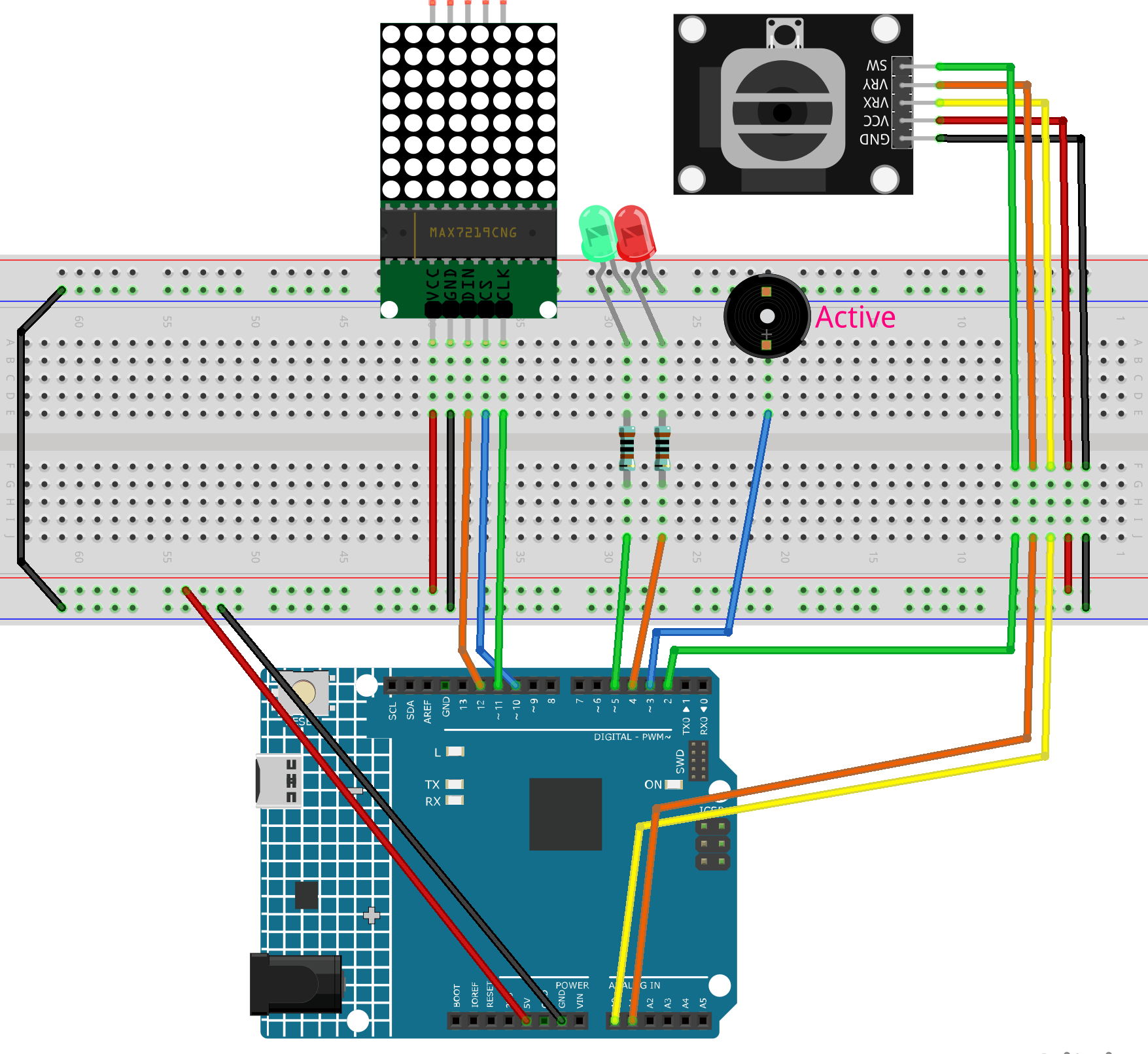
Common Connections:
MAX7219 Dot Matrix Module
CLK: Connect to 11 on the Arduino.
CS: Connect to 10 on the Arduino.
DIN: Connect to 12 on the Arduino.
GND: Connect to breadboard’s negative power bus.
VCC: Connect to breadboard’s red power bus.
Joystick Module
SW: Connect to 2 on the Arduino.
VRY: Connect to A1 on the Arduino.
VRX: Connect to A0 on the Arduino.
GND: Connect to breadboard’s negative power bus.
VCC: Connect to breadboard’s red power bus.
Active Buzzer
+: Connect to 3 on the Arduino.
-: Connect to breadboard’s negative power bus.
LEDS
Green: Connect the LED anode to a 1kΩ resistor, then to 5 on the Arduino, and the cathode to the negative power bus on the breadboard.
Red: Connect the LED anode to a 1kΩ resistor, then to 4 on the Arduino, and the cathode to the negative power bus on the breadboard.
Writing the Code
Note
You can copy this code into Arduino IDE.
To install the library, use the Arduino Library Manager and search for LedControl and install it.
Don’t forget to select the board(Arduino UNO R4 WIFI) and the correct port before clicking the Upload button.
#include <LedControl.h>

// -------------------- MAX7219 --------------------
LedControl lc = LedControl(12, 11, 10, 1); // DIN=12, CLK=11, CS=10, 1 device

// -------------------- Joystick -------------------
// According to your readings:
//   X axis: up=0, down=1023  -> vertical axis
//   Y axis: left=0, right=1023 -> horizontal axis
const int xPin = A0;     // vertical axis (X on the module)
const int yPin = A1;     // horizontal axis (Y on the module)
const int swPin = 2;     // SW (INPUT_PULLUP)

// -------------------- I/O Add-ons ----------------
const int buzzerPin = 3;   // Active buzzer on D3
const int redLEDPin = 4;   // Red LED on D4
const int greenLEDPin = 5; // Green LED on D5

// -------------------- Grid/Snake -----------------
#define GRID_SIZE 8
int snake[64][2];        // (x,y) for each segment
int snakeLength = 3;     // initial length
int direction = 0;       // 0=R,1=D,2=L,3=U
bool gameOverFlag = false;

// -------------------- Speed ----------------------
int moveSpeed = 300;     // ms
const int minSpeed = 100;

// -------------------- Food -----------------------
int foodX, foodY;

// -------------------- Joystick calibration --------
int centerX = 512;       // vertical axis center (xPin)
int centerY = 512;       // horizontal axis center (yPin)
const int TRIGGER = 220; // tilt threshold to decide direction (tune 180~260)

// -------------- Forward Declarations -------------
void resetGame();
void updateSnake();          // eat-after-predict version
void displaySnakeAndFood();
void updateDirection();
bool checkCollision();
void gameOver();
void generateFood();
// buzzer helpers
void beepOnce(unsigned int ms);     // short beep
void gameOverSound();               // end jingle

void setup() {
  lc.shutdown(0, false);
  lc.setIntensity(0, 5);
  lc.clearDisplay(0);

  pinMode(swPin, INPUT_PULLUP);

  pinMode(buzzerPin, OUTPUT);
  pinMode(redLEDPin, OUTPUT);
  pinMode(greenLEDPin, OUTPUT);
  digitalWrite(buzzerPin, LOW);

  // LEDs at game start: red OFF, green ON
  digitalWrite(redLEDPin, LOW);
  digitalWrite(greenLEDPin, HIGH);

  Serial.begin(9600);

  // ------- Auto-calibrate joystick center -------
  long sx = 0, sy = 0;
  for (int i = 0; i < 50; ++i) {
    sx += analogRead(xPin); // vertical
    sy += analogRead(yPin); // horizontal
    delay(5);
  }
  centerX = sx / 50;
  centerY = sy / 50;
  // Serial.print("Center X="); Serial.print(centerX);
  // Serial.print(" Y="); Serial.println(centerY);

  // Optional RNG seed (use a floating analog pin if available)
  // randomSeed(analogRead(A2));

  resetGame();
}

void loop() {
  if (gameOverFlag) {
    if (digitalRead(swPin) == LOW) { // press to restart
      delay(200); // debounce
      resetGame();
    }
    return;
  }

  // Direction sampling (fast)
  static unsigned long lastDirectionTime = 0;
  if (millis() - lastDirectionTime > 50) {
    updateDirection();
    lastDirectionTime = millis();
  }

  // Movement tick
  static unsigned long lastMoveTime = 0;
  if (millis() - lastMoveTime > moveSpeed) {
    updateSnake();
    if (checkCollision()) {
      gameOver();
      return;
    }
    displaySnakeAndFood();
    lastMoveTime = millis();
  }
}

// -------------------- Game Control --------------------
void resetGame() {
  lc.clearDisplay(0);
  snakeLength = 3;
  direction = 0;
  gameOverFlag = false;
  moveSpeed = 300;

  // LEDs: red OFF, green ON
  digitalWrite(redLEDPin, LOW);
  digitalWrite(greenLEDPin, HIGH);

  // Initial snake (vertical, heading right)
  snake[0][0] = 4; snake[0][1] = 2; // head
  snake[1][0] = 4; snake[1][1] = 1;
  snake[2][0] = 4; snake[2][1] = 0;

  generateFood();
  displaySnakeAndFood();
}

// eat-after-predict: grow immediately on the same tick
void updateSnake() {
  // 1) Predict new head
  int nx = snake[0][0];
  int ny = snake[0][1];
  if (direction == 0) ny += 1;       // right
  else if (direction == 1) nx += 1;  // down
  else if (direction == 2) ny -= 1;  // left
  else if (direction == 3) nx -= 1;  // up

  // 2) Will eat?
  bool willEat = (nx == foodX && ny == foodY);
  if (willEat && snakeLength < GRID_SIZE * GRID_SIZE) {
    snakeLength++; // grow first to keep old tail
  }

  // 3) Shift body
  for (int i = snakeLength - 1; i > 0; --i) {
    snake[i][0] = snake[i - 1][0];
    snake[i][1] = snake[i - 1][1];
  }

  // 4) Place new head
  snake[0][0] = nx;
  snake[0][1] = ny;

  // 5) If ate: beep + new food + speed up
  if (willEat) {
    beepOnce(40); // short, non-intrusive beep
    generateFood();
    moveSpeed = max(minSpeed, moveSpeed - 40);
  }
}

void displaySnakeAndFood() {
  lc.clearDisplay(0);

  // draw snake
  for (int i = 0; i < snakeLength; i++) {
    int rotatedRow = snake[i][1];
    int rotatedCol = GRID_SIZE - 1 - snake[i][0];
    if (rotatedRow >= 0 && rotatedRow < GRID_SIZE &&
        rotatedCol >= 0 && rotatedCol < GRID_SIZE) {
      lc.setLed(0, rotatedRow, rotatedCol, true);
    }
  }

  // draw food
  int rotatedFoodRow = foodY;
  int rotatedFoodCol = GRID_SIZE - 1 - foodX;
  lc.setLed(0, rotatedFoodRow, rotatedFoodCol, true);
}

void updateDirection() {
  // Read raw values
  int rawX = analogRead(xPin); // vertical: up=0, down=1023
  int rawY = analogRead(yPin); // horizontal: left=0, right=1023

  // Compute offsets from calibrated centers
  int dx = rawY - centerY; // horizontal uses Y
  int dy = rawX - centerX; // vertical   uses X

  // If you find the direction inverted, uncomment one or both lines:
  // dx = -dx; // invert horizontal
  // dy = -dy; // invert vertical

  int ax = abs(dx), ay = abs(dy);

  // Choose dominant axis and apply trigger threshold; forbid immediate reversal
  if (ax > ay && ax > TRIGGER) {
    if (dx > 0 && direction != 2) direction = 0; // right
    else if (dx < 0 && direction != 0) direction = 2; // left
  } else if (ay > ax && ay > TRIGGER) {
    if (dy > 0 && direction != 3) direction = 1; // down
    else if (dy < 0 && direction != 1) direction = 3; // up
  }
}

bool checkCollision() {
  // boundary
  if (snake[0][0] < 0 || snake[0][0] >= GRID_SIZE ||
      snake[0][1] < 0 || snake[0][1] >= GRID_SIZE) {
    return true;
  }
  // self
  for (int i = 1; i < snakeLength; i++) {
    if (snake[0][0] == snake[i][0] && snake[0][1] == snake[i][1]) {
      return true;
    }
  }
  return false;
}

void gameOver() {
  gameOverFlag = true;

  // LEDs at game over: red ON, green OFF
  digitalWrite(redLEDPin, HIGH);
  digitalWrite(greenLEDPin, LOW);

  // Light up all LEDs on matrix
  for (int i = 0; i < GRID_SIZE; i++) {
    for (int j = 0; j < GRID_SIZE; j++) {
      lc.setLed(0, i, j, true);
    }
  }

  // Play end jingle (active buzzer via digital pulses)
  gameOverSound();

  delay(2000); // hold the animation
  lc.clearDisplay(0);
}

void generateFood() {
  int availablePositions[GRID_SIZE * GRID_SIZE][2];
  int availableCount = 0;

  for (int x = 0; x < GRID_SIZE; x++) {
    for (int y = 0; y < GRID_SIZE; y++) {
      bool isOccupied = false;
      for (int i = 0; i < snakeLength; i++) {
        if (snake[i][0] == x && snake[i][1] == y) { isOccupied = true; break; }
      }
      if (!isOccupied) {
        availablePositions[availableCount][0] = x;
        availablePositions[availableCount][1] = y;
        availableCount++;
      }
    }
  }

  // If full, treat as win (stop spawning)
  if (availableCount == 0) {
    gameOverFlag = true;
    return;
  }

  int randomIndex = random(0, availableCount);
  foodX = availablePositions[randomIndex][0];
  foodY = availablePositions[randomIndex][1];
}

// -------------------- Buzzer Helpers --------------------
// Active buzzer short pulse
void beepOnce(unsigned int ms) {
  digitalWrite(buzzerPin, HIGH);
  delay(ms);
  digitalWrite(buzzerPin, LOW);
}

// Simple 3-part end sound (short-short-long)
void gameOverSound() {
  beepOnce(150);
  delay(70);
  beepOnce(150);
  delay(120);
  beepOnce(300);
}