Tetris4.0
Note
🌟 Welcome to the SunFounder Facebook Community! Whether you’re into Raspberry Pi, Arduino, or ESP32, you’ll find inspiration, help ideas here.
✅ Be the first to get free learning resources.
✅ Stay updated on new products & exclusive giveaways.
✅ Share your creations and get real feedback.
Kit purchase
Looking for parts? Check out our all-in-one kits below — packed with components, beginner-friendly guides, and tons of fun.

Name |
Includes Arduino board |
PURCHASE LINK |
|---|---|---|
Elite Explorer Kit |
Arduino Uno R4 WiFi |
|
3 in 1 Ultimate Starter Kit |
Arduino Uno R4 Minima |
Course Introduction
This Arduino project uses MAX7219 8x8 Dot Matrix module, four buttons to play a classic Tetris game.
Note
If this is your first time working with an Arduino project, we recommend downloading and reviewing the basic materials first.
Required Components
In this project, we need the following components:
SN |
COMPONENT INTRODUCTION |
QUANTITY |
PURCHASE LINK |
|---|---|---|---|
1 |
Arduino UNO R4 WIFI |
1 |
|
2 |
USB Type-C cable |
1 |
|
3 |
Breadboard |
1 |
|
4 |
Wires |
Several |
|
5 |
Button |
4 |
|
6 |
MAX7219 Dot Matrix Module |
1 |
Wiring
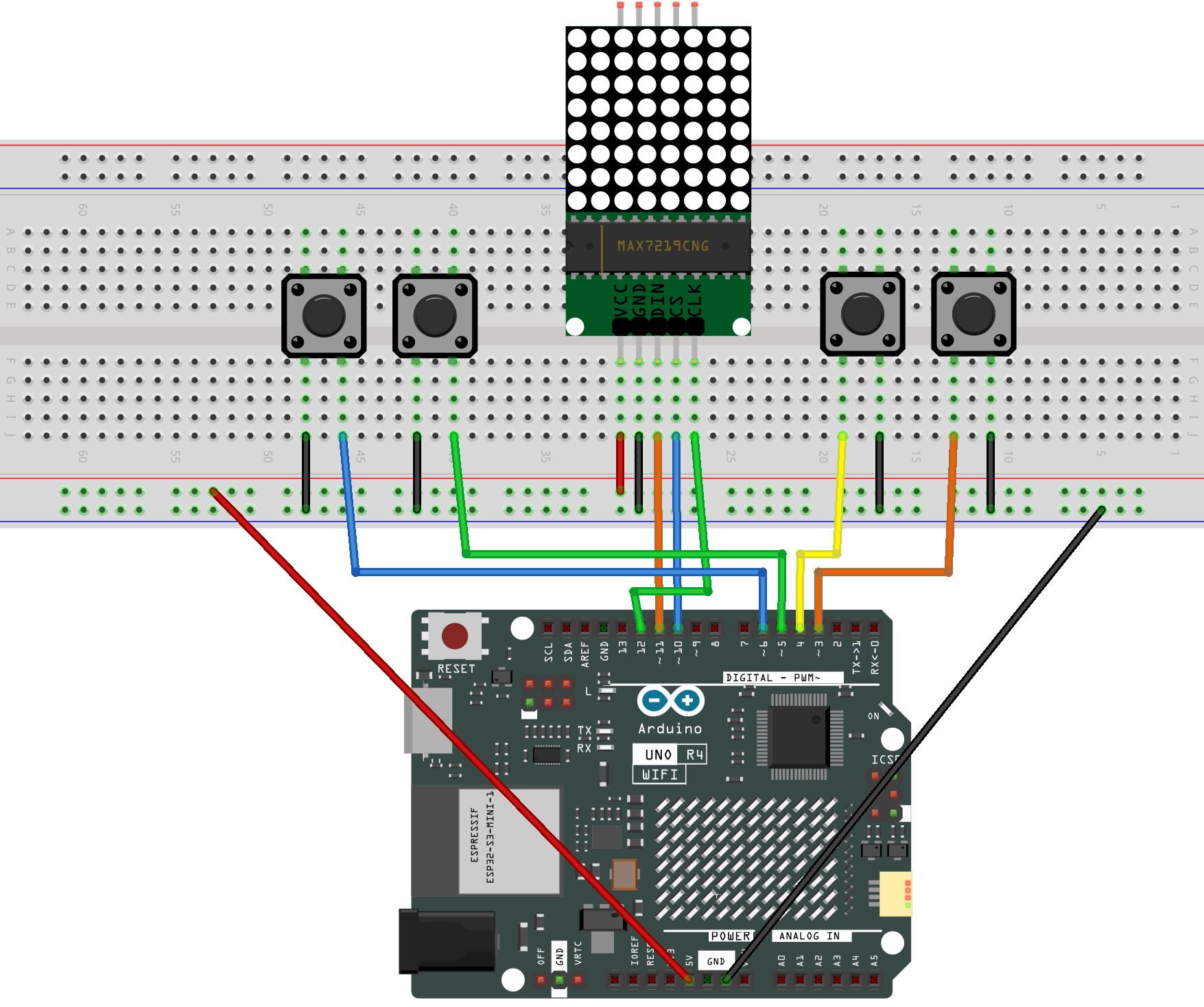
Common Connections:
MAX7219 Dot Matrix Module
CLK: Connect to 12 on the Arduino.
CS: Connect to 10 on the Arduino.
DIN: Connect to 11 on the Arduino.
GND: Connect to breadboard’s negative power bus.
VCC: Connect to breadboard’s red power bus.
Button 1
Connect to the breadboard’s negative power bus, and the other end to 3 on the Arduino board.
Button 2
Connect to the breadboard’s negative power bus, and the other end to 4 on the Arduino board.
Button 3
Connect to the breadboard’s negative power bus, and the other end to 5 on the Arduino board.
Button 4
Connect to the breadboard’s negative power bus, and the other end to 6 on the Arduino board.
Writing the Code
Note
You can copy this code into Arduino IDE.
To install the library, use the Arduino Library Manager and search for LedControl and install it.
Don’t forget to select the board(Arduino UNO R4 Minima) and the correct port before clicking the Upload button.
#include <LedControl.h>

// MAX7219 wiring (DIN -> D11, CLK -> D12, CS -> D10)
const uint8_t PIN_DIN = 11;
const uint8_t PIN_CLK = 12;
const uint8_t PIN_CS  = 10;

// Create a MAX7219 controller (1 device)
LedControl lc = LedControl(PIN_DIN, PIN_CLK, PIN_CS, 1);

// Button pins (INPUT_PULLUP: pressed = LOW)
const uint8_t PIN_LEFT   = 5;
const uint8_t PIN_RIGHT  = 6;
const uint8_t PIN_DOWN   = 3;   // Hold to fall faster
const uint8_t PIN_ROTATE = 4;   // Press to rotate / start game

// Playfield data: 8 rows, each row uses 8 bits (1 = occupied)
// field[y] corresponds to row y (0 = top, 7 = bottom)
byte field[8];

// Falling timing (gravity)
unsigned long lastDrop = 0;
unsigned long baseDropInterval = 500;   // Normal falling speed (ms)
unsigned long fastDropInterval = 120;   // Faster falling speed when holding DOWN
unsigned long currentDropInterval = 500;

// Key repeat and debounce timing
unsigned long lastMoveTime = 0;
const unsigned long moveRepeatInterval = 120;  // Repeat speed for LEFT/RIGHT when held

bool lastRotateState = HIGH;
unsigned long lastRotateTime = 0;
const unsigned long rotateDebounce = 150;      // Prevent rotating too fast

// Game state flags
bool gameRunning = false;
bool gameOver = false;

// A single point (x, y) used to describe block shapes
struct Point { int8_t x; int8_t y; };

// One shape can have up to 4 rotations
struct ShapeDef {
  const Point* rots[4];
  uint8_t rotCount;
};

// Current falling block (x, y is the block origin)
// y can be negative so the block can spawn above the screen
struct Block {
  uint8_t shapeId;   // 0..6
  uint8_t rot;       // 0..rotCount-1
  int8_t x;          // x position
  int8_t y;          // y position (can be negative for off-screen spawn)
};

// I block (2 rotations)
const Point I0[4] = {{-1,0},{0,0},{1,0},{2,0}};
const Point I1[4] = {{0,-1},{0,0},{0,1},{0,2}};

// O block (1 rotation)
const Point O0[4] = {{0,0},{1,0},{0,1},{1,1}};

// T block (4 rotations)
const Point T0[4] = {{-1,0},{0,0},{1,0},{0,1}};
const Point T1[4] = {{0,-1},{0,0},{0,1},{1,0}};
const Point T2[4] = {{-1,0},{0,0},{1,0},{0,-1}};
const Point T3[4] = {{0,-1},{0,0},{0,1},{-1,0}};

// L block (4 rotations)
const Point L0[4] = {{-1,0},{0,0},{1,0},{1,1}};
const Point L1[4] = {{0,-1},{0,0},{0,1},{1,-1}};
const Point L2[4] = {{-1,-1},{-1,0},{0,0},{1,0}};
const Point L3[4] = {{-1,1},{0,-1},{0,0},{0,1}};

// J block (4 rotations)
const Point J0[4] = {{-1,0},{0,0},{1,0},{-1,1}};
const Point J1[4] = {{0,-1},{0,0},{0,1},{1,1}};
const Point J2[4] = {{1,-1},{-1,0},{0,0},{1,0}};
const Point J3[4] = {{-1,-1},{0,-1},{0,0},{0,1}};

// S block (2 rotations)
const Point S0[4] = {{0,0},{1,0},{-1,1},{0,1}};
const Point S1[4] = {{0,-1},{0,0},{1,0},{1,1}};

// Z block (2 rotations)
const Point Z0[4] = {{-1,0},{0,0},{0,1},{1,1}};
const Point Z1[4] = {{1,-1},{0,0},{1,0},{0,1}};

// All 7 block types
const ShapeDef shapes[7] = {
  { {I0, I1, nullptr, nullptr}, 2 },      // I
  { {O0, nullptr, nullptr, nullptr}, 1 }, // O
  { {T0, T1, T2, T3}, 4 },                // T
  { {L0, L1, L2, L3}, 4 },                // L
  { {J0, J1, J2, J3}, 4 },                // J
  { {S0, S1, nullptr, nullptr}, 2 },      // S
  { {Z0, Z1, nullptr, nullptr}, 2 }       // Z
};

Block cur;

// Check if a specific bit (x) is set in a row byte
inline bool rowHas(byte row, int8_t x) {
  return (row & (1 << x)) != 0;
}

// Reverse bit order in a byte (used to match your LED module orientation)
byte reverse8(byte b) {
  b = (b & 0xF0) >> 4 | (b & 0x0F) << 4;
  b = (b & 0xCC) >> 2 | (b & 0x33) << 2;
  b = (b & 0xAA) >> 1 | (b & 0x55) << 1;
  return b;
}

// Collision test for a block at (nx, ny) with a given rotation
// Notes:
// - Left/right boundaries are always checked
// - Bottom boundary is checked
// - py < 0 is allowed (block above the visible screen)
// - Overlap with field[] is checked only when py >= 0
bool checkCollision(int8_t nx, int8_t ny, uint8_t shapeId, uint8_t rot) {
  const ShapeDef& sd = shapes[shapeId];
  const Point* pts = sd.rots[rot];

  for (uint8_t i = 0; i < 4; i++) {
    int8_t px = nx + pts[i].x;
    int8_t py = ny + pts[i].y;

    if (px < 0 || px > 7) return true;
    if (py > 7) return true;

    if (py >= 0) {
      if (rowHas(field[py], px)) return true;
    }
  }
  return false;
}

// Try moving the current block; return false if blocked
bool moveBlock(int8_t dx, int8_t dy) {
  int8_t nx = cur.x + dx;
  int8_t ny = cur.y + dy;
  if (checkCollision(nx, ny, cur.shapeId, cur.rot)) return false;
  cur.x = nx;
  cur.y = ny;
  return true;
}

// Rotate the block (with a small "wall-kick" so rotation feels smoother)
void rotateBlock() {
  const ShapeDef& sd = shapes[cur.shapeId];
  if (sd.rotCount <= 1) return;

  uint8_t oldRot = cur.rot;
  uint8_t nextRot = (cur.rot + 1) % sd.rotCount;

  if (!checkCollision(cur.x, cur.y, cur.shapeId, nextRot)) {
    cur.rot = nextRot;
    return;
  }

  // Wall-kick: try shifting left or right by 1 if rotation is blocked
  if (!checkCollision(cur.x - 1, cur.y, cur.shapeId, nextRot)) {
    cur.x -= 1;
    cur.rot = nextRot;
    return;
  }
  if (!checkCollision(cur.x + 1, cur.y, cur.shapeId, nextRot)) {
    cur.x += 1;
    cur.rot = nextRot;
    return;
  }

  // Rotation failed, restore previous state
  cur.rot = oldRot;
}

// Lock the current block into the field[] (only visible pixels are stored)
void placeBlock() {
  const ShapeDef& sd = shapes[cur.shapeId];
  const Point* pts = sd.rots[cur.rot];

  for (uint8_t i = 0; i < 4; i++) {
    int8_t px = cur.x + pts[i].x;
    int8_t py = cur.y + pts[i].y;

    if (px >= 0 && px <= 7 && py >= 0 && py <= 7) {
      field[py] |= (1 << px);
    }
  }
}

// Remove full lines (0xFF) and shift everything above down
void clearLines() {
  for (int8_t y = 7; y >= 0; y--) {
    if (field[y] == 0xFF) {
      for (int8_t yy = y; yy > 0; yy--) {
        field[yy] = field[yy - 1];
      }
      field[0] = 0;
      y++; // Re-check the same row after shifting
    }
  }
}

// Reset field and timers for a new game
void resetGame() {
  for (uint8_t i = 0; i < 8; i++) field[i] = 0;
  gameOver = false;
  lastDrop = millis();
}

// Create a new block above the visible top so it "slides in"
void spawnBlock() {
  cur.shapeId = (uint8_t)random(0, 7);
  cur.rot = 0;

  cur.x = 3;
  cur.y = -1;

  // I block is 4-wide in horizontal state, so shift left to avoid edge issues
  if (cur.shapeId == 0) {
    cur.x = 2;
    cur.y = -1;
  }

  // If the new block already hits existing blocks, the game ends
  if (checkCollision(cur.x, cur.y, cur.shapeId, cur.rot)) {
    gameOver = true;
    gameRunning = false;
  }
}

// Convert your logical 8x8 frame into the correct LED orientation
// This mapping is based on your module: rotate 90° clockwise + reverse bits
void drawMapped(const byte src[8]) {
  byte rotated[8] = {0};

  for (int y = 0; y < 8; y++) {
    for (int x = 0; x < 8; x++) {
      if (src[y] & (1 << x)) {
        rotated[x] |= (1 << (7 - y));
      }
    }
  }

  for (int row = 0; row < 8; row++) {
    rotated[row] = reverse8(rotated[row]);
  }

  for (int row = 0; row < 8; row++) {
    lc.setRow(0, row, rotated[row]);
  }
}

// Build a frame = field + current block, then display it
void drawFrame() {
  byte frame[8];
  for (uint8_t y = 0; y < 8; y++) frame[y] = field[y];

  if (gameRunning && !gameOver) {
    const ShapeDef& sd = shapes[cur.shapeId];
    const Point* pts = sd.rots[cur.rot];
    for (uint8_t i = 0; i < 4; i++) {
      int8_t px = cur.x + pts[i].x;
      int8_t py = cur.y + pts[i].y;
      if (px >= 0 && px <= 7 && py >= 0 && py <= 7) {
        frame[py] |= (1 << px);
      }
    }
  }

  drawMapped(frame);
}

// Simple blinking animation when game is over
void showGameOverAnim() {
  static unsigned long lastBlink = 0;
  static bool on = false;

  unsigned long now = millis();
  if (now - lastBlink > 300) {
    lastBlink = now;
    on = !on;
  }

  byte full[8];
  for (int i = 0; i < 8; i++) full[i] = on ? 0xFF : 0x00;
  drawMapped(full);
}

// Read buttons and apply control (move/rotate/speed)
void handleInput() {
  bool leftPressed   = (digitalRead(PIN_LEFT)   == LOW);
  bool rightPressed  = (digitalRead(PIN_RIGHT)  == LOW);
  bool downPressed   = (digitalRead(PIN_DOWN)   == LOW);
  bool rotatePressed = (digitalRead(PIN_ROTATE) == LOW);

  // DOWN changes falling speed (soft drop)
  currentDropInterval = downPressed ? fastDropInterval : baseDropInterval;

  unsigned long now = millis();

  // LEFT/RIGHT: allow holding the button (repeat movement)
  if (now - lastMoveTime >= moveRepeatInterval) {
    if (leftPressed && !rightPressed) {
      moveBlock(-1, 0);
      lastMoveTime = now;
    } else if (rightPressed && !leftPressed) {
      moveBlock(1, 0);
      lastMoveTime = now;
    }
  }

  // ROTATE: only rotate once per press (debounced)
  if (rotatePressed != lastRotateState) {
    if (now - lastRotateTime > rotateDebounce) {
      lastRotateTime = now;
      if (rotatePressed) {
        rotateBlock();
      }
    }
    lastRotateState = rotatePressed;
  }
}

// Helper used for "press to start/restart"
bool rotatePressedNow() {
  return digitalRead(PIN_ROTATE) == LOW;
}

void setup() {
  // Use A0 noise as a simple random seed (A0 is unused here)
  randomSeed(analogRead(A0));

  pinMode(PIN_LEFT, INPUT_PULLUP);
  pinMode(PIN_RIGHT, INPUT_PULLUP);
  pinMode(PIN_DOWN, INPUT_PULLUP);
  pinMode(PIN_ROTATE, INPUT_PULLUP);

  lc.shutdown(0, false);
  lc.setIntensity(0, 8);
  lc.clearDisplay(0);

  resetGame();
  drawFrame();
}

void loop() {
  // Not running: show idle/game over screen, press ROTATE to start
  if (!gameRunning) {
    if (gameOver) showGameOverAnim();
    else drawFrame();

    if (rotatePressedNow()) {
      delay(30);
      if (rotatePressedNow()) {
        resetGame();
        spawnBlock();
        gameRunning = !gameOver;

        // Wait for release to avoid an instant rotate
        while (rotatePressedNow()) { delay(10); }
      }
    }
    return;
  }

  // Running: read input and apply gravity
  handleInput();

  unsigned long now = millis();
  if (now - lastDrop >= currentDropInterval) {
    lastDrop = now;

    // If the block can't move down, lock it and spawn a new one
    if (!moveBlock(0, 1)) {
      placeBlock();
      clearLines();
      spawnBlock();
      if (gameOver) {
        gameRunning = false;
      }
    }
  }

  drawFrame();
}