Breath LED
Note
🌟 Welcome to the SunFounder Facebook Community! Whether you’re into Raspberry Pi, Arduino, or ESP32, you’ll find inspiration, help ideas here.
✅ Be the first to get free learning resources.
✅ Stay updated on new products & exclusive giveaways.
✅ Share your creations and get real feedback.
Kit purchase
Looking for parts? Check out our all-in-one kits below — packed with components, beginner-friendly guides, and tons of fun.
Name |
Includes Arduino board |
PURCHASE LINK |
|---|---|---|
Ultimate Sensor Kit |
Arduino Uno R4 Minima |
|
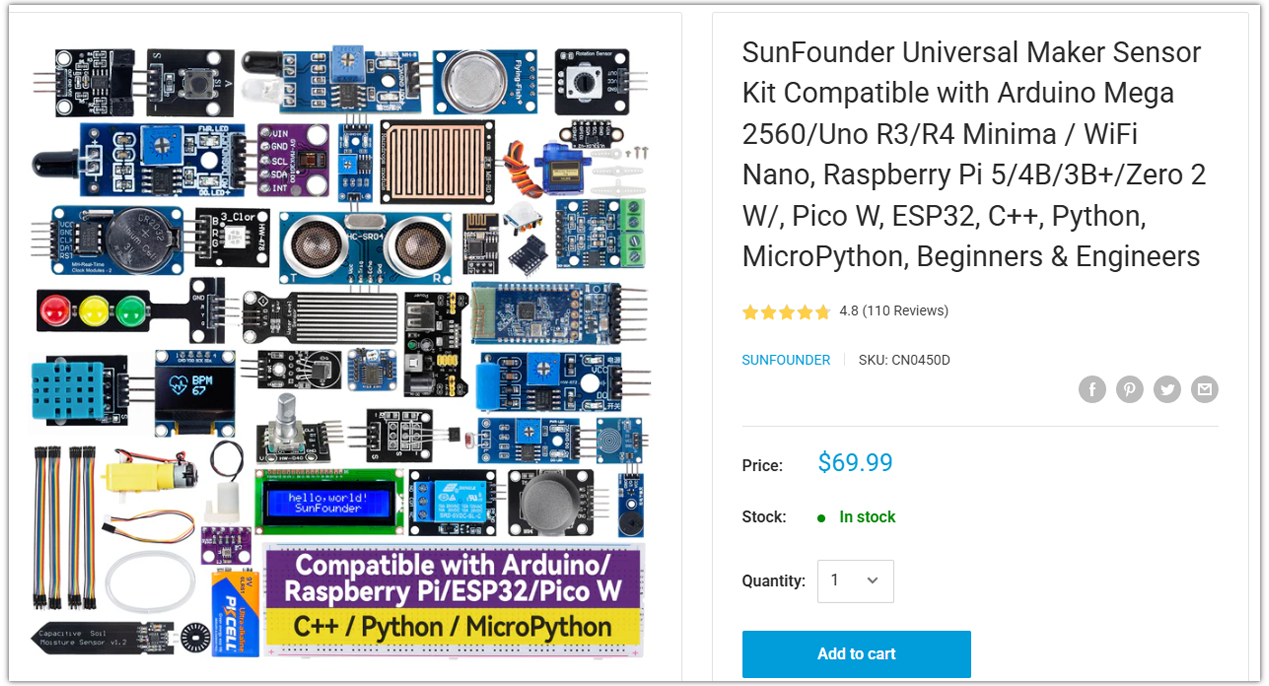
Universal Maker Sensor Kit |
× |
Course Introduction
In this project, we use a DHT11 sensor, an LCD, and a WS2812 LED strip.
The LCD shows temperature and humidity, while the LED strip breathes in blue, yellow, or red depending on the temperature.
Note
If this is your first time working with an Arduino project, we recommend downloading and reviewing the basic materials first.
Required Components
In this project, we need the following components:
SN |
COMPONENT INTRODUCTION |
QUANTITY |
PURCHASE LINK |
|---|---|---|---|
1 |
Arduino UNO R4 Minima/Arduino UNO R4 WIFI |
1 |
|
2 |
USB Type-C cable |
1 |
|
3 |
Breadboard |
1 |
|
4 |
Wires |
Several |
|
5 |
Humiture Sensor Module |
1 |
|
6 |
I2C LCD 1602 |
1 |
|
7 |
LED Strip |
1 |
Wiring
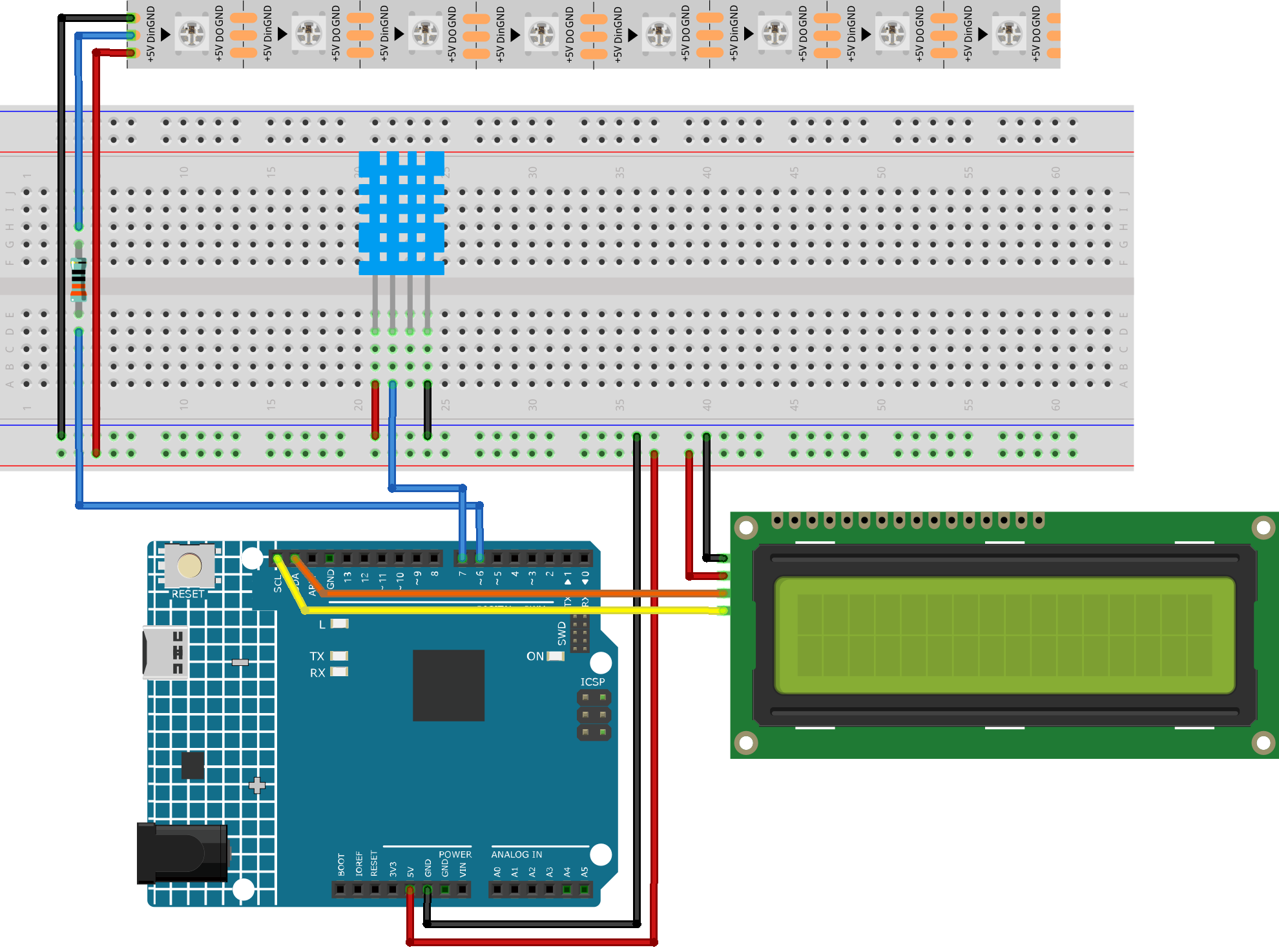
Common Connections:
DHT11 Humiture Sensor Module
DATA: Connect to 7 on the Arduino.
GND: Connect to breadboard’s negative power bus.
VCC: Connect to breadboard’s red power bus.
I2C LCD 1602
SDA: Connect to SDA on the Arduino.
SCL: Connect to SCL on the Arduino.
GND: Connect to breadboard’s negative power bus.
VCC: Connect to breadboard’s red power bus.
LED Strip
Din: Connect to a 330Ω resistor then to 6 on the Arduino.
GND: Connect to breadboard’s negative power bus.
+5V: Connect to breadboard’s passive power bus.
Writing the Code
Note
You can copy this code into Arduino IDE.
To install the library, use the Arduino Library Manager and search for Adafruit_NeoPixel and install it.
To install the library, use the Arduino Library Manager and search for LiquidCrystal_I2C and install it.
Don’t forget to select the board(Arduino UNO R4 WIFI) and the correct port before clicking the Upload button.
#include <Adafruit_NeoPixel.h>
#include <LiquidCrystal_I2C.h>
#include "DHT.h"

// -------------------- Pins & Devices --------------------
#define LED_PIN     6
#define NUM_LEDS    8

#define DHTPIN      7           // DATA pin of 4-pin DHT11 connected to D7
#define DHTTYPE     DHT11

// I2C LCD: 16x2, common address 0x27 (if not displayed, try 0x3F)
LiquidCrystal_I2C lcd(0x27, 16, 2);

Adafruit_NeoPixel strip(NUM_LEDS, LED_PIN, NEO_GRB + NEO_KHZ800);
DHT dht(DHTPIN, DHTTYPE);

// -------------------- Breathing parameters --------------------
// One full breathing cycle (dim -> bright -> dim), unit: ms
const unsigned long BREATH_PERIOD = 3000;

// Sensor reading interval
const unsigned long SENSOR_INTERVAL = 2000;
unsigned long lastSensorRead = 0;

// LCD refresh interval
const unsigned long LCD_INTERVAL = 500;
unsigned long lastLcd = 0;

// Current sensor values
float curTemp = NAN;
float curHumi = NAN;

// Colors: Blue (≤25) / Yellow (between 25~30) / Red (≥30)
uint32_t colorBlue;
uint32_t colorYellow;
uint32_t colorRed;

// Current target color
uint32_t targetColor;

void setup() {
  // Optional: enable pull-up on DHT data pin, more stable for raw sensors
  pinMode(DHTPIN, INPUT_PULLUP);

  // LED strip initialization
  strip.begin();
  strip.show();           // Clear
  strip.setBrightness(0); // Start breathing from dark

  // Preset colors
  colorBlue   = strip.Color(0, 0, 255);
  colorYellow = strip.Color(255, 180, 0);
  colorRed    = strip.Color(255, 0, 0);

  // Sensor/LCD
  dht.begin();
  lcd.init();
  lcd.backlight();

  // LCD initial message
  lcd.clear();
  lcd.setCursor(0, 0); lcd.print("WS2812 Breathing");
  lcd.setCursor(0, 1); lcd.print("DHT11 + LCD Ready");
  delay(800);
  lcd.clear();
}

void loop() {
  const unsigned long now = millis();

  // ---- Timed DHT11 read ----
  if (now - lastSensorRead >= SENSOR_INTERVAL) {
    lastSensorRead = now;
    curTemp = dht.readTemperature(); // Celsius
    curHumi = dht.readHumidity();

    // Select color based on rule:
    // ≤25 -> Blue; ≥30 -> Red; (25,30) -> Yellow
    if (!isnan(curTemp)) {
      if (curTemp <= 25.0) {
        targetColor = colorBlue;
      } else if (curTemp >= 30.0) {
        targetColor = colorRed;
      } else {
        targetColor = colorYellow;
      }
    } else {
      // If read fails, keep last color or default to Yellow
      targetColor = colorYellow;
    }
  }

  // ---- Breathing brightness (non-blocking) ----
  uint8_t brightness = breatheBrightness(now, BREATH_PERIOD);
  strip.setBrightness(brightness);

  // All LEDs same color
  for (int i = 0; i < NUM_LEDS; i++) {
    strip.setPixelColor(i, targetColor);
  }
  strip.show();

  // ---- Timed LCD update ----
  if (now - lastLcd >= LCD_INTERVAL) {
    lastLcd = now;
    lcd.setCursor(0, 0);
    lcd.print("T:");
    if (isnan(curTemp)) lcd.print("--.-");
    else                printPadded(lcd, curTemp, 4, 1); // width=4, 1 decimal place

    lcd.print("C H:");
    if (isnan(curHumi)) lcd.print("--");
    else                printPadded(lcd, curHumi, 2, 0);
    lcd.print("%  ");

    lcd.setCursor(0, 1);
    lcd.print("Mode:");
    if (targetColor == colorBlue)      lcd.print("BLUE     ");
    else if (targetColor == colorRed)  lcd.print("RED      ");
    else                               lcd.print("YELLOW   ");
  }
}

// Calculate 0..255 breathing brightness (sine wave: 0->255->0)
uint8_t breatheBrightness(unsigned long t, unsigned long period) {
  float phase = (2.0f * PI) * ( (t % period) / (float)period );
  float s = (sinf(phase) + 1.0f) * 0.5f;   // 0..1
  int val = (int)(s * 255.0f);
  if (val < 0)   val = 0;
  if (val > 255) val = 255;
  return (uint8_t)val;
}

// Print value to LCD with fixed width/decimals (pad with spaces to avoid ghosting)
void printPadded(LiquidCrystal_I2C &lcdRef, float value, int width, int decimals) {
  char buf[16];
  dtostrf(value, width + (decimals ? (decimals + 1) : 0), decimals, buf); // width includes decimal point
  lcdRef.print(buf);
}