Radar Guard 11.0
Note
🌟 Welcome to the SunFounder Facebook Community! Whether you’re into Raspberry Pi, Arduino, or ESP32, you’ll find inspiration, help ideas here.
✅ Be the first to get free learning resources.
✅ Stay updated on new products & exclusive giveaways.
✅ Share your creations and get real feedback.
Kit purchase
Looking for parts? Check out our all-in-one kits below — packed with components, beginner-friendly guides, and tons of fun.

Name |
Includes Arduino board |
PURCHASE LINK |
|---|---|---|
Ultimate Sensor Kit |
Arduino Uno R4 Minima |
|
Elite Explorer Kit |
Arduino Uno R4 WiFi |
|
3 in 1 Ultimate Starter Kit |
Arduino Uno R4 Minima |
|
Universal Maker Sensor Kit |
× |
Course Introduction
This project creates a servo-based ultrasonic scanner with LEDs and a buzzer. The ultrasonic sensor sweeps left and right to detect objects. When something gets too close, the red LED and buzzer turn on as an alarm, and when the area is safe, the green LED lights up.
Note
If this is your first time working with an Arduino project, we recommend downloading and reviewing the basic materials first.
Required Components
In this project, we need the following components:
SN |
COMPONENT INTRODUCTION |
QUANTITY |
PURCHASE LINK |
|---|---|---|---|
1 |
Arduino UNO R4 Minima/Arduino UNO R4 WIFI |
1 |
|
2 |
USB Type-C cable |
1 |
|
3 |
Breadboard |
1 |
|
4 |
Wires |
Several |
|
5 |
Ultrasonic Sensor Module |
1 |
|
6 |
1kΩ resistor |
4 |
|
7 |
Digital Servo Motor |
1 |
|
8 |
Active Buzzer |
1 |
|
9 |
LED |
4 |
|
10 |
Button |
2 |
Wiring
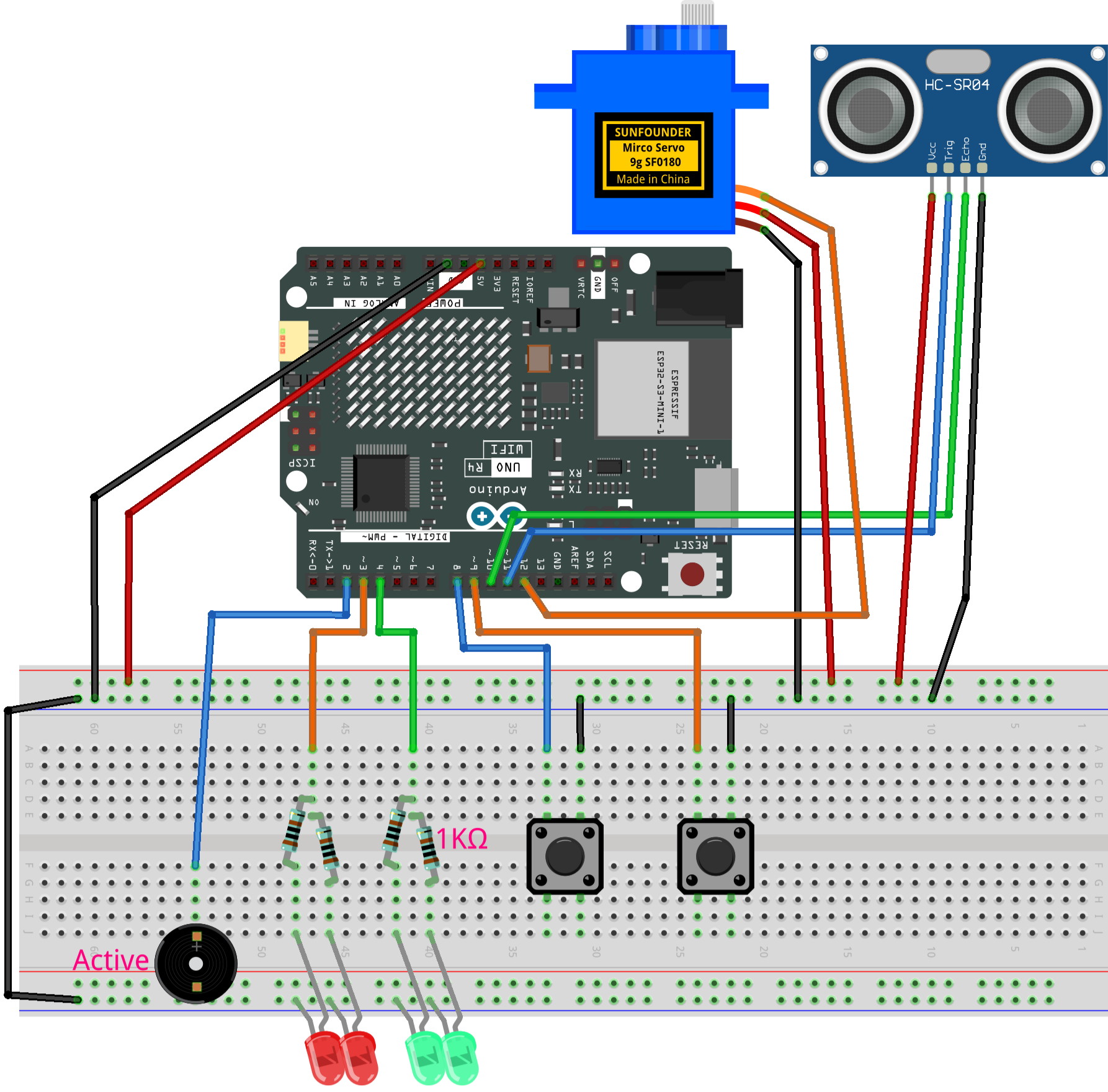
Common Connections:
Red LED
Connect the LEDs cathode to the negative power bus on the breadboard, and the LEDs anode to a 1kΩ resistor then to 3 on the Arduino.
Green LED
Connect the LEDs cathode to the negative power bus on the breadboard, and the LEDs anode to a 1kΩ resistor then to 4 on the Arduino.
Button Left
Connect to the breadboard’s negative power bus, and the other end to 8 on the Arduino board.
Button Right
Connect to the breadboard’s negative power bus, and the other end to 9 on the Arduino board.
Digital Servo Motor
Connect to breadboard’s positive power bus.
Connect to breadboard’s negative power bus.
Connect to 12 on the Arduino.
Active Buzzer
GND: Connect to breadboard’s negative power bus.
+: Connect to 2 on the Arduino.
Ultrasonic Sensor Module
Trig: Connect to 11 on the Arduino.
Echo: Connect to 10 on the Arduino.
GND: Connect to breadboard’s negative power bus.
VCC: Connect to breadboard’s red power bus.
Writing the Code
Note
Build the circuit.
Upload the code to the Arduino board using Arduino IDE.
In the Arduino IDE, check the current Arduino port(COMx).
The
ArduinoRadarGUIis used here. You can click hereRadar_Guard11.0.zipto download it.Open ArduinoLidarGUI.pde in the Processing IDE .
Modify the code in line 35 to ensure the correct port number(COMx).
Run the Processing sketch to visualize the radar data.
#include <Servo.h>

// Ultrasonic sensor pins
const int trigPin   = 11;
const int echoPin   = 10;

// Output devices
const int servoPin  = 12;
const int buzzerPin = 2;    // Active buzzer: HIGH = sound

const int ledGreen = 4;
const int ledRed   = 3;

// Control buttons
// Blue button: rotate servo to the right
// Red button: rotate servo to the left
const int btnBlue = 8;
const int btnRed  = 9;

// Servo control
Servo radarServo;
int currentAngle = 90;      // Start from center position
int servoDir = 0;           // -1 = left, 0 = stop, 1 = right

const int servoStep = 1;    // Move 1 degree each update
const unsigned long servoInterval = 20;
unsigned long lastServoMillis = 0;

// Direction hold (fix for button switching issue)
unsigned long lastDirChangeMillis = 0;
const unsigned long dirHoldTime = 50; // ms

// Ultrasonic detection
const int alertDistance = 20;   // Alarm distance (cm)
int triggerCount = 0;

unsigned long lastPingMillis = 0;
const unsigned long pingInterval = 60;

// System state
enum RadarState { SAFE, ALERT };
RadarState radarState = SAFE;

// Alarm blinking control
unsigned long lastAlertMillis = 0;
bool alertToggle = false;
const unsigned long alertInterval = 120;

// Last valid distance for radar output
int lastDistance = 40;

void setup() {
  pinMode(trigPin, OUTPUT);
  pinMode(echoPin, INPUT);

  pinMode(buzzerPin, OUTPUT);
  pinMode(ledGreen, OUTPUT);
  pinMode(ledRed, OUTPUT);

  pinMode(btnBlue, INPUT_PULLUP);
  pinMode(btnRed, INPUT_PULLUP);

  radarServo.attach(servoPin);
  radarServo.write(currentAngle);

  digitalWrite(ledGreen, HIGH);
  digitalWrite(ledRed, LOW);
  digitalWrite(buzzerPin, LOW);

  Serial.begin(9600);
}

void loop() {
  readButtons();
  updateServo();
  updateDistance();
  handleAlert();
  sendRadarData();
}

void readButtons() {
  bool bluePressed = (digitalRead(btnBlue) == LOW);
  bool redPressed  = (digitalRead(btnRed)  == LOW);

  if (bluePressed) {
    servoDir = 1;   // Rotate right
    lastDirChangeMillis = millis();
  }
  else if (redPressed) {
    servoDir = -1;  // Rotate left
    lastDirChangeMillis = millis();
  }
  else {
    // Keep last direction for a short time
    if (millis() - lastDirChangeMillis > dirHoldTime) {
      servoDir = 0;
    }
  }
}

void updateServo() {
  if (millis() - lastServoMillis >= servoInterval) {
    lastServoMillis = millis();

    currentAngle += servoDir * servoStep;
    currentAngle = constrain(currentAngle, 0, 180);

    radarServo.write(currentAngle);
  }
}

void updateDistance() {
  // Skip distance check during alarm
  if (radarState == ALERT) return;

  if (millis() - lastPingMillis < pingInterval) return;
  lastPingMillis = millis();

  int distance = getDistance();
  if (distance <= 0) return;

  lastDistance = distance;

  if (distance < alertDistance) {
    triggerCount++;
  } else {
    triggerCount = 0;
  }

  if (triggerCount >= 5) {
    radarState = ALERT;
  }
}

void handleAlert() {
  if (radarState == ALERT) {
    if (millis() - lastAlertMillis >= alertInterval) {
      lastAlertMillis = millis();
      alertToggle = !alertToggle;

      digitalWrite(ledRed, alertToggle);
      digitalWrite(buzzerPin, alertToggle);
      digitalWrite(ledGreen, LOW);
    }

    int dist = getDistance();
    if (dist >= alertDistance && dist > 0) {
      radarState = SAFE;
      triggerCount = 0;

      digitalWrite(ledRed, LOW);
      digitalWrite(buzzerPin, LOW);
      digitalWrite(ledGreen, HIGH);
    }
  }
  else {
    digitalWrite(ledRed, LOW);
    digitalWrite(buzzerPin, LOW);
    digitalWrite(ledGreen, HIGH);
  }
}

void sendRadarData() {
  // Processing expects: angle,distance.
  Serial.print(currentAngle);
  Serial.print(",");
  Serial.print(lastDistance);
  Serial.print(".");
}

int getDistance() {
  digitalWrite(trigPin, LOW);
  delayMicroseconds(2);
  digitalWrite(trigPin, HIGH);
  delayMicroseconds(10);
  digitalWrite(trigPin, LOW);

  long duration = pulseIn(echoPin, HIGH, 12000);
  if (duration == 0) return -1;

  return duration * 0.034 / 2;
}