Servo Control 3.0
Note
🌟 Welcome to the SunFounder Facebook Community! Whether you’re into Raspberry Pi, Arduino, or ESP32, you’ll find inspiration, help ideas here.
✅ Be the first to get free learning resources.
✅ Stay updated on new products & exclusive giveaways.
✅ Share your creations and get real feedback.
Kit purchase
Looking for parts? Check out our all-in-one kits below — packed with components, beginner-friendly guides, and tons of fun.

Name |
Includes Arduino board |
PURCHASE LINK |
|---|---|---|
Elite Explorer Kit |
Arduino Uno R4 WiFi |
|
Inventor Lab Kit |
Arduino Uno R3 |
Course Introduction
This project creates a servo angle controller using an Arduino, a rotary encoder, a push button, and three LEDs.
Users rotate the encoder to adjust the servo angle and press the button to toggle step sizes (1°, 5°, 10°). The LED color indicates the current step size: red = 1°, yellow = 5°, blue = 10°.
Note
If this is your first time working with an Arduino project, we recommend downloading and reviewing the basic materials first.
Required Components
In this project, we need the following components:
SN |
COMPONENT INTRODUCTION |
QUANTITY |
PURCHASE LINK |
|---|---|---|---|
1 |
Arduino UNO R4 WIFI |
1 |
|
2 |
USB Type-C cable |
1 |
|
3 |
Breadboard |
1 |
|
4 |
Wires |
Several |
|
5 |
Digital Servo Motor |
1 |
|
6 |
Rotary Encoder Module |
1 |
|
7 |
LED |
3 |
|
8 |
1kΩ resistor |
3 |
Wiring
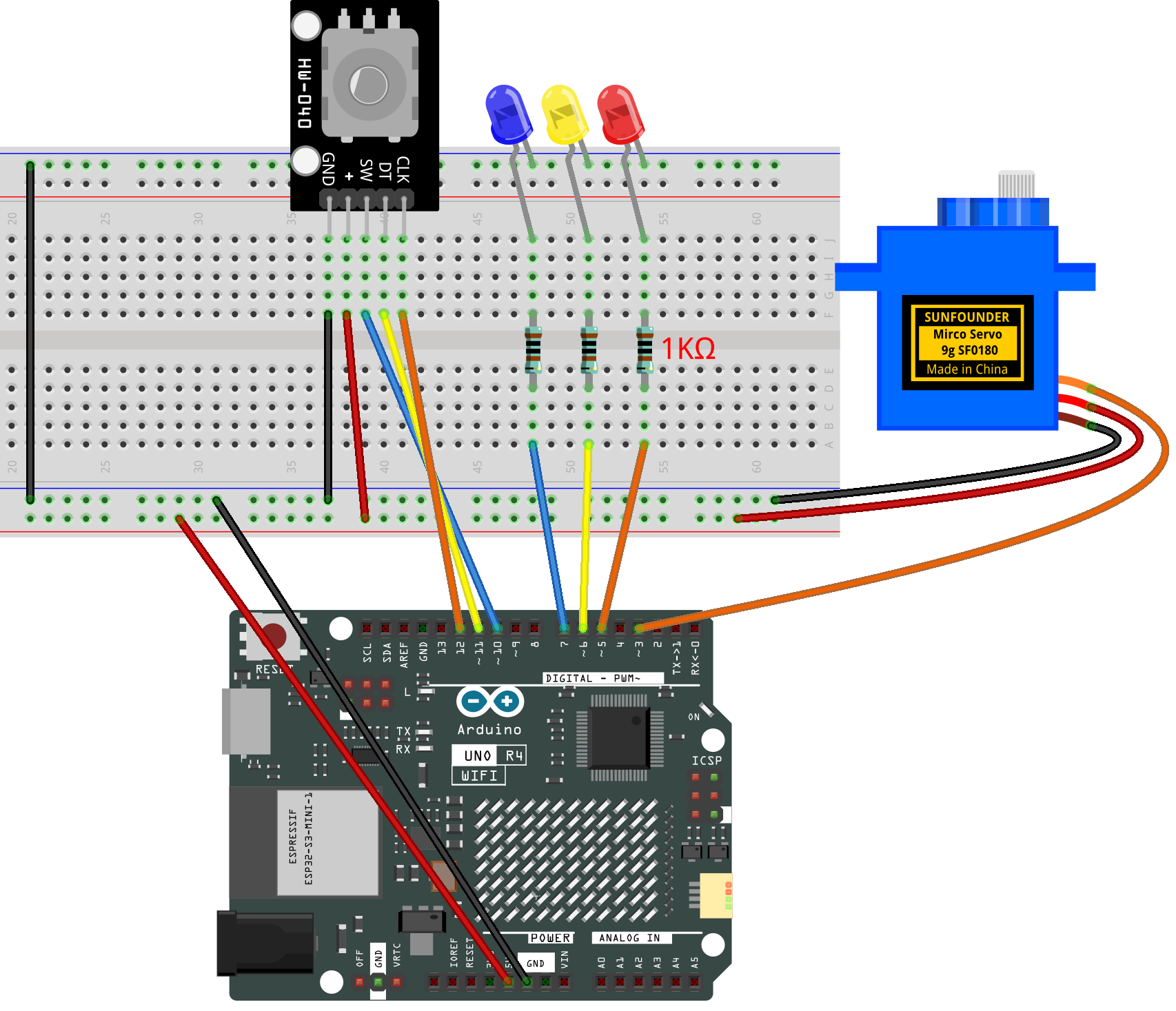
Common Connections:
Digital Servo Motor
Connect to breadboard’s positive power bus.
Connect to breadboard’s negative power bus.
Connect to 3 on the Arduino.
rotary encoder
CLK: Connect to 12 on the Arduino.
DT: Connect to 11 on the Arduino.
SW: Connect to 10 on the Arduino.
GND: Connect to breadboard’s negative power bus.
VCC: Connect to breadboard’s red power bus.
LED
Blue Connect the LEDs anode to a 1kΩ resistor then to the negative power bus on the breadboard, and the LEDs cathode to 7 on the Arduino.
Yellow Connect the LEDs anode to a 1kΩ resistor then to the negative power bus on the breadboard, and the LEDs cathode to 6 on the Arduino.
Red Connect the LEDs anode to a 1kΩ resistor then to the negative power bus on the breadboard, and the LEDs cathode to 5 on the Arduino.
Writing the Code
Note
You can copy this code into Arduino IDE.
Don’t forget to select the board(Arduino UNO R4 Minima/WIFI) and the correct port before clicking the Upload button.
#include <Servo.h>

/* ================= Pins ================= */
const uint8_t PIN_SERVO = 3;   // SG90 signal
const uint8_t PIN_LED_R = 5;   // Red LED -> 1 deg step
const uint8_t PIN_LED_Y = 6;   // Yellow LED -> 5 deg step
const uint8_t PIN_LED_B = 7;   // Blue LED -> 10 deg step
const uint8_t PIN_SW    = 10;  // Encoder push button (active LOW)
const uint8_t PIN_DT    = 11;  // Encoder B
const uint8_t PIN_CLK   = 12;  // Encoder A

/* ================ Servo ================= */
Servo s;
int angleDeg = 90;              // start at center
const int ANGLE_MIN = 0;
const int ANGLE_MAX = 180;

/* ============== Mode / Steps ============ */
enum Mode { STEP_1 = 0, STEP_5, STEP_10 };
Mode mode = STEP_1;             // power-on -> RED (1 deg)
inline int stepSize() { return (mode == STEP_1) ? 1 : (mode == STEP_5 ? 5 : 10); }

/* ====== Button debouncer: press+release with duration ======
  - Debounce both edges.
  - Only fire on a CLEAN RELEASE (LOW->HIGH).
  - Require minimum press time (minPressMs).
  - After firing, lock out for lockoutMs.
*/
uint8_t  btnStable = HIGH;          // last debounced level
uint8_t  btnLastRaw = HIGH;         // last raw read
unsigned long btnLastChangeMs = 0;  // last time raw changed
bool     pressedArmed = false;      // we've seen a clean press (LOW) and are timing it
unsigned long pressStartMs = 0;     // when the clean LOW started
unsigned long lastEventMs  = 0;     // last time we fired an event

const unsigned long debounceMs  = 30;   // per-edge debounce window
const unsigned long minPressMs  = 30;   // must hold at least this long
const unsigned long maxPressMs  = 3000; // ignore absurdly long holds (safety)
const unsigned long lockoutMs   = 200;  // block after event to absorb bounces

/* ======= Encoder (quadrature decode) ==== */
uint8_t prevAB = 0;             // previous 2-bit state (A<<1)|B
long ticks = 0;                 // raw transitions count
unsigned long lastTransUs = 0;  // last transition time (µs)
const unsigned long transGuardUs = 600; // ignore transitions faster than this

// Transition lookup table: (prevAB<<2 | currAB) -> +1 / -1 / 0
// CW: 00->01->11->10->00 => +1, CCW: 00->10->11->01->00 => -1
int8_t const qdecLUT[16] = {
/* 00->00 */  0, /* 00->01 */ +1, /* 00->10 */ -1, /* 00->11 */  0,
/* 01->00 */ -1, /* 01->01 */  0, /* 01->10 */  0, /* 01->11 */ +1,
/* 10->00 */ +1, /* 10->01 */  0, /* 10->10 */  0, /* 10->11 */ -1,
/* 11->00 */  0, /* 11->01 */ -1, /* 11->10 */ +1, /* 11->11 */  0
};

/* ================ LEDs ================== */
void setModeLeds() {
  // RED -> 1 deg, YELLOW -> 5 deg, BLUE -> 10 deg
  digitalWrite(PIN_LED_R, mode == STEP_1  ? HIGH : LOW);
  digitalWrite(PIN_LED_Y, mode == STEP_5  ? HIGH : LOW);
  digitalWrite(PIN_LED_B, mode == STEP_10 ? HIGH : LOW);
}

/* ---- Button handler: returns true exactly once per valid press-release ---- */
bool buttonPressedOnce() {
  uint8_t raw = digitalRead(PIN_SW);           // active LOW
  unsigned long now = millis();

  // Track raw changes for debounce timing
  if (raw != btnLastRaw) {
    btnLastRaw = raw;
    btnLastChangeMs = now;
  }

  // Update debounced level if raw stayed stable long enough
  if (now - btnLastChangeMs >= debounceMs && raw != btnStable) {
    btnStable = raw;

    // Edge handling on debounced signal
    // 1) Clean press (HIGH->LOW): arm and start timing
    if (btnStable == LOW) {
      if (!pressedArmed && (now - lastEventMs) >= lockoutMs) {
        pressedArmed = true;
        pressStartMs = now;
      }
    }
    // 2) Clean release (LOW->HIGH): if armed and press duration valid, fire event
    else { // btnStable == HIGH
      if (pressedArmed) {
        unsigned long held = now - pressStartMs;
        pressedArmed = false;
        if (held >= minPressMs && held <= maxPressMs && (now - lastEventMs) >= lockoutMs) {
          lastEventMs = now;
          return true;  // fire exactly once on release
        }
      }
    }
  }
  return false;
}

/* ================ Setup ================= */
void setup() {
  pinMode(PIN_LED_R, OUTPUT);
  pinMode(PIN_LED_Y, OUTPUT);
  pinMode(PIN_LED_B, OUTPUT);

  pinMode(PIN_SW,  INPUT_PULLUP);
  pinMode(PIN_DT,  INPUT_PULLUP);
  pinMode(PIN_CLK, INPUT_PULLUP);

  // Initialize encoder state
  uint8_t A = digitalRead(PIN_CLK);
  uint8_t B = digitalRead(PIN_DT);
  prevAB = (A << 1) | B;

  // Initialize button states
  btnStable = digitalRead(PIN_SW);
  btnLastRaw = btnStable;
  btnLastChangeMs = millis();

  s.attach(PIN_SERVO);
  s.write(angleDeg);

  setModeLeds();

  Serial.begin(115200);
  Serial.println(F("Encoder->Servo (release-triggered button with duration & lockout)."));
  Serial.println(F("Modes: RED=1 deg, YEL=5 deg, BLU=10 deg."));
}

/* ================= Loop ================= */
void loop() {
  /* -------- 1) Button (trigger on release -> RED->YELLOW->BLUE->RED) -------- */
  if (buttonPressedOnce()) {
    if (mode == STEP_1)      mode = STEP_5;   // RED -> YELLOW
    else if (mode == STEP_5) mode = STEP_10;  // YELLOW -> BLUE
    else                     mode = STEP_1;   // BLUE -> RED
    setModeLeds();
    Serial.print(F("Mode -> step ")); Serial.print(stepSize()); Serial.println(F(" deg"));
  }

  /* -------- 2) Encoder: table-based quadrature decode -------- */
  uint8_t A = digitalRead(PIN_CLK);
  uint8_t B = digitalRead(PIN_DT);
  uint8_t currAB = (A << 1) | B;

  if (currAB != prevAB) {
    unsigned long t = micros();
    if (t - lastTransUs >= transGuardUs) {
      int8_t inc = qdecLUT[(prevAB << 2) | currAB];
      if (inc != 0) ticks += inc;
      lastTransUs = t;
      prevAB = currAB;
    } else {
      prevAB = currAB; // track state but ignore as bounce
    }
  }

  /* -------- 3) Apply per-detent change to servo angle -------- */
  static long lastAppliedTicks = 0;
  const int transitionsPerDetent = 4; // set to 2 if your encoder uses 2 transitions/detent
  long diff = ticks - lastAppliedTicks;

  if (diff >= transitionsPerDetent || diff <= -transitionsPerDetent) {
    int detents = diff / transitionsPerDetent;   // signed
    int deltaDeg = detents * stepSize();

    int newAngle = angleDeg + deltaDeg;
    if (newAngle > ANGLE_MAX) newAngle = ANGLE_MAX;
    if (newAngle < ANGLE_MIN) newAngle = ANGLE_MIN;

    if (newAngle != angleDeg) {
      angleDeg = newAngle;
      s.write(angleDeg);
      // Optional: Serial.print(F("angle: ")); Serial.println(angleDeg);
    }
    lastAppliedTicks += detents * transitionsPerDetent;
  }

  // No delay(); everything is non-blocking
}