Distance Display 3.0
Note
🌟 Welcome to the SunFounder Facebook Community! Whether you’re into Raspberry Pi, Arduino, or ESP32, you’ll find inspiration, help ideas here.
✅ Be the first to get free learning resources.
✅ Stay updated on new products & exclusive giveaways.
✅ Share your creations and get real feedback.
Kit purchase
Looking for parts? Check out our all-in-one kits below — packed with components, beginner-friendly guides, and tons of fun.

Name |
Includes Arduino board |
PURCHASE LINK |
|---|---|---|
Ultimate Sensor Kit |
Arduino Uno R4 Minima |
|
Elite Explorer Kit |
Arduino Uno R4 WiFi |
|
3 in 1 Ultimate Starter Kit |
Arduino Uno R4 Minima |
|
Universal Maker Sensor Kit |
× |
Course Introduction
In this project, we use an ultrasonic sensor and a 1602 LCD and three groups of LEDs (green, yellow, red) to simulate a radar-style proximity alert system with the Arduino board.
The system measures the distance to an object and activates different LED groups based on how close the object is: green LEDs indicate a safe distance (≤15 cm), yellow LEDs warn that the object is getting closer (≤10 cm), and red LEDs signal a critical proximity alert (≤5 cm). The LEDs turn on from left to right and turn off from right to left to enhance the visual effect.
Note
If this is your first time working with an Arduino project, we recommend downloading and reviewing the basic materials first.
Required Components
In this project, we need the following components:
SN |
COMPONENT INTRODUCTION |
QUANTITY |
PURCHASE LINK |
|---|---|---|---|
1 |
Arduino UNO R4 WIFI |
1 |
|
2 |
USB Type-C cable |
1 |
|
3 |
Breadboard |
1 |
|
4 |
Wires |
Several |
|
5 |
1kΩ resistor |
several |
|
6 |
Ultrasonic Sensor Module |
1 |
|
7 |
LED |
several |
|
8 |
I2C LCD 1602 |
1 |
Wiring
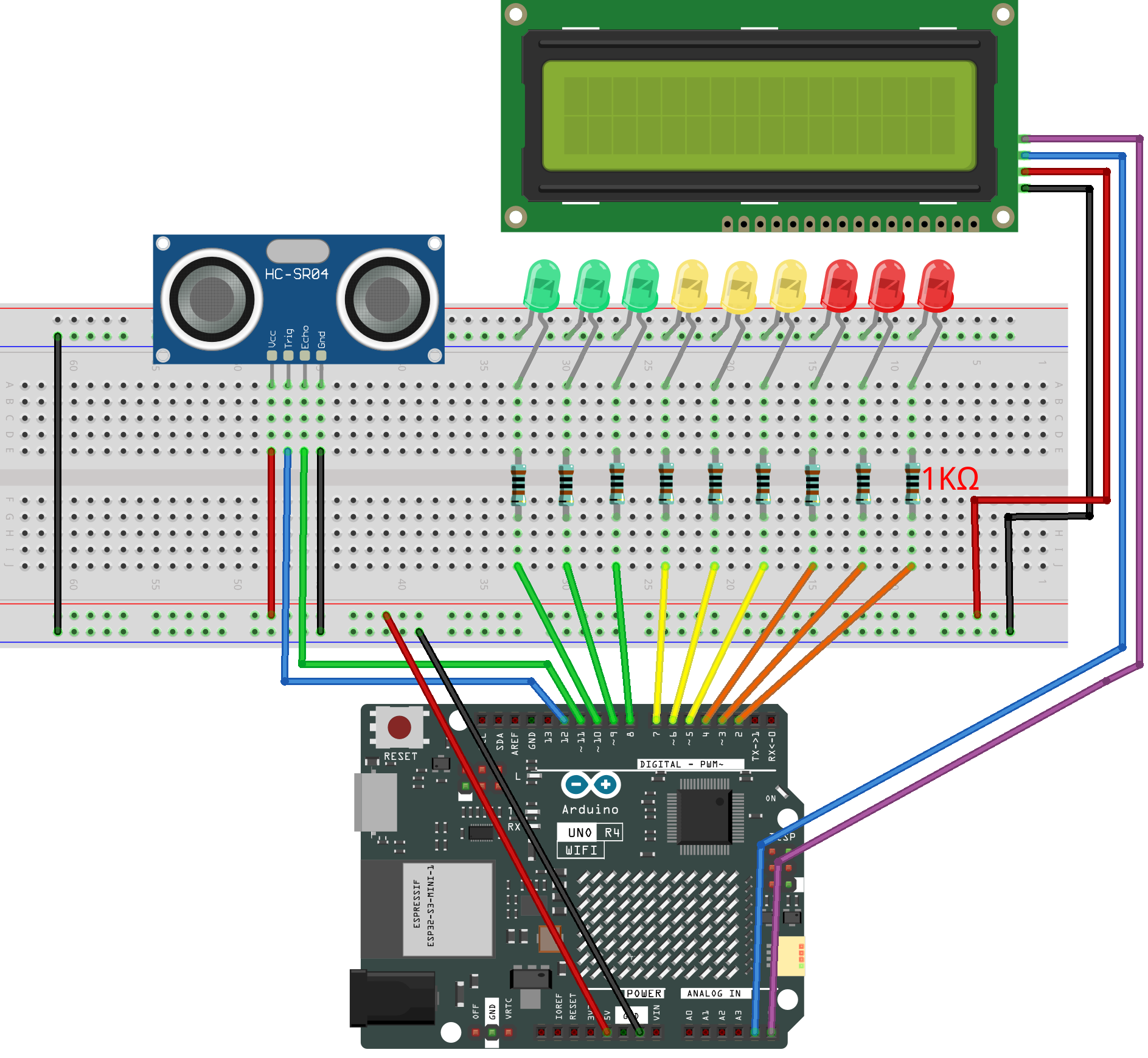
Common Connections:
LED
Connect the LEDs cathode to the negative power bus on the breadboard, and the LEDs anode to a 1kΩ resistor then to 2 ~ 10 on the Arduino.
Ultrasonic Sensor Module
Trig: Connect to 12 on the Arduino.
Echo: Connect to 11 on the Arduino.
GND: Connect to breadboard’s negative power bus.
VCC: Connect to breadboard’s red power bus.
I2C LCD 1602
SDA: Connect to A4 on the Arduino.
SCL: Connect to A5 on the Arduino.
GND: Connect to breadboard’s negative power bus.
VCC: Connect to breadboard’s red power bus.
Writing the Code
Note
You can copy this code into Arduino IDE.
To install the library, use the Arduino Library Manager and search for LiquidCrystal_I2C and install it.
Don’t forget to select the board(Arduino UNO R4 WIFI) and the correct port before clicking the Upload button.
#include <Wire.h>
#include <LiquidCrystal_I2C.h>

// --- LCD (common address 0x27 or 0x3F, adjust if needed) ---
LiquidCrystal_I2C lcd(0x27, 16, 2);

// --- Ultrasonic sensor pins ---
const int echoPin = 12; // Echo pin of ultrasonic sensor
const int trigPin = 11; // Trig pin of ultrasonic sensor

// --- LED groups (green, yellow, red) ---
const int greenLEDs[]  = {10, 9, 8};  // Safe distance
const int yellowLEDs[] = {7, 6, 5};   // Getting closer
const int redLEDs[]    = {4, 3, 2};   // Very close
constexpr uint8_t NUM_LEDS = 3;       // Each group has 3 LEDs

// --- Flags to track LED states ---
bool greenOn = false;
bool yellowOn = false;
bool redOn = false;

// --- Distance thresholds with hysteresis (avoid flicker) ---
constexpr float TH_GREEN_ON  = 15.0f, TH_GREEN_OFF  = 16.0f;
constexpr float TH_YELLOW_ON = 10.0f, TH_YELLOW_OFF = 11.0f;
constexpr float TH_RED_ON    = 5.0f,  TH_RED_OFF    = 6.0f;

// --- For smoothing (moving average filter, 5 samples) ---
const int NUM_SAMPLES = 5;
float samples[NUM_SAMPLES];
int sampleIndex = 0;

// --- LCD update control (refresh every 200ms) ---
unsigned long lastLCDUpdate = 0;
const unsigned long LCD_INTERVAL = 200;

void setup() {
  Serial.begin(9600);

  pinMode(echoPin, INPUT);
  pinMode(trigPin, OUTPUT);

  // Initialize all LED pins
  for (int i = 0; i < NUM_LEDS; i++) {
    pinMode(greenLEDs[i], OUTPUT);
    pinMode(yellowLEDs[i], OUTPUT);
    pinMode(redLEDs[i], OUTPUT);
    digitalWrite(greenLEDs[i], LOW);
    digitalWrite(yellowLEDs[i], LOW);
    digitalWrite(redLEDs[i], LOW);
  }

  // Initialize LCD
  lcd.init();        // Start LCD
  lcd.backlight();   // Turn on backlight
  lcd.setCursor(0, 0);
  lcd.print("Ultrasonic");
  lcd.setCursor(0, 1);
  lcd.print("Distance(cm)");
  delay(1500);       // Show welcome text for 1.5s
  lcd.clear();

  // Initialize sample buffer for smoothing
  for (int i = 0; i < NUM_SAMPLES; i++) {
    samples[i] = 999.0f; // Fill with "far away" default
  }
}

void loop() {
  float distance = readSensorData(); // Get raw distance in cm

  // --- Moving average filter for stable display ---
  samples[sampleIndex] = distance;
  sampleIndex = (sampleIndex + 1) % NUM_SAMPLES;

  float sum = 0;
  for (int i = 0; i < NUM_SAMPLES; i++) sum += samples[i];
  float avgDistance = sum / NUM_SAMPLES;

  // Print both raw and average to Serial Monitor
  Serial.print("Raw: "); Serial.print(distance);
  Serial.print("  Avg: "); Serial.println(avgDistance);

  // --- Update LCD only every 200ms ---
  if (millis() - lastLCDUpdate >= LCD_INTERVAL) {
    lastLCDUpdate = millis();
    lcd.setCursor(0, 0);
    lcd.print("Distance:      ");  // Clear old text
    lcd.setCursor(10, 0);

    if (avgDistance < 999.0f) {
      lcd.print(avgDistance, 1);   // Show with 1 decimal place
      lcd.print("cm ");
    } else {
      lcd.print("Out  ");          // Show "Out" when no echo
    }
  }

  // --- LED control uses raw distance for fast reaction ---
  handleLEDs(distance);

  delay(50); // Small delay to avoid reading too frequently
}

// --- LED control function ---
void handleLEDs(float distance) {
  // Green group
  if (distance <= TH_GREEN_ON) {
    if (!greenOn) { turnOnLEDs(greenLEDs); greenOn = true; }
  } else if (distance >= TH_GREEN_OFF) {
    if (greenOn) { turnOffLEDsReverse(greenLEDs); greenOn = false; }
  }

  // Yellow group
  if (distance <= TH_YELLOW_ON) {
    if (!yellowOn) { turnOnLEDs(yellowLEDs); yellowOn = true; }
  } else if (distance >= TH_YELLOW_OFF) {
    if (yellowOn) { turnOffLEDsReverse(yellowLEDs); yellowOn = false; }
  }

  // Red group
  if (distance <= TH_RED_ON) {
    if (!redOn) { turnOnLEDs(redLEDs); redOn = true; }
  } else if (distance >= TH_RED_OFF) {
    if (redOn) { turnOffLEDsReverse(redLEDs); redOn = false; }
  }
}

// --- Read distance from ultrasonic sensor safely ---
float readSensorData() {
  // Send 10us pulse to Trig pin
  digitalWrite(trigPin, LOW);
  delayMicroseconds(2);
  digitalWrite(trigPin, HIGH);
  delayMicroseconds(10);
  digitalWrite(trigPin, LOW);

  // Measure echo pulse width (timeout 30ms)
  unsigned long duration = pulseIn(echoPin, HIGH, 30000UL);
  if (duration == 0) return 999.0f; // No echo received

  // Convert pulse time to distance (cm)
  return duration / 58.0f;
}

// --- Turn on LEDs from left to right ---
void turnOnLEDs(const int ledArray[]) {
  for (int i = 0; i < NUM_LEDS; i++) {
    digitalWrite(ledArray[i], HIGH);
    delay(60); // Visual effect delay
  }
}

// --- Turn off LEDs from right to left ---
void turnOffLEDsReverse(const int ledArray[]) {
  for (int i = NUM_LEDS - 1; i >= 0; i--) {
    digitalWrite(ledArray[i], LOW);
    delay(60); // Visual effect delay
  }
}