Dino Run
Note
🌟 Welcome to the SunFounder Facebook Community! Whether you’re into Raspberry Pi, Arduino, or ESP32, you’ll find inspiration, help ideas here.
✅ Be the first to get free learning resources.
✅ Stay updated on new products & exclusive giveaways.
✅ Share your creations and get real feedback.
Kit purchase
Looking for parts? Check out our all-in-one kits below — packed with components, beginner-friendly guides, and tons of fun.

Name |
Includes Arduino board |
PURCHASE LINK |
|---|---|---|
Ultimate Sensor Kit |
Arduino Uno R4 Minima |
|
Elite Explorer Kit |
Arduino Uno R4 WiFi |
|
3 in 1 Ultimate Starter Kit |
Arduino Uno R4 Minima |
|
Universal Maker Sensor Kit |
× |
Course Introduction
In this lesson, you’ll learn how to use a 1602 LCD, a button, and a passive buzzer with the Arduino R4 UNO to create a dinosaur running challenge game.
The LCD will display the game screen, and players can press the button to make the dinosaur jump or duck to avoid obstacles. Each successful dodge will increase the player’s score.
Note
If this is your first time working with an Arduino project, we recommend downloading and reviewing the basic materials first.
Required Components
In this project, we need the following components:
SN |
COMPONENT INTRODUCTION |
QUANTITY |
PURCHASE LINK |
|---|---|---|---|
1 |
Arduino UNO R4 Minima |
1 |
|
2 |
USB Type-C cable |
1 |
|
3 |
Breadboard |
1 |
|
4 |
Wires |
Several |
|
5 |
I2C LCD 1602 |
1 |
|
6 |
Button |
1 |
|
7 |
Passive buzzer |
1 |
Wiring
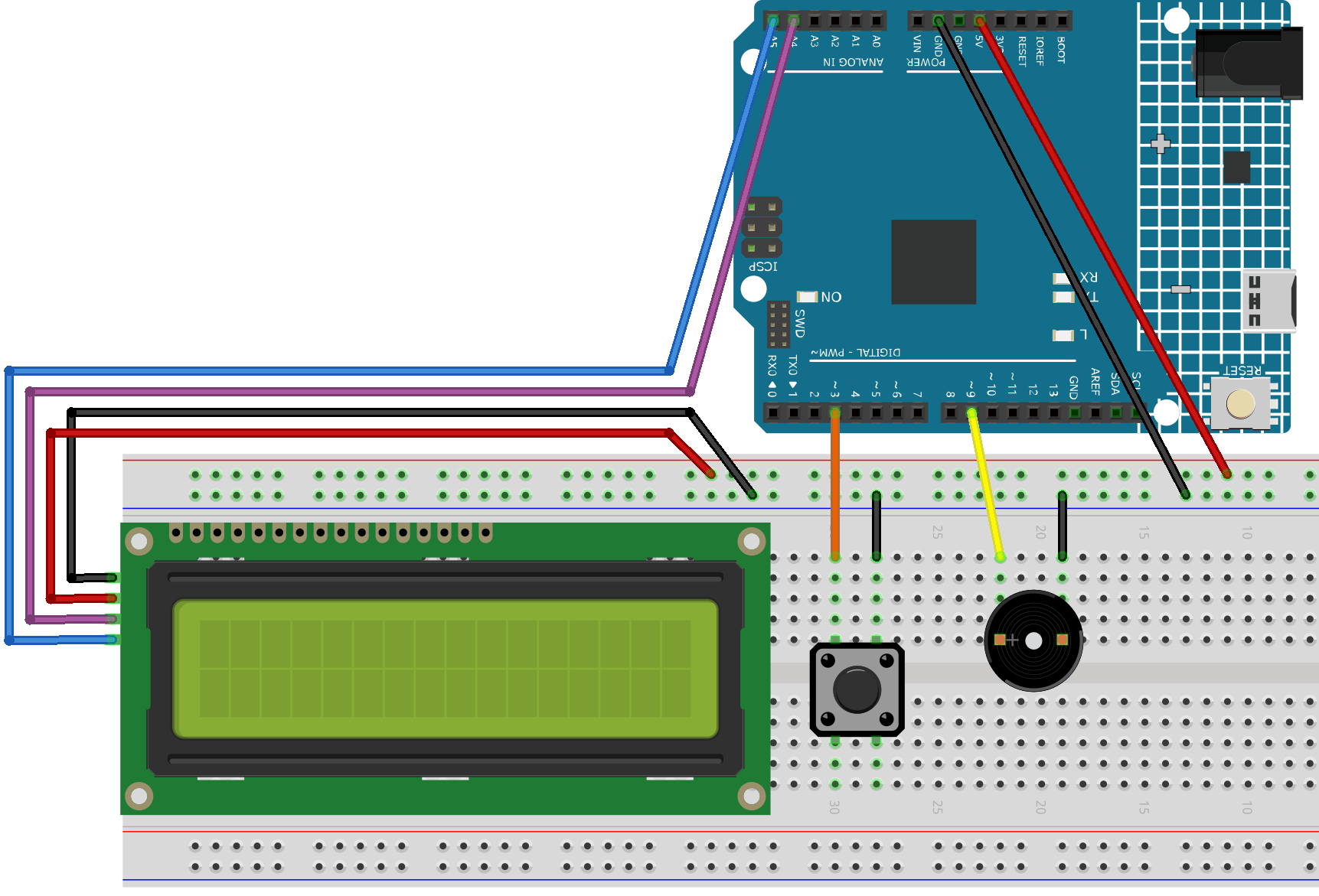
Common Connections:
I2C LCD 1602
SDA: Connect to A4 on the Arduino.
SCL: Connect to A5 on the Arduino.
GND: Connect to breadboard’s negative power bus.
VCC: Connect to breadboard’s red power bus.
Passive Buzzer
+: Connect to 9 on the Arduino.
-: Connect to breadboard’s negative power bus.
Button
Connect to breadboard’s negative power bus.
Connect to 3 on the Arduino.
Writing the Code
Note
You can copy this code into Arduino IDE.
To install the library, use the Arduino Library Manager and search for LiquidCrystal I2C and install it.
Don’t forget to select the board(Arduino UNO R4 Minima) and the correct port before clicking the Upload button.
#include <Wire.h>
#include <LiquidCrystal_I2C.h>

#define BUTTON_PIN 3
#define BUZZER_PIN 9  // Buzzer pin

LiquidCrystal_I2C lcd(0x27, 16, 2); // Modify the address as needed

// Obstacle types
#define CACTUS 2
#define BIRD   3

// Custom characters: Dinosaur (left and right parts), Cactus, Bird
byte dino_left[8] = {
  0b00000,
  0b00000,
  0b00010,
  0b00010,
  0b00011,
  0b00011,
  0b00001,
  0b00001
};

byte dino_right[8] = {
  0b00111,
  0b00111,
  0b00111,
  0b00100,
  0b11100,
  0b11100,
  0b11000,
  0b01000
};

byte cactus[8] = {
  0b00100,
  0b10100,
  0b10100,
  0b10101,
  0b01101,
  0b00101,
  0b00110,
  0b00100
};

byte bird[8] = {
  0b00100,
  0b01110,
  0b11111,
  0b01110,
  0b01010,
  0b00000,
  0b00000,
  0b00000
};

//==================== Global Variables ====================//

bool isUp = false;       // Dinosaur row: true = top row, false = bottom row
bool gameOver = false;   // Game over flag

int distance = 0;        // Current step count (0~99)
int hundreds = 0;        // Increments when every 100 steps are completed
int totalSteps = 0;      // Total steps = hundreds * 100 + distance

// Speed control
int obstacleSpeed = 200;
int minSpeed = 120;      // Minimum refresh interval (to prevent LCD flickering)
int speedIncrement = 20; // Speed increases (i.e., refresh interval decreases) after each new obstacle

// First obstacle
int obstacleX1 = 13;
int obstacleType1 = CACTUS;
int lastObstacleType1 = BIRD;
int repeatCount1 = 0;    // Limit same type to twice consecutively when steps < 100
int oldObstacleX1 = 13;
int oldObstacleRow1 = 1;

// Second obstacle
int obstacleX2 = -1;     // Initially disabled
int obstacleType2 = CACTUS;
int lastObstacleType2 = BIRD;
int repeatCount2 = 0;
int oldObstacleX2 = -1;
int oldObstacleRow2 = 1;

// Record dinosaur's previous row (for erasing)
int oldDinoRow = 1;

//---------------- Function Declarations ----------------//

void startGame();
void moveObstacle();
void drawDinosaur();
void endGame();

int  getObstacleRow(int type);
int  pickObstacleType(int &lastType, int &repeatCount);
int  pickObstacleType2Diversify(int firstType);
void fixImpossibleOverlap(int whoJustGenerated);

//---------------- Setup & Loop ----------------//

void setup() {
  lcd.init();
  lcd.backlight();

  lcd.createChar(0, dino_left);
  lcd.createChar(1, dino_right);
  lcd.createChar(2, cactus);
  lcd.createChar(3, bird);

  pinMode(BUTTON_PIN, INPUT_PULLUP);
  pinMode(BUZZER_PIN, OUTPUT); // Set buzzer as output

  randomSeed(analogRead(A0) ^ micros());

  startGame();
}

void loop() {
  static unsigned long lastButtonTime = 0;
  if (digitalRead(BUTTON_PIN) == LOW) {
    unsigned long now = millis();
    if (now - lastButtonTime > 200) { // Debounce delay
      lastButtonTime = now;
      if (gameOver) {
        startGame();
      } else {
        isUp = !isUp; // Toggle dinosaur's row
      }
    }
  }

  if (!gameOver) {
    moveObstacle();
  }
}

//---------------- Game Logic ----------------//

void startGame() {
  isUp = false;
  gameOver = false;

  distance = 0;
  hundreds = 0;
  totalSteps = 0;
  obstacleSpeed = 200;

  // Initialize the first obstacle
  obstacleX1 = 13;
  obstacleType1 = CACTUS;
  lastObstacleType1 = BIRD;
  repeatCount1 = 0;
  oldObstacleX1 = 13;
  oldObstacleRow1 = 1;

  // Disable the second obstacle initially
  obstacleX2 = -1;
  obstacleType2 = CACTUS;
  lastObstacleType2 = BIRD;
  repeatCount2 = 0;
  oldObstacleX2 = -1;
  oldObstacleRow2 = 1;

  oldDinoRow = 1;

  // Display prompt messages
  lcd.clear();
  lcd.setCursor(0, 0);
  lcd.print(" Dino Run 16x2 ");
  lcd.setCursor(0, 1);
  lcd.print(" Press BTN...  ");
  delay(1000);
  lcd.clear();
}

/**
* Every obstacleSpeed milliseconds, this function:
* - Moves obstacles
* - Updates the score
* - Checks for collisions
* - Renders the display
*/
void moveObstacle() {
  static unsigned long lastMoveTime = 0;
  unsigned long now = millis();

  if (now - lastMoveTime >= obstacleSpeed) {
    lastMoveTime = now;

    // 1. Erase obstacles from the previous frame (if within screen bounds)
    if (oldObstacleX1 >= 0 && oldObstacleX1 < 16) {
      lcd.setCursor(oldObstacleX1, oldObstacleRow1);
      lcd.write(' ');
    }
    if (oldObstacleX2 >= 0 && oldObstacleX2 < 16) {
      lcd.setCursor(oldObstacleX2, oldObstacleRow2);
      lcd.write(' ');
    }

    // 2. Update score
    distance++;
    if (distance > 99) {
      distance = 0;
      hundreds++;
    }
    totalSteps = hundreds * 100 + distance;

    // 3. When steps >= 100, enable the second obstacle
    if (totalSteps >= 100 && obstacleX2 < 0) {
      obstacleX2 = 16;
      obstacleType2 = pickObstacleType2Diversify(obstacleType1);
      fixImpossibleOverlap(2);
    }

    // 4. Move obstacles to the left
    obstacleX1--;
    if (totalSteps >= 100) {
      obstacleX2--;
    }

    // 5. When the first obstacle goes off-screen, regenerate it
    if (obstacleX1 < 0) {
      obstacleX1 = 13;
      obstacleType1 = pickObstacleType(lastObstacleType1, repeatCount1);
      fixImpossibleOverlap(1);
      // Increase speed (i.e., decrease refresh interval)
      if (obstacleSpeed > minSpeed) {
        obstacleSpeed -= speedIncrement;
        if (obstacleSpeed < minSpeed) obstacleSpeed = minSpeed;
      }
    }

    // 6. When the second obstacle goes off-screen (and steps >= 100), regenerate it
    if (totalSteps >= 100 && obstacleX2 < 0) {
      obstacleX2 = 16;
      obstacleType2 = pickObstacleType2Diversify(obstacleType1);
      fixImpossibleOverlap(2);
    }

    // 7. Draw the dinosaur, obstacles, and score
    drawDinosaur();

    int row1 = getObstacleRow(obstacleType1);
    if (obstacleX1 >= 0 && obstacleX1 < 16) {
      lcd.setCursor(obstacleX1, row1);
      lcd.write(byte(obstacleType1));
    }
    oldObstacleX1 = obstacleX1;
    oldObstacleRow1 = row1;

    int row2 = getObstacleRow(obstacleType2);
    if (totalSteps >= 100 && obstacleX2 >= 0 && obstacleX2 < 16) {
      lcd.setCursor(obstacleX2, row2);
      lcd.write(byte(obstacleType2));
      oldObstacleX2 = obstacleX2;
      oldObstacleRow2 = row2;
    }

    lcd.setCursor(14, 0);
    lcd.print(hundreds);
    lcd.setCursor(14, 1);
    lcd.print(distance / 10);
    lcd.setCursor(15, 1);
    lcd.print(distance % 10);

    // 8. Collision detection: when an obstacle reaches column 1 or 2,
    //    if it is in the same row as the dinosaur, it's a collision.
    if ((obstacleX1 == 1 || obstacleX1 == 2)) {
      if ((obstacleType1 == CACTUS && !isUp) || (obstacleType1 == BIRD && isUp)) {
        endGame();
        return;
      }
    }
    if (totalSteps >= 100 && (obstacleX2 == 1 || obstacleX2 == 2)) {
      if ((obstacleType2 == CACTUS && !isUp) || (obstacleType2 == BIRD && isUp)) {
        endGame();
        return;
      }
    }
  }
}

void drawDinosaur() {
  int newRow = isUp ? 0 : 1;
  // Erase dinosaur from previous row if changed
  if (newRow != oldDinoRow) {
    lcd.setCursor(1, oldDinoRow);
    lcd.write(' ');
    lcd.setCursor(2, oldDinoRow);
    lcd.write(' ');
  }
  lcd.setCursor(1, newRow);
  lcd.write(byte(0));
  lcd.setCursor(2, newRow);
  lcd.write(byte(1));
  oldDinoRow = newRow;
}

void endGame() {
  gameOver = true;
  // Play an alternative game over sound sequence using the buzzer:
  tone(BUZZER_PIN, 400, 100); // first note
  delay(150);
  tone(BUZZER_PIN, 600, 100); // second note
  delay(150);
  tone(BUZZER_PIN, 800, 150); // third note (peak)
  delay(200);
  tone(BUZZER_PIN, 600, 150); // fourth note
  delay(200);
  tone(BUZZER_PIN, 400, 200); // fifth note (resolution)
  delay(250);
  noTone(BUZZER_PIN);

  lcd.clear();
  lcd.setCursor(2, 0);
  lcd.print("GAME OVER!!!");
  lcd.setCursor(1, 1);
  lcd.print("Steps: ");
  lcd.print(totalSteps);
}

//---------------- Utility Functions ----------------//

// Returns the row to display the obstacle based on its type:
// CACTUS on the bottom row (1), BIRD on the top row (0)
int getObstacleRow(int type) {
  return (type == CACTUS) ? 1 : 0;
}

/**
* pickObstacleType():
*   - When steps < 100: Limit to avoid three consecutive identical obstacles (allow two in a row).
*   - When steps >= 100: Choose purely random.
*/
int pickObstacleType(int &lastType, int &repeatCount) {
  bool limitRepeat = (totalSteps < 100);
  int newType = (random(2) == 0) ? CACTUS : BIRD;

  if (!limitRepeat) {
    return newType;
  } else {
    if (repeatCount >= 2) {
      newType = (lastType == CACTUS) ? BIRD : CACTUS;
      repeatCount = 1;
    } else {
      if (newType == lastType) repeatCount++;
      else repeatCount = 1;
    }
    lastType = newType;
    return newType;
  }
}

/**
* pickObstacleType2Diversify():
*   For the second obstacle, set a 90% chance to be different from the first obstacle,
*   and a 10% chance to be the same.
*/
int pickObstacleType2Diversify(int firstType) {
  int r = random(100);
  if (r < 90) {
    return (firstType == CACTUS) ? BIRD : CACTUS;
  } else {
    return firstType;
  }
}

/**
* fixImpossibleOverlap():
*   Prevent unavoidable collisions:
*     Cases like: (12,1) + (12,0), (12,1) + (11,0), or (11,1) + (12,0)
*   When obstacles are in different rows, ensure their horizontal difference (dx) is at least 2.
*   If dx < 2, adjust the type or push the newly generated obstacle 2 columns to the right.
*
*   whoJustGenerated: 1 indicates the first obstacle was just generated, 2 indicates the second.
*/
void fixImpossibleOverlap(int whoJustGenerated) {
  while (true) {
    int row1 = getObstacleRow(obstacleType1);
    int row2 = getObstacleRow(obstacleType2);
    int dx = abs(obstacleX1 - obstacleX2);
    // If obstacles are in different rows and their horizontal gap is less than 2, it's an unavoidable collision.
    if (!(row1 != row2 && dx < 2)) break;

    if (whoJustGenerated == 1) {
      obstacleType1 = pickObstacleType2Diversify(obstacleType2);
      row1 = getObstacleRow(obstacleType1);
      dx = abs(obstacleX1 - obstacleX2);
      if (row1 != row2 && dx < 2) {
        obstacleX1 = obstacleX2 + 2; // Force the first obstacle 2 columns to the right
      }
    } else {
      obstacleType2 = pickObstacleType2Diversify(obstacleType1);
      row2 = getObstacleRow(obstacleType2);
      dx = abs(obstacleX1 - obstacleX2);
      if (row1 != row2 && dx < 2) {
        obstacleX2 = obstacleX1 + 2; // Force the second obstacle 2 columns to the right
      }
    }
  }
}