Smart Stop 4.0
Note
🌟 Welcome to the SunFounder Facebook Community! Whether you’re into Raspberry Pi, Arduino, or ESP32, you’ll find inspiration, help ideas here.
✅ Be the first to get free learning resources.
✅ Stay updated on new products & exclusive giveaways.
✅ Share your creations and get real feedback.
Kit purchase
Looking for parts? Check out our all-in-one kits below — packed with components, beginner-friendly guides, and tons of fun.

Name |
Includes Arduino board |
PURCHASE LINK |
|---|---|---|
Elite Explorer Kit |
Arduino Uno R4 WiFi |
|
3 in 1 Ultimate Starter Kit |
Arduino Uno R4 Minima |
Course Introduction
In this lesson, you’ll learn how to use an L9110 Motor Driver Module, an Ultrasonic Sensor Module, an I2C LCD Module, a traffic light module, and a TT motor with the Arduino UNO R3 to create a Smart Stop 4.0 system.
As the obstacle gets closer to the Ultrasonic Sensor Module, the LCD screen displays the distance to obstacles and the servo speed. When the distance exceeds the predefined safety threshold, the green light switches to a flashing red light as a warning, the TT motor gradually slows down until it comes to a stop.
Note
If this is your first time working with an Arduino project, we recommend downloading and reviewing the basic materials first.
Required Components
In this project, we need the following components:
SN |
COMPONENT INTRODUCTION |
QUANTITY |
PURCHASE LINK |
|---|---|---|---|
1 |
Arduino UNO R4 Minima/Arduino UNO R4 WIFI |
1 |
|
2 |
USB Cable |
1 |
|
3 |
Breadboard |
1 |
|
4 |
Wires |
Several |
|
5 |
L9110 Motor Driver Module |
1 |
|
6 |
Ultrasonic Sensor Module |
1 |
|
7 |
TT Motor |
1 |
|
8 |
Buzzer Modudle |
1 |
|
9 |
Traffic Light LED |
1 |
|
10 |
I2C LCD 1602 |
1 |
Wiring
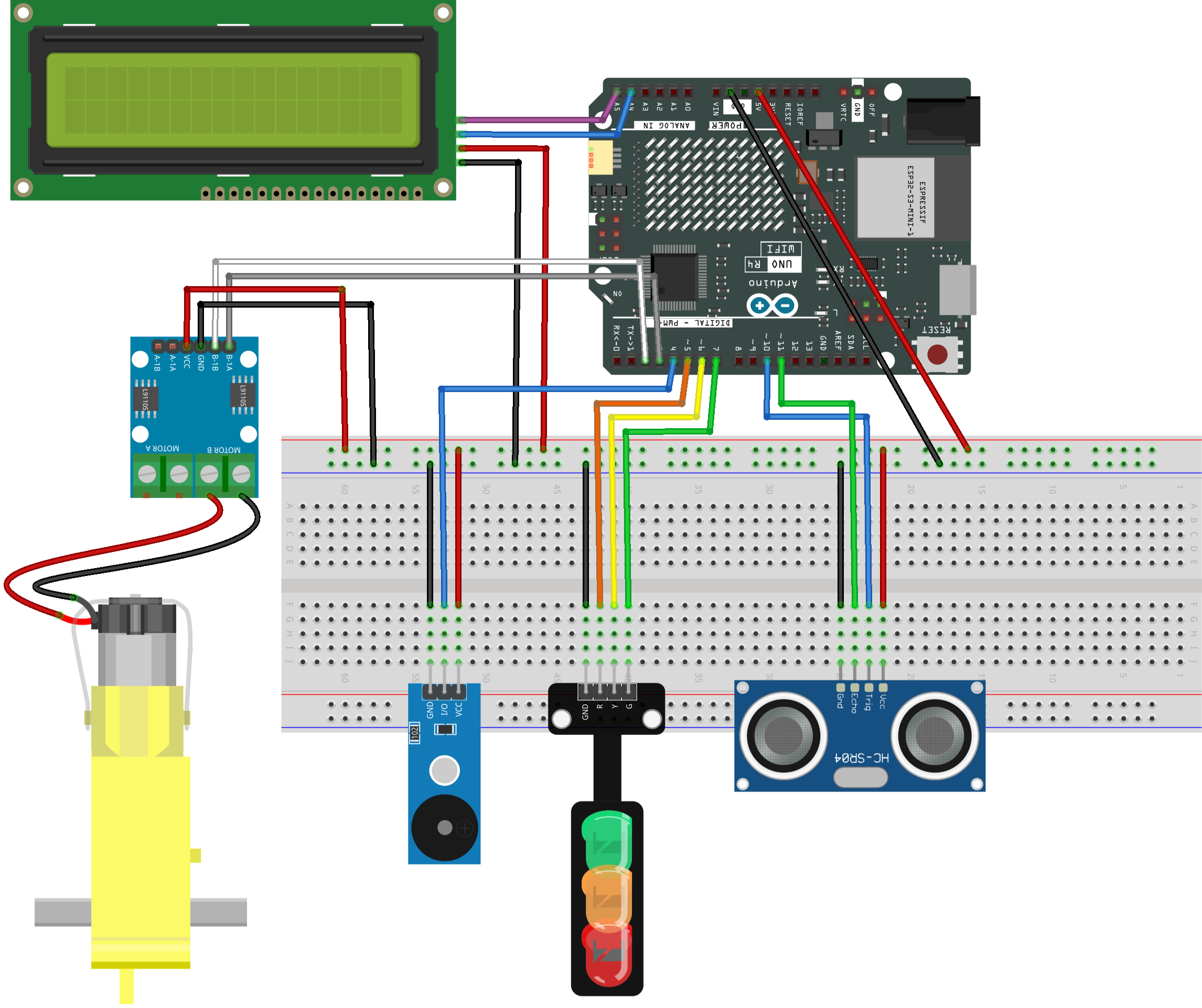
Common Connections:
Ultrasonic Sensor Module
Trig: Connect to 10 on the Arduino.
Echo: Connect to 11 on the Arduino.
GND: Connect to breadboard’s negative power bus.
VCC: Connect to breadboard’s red power bus.
TT Motor
Connect to MOTOR B on the L9110 Motor Driver Module.
L9110 Motor Driver Module
GND: Connect to breadboard’s negative power bus.
VCC: Connect to breadboard’s red power bus.
B-1B: Connect to 2 on the Arduino.
B-1A: Connect to 3 on the Arduino.
Buzzer Module
I/0: Connect to 4 on the Arduino.
+: Connect to breadboard’s red power bus.
-: Connect to breadboard’s negative power bus.
Traffic light LED
R: Connect to 5 on the Arduino.
Y: Connect to 6 on the Arduino.
G: Connect to 7 on the Arduino.
GND: Connect to breadboard’s negative power bus.
I2C LCD 1602
SDA: Connect to A4 on the Arduino.
SCL: Connect to A5 on the Arduino.
GND: Connect to breadboard’s negative power bus.
VCC: Connect to breadboard’s red power bus.
Writing the Code
Note
You can copy this code into Arduino IDE.
To install the library, use the Arduino Library Manager and search for LiquidCrystal I2C and install it.
Don’t forget to select the board(Arduino UNO R4 WiFi) and the correct port before clicking the Upload button.
#include <Wire.h>
#include <LiquidCrystal_I2C.h>

// I2C 16x2 LCD, most common address is 0x27
LiquidCrystal_I2C lcd(0x27, 16, 2);

// Motor driver pins (L9110, motor connected to B channel)
// motorPinA provides PWM signal for speed control
// motorPinB is kept LOW to fix the motor direction
const int motorPinA = 3;
const int motorPinB = 2;

// Ultrasonic sensor pins (HC-SR04)
const int trigPin = 10;    // Sends ultrasonic pulse
const int echoPin = 11;    // Receives echo pulse

// Passive buzzer pin (requires tone() function)
const int buzzerPin = 4;

// Traffic light LED pins
const int redPin    = 5;
const int yellowPin = 6;
const int greenPin  = 7;

// Distance thresholds in centimeters
// Below STOP_DISTANCE: motor stops immediately
// Below SLOW_DISTANCE: motor slows down
const int STOP_DISTANCE = 5;
const int SLOW_DISTANCE = 20;

// Motor speed limits
// Motor may not rotate reliably below MIN_MOTOR_PWM
const int MIN_MOTOR_PWM = 75;
const int MAX_MOTOR_PWM = 255;

// Variables used to control buzzer timing without delay()
unsigned long previousBeepTime = 0;
bool beepState = false;

void setup() {

  // Motor driver pins
  pinMode(motorPinA, OUTPUT);
  pinMode(motorPinB, OUTPUT);

  // Ultrasonic sensor pins
  pinMode(trigPin, OUTPUT);
  pinMode(echoPin, INPUT);

  // Buzzer and LED pins
  pinMode(buzzerPin, OUTPUT);
  pinMode(redPin, OUTPUT);
  pinMode(yellowPin, OUTPUT);
  pinMode(greenPin, OUTPUT);

  // Fix motor direction by keeping motorPinB LOW
  digitalWrite(motorPinB, LOW);

  // Initialize LCD
  lcd.init();
  lcd.backlight();

  // Display startup message
  lcd.setCursor(0, 0);
  lcd.print("Smart Stop 3.0");
  lcd.setCursor(0, 1);
  lcd.print("System Ready");
  delay(1000);
  lcd.clear();
}

void loop() {

  // Measure distance from ultrasonic sensor (cm)
  int distance = readDistance();

  // Convert distance into motor speed (PWM value)
  int speed = calculateSpeed(distance);

  // Drive motor using calculated speed
  controlMotor(speed);

  // Update LEDs, buzzer and LCD display
  updateTrafficLight(distance);
  updateBuzzer(distance);
  updateLCD(distance);

  // Small delay for stable sensor readings
  delay(50);
}

int readDistance() {
  long duration;

  // Send a 10 microsecond trigger pulse
  digitalWrite(trigPin, LOW);
  delayMicroseconds(2);
  digitalWrite(trigPin, HIGH);
  delayMicroseconds(10);
  digitalWrite(trigPin, LOW);

  // Measure echo pulse duration
  // Timeout prevents the program from blocking
  duration = pulseIn(echoPin, HIGH, 25000);

  // If no echo is detected, assume the object is far away
  if (duration == 0) {
    return 100;
  }

  // Convert time (microseconds) to distance (centimeters)
  return duration / 58;
}

int calculateSpeed(int distance) {

  // Stop motor immediately if object is too close
  if (distance < STOP_DISTANCE) {
    return 0;
  }

  // Gradually increase speed as distance increases
  // map() converts distance range into PWM range
  if (distance < SLOW_DISTANCE) {
    return map(distance,
              STOP_DISTANCE,
              SLOW_DISTANCE - 1,
              MIN_MOTOR_PWM,
              MAX_MOTOR_PWM);
  }

  // Safe distance: run motor at full speed
  return MAX_MOTOR_PWM;
}

void controlMotor(int speed) {

  // Output PWM signal to motorPinA
  // motorPinB stays LOW to keep direction unchanged
  analogWrite(motorPinA, speed);
  digitalWrite(motorPinB, LOW);
}

void updateTrafficLight(int distance) {

  // Turn off all LEDs before updating state
  digitalWrite(redPin, LOW);
  digitalWrite(yellowPin, LOW);
  digitalWrite(greenPin, LOW);

  if (distance < STOP_DISTANCE) {
    digitalWrite(redPin, HIGH);        // Stop
  }
  else if (distance < SLOW_DISTANCE) {
    digitalWrite(yellowPin, HIGH);     // Slow down
  }
  else {
    digitalWrite(greenPin, HIGH);      // Go
  }
}

void updateBuzzer(int distance) {
  unsigned long currentTime = millis();

  // Fast beeping when object is very close
  if (distance < STOP_DISTANCE) {
    if (currentTime - previousBeepTime >= 100) {
      previousBeepTime = currentTime;
      beepState = !beepState;
      beepState ? tone(buzzerPin, 2000) : noTone(buzzerPin);
    }
  }
  // Slow beeping as a warning
  else if (distance < SLOW_DISTANCE) {
    if (currentTime - previousBeepTime >= 500) {
      previousBeepTime = currentTime;
      beepState = !beepState;
      beepState ? tone(buzzerPin, 800) : noTone(buzzerPin);
    }
  }
  // No sound when it is safe
  else {
    noTone(buzzerPin);
    beepState = false;
  }
}

void updateLCD(int distance) {

  // Display distance on the first line
  lcd.setCursor(0, 0);
  lcd.print("Dist: ");
  lcd.print(distance);
  lcd.print(" cm   ");   // Extra spaces clear leftover characters

  // Display system state on the second line
  lcd.setCursor(0, 1);

  if (distance < STOP_DISTANCE) {
    lcd.print("State: STOP ");
  }
  else if (distance < SLOW_DISTANCE) {
    lcd.print("State: SLOW ");
  }
  else {
    lcd.print("State: GO   ");
  }
}