Brick Breaker
Note
🌟 Welcome to the SunFounder Facebook Community! Whether you’re into Raspberry Pi, Arduino, or ESP32, you’ll find inspiration, help ideas here.
✅ Be the first to get free learning resources.
✅ Stay updated on new products & exclusive giveaways.
✅ Share your creations and get real feedback.
Kit purchase
Looking for parts? Check out our all-in-one kits below — packed with components, beginner-friendly guides, and tons of fun.

Name |
Includes Arduino board |
PURCHASE LINK |
|---|---|---|
Ultimate Sensor Kit |
Arduino Uno R4 Minima |
|
Elite Explorer Kit |
Arduino Uno R4 WiFi |
|
3 in 1 Ultimate Starter Kit |
Arduino Uno R4 Minima |
|
Universal Maker Sensor Kit |
× |
Course Introduction
In this lesson, you’ll learn how to use a OLED Display Module, a Joystick Module with the Arduino R4 UNO to create a brick breaker game. We’ll cover using the Adafruit SSD1306 and GFX libraries to display on the screen.
The OLED Screen will display the game screen, and players can use the joystick to control the game.
Note
If this is your first time working with an Arduino project, we recommend downloading and reviewing the basic materials first.
Required Components
In this project, we need the following components:
SN |
COMPONENT INTRODUCTION |
QUANTITY |
PURCHASE LINK |
|---|---|---|---|
1 |
Arduino UNO R4 Minima |
1 |
|
2 |
USB Type-C cable |
1 |
|
3 |
Breadboard |
1 |
|
4 |
Wires |
Several |
|
5 |
Joystick Module |
1 |
|
6 |
OLED Display Module |
1 |
Wiring
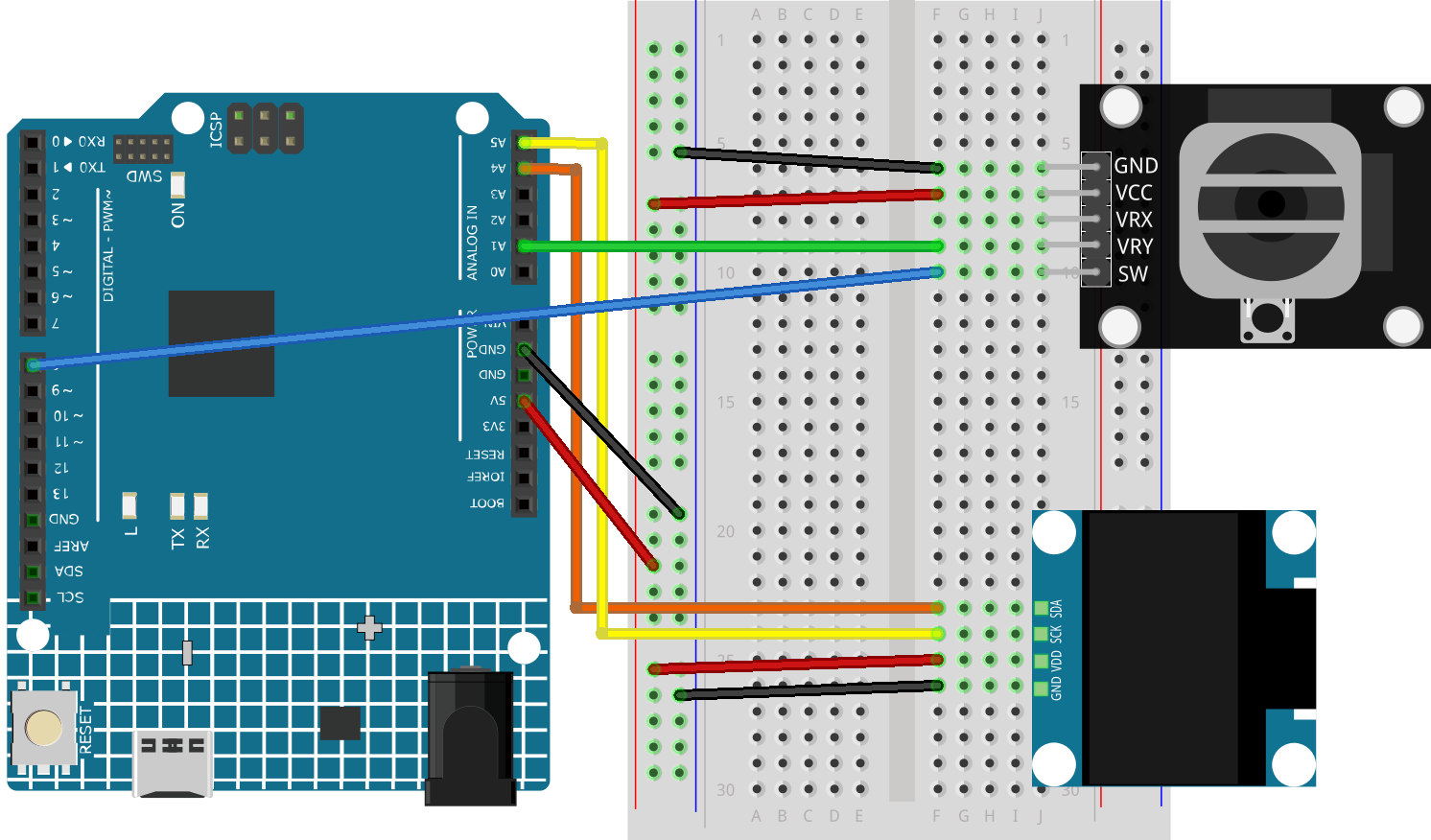
Common Connections:
Joystick Module
VRY: Connect to A1 on the Arduino.
SW: Connect to 8 on the Arduino.
GND: Connect to breadboard’s negative power bus.
VCC: Connect to breadboard’s red power bus.
OLED Display Module
SDA: Connect to A4 on the Arduino.
SCK: Connect to A5 on the Arduino.
GND: Connect to breadboard’s negative power bus.
VCC: Connect to breadboard’s red power bus.
Writing the Code
Note
You can copy this code into Arduino IDE.
To install the library, use the Arduino Library Manager and search for Adafruit SSD1306 and Adafruit GFX and install it.
Don’t forget to select the board(Arduino UNO R4 Minima) and the correct port before clicking the Upload button.
#include <Wire.h>
#include <Adafruit_GFX.h>
#include <Adafruit_SSD1306.h>

#define SCREEN_WIDTH 128  // OLED screen width
#define SCREEN_HEIGHT 64  // OLED screen height

#define OLED_RESET -1  // Reset pin for OLED (not used)
#define SCREEN_ADDRESS 0x3C  // OLED screen I2C address
Adafruit_SSD1306 display(SCREEN_WIDTH, SCREEN_HEIGHT, &Wire, OLED_RESET);

// Pins for joystick and button
const int yPin = A1;  // Y-axis for joystick (up and down movement)
const int swPin = 8;   // Button for reset

// Paddle properties
int paddleX;  // Paddle X position
const int paddleWidth = 30, paddleHeight = 3;  // Paddle size
const int brickRows = 3, brickCols = 6;  // Number of rows and columns of bricks
const int brickWidth = SCREEN_WIDTH / brickCols;  // Brick width
const int brickHeight = 5;  // Brick height
bool bricks[brickRows][brickCols];  // 2D array to track brick status

// Game settings
const int deadZone = 100;  // Joystick dead zone
const int speed = 8;  // Paddle speed
float ballSpeed = 3.0;  // Initial ball speed
bool gameOver = false;  // Game over flag
bool gameWin = false;  // Game win flag

// Ball properties
float ballX, ballY;  // Ball position
float ballDX, ballDY;  // Ball movement speed in X and Y
int hitCount = 0;  // Hit count (how many times the ball hits the paddle)

void setup() {
  pinMode(swPin, INPUT_PULLUP);  // Set button pin as input with pull-up resistor
  Serial.begin(9600);  // Start serial communication for debugging
  randomSeed(analogRead(A2));  // Initialize random seed using unconnected analog pin

  // Initialize OLED display
  if (!display.begin(SSD1306_SWITCHCAPVCC, SCREEN_ADDRESS)) {
    Serial.println(F("SSD1306 allocation failed"));
    for (;;);  // Stay here if the display initialization fails
  }

  resetGame();  // Reset game state when setup is done
}

void loop() {
  if (gameOver || gameWin) {  // Show game over or win screen if the game is over
    showGameOverScreen();
    return;
  }

  int yValue = analogRead(yPin);  // Read joystick Y-axis value

  // Move paddle based on joystick value
  if (abs(yValue - 512) > deadZone) {
    if (yValue < 400) paddleX -= speed;  // Move paddle left
    else if (yValue > 600) paddleX += speed;  // Move paddle right
  }

  paddleX = constrain(paddleX, 0, SCREEN_WIDTH - paddleWidth);  // Prevent paddle from going off-screen

  // Update ball position
  int oldBallX = ballX;
  int oldBallY = ballY;
  ballX += ballDX;
  ballY += ballDY;

  // Ball boundary checks
  if (ballX <= 0 || ballX >= SCREEN_WIDTH - 2) ballDX = -ballDX;  // Reflect ball if it hits left or right
  if (ballY <= 0) ballDY = -ballDY;  // Reflect ball if it hits top

  // Paddle collision check
  if (ballY >= SCREEN_HEIGHT - paddleHeight - 1 && ballX >= paddleX && ballX <= paddleX + paddleWidth) {
    ballDY = -ballDY;  // Reflect ball vertically
    hitCount++;  // Increment hit count

    // Increase ball speed based on hit count
    if (hitCount == 2) ballSpeed = 4.0;
    if (hitCount == 4) ballSpeed = 5.0;
    if (hitCount == 6) ballSpeed = 6.0;  // Max speed at hit 6

    ballSpeed = min(ballSpeed, 6.0);  // Ensure ball speed doesn't exceed max value
    normalizeBallSpeed();  // Normalize ball speed
  }

  // Check for brick collision
  int remainingBricks = 0;
  for (int i = 0; i < brickRows; i++) {
    for (int j = 0; j < brickCols; j++) {
      if (bricks[i][j]) {
        remainingBricks++;
        int brickX = j * brickWidth;
        int brickY = i * brickHeight;

        // Check if ball hits the brick
        bool hitX = (ballX + 2 >= brickX && ballX - 2 <= brickX + brickWidth);
        bool hitY = (ballY + 2 >= brickY && ballY - 2 <= brickY + brickHeight);

        if (hitX && hitY) {
          bricks[i][j] = false;  // Remove brick if hit

          // Reflect ball direction based on collision side
          if (oldBallX < brickX || oldBallX > brickX + brickWidth) {
            ballDX = -ballDX;  // Reflect ball horizontally
          }
          if (oldBallY < brickY || oldBallY > brickY + brickHeight) {
            ballDY = -ballDY;  // Reflect ball vertically
          }

          normalizeBallSpeed();  // Normalize ball speed after collision
          break;
        }
      }
    }
  }

  if (remainingBricks == 0) {  // If all bricks are cleared, the player wins
    gameWin = true;
  }

  if (ballY > SCREEN_HEIGHT) {  // If ball falls below screen, the game is over
    gameOver = true;
  }

  drawGame();  // Draw updated game state on screen
  delay(10);  // Delay to control game speed
}

// Reset game state
void resetGame() {
  gameOver = false;
  gameWin = false;

  // Reset paddle position
  paddleX = SCREEN_WIDTH / 2 - paddleWidth / 2;

  // Reset ball position
  ballX = SCREEN_WIDTH / 2;
  ballY = SCREEN_HEIGHT / 2;

  // Reset speed and hit count
  ballSpeed = 3.0;
  hitCount = 0;

  // Random ball direction
  float angle;
  if (random(0, 2) == 0) {
    angle = random(30, 60);  // Angle between 30° and 60°
  } else {
    angle = random(120, 150); // Angle between 120° and 150°
  }

  // Calculate ball velocity based on random angle
  ballDX = ballSpeed * cos(radians(angle));
  ballDY = -ballSpeed * sin(radians(angle));  // Ball moves upwards initially

  // Initialize all bricks as present
  for (int i = 0; i < brickRows; i++) {
    for (int j = 0; j < brickCols; j++) {
      bricks[i][j] = true;
    }
  }
  drawGame();  // Draw initial game state
}

// Normalize ball speed to maintain consistent speed after reflections
void normalizeBallSpeed() {
  float magnitude = sqrt(ballDX * ballDX + ballDY * ballDY);  // Calculate the ball's current speed
  ballDX = (ballDX / magnitude) * ballSpeed;  // Adjust X speed
  ballDY = (ballDY / magnitude) * ballSpeed;  // Adjust Y speed
}

// Draw the current game state to the OLED screen
void drawGame() {
  display.clearDisplay();  // Clear previous frame
  display.fillRect(paddleX, SCREEN_HEIGHT - paddleHeight, paddleWidth, paddleHeight, WHITE);  // Draw paddle
  display.fillCircle(ballX, ballY, 2, WHITE);  // Draw ball

  // Draw remaining bricks
  for (int i = 0; i < brickRows; i++) {
    for (int j = 0; j < brickCols; j++) {
      if (bricks[i][j]) {
        display.fillRect(j * brickWidth, i * brickHeight, brickWidth - 1, brickHeight - 1, WHITE);
      }
    }
  }

  display.display();  // Update display
}

// Display game over or win screen
void showGameOverScreen() {
  display.clearDisplay();
  display.setTextSize(2);  // Larger text for game over message
  display.setTextColor(WHITE);
  display.setCursor(20, 30);  // Position message on screen
  if (gameWin) {
    display.println("You Win!");  // Display "You Win!" if player won
  } else {
    display.println("Game Over");  // Display "Game Over" if player lost
  }
  display.display();

  while (digitalRead(swPin) == HIGH);  // Wait for button press to reset game
  delay(500);  // Debounce delay
  resetGame();  // Reset game
}