Barrier Gate 5.0
Note
🌟 Welcome to the SunFounder Facebook Community! Whether you’re into Raspberry Pi, Arduino, or ESP32, you’ll find inspiration, help ideas here.
✅ Be the first to get free learning resources.
✅ Stay updated on new products & exclusive giveaways.
✅ Share your creations and get real feedback.
Kit purchase
Looking for parts? Check out our all-in-one kits below — packed with components, beginner-friendly guides, and tons of fun.

Name |
Includes Arduino board |
PURCHASE LINK |
|---|---|---|
Ultimate Sensor Kit |
Arduino Uno R4 Minima |
|
Elite Explorer Kit |
Arduino Uno R4 WiFi |
|
3 in 1 Ultimate Starter Kit |
Arduino Uno R4 Minima |
|
Universal Maker Sensor Kit |
× |
Course Introduction
This project uses an ultrasonic sensor, MFRC522 Module, a servo, and a buzzer to create an automatic gate system.
Note
If this is your first time working with an Arduino project, we recommend downloading and reviewing the basic materials first.
Required Components
In this project, we need the following components:
SN |
COMPONENT INTRODUCTION |
QUANTITY |
PURCHASE LINK |
|---|---|---|---|
1 |
Arduino UNO R4 Minima/Arduino UNO R4 WIFI |
1 |
|
2 |
USB Type-C cable |
1 |
|
3 |
Breadboard |
1 |
|
4 |
Wires |
Several |
|
5 |
MFRC522 Module |
1 |
|
6 |
Digital Servo Motor |
1 |
|
7 |
Buzzer Modudle |
1 |
|
8 |
Ultrasonic Sensor Module |
1 |
Wiring
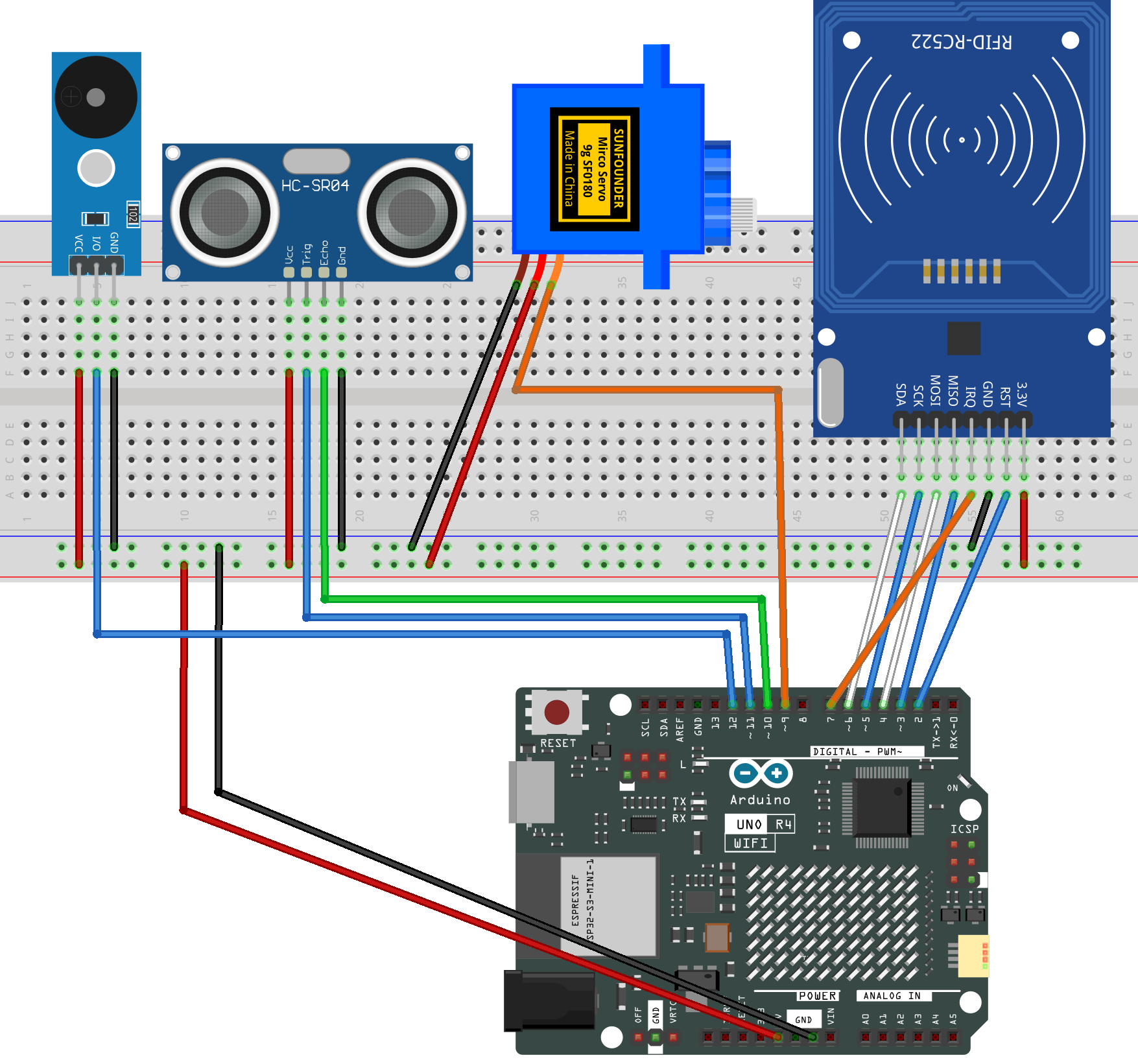
Common Connections:
MFRC522 Module
SDA: Connect to 6 on the Arduino.
SCK: Connect to 5 on the Arduino.
MOSI: Connect to 4 on the Arduino.
MISO: Connect to 3 on the Arduino.
IRQ: Connect to 7 on the Arduino.
GND: Connect to breadboard’s negative power bus.
RST: Connect to 2 on the Arduino.
3.3V: Connect to breadboard’s passive power bus.
Digital Servo Motor
Connect to breadboard’s positive power bus.
Connect to breadboard’s negative power bus.
Connect to 9 on the Arduino.
Ultrasonic Sensor Module
Trig: Connect to 11 on the Arduino.
Echo: Connect to 10 on the Arduino.
GND: Connect to breadboard’s negative power bus.
VCC: Connect to breadboard’s red power bus.
Buzzer Module
I/0: Connect to 12 on the Arduino.
+: Connect to breadboard’s red power bus.
-: Connect to breadboard’s negative power bus.
Writing the Code
Note
You can copy this code into Arduino IDE.
The
RFID1library is used here. You can click hereRFID1.zipto download it.Don’t forget to select the board(Arduino UNO R4 Minima/WIFI) and the correct port before clicking the Upload button.
#include <Servo.h>
#include <rfid1.h>

// Ultrasonic sensor pins
const int trigPin = 11;
const int echoPin = 10;

// Servo motor pin
const int servoPin = 9;

// Buzzer pin
const int buzzerPin = 12;

// RFID module
RFID1 rfid;

// Length of RFID UID (4 bytes)
#define ID_LEN 4

// Authorized card UID
uchar userId[ID_LEN] = {0x33, 0xF8, 0xB8, 0x1A};

// Buffer for scanned UID
uchar userIdRead[ID_LEN];

// Distance settings (cm)
const int ENTRY_DISTANCE = 12;   // Detect vehicle approaching
const int CLEAR_DISTANCE = 25;   // Detect vehicle leaving
const int CLEAR_COUNT    = 7;    // About 1 second (7 × 150 ms)

// Minimum time the gate stays open (ms)
const unsigned long MIN_OPEN_TIME = 2000;

// System states
enum GateMode {
  WAIT_ENTRY,   // Waiting for vehicle to enter (ultrasonic)
  WAIT_EXIT     // Waiting for vehicle to exit (RFID)
};

GateMode mode = WAIT_ENTRY;

// Servo object
Servo myServo;

// Play a simple beep sound
void beepOnce(int freq, int dur) {
  tone(buzzerPin, freq, dur);
  delay(dur * 1.2);
  noTone(buzzerPin);
}

// Beep sound for unauthorized card
void beepError() {
  for (int i = 0; i < 2; i++) {
    tone(buzzerPin, 800);
    delay(120);
    noTone(buzzerPin);
    delay(80);
  }
}

// Open the gate smoothly
void openGate() {
  for (int pos = 0; pos <= 90; pos++) {
    myServo.write(pos);
    delay(10);
  }
}

// Close the gate smoothly
void closeGate() {
  for (int pos = 90; pos >= 0; pos--) {
    myServo.write(pos);
    delay(10);
  }
}

// Measure distance using ultrasonic sensor (cm)
float getDistance() {
  digitalWrite(trigPin, LOW);
  delayMicroseconds(2);
  digitalWrite(trigPin, HIGH);
  delayMicroseconds(10);
  digitalWrite(trigPin, LOW);

  long duration = pulseIn(echoPin, HIGH, 25000);
  if (duration == 0) return 999;

  return duration * 0.034 / 2;
}

// Read RFID card UID
bool getId() {
  uchar status, str[MAX_LEN];
  status = rfid.anticoll(str);

  if (status == MI_OK) {
    for (int i = 0; i < ID_LEN; i++) {
      userIdRead[i] = str[i];
    }
    rfid.halt();
    return true;
  }
  return false;
}

// Compare scanned UID with authorized UID
bool idVerify() {
  for (int i = 0; i < ID_LEN; i++) {
    if (userIdRead[i] != userId[i]) return false;
  }
  return true;
}

// Clear UID buffer
void clearBuffer() {
  for (int i = 0; i < ID_LEN; i++) {
    userIdRead[i] = 0;
  }
}

void setup() {
  Serial.begin(9600);

  pinMode(trigPin, OUTPUT);
  pinMode(echoPin, INPUT);
  pinMode(buzzerPin, OUTPUT);

  myServo.attach(servoPin);
  myServo.write(0);   // Gate starts closed

  // RFID initialization (pin order must match wiring)
  rfid.begin(7, 5, 4, 3, 6, 2);
  rfid.init();

  Serial.println("System Ready - WAIT_ENTRY");
}

void loop() {

  // Entry mode: ultrasonic detection
  if (mode == WAIT_ENTRY) {

    float distance = getDistance();
    Serial.print("Distance: ");
    Serial.println(distance);

    if (distance < ENTRY_DISTANCE) {

      beepOnce(1000, 200);
      openGate();

      // Wait until the vehicle completely leaves
      int clearCounter = 0;
      while (clearCounter < CLEAR_COUNT) {
        float d = getDistance();

        if (d > CLEAR_DISTANCE)
          clearCounter++;
        else
          clearCounter = 0;

        delay(150);
      }

      closeGate();
      mode = WAIT_EXIT;
      delay(500);
    }
  }

  // Exit mode: RFID verification
  else if (mode == WAIT_EXIT) {

    uchar status, str[MAX_LEN];
    status = rfid.request(PICC_REQIDL, str);

    if (status == MI_OK) {

      clearBuffer();

      if (getId() && idVerify()) {

        beepOnce(1500, 150);
        openGate();

        // Keep gate open for a minimum time
        unsigned long openTime = millis();
        while (millis() - openTime < MIN_OPEN_TIME) {
          delay(50);
        }

        // Wait until the vehicle leaves
        int clearCounter = 0;
        while (clearCounter < CLEAR_COUNT) {
          float d = getDistance();

          if (d > CLEAR_DISTANCE)
            clearCounter++;
          else
            clearCounter = 0;

          delay(150);
        }

        closeGate();
        mode = WAIT_ENTRY;
        delay(500);
      }
      else {
        beepError();
      }
    }
  }

  delay(100);
}