Water Level
Note
🌟 Welcome to the SunFounder Facebook Community! Whether you’re into Raspberry Pi, Arduino, or ESP32, you’ll find inspiration, help ideas here.
✅ Be the first to get free learning resources.
✅ Stay updated on new products & exclusive giveaways.
✅ Share your creations and get real feedback.
Kit purchase
Looking for parts? Check out our all-in-one kits below — packed with components, beginner-friendly guides, and tons of fun.

Name |
Includes Arduino board |
PURCHASE LINK |
|---|---|---|
Elite Explorer Kit |
Arduino Uno R4 WiFi |
|
3 in 1 Ultimate Starter Kit |
Arduino Uno R4 Minima |
Course Introduction
In this lesson, you’ll learn how to use an Ultrasonic Sensor Module, a 1602 LCD with the Arduino UNO R4 to create a Ultrasonic water level monitor system.
The LED lights red when the water is low, turns yellow as it rises, and switches to green once it reaches the set level.
Note
If this is your first time working with an Arduino project, we recommend downloading and reviewing the basic materials first.
Required Components
In this project, we need the following components:
SN |
COMPONENT INTRODUCTION |
QUANTITY |
PURCHASE LINK |
|---|---|---|---|
1 |
Arduino UNO R4 Minima/Arduino UNO R4 wifi |
1 |
|
2 |
USB Cable |
1 |
|
3 |
Breadboard |
1 |
|
4 |
Wires |
Several |
|
5 |
Ultrasonic Sensor Module |
1 |
|
6 |
I2C LCD 1602 |
1 |
|
7 |
Resistor |
1KΩ |
|
8 |
LED |
3 |
Wiring
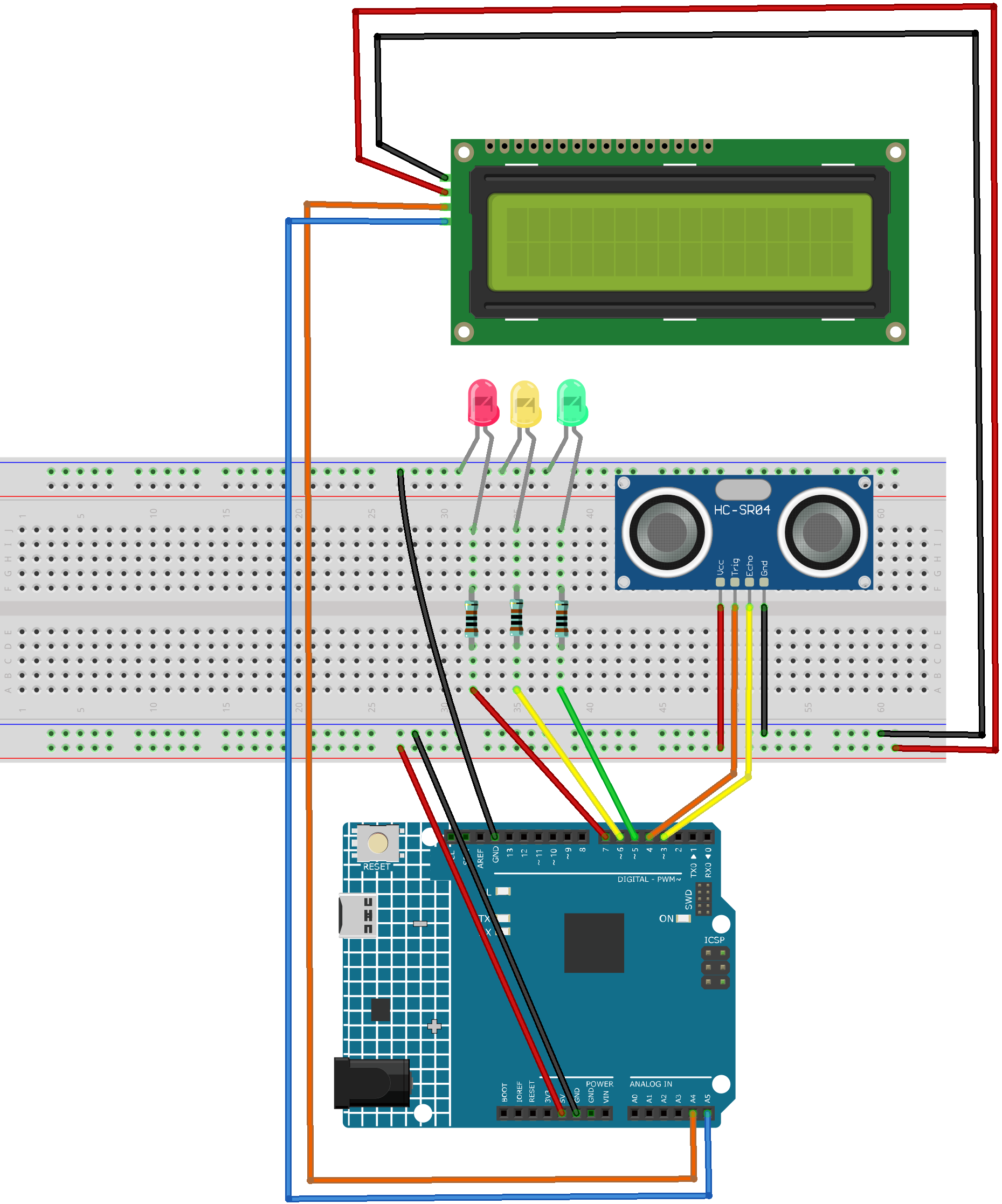
Common Connections:
Ultrasonic Sensor Module
Trig: Connect to 4 on the Arduino.
Echo: Connect to 3 on the Arduino.
GND: Connect to breadboard’s negative power bus.
VCC: Connect to breadboard’s red power bus.
I2C LCD 1602
SDA: Connect to A4 on the Arduino.
SCL: Connect to A5 on the Arduino.
GND: Connect to breadboard’s negative power bus.
VCC: Connect to breadboard’s red power bus.
LEDS
Green: Connect the LED cathode to the negative power bus on the breadboard, and the anode to a 1KΩ resistor, then to 5 on the Arduino.
Yellow: Connect the LED cathode to the negative power bus on the breadboard, and the anode to a 1kΩ resistor, then to 6 on the Arduino.
Red: Connect the LED cathode to the negative power bus on the breadboard, and the anode to a 1kΩ resistor, then to 7 on the Arduino.
Writing the Code
Note
You can copy this code into Arduino IDE.
To install the library, use the Arduino Library Manager and search for LiquidCrystal I2C and install it.
Don’t forget to select the board(Arduino UNO R4 Minima/WIFI) and the correct port before clicking the Upload button.
#include <LiquidCrystal_I2C.h>

// Initialize the LCD (I2C address 0x27, 16 columns, 2 rows)
LiquidCrystal_I2C lcd(0x27, 16, 2);

// Define the pins for the ultrasonic sensor
const int echoPin = 3;
const int trigPin = 4;

// Define the pins for the LEDs
const int greenLed = 7;   // Green LED connected to pin 7
const int yellowLed = 6;  // Yellow LED connected to pin 6
const int redLed = 5;     // Red LED connected to pin 5
void setup() {
  // Initialize the LCD and clear the lcd
  lcd.init();
  lcd.clear();
  lcd.backlight();

  // Initialize ultrasonic sensor pins
  pinMode(echoPin, INPUT);
  pinMode(trigPin, OUTPUT);

  // Initialize LED pins
  pinMode(greenLed, OUTPUT);
  pinMode(yellowLed, OUTPUT);
  pinMode(redLed, OUTPUT);
}

void loop() {
  // Get the distance to the water level
  float distance = readDistance();

  // Display the distance on the LCD
  lcd.setCursor(0, 0);
  lcd.print("Distance:");
  lcd.setCursor(0, 1);
  lcd.print(distance);
  lcd.print(" cm  ");

  // Light up the corresponding LED based on the distance
  if (distance <= 5) {
    // Distance 0-5 cm, turn on the green LED
    digitalWrite(greenLed, HIGH);
    digitalWrite(yellowLed, LOW);
    digitalWrite(redLed, LOW);
  } else if (distance > 5 && distance <= 10) {
    // Distance 5-10 cm, turn on the yellow LED
    digitalWrite(greenLed, LOW);
    digitalWrite(yellowLed, HIGH);
    digitalWrite(redLed, LOW);
  } else if (distance > 10 && distance <= 15) {
    // Distance 10-15 cm, turn on the red LED
    digitalWrite(greenLed, LOW);
    digitalWrite(yellowLed, LOW);
    digitalWrite(redLed, HIGH);
  } else {
    // Distance greater than 15 cm, turn off all LEDs
    digitalWrite(greenLed, LOW);
    digitalWrite(yellowLed, LOW);
    digitalWrite(redLed, LOW);
  }

  delay(500);  // Delay 500 milliseconds
}

// Read the distance from the ultrasonic sensor
float readDistance() {
  digitalWrite(trigPin, LOW);  // Ensure the trigger pin is low
  delayMicroseconds(2);
  digitalWrite(trigPin, HIGH); // Trigger the ultrasonic sensor to send a pulse
  delayMicroseconds(10);
  digitalWrite(trigPin, LOW);  // End the trigger

  // Measure the pulse width of the echo pin and convert it to distance
  float distance = pulseIn(echoPin, HIGH) / 58.00;
  return distance;
}