Radar Guard 1.0
Note
🌟 Welcome to the SunFounder Facebook Community! Whether you’re into Raspberry Pi, Arduino, or ESP32, you’ll find inspiration, help ideas here.
✅ Be the first to get free learning resources.
✅ Stay updated on new products & exclusive giveaways.
✅ Share your creations and get real feedback.
Kit purchase
Looking for parts? Check out our all-in-one kits below — packed with components, beginner-friendly guides, and tons of fun.

Name |
Includes Arduino board |
PURCHASE LINK |
|---|---|---|
Ultimate Sensor Kit |
Arduino Uno R4 Minima |
|
Elite Explorer Kit |
Arduino Uno R4 WiFi |
|
3 in 1 Ultimate Starter Kit |
Arduino Uno R4 Minima |
|
Universal Maker Sensor Kit |
× |
Course Introduction
In this lesson, we will learn how to use the Ultrasonic Sensor Module, Digital Servo Motor, and I2C LCD 1602 with the Arduino Board to create a radar defense system.
When the ultrasonic sensor module is running, it emits an audible alarm and flashes the red LED if it detects an obstacle within its sensing range. If no obstacle is detected, indicating a safe state, the green LED stays on.
Note
If this is your first time working with an Arduino project, we recommend downloading and reviewing the basic materials first.
Required Components
In this project, we need the following components:
SN |
COMPONENT INTRODUCTION |
QUANTITY |
PURCHASE LINK |
|---|---|---|---|
1 |
Arduino UNO R4 Minima/Arduino UNO R4 WIFI |
1 |
|
2 |
USB Type-C cable |
1 |
|
3 |
Breadboard |
1 |
|
4 |
Wires |
Several |
|
5 |
1kΩ resistor |
4 |
|
6 |
Ultrasonic Sensor Module |
1 |
|
7 |
LED |
4 |
|
8 |
I2C LCD 1602 |
1 |
|
9 |
Digital Servo Motor |
1 |
|
10 |
Passive Buzzer |
1 |
Wiring
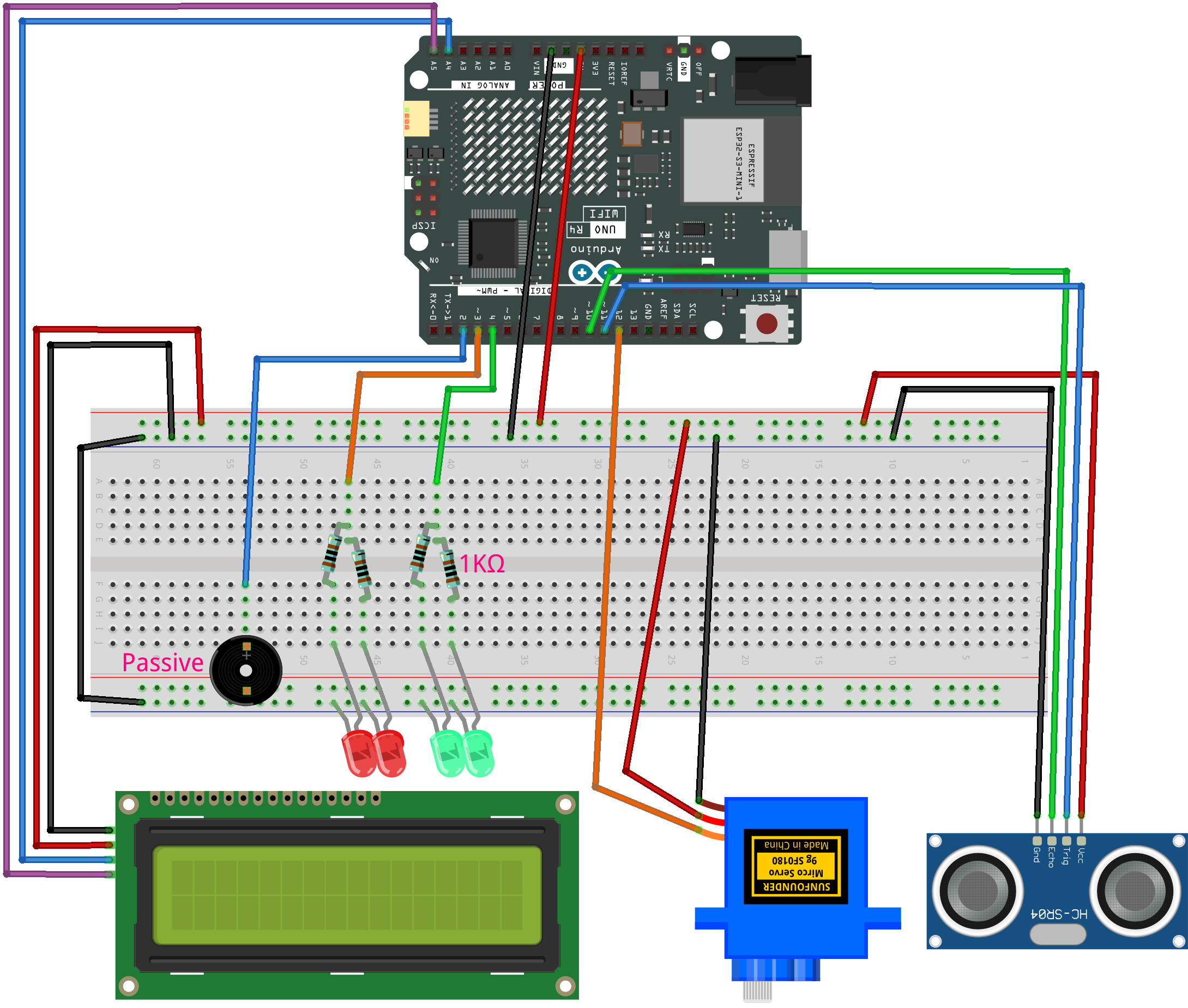
Common Connections:
LED
Connect the LEDs cathode to a 1kΩ resistor then to the negative power bus on the breadboard, and the LEDs anode to 3, 4 on the Arduino.
Digital Servo Motor
Connect to breadboard’s positive power bus.
Connect to breadboard’s negative power bus.
Connect to 12 on the Arduino.
Button
Connect to breadboard’s negative power bus.
Connect to 8 to 11 on the Arduino.
Passive Buzzer
+: Connect to 2 on the Arduino.
-: Connect to breadboard’s negative power bus.
I2C LCD 1602
SDA: Connect to A4 on the Arduino.
SCL: Connect to A5 on the Arduino.
GND: Connect to breadboard’s negative power bus.
VCC: Connect to breadboard’s red power bus.
Ultrasonic Sensor Module
Trig: Connect to 11 on the Arduino.
Echo: Connect to 10 on the Arduino.
GND: Connect to breadboard’s negative power bus.
VCC: Connect to breadboard’s red power bus.
Writing the Code
Note
You can copy this code into Arduino IDE.
To install the library, use the Arduino Library Manager and search for LiquidCrystal I2C and install it.
Don’t forget to select the board(Arduino UNO R4 WIFI) and the correct port before clicking the Upload button.
#include <Servo.h>
#include <Wire.h>
#include <LiquidCrystal_I2C.h>

// Servo and ultrasonic sensor settings
Servo radarServo;
const int trigPin = 11;
const int echoPin = 10;
const int servoPin = 12;

// LED and buzzer (active buzzer controlled via digitalWrite)
const int redLed = 3;
const int greenLed = 4;
const int buzzer = 2;

// Initialize the LCD (16x2). Check the I2C address (commonly 0x27 or 0x3F)
LiquidCrystal_I2C lcd(0x27, 16, 2);

// Settings
const int alertDistance = 20;           // Alarm triggers if distance is less than 20cm
const unsigned long updateInterval = 20; // Servo update interval (ms)

// Variables for smooth scanning
int currentAngle = 0;
int increment = 1;  // Increase or decrease angle by 1 degree each update

unsigned long lastServoUpdate = 0;

// Variable to count consecutive detections under threshold
int triggerCount = 0;

// Enum to record state (for updating LCD only when state changes)
enum RadarState { EMPTY, WARNING };
RadarState lastState = EMPTY;

void setup() {
  // Initialize servo
  radarServo.attach(servoPin);

  // Initialize ultrasonic sensor pins
  pinMode(trigPin, OUTPUT);
  pinMode(echoPin, INPUT);

  // Initialize LED and buzzer pins
  pinMode(redLed, OUTPUT);
  pinMode(greenLed, OUTPUT);
  pinMode(buzzer, OUTPUT);

  // Initialize LCD
  lcd.init();
  lcd.backlight();
  lcd.clear();

  // Set initial status: LCD shows "Area is Empty", green LED on
  lcdSetEmpty();
  setNormalState();
}

void loop() {
  unsigned long currentMillis = millis();

  // If not in alarm mode, update servo position smoothly
  if (currentMillis - lastServoUpdate >= updateInterval) {
    lastServoUpdate = currentMillis;

    // Update servo position
    radarServo.write(currentAngle);

    // Every 5 degrees, perform ultrasonic distance measurement
    if (currentAngle % 5 == 0) {
      float distance = getDistance();
      if (distance < alertDistance) {
        triggerCount++;  // Count consecutive detections under threshold
      } else {
        triggerCount = 0; // Reset counter if measurement is safe
      }

      // Trigger alarm only if detected three times consecutively
      if (triggerCount >= 5) {
        if (lastState != WARNING) {
          lastState = WARNING;
          lcdSetWarning();
        }
        alertMode();
        triggerCount = 0; // Reset counter after alarm mode
      }
      else {
        if (lastState != EMPTY) {
          lastState = EMPTY;
          lcdSetEmpty();
          setNormalState();
        }
      }
    }

    // Update angle for smooth scanning
    currentAngle += increment;
    if (currentAngle >= 180) {
      currentAngle = 180;
      increment = -1;
    } else if (currentAngle <= 0) {
      currentAngle = 0;
      increment = 1;
    }
  }
}

// Measure distance using the ultrasonic sensor (returns distance in cm)
float getDistance() {
  digitalWrite(trigPin, LOW);
  delayMicroseconds(2);
  digitalWrite(trigPin, HIGH);
  delayMicroseconds(10);
  digitalWrite(trigPin, LOW);

  long duration = pulseIn(echoPin, HIGH, 30000);  // Wait for a maximum of 30ms
  float distance = duration * 0.034 / 2;  // Calculate distance (cm)
  return distance;
}

// Alarm mode: if an object is detected, halt servo and continuously alarm
void alertMode() {
  // Turn off green LED while in alarm mode
  digitalWrite(greenLed, LOW);

  // Keep alarming until the object is removed
  while (getDistance() < alertDistance) {
    // Flash red LED and activate the active buzzer (producing continuous beeps)
    digitalWrite(redLed, HIGH);
    digitalWrite(buzzer, HIGH);
    delay(100);
    digitalWrite(redLed, LOW);
    digitalWrite(buzzer, LOW);
    delay(100);
  }
  // When safe, exit alarm mode and update status
  lcdSetEmpty();
  setNormalState();
  lastState = EMPTY;
}

// Set normal status: green LED on, red LED and buzzer off
void setNormalState() {
  digitalWrite(greenLed, HIGH);
  digitalWrite(redLed, LOW);
  digitalWrite(buzzer, LOW);
}

// LCD display "Area is Empty" centered on the first line; clear the second line
void lcdSetEmpty() {
  lcd.clear();
  // "Area is Empty" has 14 characters; center calculates as (16-14)/2 = 1
  lcd.setCursor(1, 0);
  lcd.print("Area is Empty");
  lcd.setCursor(0, 1);
  lcd.print("                ");
}

// LCD display warning message: first line "WARNING!!", second line "Foreign Body" centered
void lcdSetWarning() {
  lcd.clear();
  // "WARNING!!" has 9 characters; center calculates as (16-9)/2 ≈ 4
  lcd.setCursor(4, 0);
  lcd.print("WARNING!!");
  // "Foreign Body" is printed starting at column 2 (as requested)
  lcd.setCursor(2, 1);
  lcd.print("Foreign Body");
}