Note
Hello, welcome to the SunFounder Raspberry Pi & Arduino & ESP32 Enthusiasts Community on Facebook! Dive deeper into Raspberry Pi, Arduino, and ESP32 with fellow enthusiasts.
Why Join?
Expert Support: Solve post-sale issues and technical challenges with help from our community and team.
Learn & Share: Exchange tips and tutorials to enhance your skills.
Exclusive Previews: Get early access to new product announcements and sneak peeks.
Special Discounts: Enjoy exclusive discounts on our newest products.
Festive Promotions and Giveaways: Take part in giveaways and holiday promotions.
👉 Ready to explore and create with us? Click [here] and join today!
5.9 Measure Soil Moisture
This capacitive soil moisture sensor is different from most of the resistive sensors on the market, using the principle of capacitive induction to detect soil moisture.
By visually reading the values from the soil moisture sensor, we can gather information about the moisture level in the soil. This information is useful for various applications, such as automatic irrigation systems, plant health monitoring, or environmental sensing projects.
Required Components
In this project, we need the following components.
It’s definitely convenient to buy a whole kit, here’s the link:
Name |
ITEMS IN THIS KIT |
LINK |
|---|---|---|
ESP32 Starter Kit |
320+ |
You can also buy them separately from the links below.
COMPONENT INTRODUCTION |
PURCHASE LINK |
|---|---|
Available Pins
Available Pins
Here is a list of available pins on the ESP32 board for this project.
Available Pins
IO14, IO25, I35, I34, I39, I36
Strapping Pins
The following pins are strapping pins, which affect the startup process of the ESP32 during power on or reset. However, once the ESP32 is booted up successfully, they can be used as regular pins.
Strapping Pins
IO0, IO12
Schematic
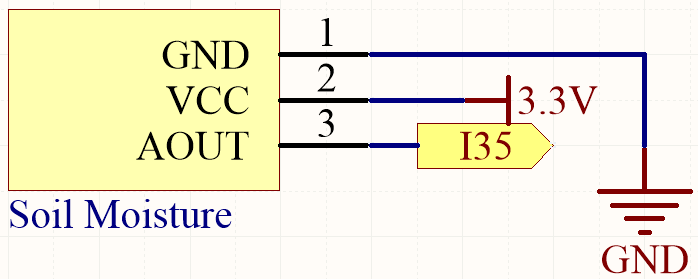
By inserting the module into the soil and watering it, the value read on I35 will decrease.
Wiring
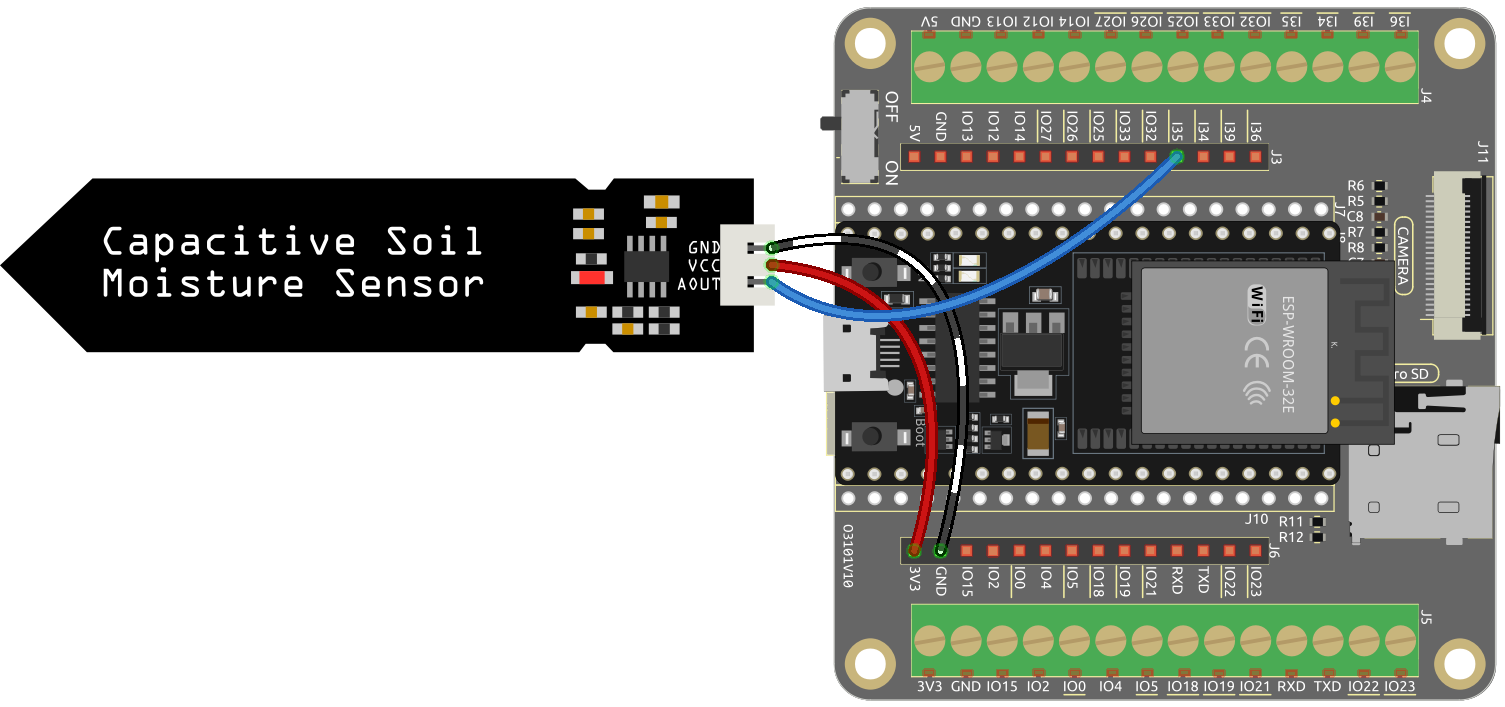
Code
Note
Open the
5.9_moisture.inofile under the path ofesp32-starter-kit-main\c\codes\5.9_moisture.After selecting the board (ESP32 Dev Module) and the appropriate port, click the Upload button.
Remember to Set the serial communication baud rate to 115200.
Once the code is successfully uploaded, the serial monitor will print out the soil moisture value.
By inserting the module into the soil and watering it, the value of the soil moisture sensor will become smaller.