注釈
こんにちは、SunFounderのRaspberry Pi & Arduino & ESP32愛好家コミュニティへようこそ!Facebook上でRaspberry Pi、Arduino、ESP32についてもっと深く掘り下げ、他の愛好家と交流しましょう。
参加する理由は?
エキスパートサポート:コミュニティやチームの助けを借りて、販売後の問題や技術的な課題を解決します。
学び&共有:ヒントやチュートリアルを交換してスキルを向上させましょう。
独占的なプレビュー:新製品の発表や先行プレビューに早期アクセスしましょう。
特別割引:最新製品の独占割引をお楽しみください。
祭りのプロモーションとギフト:ギフトや祝日のプロモーションに参加しましょう。
👉 私たちと一緒に探索し、創造する準備はできていますか?[ここ]をクリックして今すぐ参加しましょう!
7.6 交通信号機
交通信号機 は、道路交差点や横断歩道、その他の場所で交通の流れを制御するための信号装置です。
交通信号は、 ウィーン道路標識および信号に関する条約 によって標準化されています。 三つの標準色のLEDを交互に点灯させて、交通の優先権を与えます。
赤信号 : 点滅する赤い光を見たら、停止標識と同等として停止すべきです。
黄信号 : 赤に変わる前の警告信号です。黄信号の解釈は国や地域によって異なります。
緑信号 : 指示された方向への交通を許可します。
このプロジェクトでは、交通信号機の変化を実装するために3色のLEDと、各交通状態の時間を表示するための4桁7セグメントディスプレイを使用します。
必要なコンポーネント
このプロジェクトでは、以下のコンポーネントが必要です。
便宜上、全体のキットを購入することもできます。リンクはこちら:
名前 |
このキットに含まれるアイテム |
リンク |
|---|---|---|
ケプラーキット |
450以上 |
以下のリンクから個別に購入することもできます。
SN |
コンポーネント |
数量 |
リンク |
|---|---|---|---|
1 |
1 |
||
2 |
マイクロUSBケーブル |
1 |
|
3 |
1 |
||
4 |
数本 |
||
5 |
7(220Ω) |
||
6 |
1 |
||
7 |
1 |
||
8 |
3 |
回路図
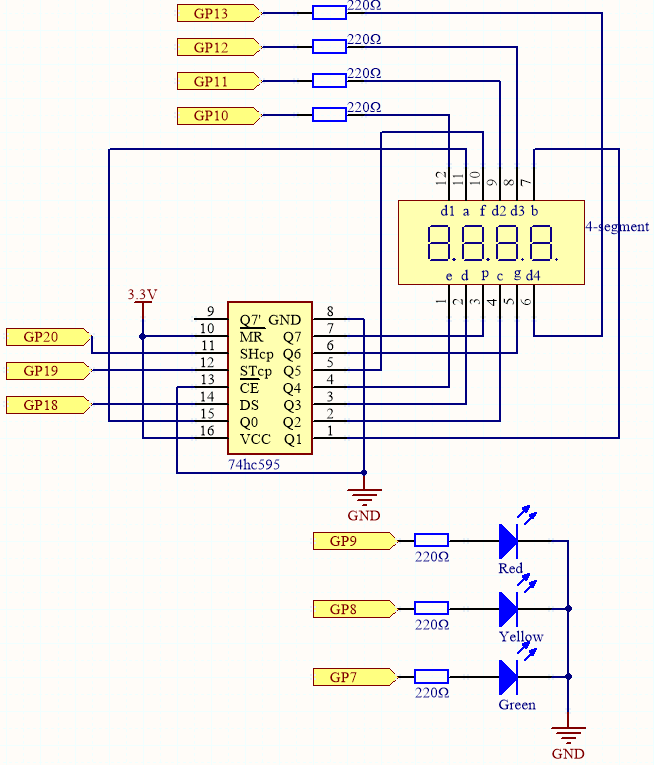
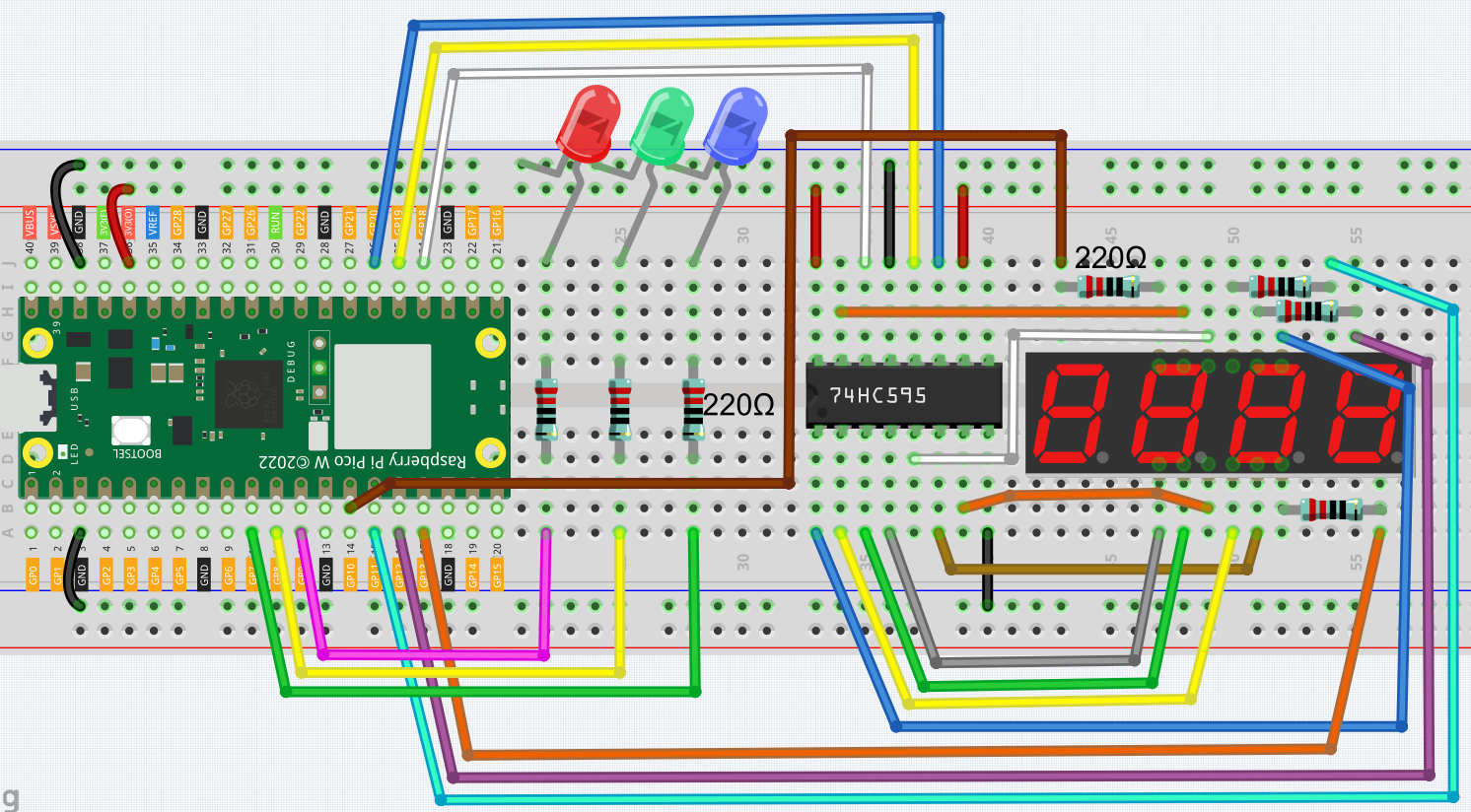
この回路は、 5.3 時間カウンター を基に、3つのLEDが追加されています。
3つの赤、黄、緑のLEDはそれぞれGP7~GP9に接続されています。
配線図
コード
注釈
kepler-kit-main/micropythonのパス下の7.6_traffic_light.pyファイルを開くか、このコードをThonnyにコピーしてから、「Run Current Script」をクリックするか、単にF5キーを押して実行します。画面の右下隅にある「MicroPython(Raspberry Pi Pico)」のインタープリタをクリックすることを忘れずに。
詳細なチュートリアルは、 コードを直接開いて実行する を参照してください。
import machine
import time
from machine import Timer

# Define the duration for each traffic light color in seconds [Green, Yellow, Red]
lightTime = [30, 5, 30]

# 7-segment display codes for digits 0-9, using hexadecimal to represent LED segments
SEGCODE = [0x3f, 0x06, 0x5b, 0x4f, 0x66, 0x6d, 0x7d, 0x07, 0x7f, 0x6f]

# Initialize pins for shift register communication (74HC595)
sdi = machine.Pin(18, machine.Pin.OUT)   # Serial Data Input
rclk = machine.Pin(19, machine.Pin.OUT)  # Register Clock (Latch)
srclk = machine.Pin(20, machine.Pin.OUT) # Shift Register Clock

# Initialize list to store 4 digit control pins for the 7-segment display
placePin = []
pin = [10, 13, 12, 11]  # Pin numbers for the 4-digit display
for i in range(4):
    placePin.append(None)  # Reserve space in list
    placePin[i] = machine.Pin(pin[i], machine.Pin.OUT)  # Initialize pins as output

# Function to select which digit (0-3) to display by controlling the common anode pins
def pickDigit(digit):
    for i in range(4):
        placePin[i].value(1)  # Turn off all digits
    placePin[digit].value(0)  # Turn on the selected digit

# Function to clear the display by sending '0x00' to the shift register
def clearDisplay():
    hc595_shift(0x00)

# Function to send data to the shift register (74HC595)
def hc595_shift(dat):
    rclk.low()  # Pull latch low to prepare for data shifting
    time.sleep_us(200)  # Small delay for timing stability
    for bit in range(7, -1, -1):  # Loop through each bit (MSB first)
        srclk.low()  # Prepare to send the next bit
        time.sleep_us(200)
        value = 1 & (dat >> bit)  # Extract the current bit from the data
        sdi.value(value)  # Set the data line to the current bit value
        time.sleep_us(200)
        srclk.high()  # Pulse the shift clock to store the bit in the register
        time.sleep_us(200)
    time.sleep_us(200)
    rclk.high()  # Pulse the register clock to move the data to the output

# Function to display a number on the 7-segment display
# This function breaks down the number into its individual digits and displays them
def display(num):
    pickDigit(0)  # Select the units place
    hc595_shift(SEGCODE[num % 10])  # Display units

    pickDigit(1)  # Select the tens place
    hc595_shift(SEGCODE[num % 100 // 10])  # Display tens

    pickDigit(2)  # Select the hundreds place
    hc595_shift(SEGCODE[num % 1000 // 100])  # Display hundreds

    pickDigit(3)  # Select the thousands place
    hc595_shift(SEGCODE[num % 10000 // 1000])  # Display thousands

# Setup for traffic light LEDs (Red, Yellow, Green)
# LEDs are connected to pins 9 (Green), 8 (Yellow), and 7 (Red)
pin = [7, 8, 9]  # LED pin numbers
led = []
for i in range(3):
    led.append(None)  # Reserve space in list
    led[i] = machine.Pin(pin[i], machine.Pin.OUT)  # Initialize each pin as output for LEDs

# Function to turn on the correct LED based on the current state
# 0 = Green, 1 = Yellow, 2 = Red
def lightup(state):
    for i in range(3):
        led[i].value(0)  # Turn off all LEDs
    led[state].value(1)  # Turn on the selected LED (Green, Yellow, or Red)

# Timer-related variables
counter = 0  # Counter for the remaining time
color_state = 0  # Current state of the traffic light (0 = Green, 1 = Yellow, 2 = Red)

# Timer interrupt callback to update the traffic light state and counter
def time_count(ev):
    global counter, color_state
    counter -= 1  # Decrease the counter by 1 second
    if counter <= 0:  # If the counter reaches zero, switch to the next light color
        color_state = (color_state + 1) % 3  # Cycle through Green, Yellow, and Red
        counter = lightTime[color_state]  # Reset counter based on the new color's duration

# Initialize a timer to call the time_count function every 1 second (1000ms)
tim = Timer(period=1000, mode=Timer.PERIODIC, callback=time_count)

# Main loop to update the 7-segment display and traffic light LEDs
while True:
    display(counter)  # Update the display with the remaining time
    lightup(color_state)  # Update the traffic light LEDs based on the current color
コードが実行されると、緑のLEDが30秒間点灯し、黄色のLEDが5秒間点灯し、赤のLEDが30秒間点灯します。