Note
Hello, welcome to the SunFounder Raspberry Pi & Arduino & ESP32 Enthusiasts Community on Facebook! Dive deeper into Raspberry Pi, Arduino, and ESP32 with fellow enthusiasts.
Why Join?
Expert Support: Solve post-sale issues and technical challenges with help from our community and team.
Learn & Share: Exchange tips and tutorials to enhance your skills.
Exclusive Previews: Get early access to new product announcements and sneak peeks.
Special Discounts: Enjoy exclusive discounts on our newest products.
Festive Promotions and Giveaways: Take part in giveaways and holiday promotions.
👉 Ready to explore and create with us? Click [here] and join today!
4.2 Pumping
In this intriguing project, we will delve into controlling a water pump using the L293D.
In the realm of water pump control, things are a bit simpler compared to controlling other motors. The beauty of this project lies in its simplicity - there’s no need to worry about the direction of rotation. Our primary goal is to successfully activate the water pump and keep it running.
Required Components
In this project, we need the following components.
It’s definitely convenient to buy a whole kit, here’s the link:
Name |
ITEMS IN THIS KIT |
LINK |
|---|---|---|
ESP32 Starter Kit |
320+ |
You can also buy them separately from the links below.
COMPONENT INTRODUCTION |
PURCHASE LINK |
|---|---|
- |
|
- |
Available Pins
Here is a list of available pins on the ESP32 board for this project.
Available Pins |
IO13, IO12, IO14, IO27, IO26, IO25, IO33, IO32, IO15, IO2, IO0, IO4, IO5, IO18, IO19, IO21, IO22, IO23 |
Schematic
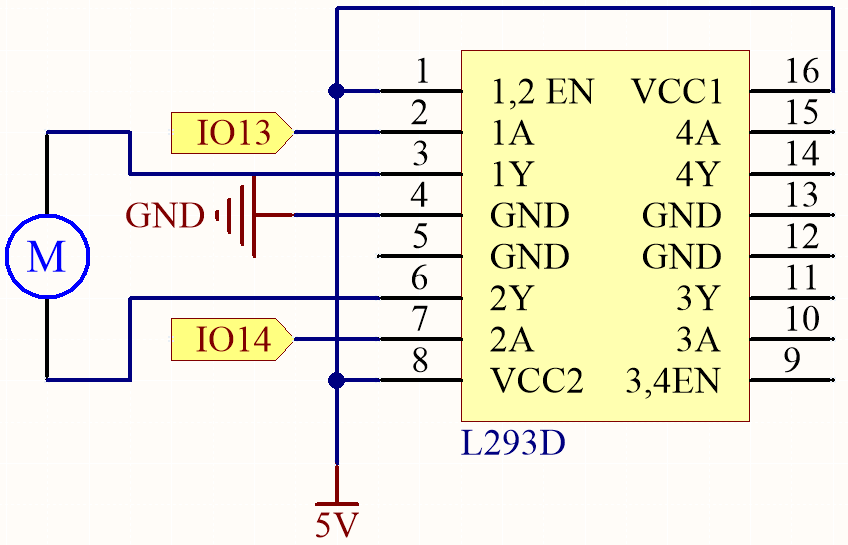
Wiring
Note
It is recommended here to insert the Power Pack and then slide the switch on the expansion board to the ON position to activate the power supply.
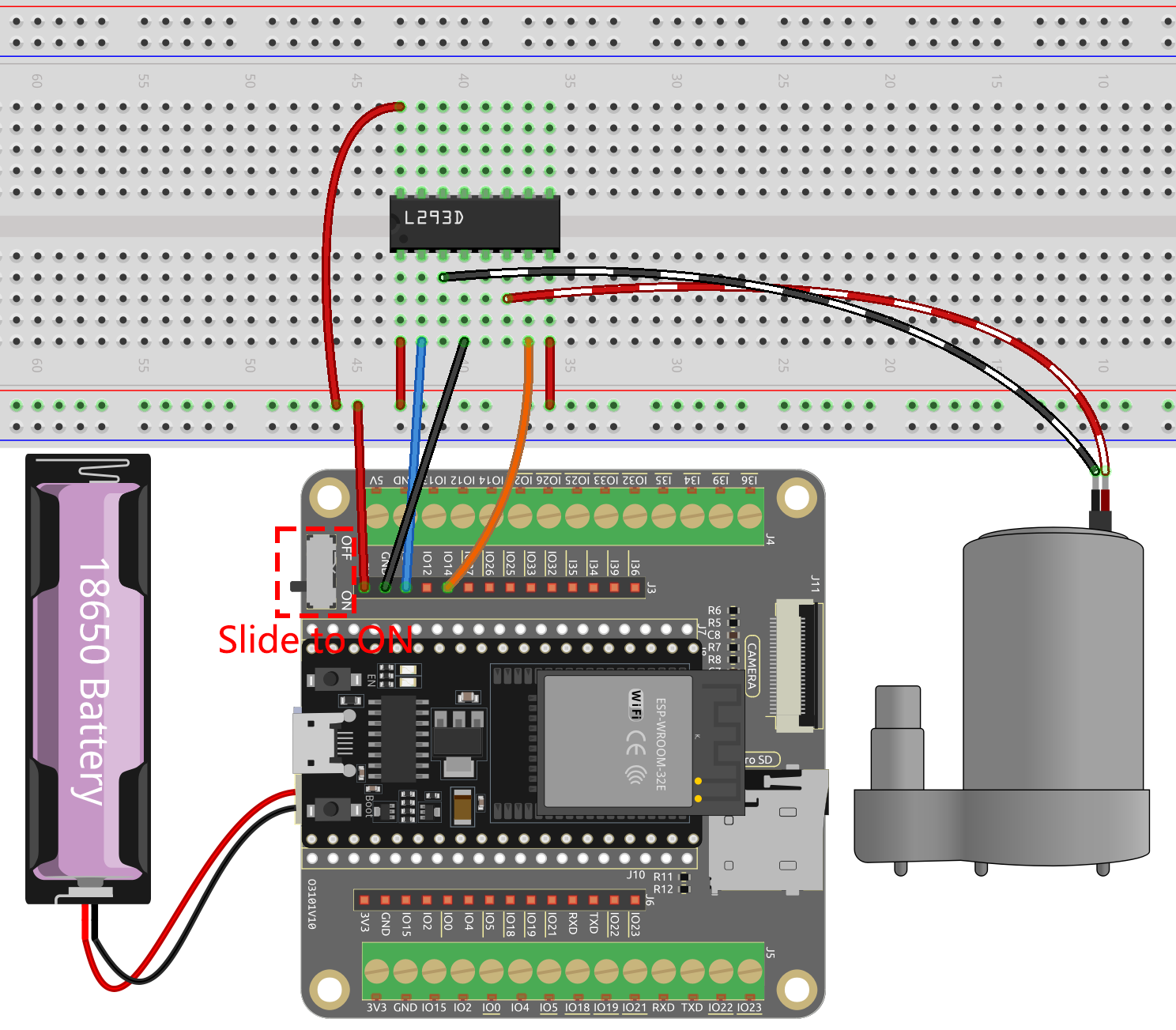
Code
Note
Open the
4.2_pumping.pyfile located in theesp32-starter-kit-main\micropython\codespath, or copy and paste the code into Thonny. Then, click “Run Current Script” or press F5 to execute it.Make sure to select the “MicroPython (ESP32).COMxx” interpreter in the bottom right corner.
import machine
import time

# Create Pin objects representing the motor control pins and set them to output mode
motor1A = machine.Pin(13, machine.Pin.OUT)
motor2A = machine.Pin(14, machine.Pin.OUT)

# Define a function to rotate the pump
def rotate():
    motor1A.value(1)
    motor2A.value(0)

# Define a function to stop the pump
def stop():
    motor1A.value(0)
    motor2A.value(0)

try:
    while True:
        rotate()  # Rotate the motor clockwise
        time.sleep(5)  # Pause for 5 seconds
        stop()  # Stop the motor
        time.sleep(2)

except KeyboardInterrupt:
    stop()  # Stop the motor when KeyboardInterrupt is caught
During the script execution, you will see the pump working and water coming out of the tube, then stopping for 2 seconds before starting to work again.