注釈
こんにちは、SunFounderのRaspberry Pi & Arduino & ESP32愛好家コミュニティへようこそ!Facebook上でRaspberry Pi、Arduino、ESP32についてもっと深く掘り下げ、他の愛好家と交流しましょう。
参加する理由は?
エキスパートサポート:コミュニティやチームの助けを借りて、販売後の問題や技術的な課題を解決します。
学び&共有:ヒントやチュートリアルを交換してスキルを向上させましょう。
独占的なプレビュー:新製品の発表や先行プレビューに早期アクセスしましょう。
特別割引:最新製品の独占割引をお楽しみください。
祭りのプロモーションとギフト:ギフトや祝日のプロモーションに参加しましょう。
👉 私たちと一緒に探索し、創造する準備はできていますか?[ ここ]をクリックして今すぐ参加しましょう!
BMP180
概要
このチュートリアルでは、GY-87 IMUモジュールに焦点を当て、特に気温、気圧、高度を測定するためのBMP180センサーについて詳しく解説します。天気監視や高度追跡などの用途に理想的なこのレッスンでは、GY-87をArduino Unoとインターフェースし、Adafruit BMP085ライブラリを使用する方法について紹介します。BMP180センサーを初期化し、Arduinoシリアルモニターでそのデータを読み取る方法を学ぶことができます。これは、環境データを必要とするプロジェクトにとって重要なスキルです。
必要なコンポーネント
このプロジェクトには、以下のコンポーネントが必要です。
全てのキットを一括で購入するのが便利です。リンクはこちらです:
名称 |
このキットのアイテム数 |
リンク |
|---|---|---|
Elite Explorer Kit |
300+ |
以下のリンクから個別に購入することもできます。
コンポーネント紹介 |
購入リンク |
|---|---|
- |
|
- |
配線図

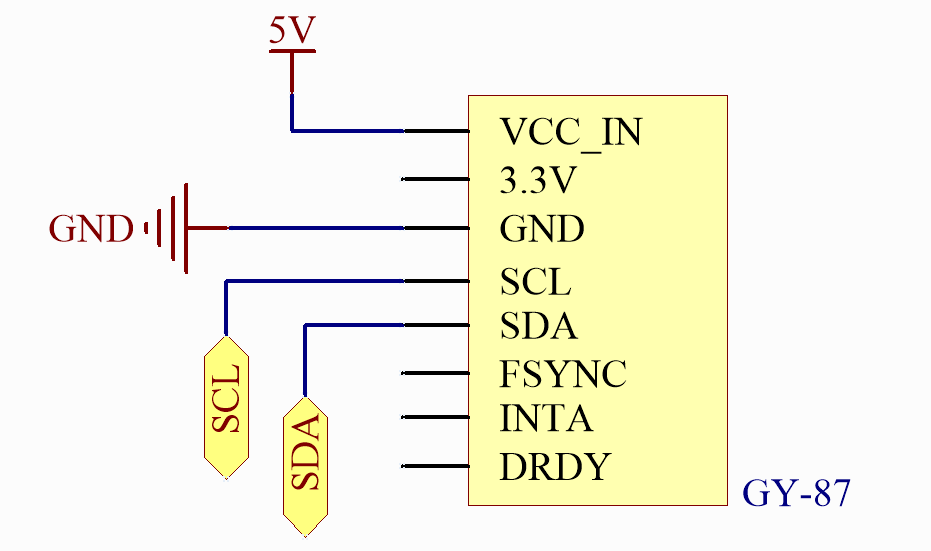
回路図
コード
注釈
ファイル
09-gy87_bmp180.inoを直接elite-explorer-kit-main\basic_project\09-gy87_bmp180のパスから開くことができます。または、このコードをArduino IDEにコピーしてください。
注釈
ライブラリをインストールするには、Arduinoライブラリマネージャーを使用し、 「Adafruit BMP085 Library」 を検索してインストールしてください。
 1/*
 2  This Arduino code interfaces with the GY-87 IMU (Inertial Measurement Unit) module,
 3  specifically using the BMP180 sensor for measuring temperature, pressure, and
 4  calculating altitude. It initializes the BMP180 sensor and continuously outputs its
 5  readings to the Serial Monitor.
 6
 7  Board: Arduino Uno R4
 8  Component: GY-87 IMU Module
 9  Library: https://github.com/adafruit/Adafruit-BMP085-Library  (Adafruit BMP085 Library by Adafruit)
10*/
11
12// Include required libraries
13#include <Adafruit_BMP085.h>
14
15// Initialize sensor objects
16Adafruit_BMP085 bmp;
17
18void setup() {
19  // Initialize the serial communication with a baud rate of 9600
20  Serial.begin(9600);
21
22  // Initialize BMP180 barometric sensor
23  initializeBMP180();
24}
25
26void loop() {
27  // Print BMP180 data
28  printBMP180();
29
30  delay(500);
31}
32
33void initializeBMP180() {
34  // Start BMP180 initialization
35  if (!bmp.begin()) {
36    Serial.println("Could not find a valid BMP180 sensor, check wiring!");
37    while (1)
38      ;  // Halt if sensor not found
39  }
40  Serial.println("BMP180 Found!");
41}
42
43void printBMP180() {
44  Serial.println();
45  Serial.println("BMP180 ------------");
46  Serial.print("Temperature = ");
47  Serial.print(bmp.readTemperature());
48  Serial.println(" *C");
49
50  Serial.print("Pressure = ");
51  Serial.print(bmp.readPressure());
52  Serial.println(" Pa");
53
54  // Calculate altitude assuming 'standard' barometric
55  // pressure of 1013.25 millibar = 101325 Pascal
56  Serial.print("Altitude = ");
57  Serial.print(bmp.readAltitude());
58  Serial.println(" meters");
59
60  Serial.print("Pressure at sealevel (calculated) = ");
61  Serial.print(bmp.readSealevelPressure());
62  Serial.println(" Pa");
63  Serial.println("BMP180 ------------");
64  Serial.println();
65}
コード解析
initializeBMP180()BMP180センサーの初期化。
void initializeBMP180() {
  // Start BMP180 initialization
  if (!bmp.begin()) {
    Serial.println("Could not find a valid BMP180 sensor, check wiring!");
    while (1)
      ;  // Halt if sensor not found
  }
  Serial.println("BMP180 Found!");
}
printBMP180()BMP180センサーによって読み取られた値を表示します。
void printBMP180() {
  Serial.println();
  Serial.println("BMP180 ------------");
  Serial.print("Temperature = ");
  Serial.print(bmp.readTemperature());
  Serial.println(" *C");

  Serial.print("Pressure = ");
  Serial.print(bmp.readPressure());
  Serial.println(" Pa");

  // Calculate altitude assuming 'standard' barometric
  // pressure of 1013.25 millibar = 101325 Pascal
  Serial.print("Altitude = ");
  Serial.print(bmp.readAltitude());
  Serial.println(" meters");

  Serial.print("Pressure at sealevel (calculated) = ");
  Serial.print(bmp.readSealevelPressure());
  Serial.println(" Pa");
  Serial.println("BMP180 ------------");
  Serial.println();
}