Nota
¡Hola, bienvenido a la comunidad de entusiastas de SunFounder Raspberry Pi & Arduino & ESP32 en Facebook! Sumérgete más en Raspberry Pi, Arduino y ESP32 con otros entusiastas.
¿Por qué unirte?
Soporte Experto: Resuelve problemas postventa y desafíos técnicos con la ayuda de nuestra comunidad y equipo.
Aprende y Comparte: Intercambia consejos y tutoriales para mejorar tus habilidades.
Preestrenos Exclusivos: Obtén acceso anticipado a anuncios de nuevos productos y avances exclusivos.
Descuentos Especiales: Disfruta de descuentos exclusivos en nuestros productos más recientes.
Promociones y Sorteos Festivos: Participa en sorteos y promociones de temporada.
👉 ¿Listo para explorar y crear con nosotros? Haz clic en [Aquí] y únete hoy mismo!
4.1.10 Monitor de Sobrecalentamiento
Nota
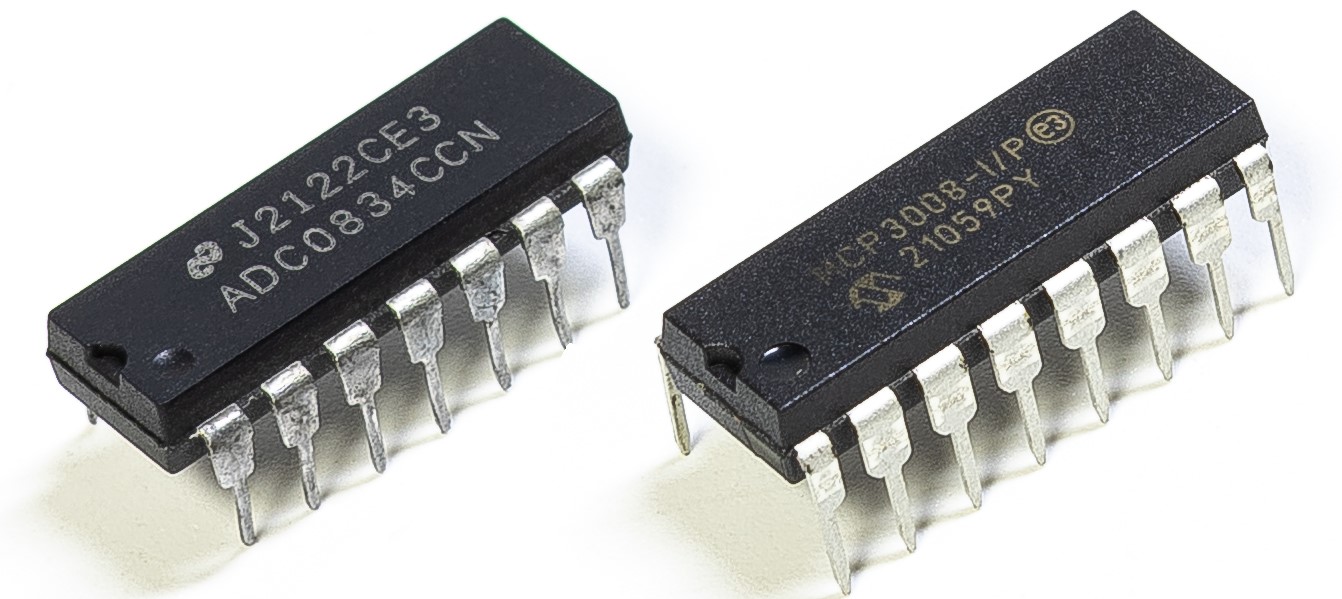
Dependiendo de la versión de su kit, identifique si tiene ADC0834 o MCP3008 y continúe con la sección correspondiente.
Introducción
Puede que desees crear un dispositivo de monitoreo de sobrecalentamiento que se aplique a diversas situaciones, por ejemplo, en una fábrica, si queremos tener una alarma y el apagado automático oportuno de la máquina cuando hay un sobrecalentamiento del circuito. En este proyecto, usaremos un termistor, joystick, zumbador, LED y LCD para hacer un dispositivo inteligente de monitoreo de temperatura cuyo umbral es ajustable.
Componentes Necesarios
En este proyecto, necesitamos los siguientes componentes.
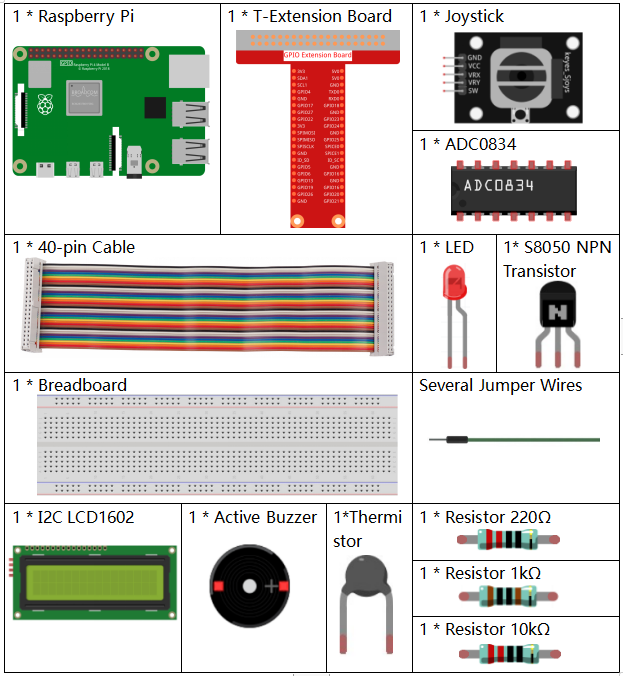
Es definitivamente conveniente comprar un kit completo, aquí está el enlace:
Nombre |
ARTÍCULOS EN ESTE KIT |
ENLACE |
|---|---|---|
Kit Raphael |
337 |
También puedes comprarlos por separado en los enlaces a continuación.
INTRODUCCIÓN DEL COMPONENTE |
ENLACE DE COMPRA |
|---|---|
- |
|
- |
|
- |
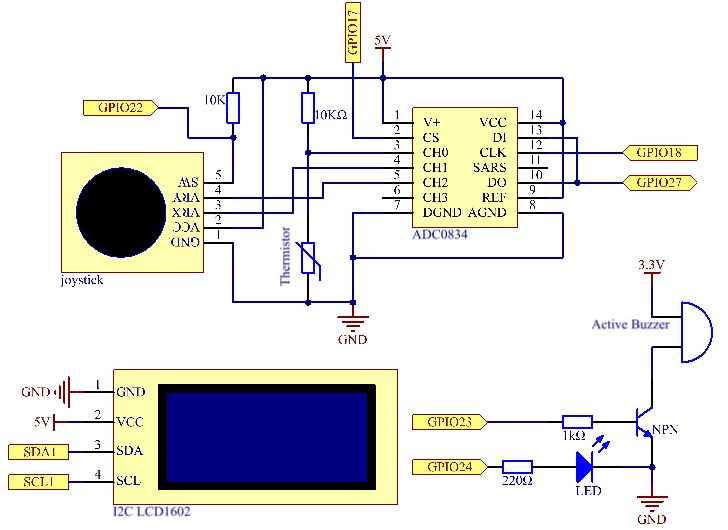
Diagrama Esquemático
Nombre T-Board |
física |
WiringPi |
BCM |
GPIO17 |
Pin 11 |
0 |
17 |
GPIO18 |
Pin 12 |
1 |
18 |
GPIO27 |
Pin 13 |
2 |
27 |
GPIO22 |
Pin15 |
3 |
22 |
GPIO23 |
Pin16 |
4 |
23 |
GPIO24 |
Pin18 |
5 |
24 |
SDA1 |
Pin 3 |
||
SCL1 |
Pin 5 |
Procedimientos Experimentales
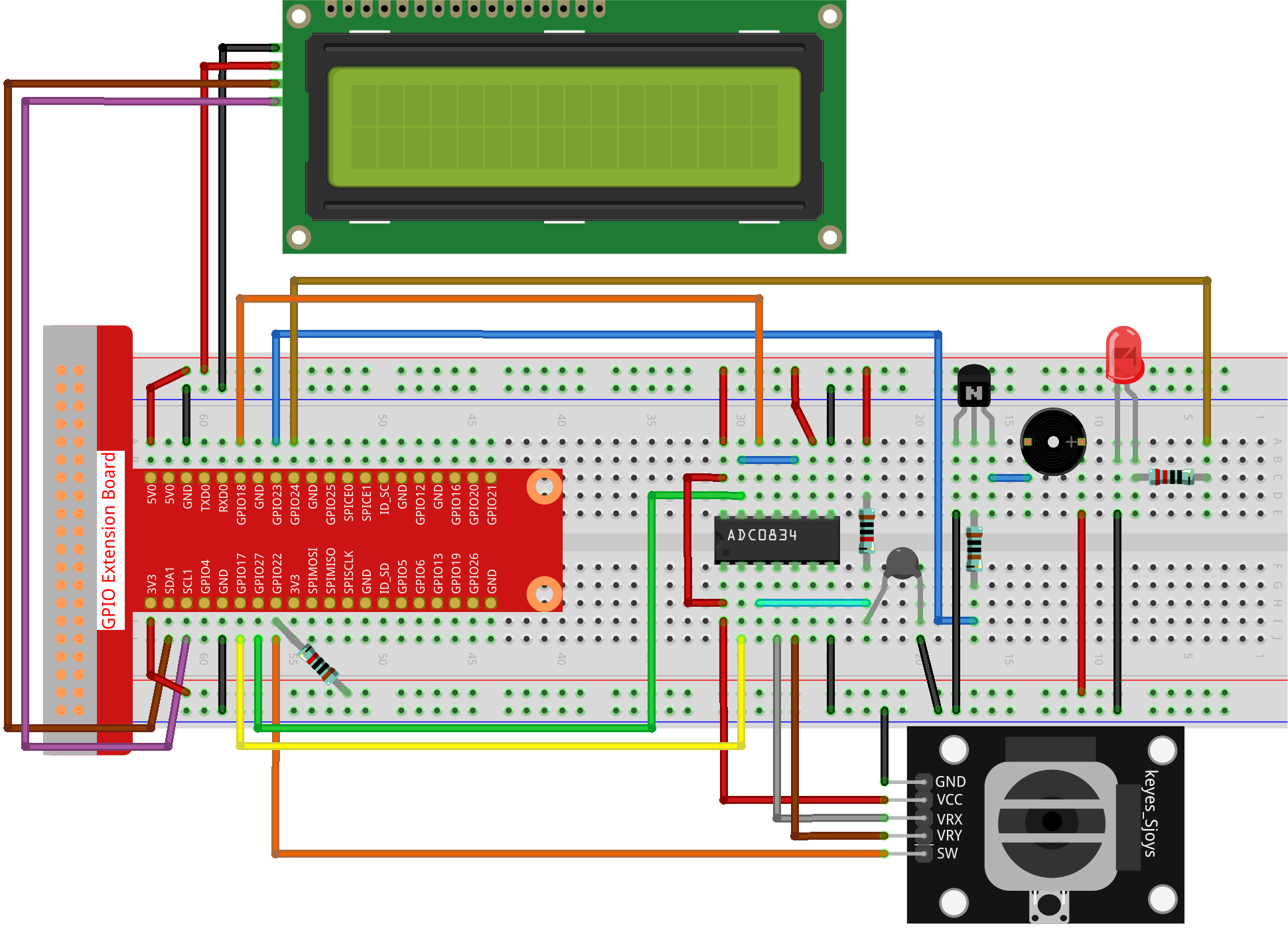
Paso 1: Construye el circuito.
Paso 2: Ve a la carpeta del código.
cd ~/raphael-kit/python-pi5
Paso 3: Ejecuta el archivo ejecutable.
sudo python3 4.1.13_OverheatMonitor_zero.py
Cuando el código se ejecute, la temperatura actual y el umbral de alta temperatura 40 se mostrarán en I2C LCD1602. Si la temperatura actual es mayor que el umbral, el zumbador y el LED se activarán para alertarte.
Joystick aquí es para que lo presiones y ajustes el umbral de alta temperatura. Mover el Joystick en la dirección del eje X y del eje Y puede ajustar (subir o bajar) el umbral de alta temperatura actual. Presiona el Joystick nuevamente para restablecer el umbral al valor inicial.
Nota
Si obtienes el error
FileNotFoundError: [Errno 2] No such file or directory: '/dev/i2c-1', necesitas consultar Configuración de I²C para habilitar el I2C.Si obtienes el error
ModuleNotFoundError: No module named 'smbus2', por favor ejecutasudo apt install python3-smbus2.Si aparece el error
OSError: [Errno 121] Remote I/O error, significa que el módulo está mal conectado o está dañado.Si el código y el cableado están bien, pero la pantalla LCD aún no muestra contenido, puedes girar el potenciómetro en la parte trasera para aumentar el contraste.
Advertencia
Si recibe el mensaje de error RuntimeError: Cannot determine SOC peripheral base address, consulte Si «gpiozero» no funciona.
Código
Nota
Puedes Modificar/Restablecer/Copiar/Ejecutar/Detener el código a continuación. Pero antes de eso, necesitas ir a la ruta del código fuente como raphael-kit/python. Después de modificar el código, puedes ejecutarlo directamente para ver el efecto.
#!/usr/bin/env python3

import LCD1602
from gpiozero import LED, Buzzer, Button
import ADC0834
import time
import math

# Inicializar botón del joystick, zumbador y LED
Joy_BtnPin = Button(22)
buzzPin = Buzzer(23)
ledPin = LED(24)

# Establecer umbral de temperatura inicial
upperTem = 40

# Configurar módulos ADC y LCD
ADC0834.setup()
LCD1602.init(0x27, 1)

def get_joystick_value():
    """
    Reads the joystick values and returns a change value based on the joystick's position.
    """
    x_val = ADC0834.getResult(1)
    y_val = ADC0834.getResult(2)
    if x_val > 200:
        return 1
    elif x_val < 50:
        return -1
    elif y_val > 200:
        return -10
    elif y_val < 50:
        return 10
    else:
        return 0

def upper_tem_setting():
    """
    Adjusts and displays the upper temperature threshold on the LCD.
    """
    global upperTem
    LCD1602.write(0, 0, 'Upper Adjust: ')
    change = int(get_joystick_value())
    upperTem += change
    strUpperTem = str(upperTem)
    LCD1602.write(0, 1, strUpperTem)
    LCD1602.write(len(strUpperTem), 1, '              ')
    time.sleep(0.1)

def temperature():
    """
    Reads the current temperature from the sensor and returns it in Celsius.
    """
    analogVal = ADC0834.getResult()
    Vr = 5 * float(analogVal) / 255
    Rt = 10000 * Vr / (5 - Vr)
    temp = 1 / (((math.log(Rt / 10000)) / 3950) + (1 / (273.15 + 25)))
    Cel = temp - 273.15
    return round(Cel, 2)

def monitoring_temp():
    """
    Monitors and displays the current temperature and upper temperature threshold.
    Activates buzzer and LED if the temperature exceeds the upper limit.
    """
    global upperTem
    Cel = temperature()
    LCD1602.write(0, 0, 'Temp: ')
    LCD1602.write(0, 1, 'Upper: ')
    LCD1602.write(6, 0, str(Cel))
    LCD1602.write(7, 1, str(upperTem))
    time.sleep(0.1)
    if Cel >= upperTem:
        buzzPin.on()
        ledPin.on()
    else:
        buzzPin.off()
        ledPin.off()

# Bucle principal de ejecución
try:
    lastState = 1
    stage = 0
    while True:
        currentState = Joy_BtnPin.value
        # Alternar entre modo de ajuste y modo de monitoreo
        if currentState == 1 and lastState == 0:
            stage = (stage + 1) % 2
            time.sleep(0.1)
            LCD1602.clear()
        lastState = currentState
        if stage == 1:
            upper_tem_setting()
        else:
            monitoring_temp()
except KeyboardInterrupt:
    # Limpiar y salir
    LCD1602.clear()
    ADC0834.destroy()
Explicación del Código
Esta sección importa las bibliotecas necesarias para el proyecto.
LCD1602es para la pantalla LCD,gpiozeroproporciona clases para LED, Buzzer y Button,ADC0834es para la conversión de analógico a digital, ytimeymathson bibliotecas estándar de Python para funciones relacionadas con el tiempo y operaciones matemáticas, respectivamente.#!/usr/bin/env python3 import LCD1602 from gpiozero import LED, Buzzer, Button import ADC0834 import time import math
Aquí se inicializan el botón del joystick, el zumbador y el LED.
Button(22)crea un objeto botón conectado al pin GPIO 22.Buzzer(23)yLED(24)inicializan el zumbador y el LED a los pines GPIO 23 y 24, respectivamente.# Inicializar botón del joystick, zumbador y LED Joy_BtnPin = Button(22) buzzPin = Buzzer(23) ledPin = LED(24)
Establece el límite superior de temperatura inicial e inicializa los módulos ADC y LCD. La LCD se inicializa con una dirección (
0x27) y un modo (1).# Establecer umbral de temperatura inicial upperTem = 40 # Configurar módulos ADC y LCD ADC0834.setup() LCD1602.init(0x27, 1)
Esta función lee los valores X e Y del joystick usando ADC0834. Devuelve un valor de cambio basado en la posición del joystick, que se usará para ajustar el umbral de temperatura.
def get_joystick_value():
    """
    Reads the joystick values and returns a change value based on the joystick's position.
    """
    x_val = ADC0834.getResult(1)
    y_val = ADC0834.getResult(2)
    if x_val > 200:
        return 1
    elif x_val < 50:
        return -1
    elif y_val > 200:
        return -10
    elif y_val < 50:
        return 10
    else:
        return 0
Ajusta el límite superior de temperatura utilizando la entrada del joystick. El nuevo límite se muestra en la pantalla LCD.
def upper_tem_setting():
    """
    Adjusts and displays the upper temperature threshold on the LCD.
    """
    global upperTem
    LCD1602.write(0, 0, 'Upper Adjust: ')
    change = int(get_joystick_value())
    upperTem += change
    strUpperTem = str(upperTem)
    LCD1602.write(0, 1, strUpperTem)
    LCD1602.write(len(strUpperTem), 1, '              ')
    time.sleep(0.1)
Lee la temperatura actual del sensor usando ADC0834 y la convierte a grados Celsius.
def temperature():
    """
    Reads the current temperature from the sensor and returns it in Celsius.
    """
    analogVal = ADC0834.getResult()
    Vr = 5 * float(analogVal) / 255
    Rt = 10000 * Vr / (5 - Vr)
    temp = 1 / (((math.log(Rt / 10000)) / 3950) + (1 / (273.15 + 25)))
    Cel = temp - 273.15
    return round(Cel, 2)
Monitorea y muestra la temperatura actual y el límite superior. Si la temperatura excede el límite superior, se activan el zumbador y el LED.
def monitoring_temp():
    """
    Monitors and displays the current temperature and upper temperature threshold.
    Activates buzzer and LED if the temperature exceeds the upper limit.
    """
    global upperTem
    Cel = temperature()
    LCD1602.write(0, 0, 'Temp: ')
    LCD1602.write(0, 1, 'Upper: ')
    LCD1602.write(6, 0, str(Cel))
    LCD1602.write(7, 1, str(upperTem))
    time.sleep(0.1)
    if Cel >= upperTem:
        buzzPin.on()
        ledPin.on()
    else:
        buzzPin.off()
        ledPin.off()
El bucle principal de ejecución alterna entre los modos de ajuste y monitoreo basado en las pulsaciones del botón del joystick. Actualiza continuamente la configuración de la temperatura o monitorea la temperatura actual.
# Bucle principal de ejecución
try:
    lastState = 1
    stage = 0
    while True:
        currentState = Joy_BtnPin.value
        # Alternar entre modo de ajuste y modo de monitoreo
        if currentState == 1 and lastState == 0:
            stage = (stage + 1) % 2
            time.sleep(0.1)
            LCD1602.clear()
        lastState = currentState
        if stage == 1:
            upper_tem_setting()
        else:
            monitoring_temp()
Esta sección asegura la limpieza y liberación adecuada de recursos cuando se interrumpe el programa.
except KeyboardInterrupt:
    # Limpiar y salir
    LCD1602.clear()
    ADC0834.destroy()