Parking Sensor 1.0
Note
🌟 Welcome to the SunFounder Facebook Community! Whether you’re into Raspberry Pi, Arduino, or ESP32, you’ll find inspiration, help ideas here.
✅ Be the first to get free learning resources.
✅ Stay updated on new products & exclusive giveaways.
✅ Share your creations and get real feedback.
Kit purchase
Looking for parts? Check out our all-in-one kits below — packed with components, beginner-friendly guides, and tons of fun.
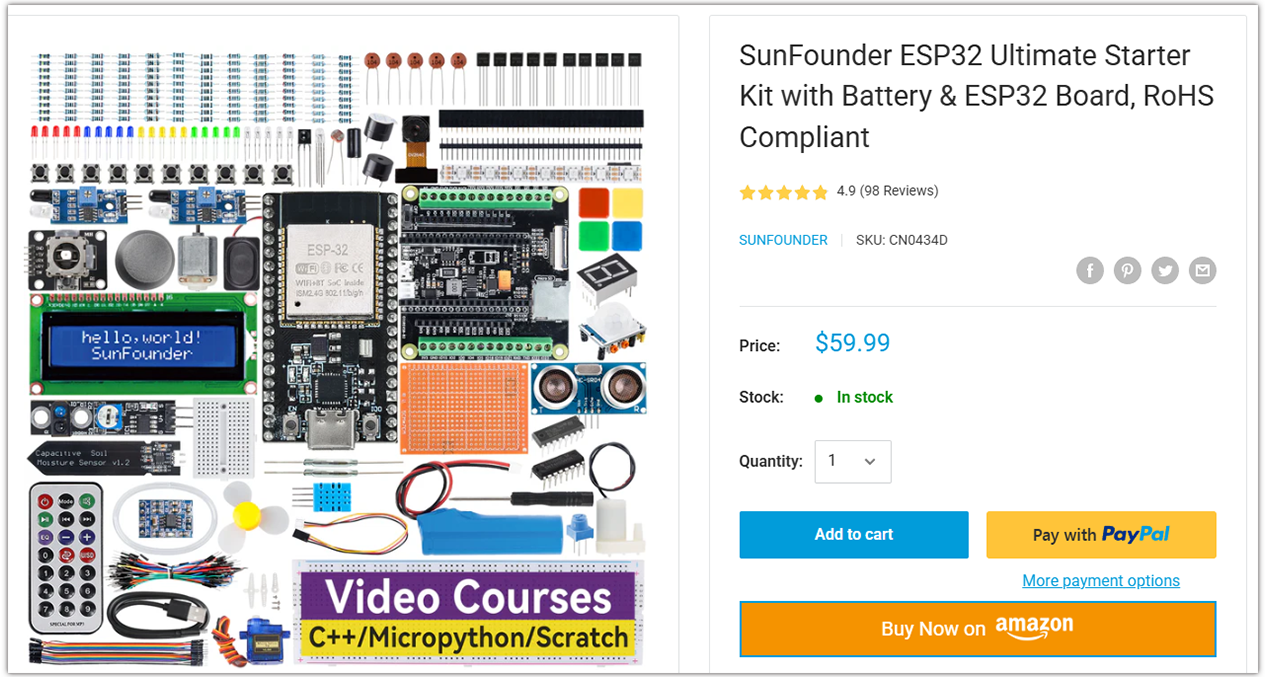
Name |
Includes ESP32 board |
PURCHASE LINK |
|---|---|---|
ESP32 Ultimate Starter Kit |
ESP32 WROOM 32E + |
|
Universal Maker Sensor Kit |
Course Introduction
In this lesson, we’ll build a basic parking assistance system (v1.0) using an Ultrasonic Sensor Module, MAX7219 Dot Matrix Module, and a passive buzzer Module with ESP32 board.
As an obstacle approaches the ultrasonic sensor, the buzzer will emit warning sounds that become increasingly rapid, while the dot matrix display will show a rough visual representation of the obstacle’s proximity.
Note
If this is your first time working with an ESP32 project, we recommend downloading and reviewing the basic materials first.
Required Components
In this project, we need the following components:
SN |
COMPONENT INTRODUCTION |
QUANTITY |
PURCHASE LINK |
|---|---|---|---|
1 |
ESP-WROOM-32 ESP32 ESP-32S Development Board |
1 |
|
2 |
USB Type-C cable |
1 |
|
3 |
Breadboard |
1 |
|
4 |
Wires |
Several |
|
5 |
Ultrasonic Sensor Module |
1 |
|
6 |
MAX7219 Dot Matrix Module |
1 |
|
7 |
Alarm Sound Module |
1 |
Wiring
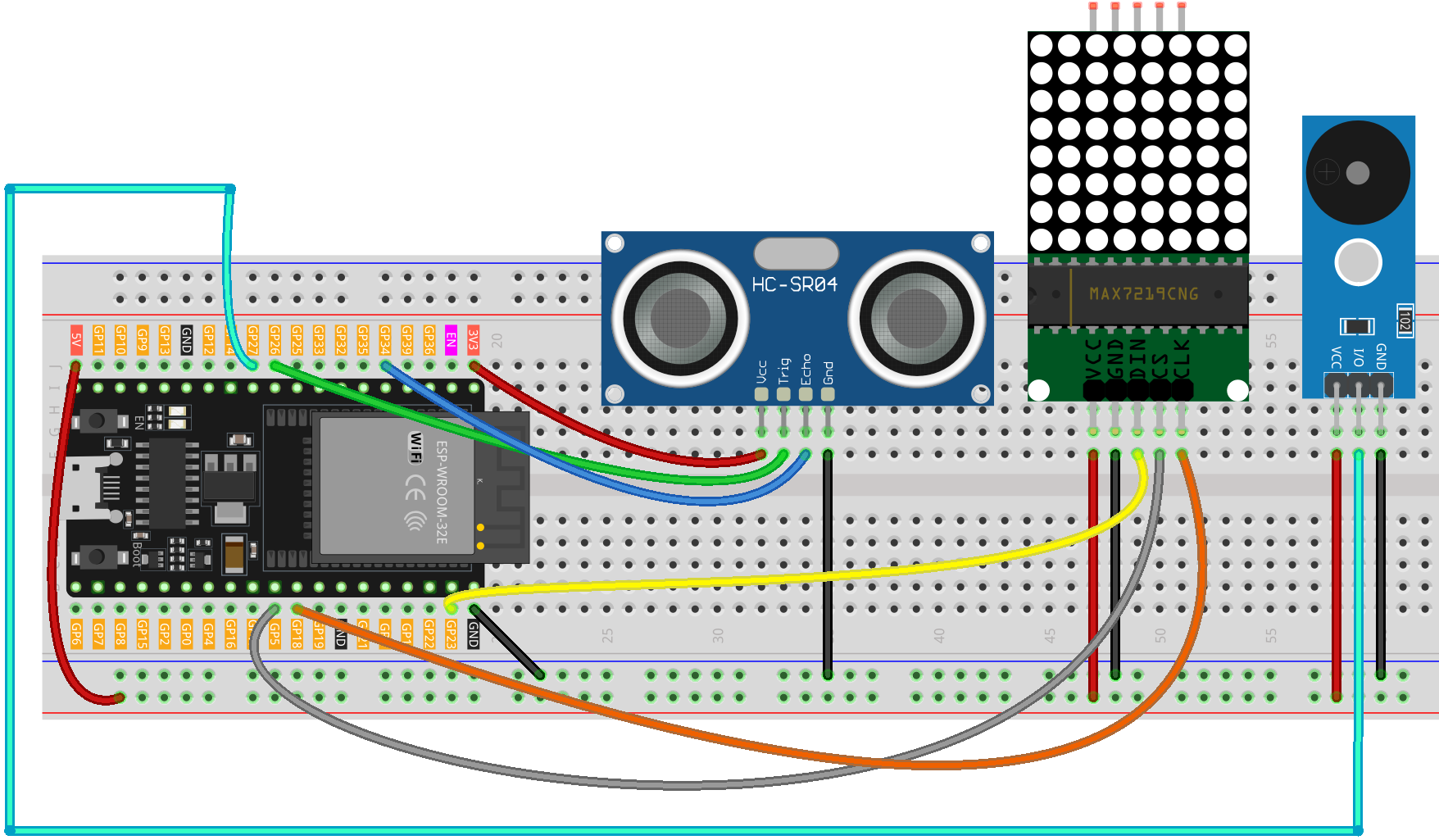
Common Connections:
Passive Buzzer Module
VCC: Connect to breadboard’s red power bus.
I/O: Connect to GPIO27 on the ESP32.
GND: Connect to breadboard’s negative power bus.
MAX7219 Dot Matrix Module
CLK: Connect to GPIO18 on the ESP32.
CS: Connect to GPIO5 on the ESP32.
DIN: Connect to GPIO18 on the ESP32.
GND: Connect to breadboard’s negative power bus.
VCC: Connect to breadboard’s red power bus.
Ultrasonic Sensor Module
Trig: Connect to GPIO26 on the ESP32.
Echo: Connect to GPIO34 on the ESP32.
GND: Connect to GND on the ESP32.
VCC: Connect to 3.3V on the ESP32.
Writing the Code
Note
You can copy this code into Arduino IDE.
To install the library, use the Arduino Library Manager and search for MD_MAX72xx and install it.
Don’t forget to select the board(ESP32 Dev module) and the correct port before clicking the Upload button.
#include <MD_MAX72xx.h>
#include <SPI.h>

// ===== MAX7219 hardware type & device count =====
#define HARDWARE_TYPE MD_MAX72XX::FC16_HW   // Common 8x8 FC-16 module
#define MAX_DEVICES   1

// ===== ESP32 hardware SPI pins =====
// VSPI default: MOSI=23, SCK=18; only CS needs to be defined here
const uint8_t CS_PIN = 5;

// Hardware SPI constructor (recommended)
MD_MAX72XX mx(HARDWARE_TYPE, CS_PIN, MAX_DEVICES);

// ===== Pin definitions (ESP32 safe GPIOs) =====
const int echoPin   = 34;  // Ultrasonic Echo (input-only pin, safe for ESP32)
const int trigPin   = 26;  // Ultrasonic Trig (output)
const int buzzerPin = 27;  // Buzzer (supports tone())

int previousColumnsLit = 0;       // Last number of lit columns

// Buzzer non-blocking control variables
unsigned long lastBeepTime = 0;   // Timestamp of last beep toggle
bool isBeepOn = false;            // Current buzzer state
unsigned long beepInterval = 500; // Interval for buzzer toggle in ms

void setup() {
  Serial.begin(115200);

  pinMode(echoPin, INPUT);
  pinMode(trigPin, OUTPUT);
  pinMode(buzzerPin, OUTPUT);

  // Initialize MAX72xx (replaces LedControl's shutdown/intensity/clear)
  mx.begin();
  mx.control(MD_MAX72XX::INTENSITY, 8);  // Brightness level 0–15
  mx.clear();
}

void loop() {
  // 1) Read distance and update LED columns
  float distance = readSensorData();
  int columnsToLight = calculateColumnsToLight(distance);
  displayColumnsWithTransition(previousColumnsLit, columnsToLight);
  previousColumnsLit = columnsToLight;

  // 2) Update buzzer speed based on distance and toggle buzzer
  updateBeepInterval(distance);
  updateBeepState();

  // 3) Debug print
  Serial.print("Distance: ");
  Serial.print(distance);
  Serial.println(" cm");
}

// Read distance from ultrasonic sensor in centimeters
float readSensorData() {
  digitalWrite(trigPin, LOW);
  delayMicroseconds(2);
  digitalWrite(trigPin, HIGH);
  delayMicroseconds(10);
  digitalWrite(trigPin, LOW);

  float duration = pulseIn(echoPin, HIGH); // microseconds
  float distance = duration / 58.0;        // convert to centimeters
  return distance;
}

// Map distance to number of LED matrix columns (0 to 8)
int calculateColumnsToLight(float distance) {
  if (distance > 20) {
    return 0;
  } else {
    int cols = (20 - distance) / 2;  // Every 2 cm closer lights one column
    return constrain(cols, 0, 8);
  }
}

// Animate LED columns lighting/unlighting with small blocking delay
void displayColumnsWithTransition(int previousColumns, int currentColumns) {
  if (currentColumns > previousColumns) {
    // Light up new columns from left to right
    for (int col = previousColumns; col < currentColumns; col++) {
      for (int row = 0; row <= col; row++) {
        mx.setPoint(col, row, true);  // Light up (row, col)
      }
      delay(50);
    }
  } else if (currentColumns < previousColumns) {
    // Turn off columns from left to right
    for (int col = previousColumns - 1; col >= currentColumns; col--) {
      for (int row = 0; row <= col; row++) {
        mx.setPoint(col, row, false); // Turn off (row, col)
      }
      delay(50);
    }
  }
}

// Beep policy:
// <6 cm   -> fast beep (100 ms)
// <12 cm  -> medium beep (300 ms)
// <18 cm  -> slow beep (500 ms)
// >=18 cm -> no beep
void updateBeepInterval(float distance) {
  if (distance < 6) {
    beepInterval = 100;
  } else if (distance < 12) {
    beepInterval = 300;
  } else if (distance < 18) {
    beepInterval = 500;
  } else {
    beepInterval = 0;
    noTone(buzzerPin);
    isBeepOn = false;
  }
}

// Toggle buzzer on/off without blocking using millis()
void updateBeepState() {
  if (beepInterval == 0) return;

  unsigned long now = millis();
  if (now - lastBeepTime >= beepInterval) {
    if (isBeepOn) {
      noTone(buzzerPin);
      isBeepOn = false;
    } else {
      tone(buzzerPin, 1000);  // 1 kHz tone
      isBeepOn = true;
    }
    lastBeepTime = now;
  }
}