Note
Hello, welcome to the SunFounder Raspberry Pi & Arduino & ESP32 Enthusiasts Community on Facebook! Dive deeper into Raspberry Pi, Arduino, and ESP32 with fellow enthusiasts.
Why Join?
Expert Support: Solve post-sale issues and technical challenges with help from our community and team.
Learn & Share: Exchange tips and tutorials to enhance your skills.
Exclusive Previews: Get early access to new product announcements and sneak peeks.
Special Discounts: Enjoy exclusive discounts on our newest products.
Festive Promotions and Giveaways: Take part in giveaways and holiday promotions.
👉 Ready to explore and create with us? Click [here] and join today!
4-Digit 7-Segment Display
4-Digit 7-segment display consists of four 7- segment displays working together.
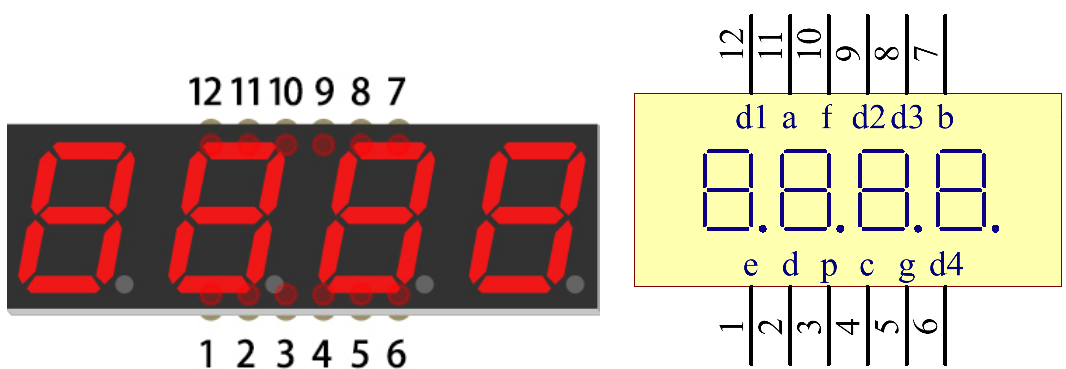
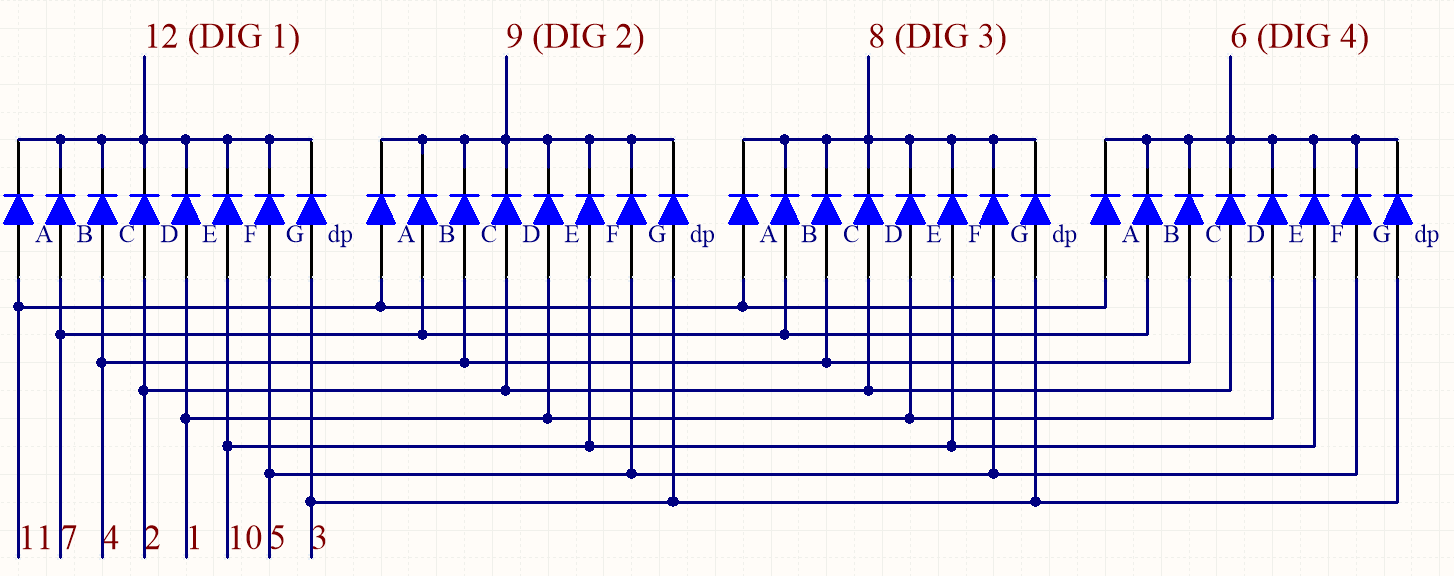
The 4-digit 7-segment display operates independently. It leverages the principle of visual persistence to rapidly cycle through each digit, creating the appearance of a continuous sequence of characters.
For example, when “1234” is displayed, the first 7-segment digit lights up to show “1” while the other three remain off. Shortly after, the second digit lights up to display “2,” with the first, third, and fourth digits turned off. This process continues in sequence until all four digits are displayed. The entire cycle happens very quickly (typically within 5 milliseconds). Due to the phenomenon of optical afterglow and visual persistence, the human eye perceives all four characters as being displayed simultaneously.
Display Codes
To help you get to know how 7-segment displays(Common Cathode) display Numbers, we have drawn the following table. Numbers are the number 0-F displayed on the 7-segment display; (DP) GFEDCBA refers to the corresponding LED set to 0 or 1, For example, 00111111 means that DP and G are set to 0, while others are set to 1. Therefore, the number 0 is displayed on the 7-segment display, while HEX Code corresponds to hexadecimal number.
Numbers |
Binary Code |
Hex Code |
|---|---|---|
0 |
00111111 |
0x3f |
1 |
00000110 |
0x06 |
2 |
01011011 |
0x5b |
3 |
01001111 |
0x4f |
4 |
01100110 |
0x66 |
5 |
01101101 |
0x6d |
6 |
01111101 |
0x7d |
7 |
00000111 |
0x07 |
8 |
01111111 |
0x7f |
9 |
01101111 |
0x6f |
A |
01110111 |
0x77 |
B |
01111100 |
0x7c |
C |
00111001 |
0x39 |
D |
01011110 |
0x5e |
E |
01111001 |
0x79 |
F |
01110001 |
0x71 |
Example
5.3 Time Counter (For MicroPython User)
7.4 Building a Passenger Counter (For MicroPython User)
7.5 Creating a “10 Second” Game (For MicroPython User)
7.6 Building a Traffic Light Controller (For MicroPython User)
5.3 Creating a Time Counter with a 4-Digit 7-Segment Display (For Arduino User)