Note
Hello, welcome to the SunFounder Raspberry Pi & Arduino & ESP32 Enthusiasts Community on Facebook! Dive deeper into Raspberry Pi, Arduino, and ESP32 with fellow enthusiasts.
Why Join?
Expert Support: Solve post-sale issues and technical challenges with help from our community and team.
Learn & Share: Exchange tips and tutorials to enhance your skills.
Exclusive Previews: Get early access to new product announcements and sneak peeks.
Special Discounts: Enjoy exclusive discounts on our newest products.
Festive Promotions and Giveaways: Take part in giveaways and holiday promotions.
👉 Ready to explore and create with us? Click [here] and join today!
4.15 Whack-a-Mole Game
Introduction
In this lesson, you will build a Whack-a-Mole game using the Fusion HAT+. Four PWM-driven LEDs act as “moles,” fading smoothly in a 1-second cycle. Your goal is to hit the correct button when its corresponding LED lights up. A buzzer gives audio feedback:
Correct hole → short high-pitch beep
Wrong hole → GAME OVER (low beep)
An SSD1306 OLED display shows your current score during the game and a final score on game over.
This project combines PWM brightness shaping, button edge detection, timing loops, and a simple game state machine.
What You’ll Need
The following components are required for this project:
COMPONENT INTRODUCTION |
PURCHASE LINK |
|---|---|
- |
|
- |
|
Raspberry Pi |
- |
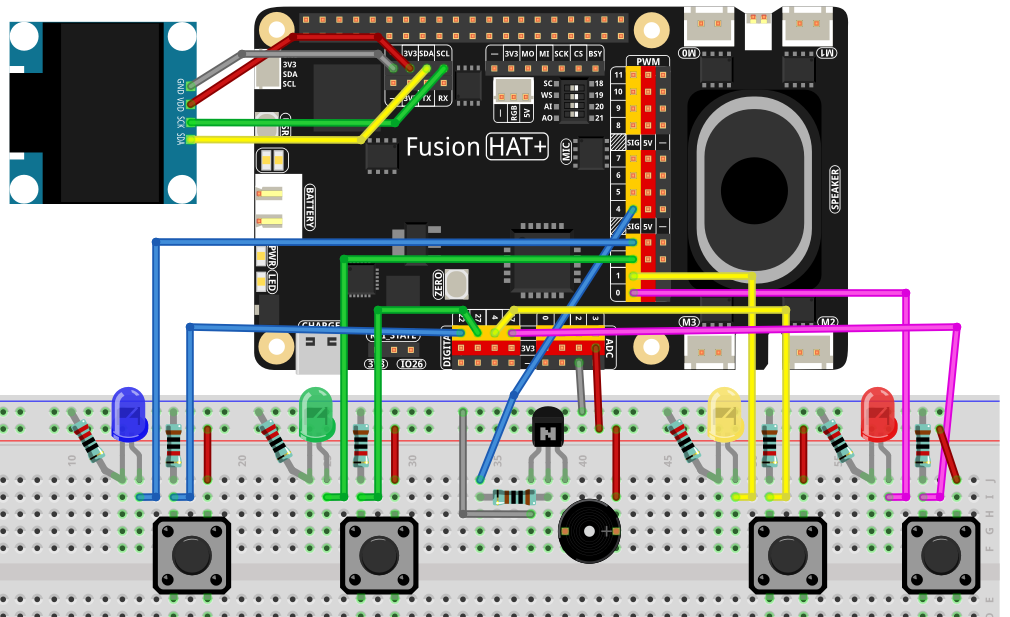
Wiring Diagram
Refer to the wiring diagram for assembling the components:
Setup Steps
Install the required libraries:
sudo pip3 install adafruit-circuitpython-ssd1306 --break
Run the game from the
ai-lab-kitdirectory:cd ~/ai-lab-kit/python/ sudo python3 4.15_WhackAMole.py
When the script runs:
One LED fades up/down (triangle wave).
Press only the lit LED’s button within the 1-second window:
Correct → score increases, next mole appears
Incorrect → buzzer plays error tone → GAME OVER
OLED shows only the current score (in-game)
OLED shows “GAME OVER” + final score upon losing
Press Ctrl+C to exit
Code
Here is the full Python script for the Whack-a-Mole game:
#!/usr/bin/env python3
# -*- coding: utf-8 -*-

"""
Whack-a-Mole using fusion_hat:
- 4 PWM LEDs (smooth fade in/out; whole cycle = 1.0s)
- 4 buttons via fusion_hat.Pin (PULL_DOWN; pressed=1)
- Buzzer via fusion_hat.Buzzer(PWM(...)) for short feedback tone
- SSD1306 OLED shows only the current hit count during game
- If a non-lit button is pressed -> GAME OVER with final score
"""

import time
import random
from typing import List, Optional

# ---- fusion_hat GPIO / PWM / Buzzer ----
from fusion_hat.pwm import PWM
from fusion_hat.pin import Pin, Mode, Pull
from fusion_hat.modules import Buzzer

# ---- OLED ----
from PIL import Image, ImageDraw, ImageFont
import adafruit_ssd1306
import board

# ===================== Port map (EDIT HERE) =====================
# 4 PWM LED ports of Fusion HAT+
LED_PORTS = ['P0', 'P1', 'P2', 'P3']

# 4 button pins (BCM numbering). Example here uses 17/4/27/22.
# Buttons are configured as PULL_DOWN, so pressed -> value==1
BTN_PINS = [17, 4, 27, 22]

# Buzzer on a PWM-capable Fusion HAT+ port
BUZZER_PORT = 'P4'
# ===============================================================

# ===================== OLED setup =====================
WIDTH, HEIGHT = 128, 64
i2c = board.I2C()
oled = adafruit_ssd1306.SSD1306_I2C(WIDTH, HEIGHT, i2c, addr=0x3C)
oled.fill(0)
oled.show()
image = Image.new("1", (WIDTH, HEIGHT))
draw = ImageDraw.Draw(image)
font = ImageFont.load_default()

def draw_score(score: int):
   """Render in-game screen: only the current score."""
   draw.rectangle((0, 0, WIDTH, HEIGHT), outline=0, fill=0)
   msg = f"Score: {score}"
   tw, th = font.getbbox(msg)[2:]
   draw.text(((WIDTH - tw) // 2, (HEIGHT - th) // 2), msg, font=font, fill=255)
   oled.image(image)
   oled.show()

def draw_game_over(score: int):
   """Render GAME OVER screen with final score."""
   draw.rectangle((0, 0, WIDTH, HEIGHT), outline=0, fill=0)
   title = "GAME OVER"
   tw, th = font.getbbox(title)[2:]
   draw.text(((WIDTH - tw) // 2, 8), title, font=font, fill=255)
   line = f"Score: {score}"
   lw, lh = font.getbbox(line)[2:]
   draw.text(((WIDTH - lw) // 2, 8 + th + 8), line, font=font, fill=255)
   oled.image(image)
   oled.show()

# ===================== Hardware objects =====================
# LEDs (PWM)
leds = [PWM(p) for p in LED_PORTS]

def led_set(idx: int, duty_pct: float):
   """Set LED brightness (0..100%)."""
   duty = max(0.0, min(100.0, float(duty_pct)))
   leds[idx].pulse_width_percent(duty)

def all_leds_off():
   for i in range(len(leds)):
      leds[i].pulse_width_percent(0)

# Buttons (Pin, PULL_DOWN => pressed=1)
buttons = [Pin(pin, mode=Mode.IN, pull=Pull.DOWN) for pin in BTN_PINS]

def read_buttons() -> List[int]:
   """Read all buttons; return their current logic levels (0/1)."""
   return [b.value() if callable(getattr(b, "value", None)) else int(b.value) for b in buttons]

# Buzzer (tonal)
tb = Buzzer(PWM(BUZZER_PORT))

def beep_hit():
   """Short bright tone for a correct hit."""
   tb.play('A5', 0.08)  # A5 ~ 880 Hz short chirp
   tb.off()

def beep_miss():
   """Lower/longer tone for a miss (game over)."""
   tb.play('E4', 0.25)  # E4 ~ 330 Hz
   tb.off()

# ===================== LED fade (1s total) =====================
def triangle01(u: float) -> float:
   """
   Triangle wave in [0,1], rising 0->1 over first half, then 1->0.
   u in [0,1].
   """
   return 2*u if u < 0.5 else 2*(1.0 - u)

def fade_led_with_button_check(active_idx: int,
                              prev_states: List[int],
                              duration: float = 1.0,
                              step: float = 0.01,
                              gamma: float = 1.8) -> (bool, Optional[List[int]]):
   """
   Fade one LED (active_idx) with triangle brightness over 'duration' seconds.
   While fading, poll buttons at 'step' interval:
      - If matching button pressed (rising edge) -> immediately turn off LED, return (True, new_states).
      - If non-matching button pressed (rising edge) -> game over: return (False, new_states) and let caller handle.
   If no press -> return (None, new_states) to continue game.
   Returns:
      (hit, states)
      hit=True  -> correct hit
      hit=False -> wrong button (game over)
      hit=None  -> no button pressed in this cycle
   """
   t0 = time.monotonic()
   states = prev_states[:]

   while True:
      t = time.monotonic() - t0
      if t > duration:
            break

      # Triangle brightness 0..1 then 1..0
      u = triangle01(t / duration)
      # Gamma correction for perceived linearity
      level = u ** gamma
      duty = 3 + 97 * level   # keep a tiny floor so LED is visible at the start

      led_set(active_idx, duty)

      # Poll buttons and detect rising edges
      curr = read_buttons()
      for i, (p, c) in enumerate(zip(states, curr)):
            if p == 0 and c == 1:  # rising edge = just pressed
               if i == active_idx:
                  # Correct hit
                  all_leds_off()
                  beep_hit()
                  return True, curr
               else:
                  # Wrong hole -> game over
                  all_leds_off()
                  beep_miss()
                  return False, curr
      states = curr
      time.sleep(step)

   # Finished fade with no press
   all_leds_off()
   return None, states

# ===================== Game loop =====================
def pick_next(prev_idx: Optional[int]) -> int:
   """Pick a random index different from prev_idx."""
   choices = list(range(4))
   if prev_idx in choices:
      choices.remove(prev_idx)
   return random.choice(choices)

def main():
   random.seed(time.time())
   score = 0
   last_idx = None
   states = read_buttons()  # baseline for edge detection

   draw_score(score)

   while True:
      # Choose which LED lights next
      idx = pick_next(last_idx)
      last_idx = idx

      # Run a 1.0s fade cycle, checking button presses
      hit, states = fade_led_with_button_check(idx, states, duration=1.0, step=0.01, gamma=1.8)

      if hit is False:
            # Wrong button pressed -> Game Over
            draw_game_over(score)
            break
      elif hit is True:
            # Correct hit -> score++
            score += 1
            draw_score(score)
      else:
            # No press during this mole -> no score change; continue
            pass

   # stop all outputs
   all_leds_off()

if __name__ == "__main__":
   try:
      main()
   except KeyboardInterrupt:
      all_leds_off()
      oled.fill(0)
      oled.show()
      tb.off()
      print("\nExited.")
Understanding the Code
LED Fade Animation
Each LED performs a 1-second triangle-wave fade:
Brightness rises from 0 → 100%
Then falls from 100% → 0
Gamma correction (
u ** gamma) improves visual linearity
def fade_led_with_button_check(active_idx: int,
                              prev_states: List[int],
                              duration: float = 1.0,
                              step: float = 0.01,
                              gamma: float = 1.8) -> (bool, Optional[List[int]]):
   ...
Button Edge Detection
read_buttons()reads all four buttons. A rising edge (previous=0, current=1) means “button just pressed.”If pressed button matches lit LED → correct hit
Else → wrong hit → GAME OVER
def read_buttons() -> List[int]:
   """Read all buttons; return their current logic levels (0/1)."""
   return [b.value() if callable(getattr(b, "value", None)) else int(b.value) for b in buttons]
Buzzer Feedback
A5short chirp = successE4longer tone = miss / game over
# Buzzer (tonal)
tb = Buzzer(PWM(BUZZER_PORT))

def beep_hit():
   """Short bright tone for a correct hit."""
   tb.play('A5', 0.08)  # A5 ~ 880 Hz short chirp
   tb.off()

def beep_miss():
   """Lower/longer tone for a miss (game over)."""
   tb.play('E4', 0.25)  # E4 ~ 330 Hz
   tb.off()
Game Loop
Randomly picks one of four LEDs (never the same twice in a row)
Runs a fade cycle, checking button presses
Updates score or ends the game
while True:
   # Choose which LED lights next
   idx = pick_next(last_idx)
   last_idx = idx

   # Run a 1.0s fade cycle, checking button presses
   hit, states = fade_led_with_button_check(idx, states, duration=1.0, step=0.01, gamma=1.8)

   ...
OLED Display
Shows only the score during play
Shows GAME OVER + final score when game ends
def draw_score(score: int):
   """Render in-game screen: only the current score."""
   draw.rectangle((0, 0, WIDTH, HEIGHT), outline=0, fill=0)
   msg = f"Score: {score}"
   tw, th = font.getbbox(msg)[2:]
   draw.text(((WIDTH - tw) // 2, (HEIGHT - th) // 2), msg, font=font, fill=255)
   oled.image(image)
   oled.show()

   ...
Troubleshooting
Buttons do not register presses
Ensure buttons are wired correctly using BCM pin numbering
Confirm
PULL_DOWNis applied so pressed state = 1Check for correct ground wiring
LEDs flicker instead of fading smoothly
Reduce
steptime for smoother updates (e.g., 0.005)Ensure PWM ports support proper duty cycle updates
Game ends immediately without pressing anything
A floating button pin may read as 1
Ensure pull-down resistors are correctly configured
Score does not increase
Verify the LED index matches the button index
Ensure LED ports and button pins are in correct order
Try It Yourself
Variable Speed Mode
Gradually shorten the fade duration to make the game more challenging.
Multi-LED Mode
Light up two LEDs at once—player must hit either one.
Lives System
Allow 3 mistakes before game over.
High-Score Storage
Save the highest score to a file and display it at startup.
Animated Title Screen
Add a splash screen before the game starts.
These ideas can turn Whack-a-Mole into a full arcade experience!