注釈
こんにちは、SunFounder Raspberry Pi & Arduino & ESP32 Enthusiast Community on Facebookへようこそ!他の愛好家と一緒に、Raspberry Pi、Arduino、ESP32の世界により深く入り込みましょう。
参加する理由
専門家サポート: 購入後の問題や技術的な課題を、コミュニティと私たちのチームの助けを借りて解決します。
学習と共有: ヒントやチュートリアルを交換して、スキルを向上させましょう。
限定プレビュー: 新製品の発表や先行プレビューに早期アクセスできます。
特別割引: 最新製品を特別割引でお楽しみいただけます。
季節限定キャンペーンとプレゼント: プレゼント企画やホリデーキャンペーンに参加しましょう。
👉 一緒に発見し、創造する準備はできましたか? [こちら] をクリックして、今すぐ参加しましょう!
4.15 モグラたたきゲーム
はじめに
このレッスンでは、Fusion HAT+ を使用して Whack-a-Mole(モグラたたき)ゲーム を作成します。 4 つの PWM 制御 LED が「モグラ」として動作し、1 秒周期で滑らかにフェードします。 対応する LED が点灯しているときに、正しいボタンを押すことが目標です。ブザーは音でフィードバックを行います。
正しい穴 → 短い高音ビープ
間違った穴 → GAME OVER(低音ビープ)
SSD1306 OLED ディスプレイには、ゲーム中は 現在のスコア が表示され、ゲームオーバー時には 最終スコア が表示されます。
このプロジェクトでは、PWM による明るさ制御、ボタンのエッジ検出、タイミングループ、そしてシンプルなゲーム状態マシンを組み合わせて実装します。
必要なもの
このプロジェクトで必要なコンポーネントは以下のとおりです。
COMPONENT INTRODUCTION |
PURCHASE LINK |
|---|---|
- |
|
- |
|
Raspberry Pi |
- |
配線図
各コンポーネントの接続は、以下の配線図を参照してください。
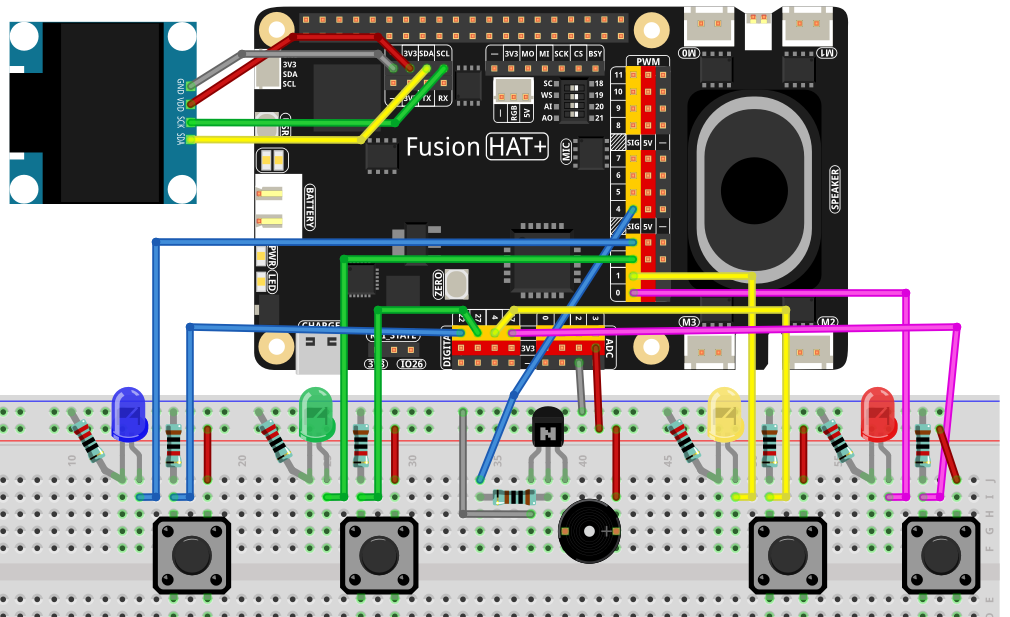
セットアップ手順
必要なライブラリをインストールします。
sudo pip3 install adafruit-circuitpython-ssd1306 --break
ai-lab-kitディレクトリからゲームを実行します。cd ~/ai-lab-kit/python/ sudo python3 4.15_WhackAMole.py
スクリプトを実行すると、次のように動作します。
1 つの LED がフェードイン/フェードアウト(トライアングル波)します
点灯している LED に対応するボタンのみ を 1 秒以内に押してください
正解 → スコアが増加し、次のモグラが出現
不正解 → ブザーがエラー音を再生 → GAME OVER
OLED にはゲーム中 現在のスコアのみ が表示されます
ゲーム終了時には OLED に “GAME OVER” + 最終スコア が表示されます
Ctrl+C を押すと終了します
コード
以下は、Whack-a-Mole ゲームの完全な Python スクリプトです。
#!/usr/bin/env python3
# -*- coding: utf-8 -*-

"""
Whack-a-Mole using fusion_hat:
- 4 PWM LEDs (smooth fade in/out; whole cycle = 1.0s)
- 4 buttons via fusion_hat.Pin (PULL_DOWN; pressed=1)
- Buzzer via fusion_hat.Buzzer(PWM(...)) for short feedback tone
- SSD1306 OLED shows only the current hit count during game
- If a non-lit button is pressed -> GAME OVER with final score
"""

import time
import random
from typing import List, Optional

# ---- fusion_hat GPIO / PWM / Buzzer ----
from fusion_hat.pwm import PWM
from fusion_hat.pin import Pin, Mode, Pull
from fusion_hat.modules import Buzzer

# ---- OLED ----
from PIL import Image, ImageDraw, ImageFont
import adafruit_ssd1306
import board

# ===================== Port map (EDIT HERE) =====================
# 4 PWM LED ports of Fusion HAT+
LED_PORTS = ['P0', 'P1', 'P2', 'P3']

# 4 button pins (BCM numbering). Example here uses 17/4/27/22.
# Buttons are configured as PULL_DOWN, so pressed -> value==1
BTN_PINS = [17, 4, 27, 22]

# Buzzer on a PWM-capable Fusion HAT+ port
BUZZER_PORT = 'P4'
# ===============================================================

# ===================== OLED setup =====================
WIDTH, HEIGHT = 128, 64
i2c = board.I2C()
oled = adafruit_ssd1306.SSD1306_I2C(WIDTH, HEIGHT, i2c, addr=0x3C)
oled.fill(0)
oled.show()
image = Image.new("1", (WIDTH, HEIGHT))
draw = ImageDraw.Draw(image)
font = ImageFont.load_default()

def draw_score(score: int):
   """Render in-game screen: only the current score."""
   draw.rectangle((0, 0, WIDTH, HEIGHT), outline=0, fill=0)
   msg = f"Score: {score}"
   tw, th = font.getbbox(msg)[2:]
   draw.text(((WIDTH - tw) // 2, (HEIGHT - th) // 2), msg, font=font, fill=255)
   oled.image(image)
   oled.show()

def draw_game_over(score: int):
   """Render GAME OVER screen with final score."""
   draw.rectangle((0, 0, WIDTH, HEIGHT), outline=0, fill=0)
   title = "GAME OVER"
   tw, th = font.getbbox(title)[2:]
   draw.text(((WIDTH - tw) // 2, 8), title, font=font, fill=255)
   line = f"Score: {score}"
   lw, lh = font.getbbox(line)[2:]
   draw.text(((WIDTH - lw) // 2, 8 + th + 8), line, font=font, fill=255)
   oled.image(image)
   oled.show()

# ===================== Hardware objects =====================
# LEDs (PWM)
leds = [PWM(p) for p in LED_PORTS]

def led_set(idx: int, duty_pct: float):
   """Set LED brightness (0..100%)."""
   duty = max(0.0, min(100.0, float(duty_pct)))
   leds[idx].pulse_width_percent(duty)

def all_leds_off():
   for i in range(len(leds)):
      leds[i].pulse_width_percent(0)

# Buttons (Pin, PULL_DOWN => pressed=1)
buttons = [Pin(pin, mode=Mode.IN, pull=Pull.DOWN) for pin in BTN_PINS]

def read_buttons() -> List[int]:
   """Read all buttons; return their current logic levels (0/1)."""
   return [b.value() if callable(getattr(b, "value", None)) else int(b.value) for b in buttons]

# Buzzer (tonal)
tb = Buzzer(PWM(BUZZER_PORT))

def beep_hit():
   """Short bright tone for a correct hit."""
   tb.play('A5', 0.08)  # A5 ~ 880 Hz short chirp
   tb.off()

def beep_miss():
   """Lower/longer tone for a miss (game over)."""
   tb.play('E4', 0.25)  # E4 ~ 330 Hz
   tb.off()

# ===================== LED fade (1s total) =====================
def triangle01(u: float) -> float:
   """
   Triangle wave in [0,1], rising 0->1 over first half, then 1->0.
   u in [0,1].
   """
   return 2*u if u < 0.5 else 2*(1.0 - u)

def fade_led_with_button_check(active_idx: int,
                              prev_states: List[int],
                              duration: float = 1.0,
                              step: float = 0.01,
                              gamma: float = 1.8) -> (bool, Optional[List[int]]):
   """
   Fade one LED (active_idx) with triangle brightness over 'duration' seconds.
   While fading, poll buttons at 'step' interval:
      - If matching button pressed (rising edge) -> immediately turn off LED, return (True, new_states).
      - If non-matching button pressed (rising edge) -> game over: return (False, new_states) and let caller handle.
   If no press -> return (None, new_states) to continue game.
   Returns:
      (hit, states)
      hit=True  -> correct hit
      hit=False -> wrong button (game over)
      hit=None  -> no button pressed in this cycle
   """
   t0 = time.monotonic()
   states = prev_states[:]

   while True:
      t = time.monotonic() - t0
      if t > duration:
            break

      # Triangle brightness 0..1 then 1..0
      u = triangle01(t / duration)
      # Gamma correction for perceived linearity
      level = u ** gamma
      duty = 3 + 97 * level   # keep a tiny floor so LED is visible at the start

      led_set(active_idx, duty)

      # Poll buttons and detect rising edges
      curr = read_buttons()
      for i, (p, c) in enumerate(zip(states, curr)):
            if p == 0 and c == 1:  # rising edge = just pressed
               if i == active_idx:
                  # Correct hit
                  all_leds_off()
                  beep_hit()
                  return True, curr
               else:
                  # Wrong hole -> game over
                  all_leds_off()
                  beep_miss()
                  return False, curr
      states = curr
      time.sleep(step)

   # Finished fade with no press
   all_leds_off()
   return None, states

# ===================== Game loop =====================
def pick_next(prev_idx: Optional[int]) -> int:
   """Pick a random index different from prev_idx."""
   choices = list(range(4))
   if prev_idx in choices:
      choices.remove(prev_idx)
   return random.choice(choices)

def main():
   random.seed(time.time())
   score = 0
   last_idx = None
   states = read_buttons()  # baseline for edge detection

   draw_score(score)

   while True:
      # Choose which LED lights next
      idx = pick_next(last_idx)
      last_idx = idx

      # Run a 1.0s fade cycle, checking button presses
      hit, states = fade_led_with_button_check(idx, states, duration=1.0, step=0.01, gamma=1.8)

      if hit is False:
            # Wrong button pressed -> Game Over
            draw_game_over(score)
            break
      elif hit is True:
            # Correct hit -> score++
            score += 1
            draw_score(score)
      else:
            # No press during this mole -> no score change; continue
            pass

   # stop all outputs
   all_leds_off()

if __name__ == "__main__":
   try:
      main()
   except KeyboardInterrupt:
      all_leds_off()
      oled.fill(0)
      oled.show()
      tb.off()
      print("\nExited.")
コードの解説
LED フェードアニメーション
各 LED は 1 秒周期の三角波フェードを行います。
明るさは 0 → 100% まで上昇
その後 100% → 0 まで下降
ガンマ補正(
u ** gamma)により視覚的な直線性を改善
def fade_led_with_button_check(active_idx: int,
                              prev_states: List[int],
                              duration: float = 1.0,
                              step: float = 0.01,
                              gamma: float = 1.8) -> (bool, Optional[List[int]]):
   ...
ボタンのエッジ検出
read_buttons()は 4 つすべてのボタン状態を読み取ります。 立ち上がりエッジ (previous=0, current=1)は「ボタンが押された瞬間」を意味します。押されたボタンが点灯 LED と一致 → 正解
それ以外 → ミス → GAME OVER
def read_buttons() -> List[int]:
   """Read all buttons; return their current logic levels (0/1)."""
   return [b.value() if callable(getattr(b, "value", None)) else int(b.value) for b in buttons]
ブザーによるフィードバック
A5の短い音 → 成功E4のやや長い音 → ミス / ゲームオーバー
# Buzzer (tonal)
tb = Buzzer(PWM(BUZZER_PORT))

def beep_hit():
   """Short bright tone for a correct hit."""
   tb.play('A5', 0.08)  # A5 ~ 880 Hz short chirp
   tb.off()

def beep_miss():
   """Lower/longer tone for a miss (game over)."""
   tb.play('E4', 0.25)  # E4 ~ 330 Hz
   tb.off()
ゲームループ
4 つの LED の中からランダムに 1 つを選択(同じものが連続しない)
フェード中にボタン入力をチェック
スコア更新またはゲーム終了を判定
while True:
   # Choose which LED lights next
   idx = pick_next(last_idx)
   last_idx = idx

   # Run a 1.0s fade cycle, checking button presses
   hit, states = fade_led_with_button_check(idx, states, duration=1.0, step=0.01, gamma=1.8)

   ...
OLED 表示
プレイ中はスコアのみ表示
ゲーム終了時は GAME OVER と最終スコアを表示
def draw_score(score: int):
   """Render in-game screen: only the current score."""
   draw.rectangle((0, 0, WIDTH, HEIGHT), outline=0, fill=0)
   msg = f"Score: {score}"
   tw, th = font.getbbox(msg)[2:]
   draw.text(((WIDTH - tw) // 2, (HEIGHT - th) // 2), msg, font=font, fill=255)
   oled.image(image)
   oled.show()

   ...
トラブルシューティング
ボタンを押しても反応しない
BCM ピン番号で正しく配線されているか確認してください
PULL_DOWNが設定され、押したときに値が 1 になることを確認してくださいGND 配線を確認してください
LED が滑らかにフェードせず点滅する
stepを小さくしてください(例: 0.005)PWM ポートが適切にデューティ更新できるか確認してください
何も押していないのにゲームが終了する
ボタンピンがフローティング状態の可能性があります
プルダウン抵抗が正しく設定されているか確認してください
スコアが増えない
LED インデックスとボタンインデックスが一致しているか確認してください
LED ポートとボタンピンの順序が正しいか確認してください
試してみよう
可変スピードモード
フェード時間を徐々に短くし、ゲームの難易度を上げます。
マルチ LED モード
同時に 2 つの LED を点灯させ、どちらかを叩く必要があるルールにします。
ライフシステム
3 回ミスするまでゲームを続行できるようにします。
ハイスコア保存
最高スコアをファイルに保存し、起動時に表示します。
アニメーション付きタイトル画面
ゲーム開始前にスプラッシュ画面を表示します。
これらのアイデアを追加すれば、Whack-a-Mole を本格的なアーケードゲームへ発展させることができます。