Nota
Ciao, benvenuto nella Community di SunFounder Raspberry Pi & Arduino & ESP32 Enthusiasts su Facebook! Approfondisci le tue conoscenze su Raspberry Pi, Arduino ed ESP32 insieme ad altri appassionati.
Perché Unirsi?
Supporto da Esperti: Risolvi problemi post-vendita e sfide tecniche con l’aiuto della nostra community e del nostro team.
Impara e Condividi: Scambia consigli e tutorial per migliorare le tue competenze.
Anteprime Esclusive: Ottieni accesso anticipato a nuovi annunci di prodotti e anteprime esclusive.
Sconti Speciali: Approfitta di sconti esclusivi sui nostri prodotti più recenti.
Promozioni Festive e Giveaway: Partecipa a giveaway e promozioni festive.
👉 Pronto a esplorare e creare con noi? Clicca [Qui] e unisciti oggi stesso!
7.8 Lettore Musicale RFID
Nel nostro progetto precedente, 6.5 Identificazione a Radiofrequenza, abbiamo appreso che il modulo MFRC522 ci permette di scrivere fino a 48 caratteri di informazioni sulla scheda (o chiave), inclusi sia la chiave che le informazioni di identità, così come lo spartito musicale.
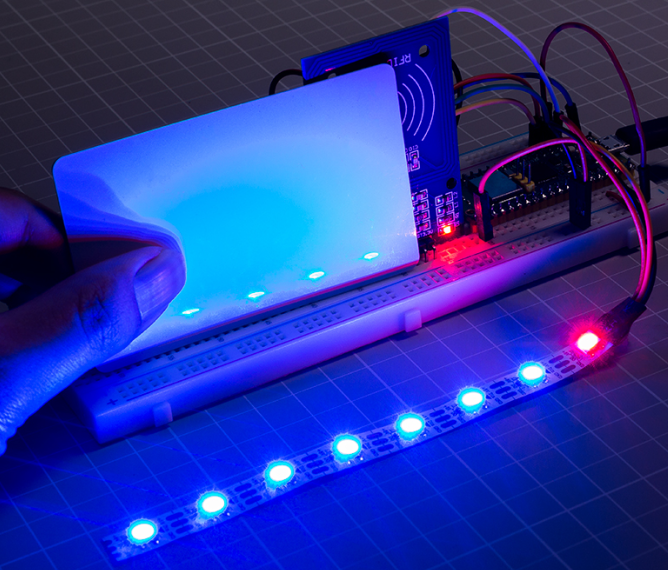
Ad esempio, se scrivi EEFGGFEDCCDEEDD EEFGGFEDCCDEDCC, il cicalino riprodurrà la musica quando la scheda (o chiave) verrà letta di nuovo. Può essere anche equipaggiato con un WS2812 per mostrare effetti sorprendenti.
Puoi trovare altri spartiti musicali su Internet o persino scrivere la tua musica, inserirli nella scheda (o chiave) e condividerli con i tuoi amici!
Componenti Necessari
In questo progetto, abbiamo bisogno dei seguenti componenti.
È sicuramente conveniente acquistare un kit completo, ecco il link:
Nome |
ELEMENTI IN QUESTO KIT |
LINK |
|---|---|---|
Kepler Kit |
450+ |
Puoi anche acquistarli separatamente dai link sottostanti.
SN |
COMPONENTE |
QUANTITÀ |
LINK |
|---|---|---|---|
1 |
1 |
||
2 |
Cavo Micro USB |
1 |
|
3 |
1 |
||
4 |
Diversi |
||
5 |
1(S8050) |
||
6 |
1(1KΩ) |
||
7 |
Cicalino Passivo Cicalino |
1 |
|
8 |
1 |
||
9 |
1 |
Schema
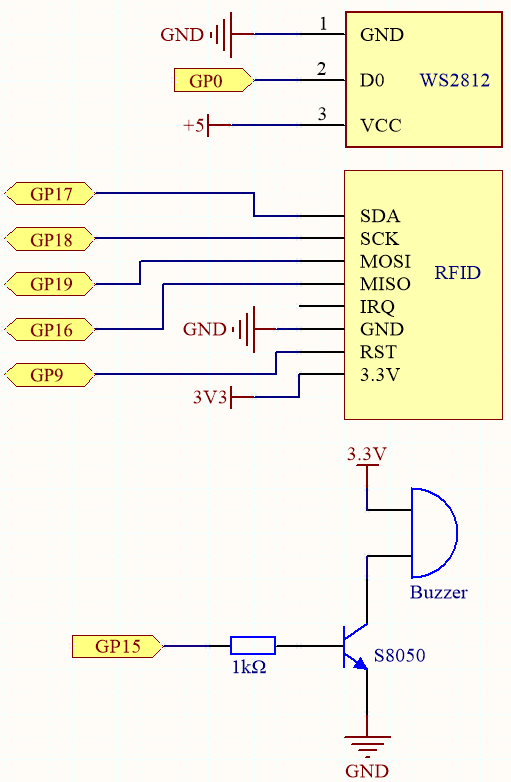
Collegamenti

Codice
Apri il file
6.5_rfid_write.pynel percorsokepler-kit-main/micropython, poi clicca su «Esegui Script Corrente» o semplicemente premi F5 per eseguirlo.Nota
Qui è necessario utilizzare le librerie nella cartella
mfrc522. Controlla se sono state caricate su Pico; per un tutorial dettagliato, fai riferimento a 1.4 Caricare le Librerie su Pico.Dopo aver eseguito, digita
EEFGGFEDCCDEEDD EEFGGFEDCCDEDCCnel shell, quindi avvicina la scheda (o la chiave) al modulo MFRC522 per memorizzare una partitura di «Ode to Joy».Apri il file
7.8_rfid_music_player.pynel percorsokepler-kit-main/micropythono copia questo codice in Thonny, poi clicca su «Esegui Script Corrente» o semplicemente premi F5 per eseguirlo.from mfrc522 import SimpleMFRC522 import machine import time from ws2812 import WS2812 import urandom # WS2812 LED setup # Initialize an 8-LED WS2812 strip on pin 0 ws = WS2812(machine.Pin(0), 8) # MFRC522 RFID reader setup # Initialize the RFID reader using SPI on specific pins reader = SimpleMFRC522(spi_id=0, sck=18, miso=16, mosi=19, cs=17, rst=9) # Buzzer note frequencies (in Hertz) NOTE_C4 = 262 NOTE_D4 = 294 NOTE_E4 = 330 NOTE_F4 = 349 NOTE_G4 = 392 NOTE_A4 = 440 NOTE_B4 = 494 NOTE_C5 = 523 # Initialize PWM for buzzer on pin 15 buzzer = machine.PWM(machine.Pin(15)) # List of note frequencies corresponding to musical notes note = [NOTE_C4, NOTE_D4, NOTE_E4, NOTE_F4, NOTE_G4, NOTE_A4, NOTE_B4, NOTE_C5] # Function to play a tone on the buzzer with a specified frequency and duration def tone(pin, frequency, duration): pin.freq(frequency) # Set the buzzer frequency pin.duty_u16(30000) # Set duty cycle to 50% (approx) time.sleep_ms(duration) # Play the tone for the specified duration pin.duty_u16(0) # Stop the tone by setting duty cycle to 0 # Function to light up a WS2812 LED at a specific index with a random color def lumi(index): for i in range(8): ws[i] = 0x000000 # Turn off all LEDs ws[index] = int(urandom.uniform(0, 0xFFFFFF)) # Set a random color for the LED at the given index ws.write() # Write the color data to the WS2812 LEDs # Encode musical notes text into indices and play the corresponding notes words = ["C", "D", "E", "F", "G", "A", "B", "N"] # Mapping of musical notes to text characters def take_text(text): string = text.replace(' ', '').upper() # Remove spaces and convert the text to uppercase while len(string) > 0: index = words.index(string[0]) # Find the index of the first note in the string tone(buzzer, note[index], 250) # Play the corresponding note on the buzzer for 250 ms lumi(index) # Light up the LED corresponding to the note string = string[1:] # Move to the next character in the string # Function to read from the RFID card and play the stored score def read(): print("Reading...Please place the card...") id, text = reader.read() # Read the RFID card (ID and stored text) print("ID: %s\nText: %s" % (id, text)) # Print the ID and text take_text(text) # Play the score from the text stored on the card # Start reading from the RFID card and play the corresponding score read()
Avvicinando nuovamente la scheda (o chiave) al modulo MFRC522, il cicalino riprodurrà la musica memorizzata sulla scheda (o chiave), e la striscia RGB si illuminerà con un colore casuale.