Nota
Ciao, benvenuto nella Community di SunFounder Raspberry Pi & Arduino & ESP32 Enthusiasts su Facebook! Approfondisci le tue conoscenze su Raspberry Pi, Arduino ed ESP32 insieme ad altri appassionati.
Perché Unirsi?
Supporto da Esperti: Risolvi problemi post-vendita e sfide tecniche con l’aiuto della nostra community e del nostro team.
Impara e Condividi: Scambia consigli e tutorial per migliorare le tue competenze.
Anteprime Esclusive: Ottieni accesso anticipato a nuovi annunci di prodotti e anteprime esclusive.
Sconti Speciali: Approfitta di sconti esclusivi sui nostri prodotti più recenti.
Promozioni Festive e Giveaway: Partecipa a giveaway e promozioni festive.
👉 Pronto a esplorare e creare con noi? Clicca [Qui] e unisciti oggi stesso!
7.10 Assistenza al Parcheggio
In questo progetto utilizziamo un LED, un cicalino e un modulo a ultrasuoni per creare un sistema di assistenza al parcheggio. Possiamo montarlo su un’auto telecomandata per simulare il processo reale di retromarcia in un garage.
Componenti Necessari
In questo progetto, abbiamo bisogno dei seguenti componenti.
È sicuramente conveniente acquistare un kit completo, ecco il link:
Nome |
ELEMENTI IN QUESTO KIT |
LINK |
|---|---|---|
Kepler Kit |
450+ |
Puoi anche acquistarli separatamente dai link sottostanti.
SN |
COMPONENTE |
QUANTITÀ |
LINK |
|---|---|---|---|
1 |
1 |
||
2 |
Cavo Micro USB |
1 |
|
3 |
1 |
||
4 |
Diversi |
||
5 |
1(S8050) |
||
6 |
2(1KΩ, 220Ω) |
||
7 |
Cicalino Attivo Cicalino |
1 |
|
8 |
1 |
||
9 |
1 |
Schema
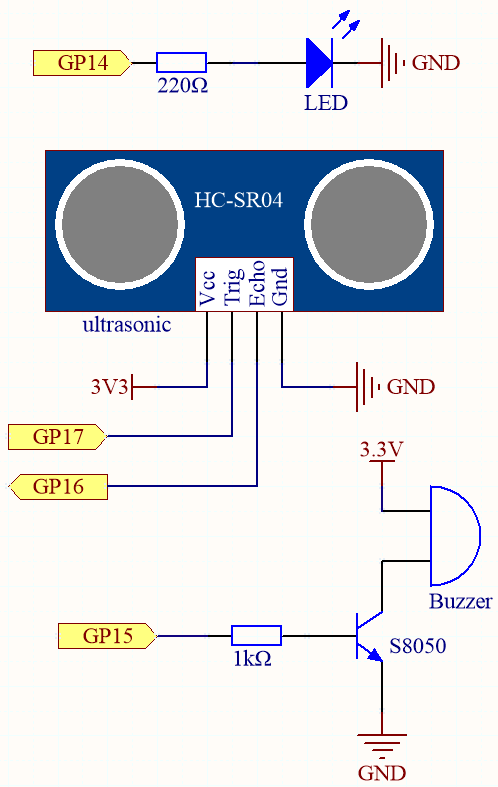
Collegamenti
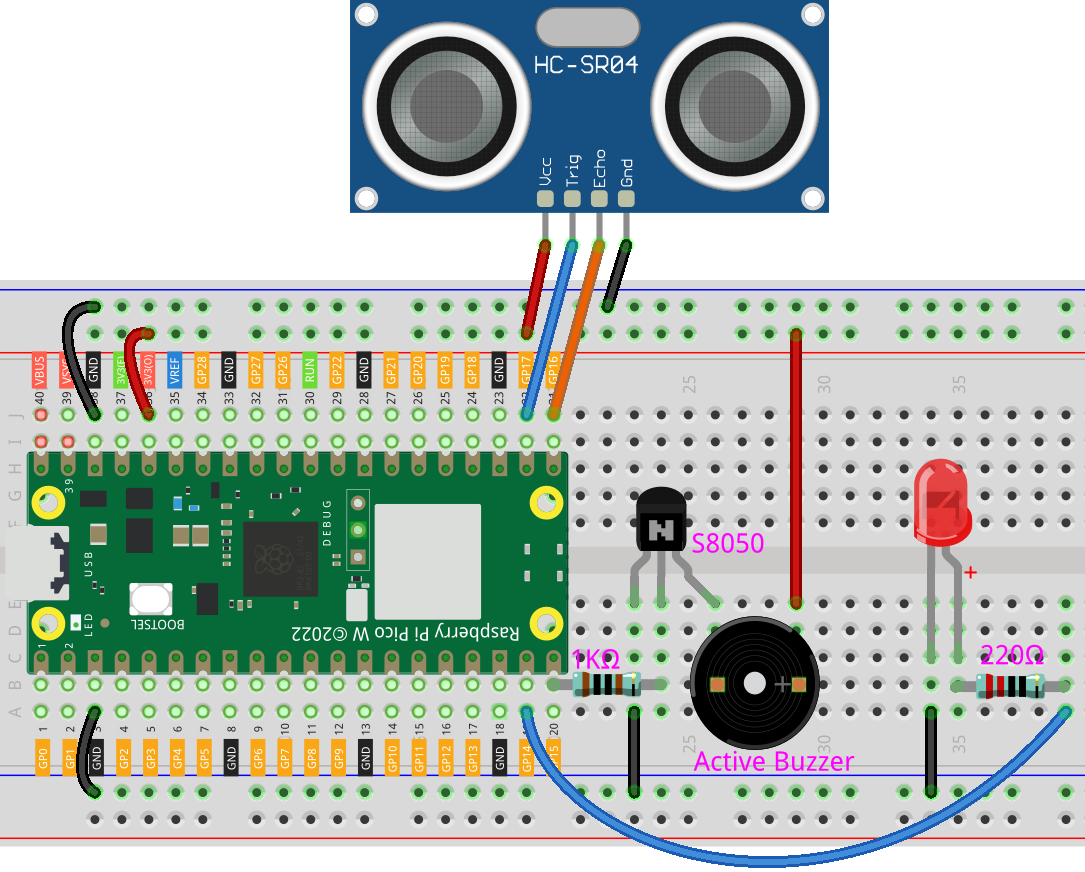
Codice
Nota
Apri il file
7.10_reversing_aid.pynel percorsokepler-kit-main/micropythono copia questo codice in Thonny, poi clicca su «Esegui Script Corrente» o semplicemente premi F5 per eseguirlo.Non dimenticare di selezionare l’interprete «MicroPython (Raspberry Pi Pico)» nell’angolo in basso a destra.
Per tutorial dettagliati, fai riferimento a Aprire ed Eseguire Codice Direttamente.
import machine
import time

# Initialize pins for the buzzer and LED
buzzer = machine.Pin(15, machine.Pin.OUT)  # Buzzer on pin 15
led = machine.Pin(14, machine.Pin.OUT)  # LED on pin 14

# Initialize pins for the ultrasonic sensor (HC-SR04)
TRIG = machine.Pin(17, machine.Pin.OUT)  # Trigger pin for the ultrasonic sensor
ECHO = machine.Pin(16, machine.Pin.IN)  # Echo pin for the ultrasonic sensor

dis = 100  # Global variable to store the distance

# Function to measure distance using the ultrasonic sensor
def distance():
    TRIG.low()
    time.sleep_us(2)
    TRIG.high()
    time.sleep_us(10)
    TRIG.low()

    timeout_start = time.ticks_us()  # Use microseconds for more precision

    # Wait for ECHO pin to go high (start of echo pulse)
    while not ECHO.value():
        if time.ticks_diff(time.ticks_us(), timeout_start) > 30000:  # 30ms timeout
            return -1  # Timeout, return -1 if no pulse is detected

    time1 = time.ticks_us()  # Start time for pulse width calculation

    # Wait for ECHO pin to go low (end of echo pulse)
    while ECHO.value():
        if time.ticks_diff(time.ticks_us(), time1) > 30000:  # 30ms timeout
            return -1  # Timeout, return -1 if pulse is too long

    time2 = time.ticks_us()  # End time for pulse width calculation

    # Calculate the distance based on the duration of the echo pulse
    during = time.ticks_diff(time2, time1)
    distance_cm = during * 340 / 2 / 10000  # Convert time to distance in cm
    return distance_cm

# Function to beep the buzzer and light up the LED
def beep():
    buzzer.value(1)  # Turn on the buzzer
    led.value(1)  # Turn on the LED
    time.sleep(0.1)  # Beep duration
    buzzer.value(0)  # Turn off the buzzer
    led.value(0)  # Turn off the LED
    time.sleep(0.1)  # Short pause between beeps

# Initialize variables for controlling beep intervals
intervals = 2000  # Default long initial interval
previousMillis = time.ticks_ms()  # Store the previous time to track beep intervals

# Main loop to handle distance-based beeping intervals
while True:
    dis = distance()  # Measure the distance directly in the main loop

    # Adjust beep intervals based on the distance
    if dis > 0:  # Ensure valid distance is measured
        if dis <= 10:
            intervals = 300  # Close distance, faster beeps
        elif dis <= 20:
            intervals = 500  # Medium-close distance, moderate beeps
        elif dis <= 50:
            intervals = 1000  # Medium distance, slower beeps
        else:
            intervals = 2000  # Far distance, much slower beeps

        # Print the measured distance
        print(f'Distance: {dis:.2f} cm')

        # Check if it's time to beep again based on the interval
        currentMillis = time.ticks_ms()  # Get the current time
        if time.ticks_diff(currentMillis, previousMillis) >= intervals:
            beep()  # Beep the buzzer and blink the LED
            previousMillis = currentMillis  # Update the time of the last beep

    time.sleep_ms(100)  # Small delay to avoid too frequent readings
Non appena il programma viene eseguito, il sensore a ultrasuoni leggerà continuamente la distanza dall’ostacolo di fronte a te, e sarai in grado di vedere il valore esatto della distanza sulla shell.
Il LED e il cicalino modificheranno la frequenza di lampeggio e di beep in base al valore della distanza, indicando così l’avvicinamento dell’ostacolo.
Nell’articolo 6.1 Misurazione della Distanza è stato menzionato che quando il sensore a ultrasuoni funziona, il programma viene sospeso.
Per evitare interferenze con il tempo di lampeggio del LED o del cicalino, in questo esempio abbiamo creato un thread separato per il rilevamento della distanza.