Xmas Gadget
Note
🌟 Welcome to the SunFounder Facebook Community! Whether you’re into Raspberry Pi, Arduino, or ESP32, you’ll find inspiration, help ideas here.
✅ Be the first to get free learning resources.
✅ Stay updated on new products & exclusive giveaways.
✅ Share your creations and get real feedback.
Kit purchase
Looking for parts? Check out our all-in-one kits below — packed with components, beginner-friendly guides, and tons of fun.
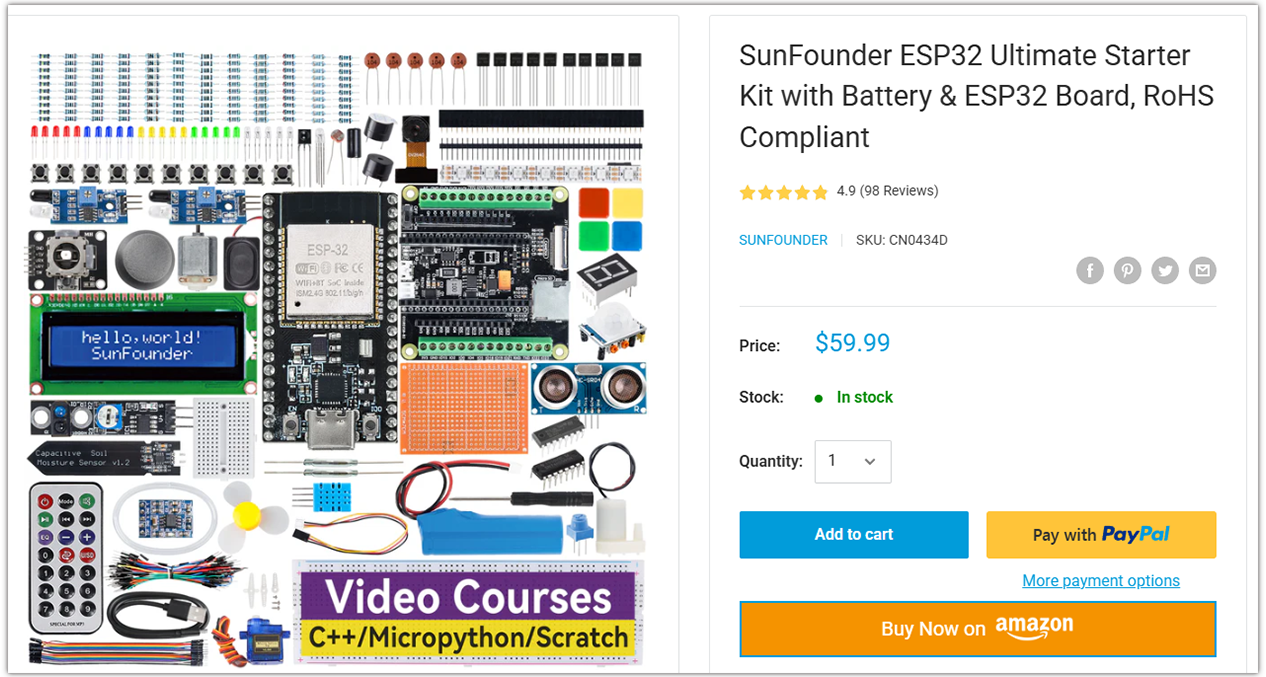
Name |
Includes ESP32 board |
PURCHASE LINK |
|---|---|---|
ESP32 Ultimate Starter Kit |
ESP32 WROOM 32E + |
|
Universal Maker Sensor Kit |
Course Introduction
In this project, we use an Arduino Nano ESP32 drives a MAX7219 LED matrix and buzzer to display animated Christmas patterns with synchronized music, triggered by an obstacle sensor.
Note
If this is your first time working with an Arduino project, we recommend downloading and reviewing the basic materials first.
Required Components
In this project, we need the following components:
SN |
COMPONENT INTRODUCTION |
QUANTITY |
PURCHASE LINK |
|---|---|---|---|
1 |
Arduino Nano ESP32 |
1 |
|
2 |
USB Type-C cable |
1 |
|
3 |
Breadboard |
1 |
|
4 |
Wires |
Several |
|
5 |
IR Obstacle Avoidance Sensor Module |
1 |
|
6 |
MAX7219 Dot Matrix Module |
1 |
|
7 |
Buzzer Modudle |
1 |
Wiring
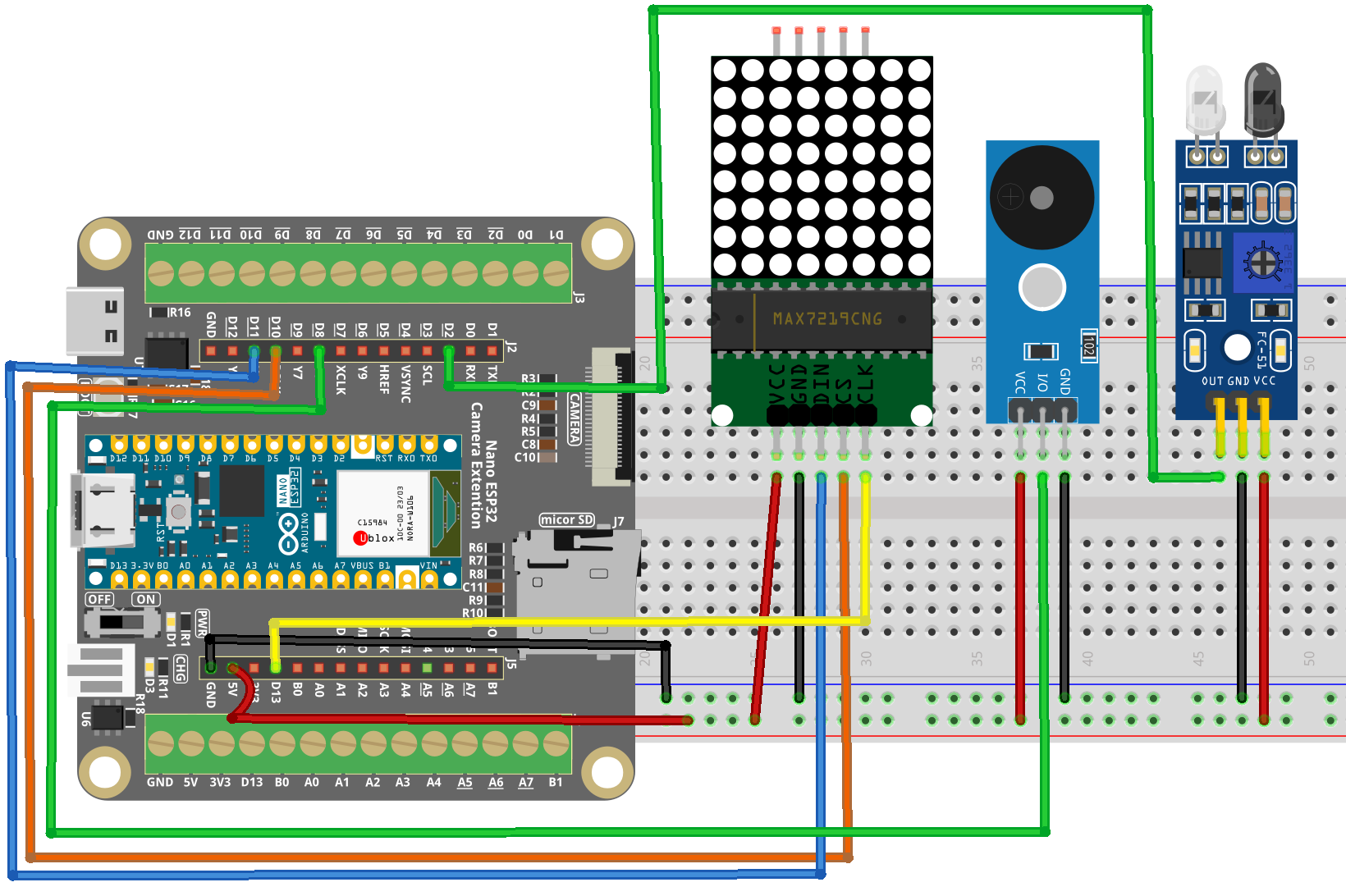
Common Connections:
MAX7219 Dot Matrix Module
CLK: Connect to D13 on the ESP32.
CS: Connect to D10 on the ESP32.
DIN: Connect to D11 on the ESP32.
GND: Connect to GND on the ESP32 Extension Board
VCC: Connect to 5V on the ESP32 Extension Board.
Buzzer Module
I/0: Connect to D2 on the ESP32.
+: Connect to breadboard’s red power bus.
-: Connect to 3.3V on the ESP32 Extension Board.
IR Obstacle Avoidance Sensor Module
OUT: Connect to D8 on the ESP32.
GND: Connect to GND on the ESP32 Extension Board
VCC: Connect to 3.3V on the ESP32 Extension Board.
Writing the Code
Note
Before you begin, you need to upload the pitches.h library to your Arduino. Copy the contents of the library into the Arduino IDE, save it as pitches.h and then upload it to your Arduino.
#define NOTE_B0  31
#define NOTE_C1  33
#define NOTE_CS1 35
#define NOTE_D1  37
#define NOTE_DS1 39
#define NOTE_E1  41
#define NOTE_F1  44
#define NOTE_FS1 46
#define NOTE_G1  49
#define NOTE_GS1 52
#define NOTE_A1  55
#define NOTE_AS1 58
#define NOTE_B1  62
#define NOTE_C2  65
#define NOTE_CS2 69
#define NOTE_D2  73
#define NOTE_DS2 78
#define NOTE_E2  82
#define NOTE_F2  87
#define NOTE_FS2 93
#define NOTE_G2  98
#define NOTE_GS2 104
#define NOTE_A2  110
#define NOTE_AS2 117
#define NOTE_B2  123
#define NOTE_C3  131
#define NOTE_CS3 139
#define NOTE_D3  147
#define NOTE_DS3 156
#define NOTE_E3  165
#define NOTE_F3  175
#define NOTE_FS3 185
#define NOTE_G3  196
#define NOTE_GS3 208
#define NOTE_A3  220
#define NOTE_AS3 233
#define NOTE_B3  247
#define NOTE_C4  262
#define NOTE_CS4 277
#define NOTE_D4  294
#define NOTE_DS4 311
#define NOTE_E4  330
#define NOTE_F4  349
#define NOTE_FS4 370
#define NOTE_G4  392
#define NOTE_GS4 415
#define NOTE_A4  440
#define NOTE_AS4 466
#define NOTE_B4  494
#define NOTE_C5  523
#define NOTE_CS5 554
#define NOTE_D5  587
#define NOTE_DS5 622
#define NOTE_E5  659
#define NOTE_F5  698
#define NOTE_FS5 740
#define NOTE_G5  784
#define NOTE_GS5 831
#define NOTE_A5  880
#define NOTE_AS5 932
#define NOTE_B5  988
#define NOTE_C6  1047
#define NOTE_CS6 1109
#define NOTE_D6  1175
#define NOTE_DS6 1245
#define NOTE_E6  1319
#define NOTE_F6  1397
#define NOTE_FS6 1480
#define NOTE_G6  1568
#define NOTE_GS6 1661
#define NOTE_A6  1760
#define NOTE_AS6 1865
#define NOTE_B6  1976
#define NOTE_C7  2093
#define NOTE_CS7 2217
#define NOTE_D7  2349
#define NOTE_DS7 2489
#define NOTE_E7  2637
#define NOTE_F7  2794
#define NOTE_FS7 2960
#define NOTE_G7  3136
#define NOTE_GS7 3322
#define NOTE_A7  3520
#define NOTE_AS7 3729
#define NOTE_B7  3951
#define NOTE_C8  4186
#define NOTE_CS8 4435
#define NOTE_D8  4699
#define NOTE_DS8 4978
Note
You can copy this code into Arduino IDE.
Don’t forget to select the board(Arduino Nano ESP32) and the correct port before clicking the Upload button.
// Arduino Nano ESP32 - Obstacle Triggered Christmas LED + Melody
// - MAX7219 8x8 LED matrix (bit-bang driver, ESP32 compatible)
// - Obstacle sensor triggers animation + melody
// - Buzzer plays melody while LED brightness "breathes"
// Wiring is provided below the sketch.

#include "pitches.h"

// -------------------- Pin definitions (Nano ESP32) --------------------
const int sensorPin = 2;   // Obstacle sensor digital output pin
const int buzzerPin = 8;   // Buzzer pin (use a PWM-capable pin if possible)

// MAX7219 pins (match your previous reference wiring)
#define DIN  11            // MAX7219 DIN
#define CS   10            // MAX7219 CS/LOAD
#define CLK  13            // MAX7219 CLK

// -------------------- Minimal MAX7219 Driver (ESP32 compatible) --------------------
class MAX7219_8x8 {
public:
  MAX7219_8x8(int din, int clk, int cs) : _din(din), _clk(clk), _cs(cs) {}

  void begin(uint8_t intensity /*0..15*/) {
    pinMode(_din, OUTPUT);
    pinMode(_clk, OUTPUT);
    pinMode(_cs,  OUTPUT);

    digitalWrite(_cs, HIGH);
    digitalWrite(_clk, LOW);

    // MAX7219 init sequence
    sendCmd(0x0F, 0x00); // Display test: off
    sendCmd(0x09, 0x00); // Decode mode: none
    sendCmd(0x0B, 0x07); // Scan limit: 0..7 (8 digits)
    sendCmd(0x0C, 0x01); // Shutdown: normal operation
    setIntensity(intensity);
    clear();
  }

  void setIntensity(uint8_t intensity) {
    if (intensity > 15) intensity = 15;
    sendCmd(0x0A, intensity);
  }

  void clear() {
    for (int row = 0; row < 8; row++) setRow(row, 0x00);
  }

  // row: 0..7, data bits are columns (bit0 = col0)
  void setRow(uint8_t row, uint8_t data) {
    sendCmd(row + 1, data);
  }

  // Column write compatible with LedControl::setColumn()
  // col: 0..7, data bits are rows (bit0 = row0)
  void setColumn(uint8_t col, uint8_t data) {
    for (int r = 0; r < 8; r++) {
      bool on = (data >> r) & 0x01;
      if (on) _rowBuf[r] |=  (1 << col);
      else    _rowBuf[r] &= ~(1 << col);
    }
    for (int r = 0; r < 8; r++) setRow(r, _rowBuf[r]);
  }

  void clearBuffered() {
    for (int r = 0; r < 8; r++) _rowBuf[r] = 0;
    clear();
  }

private:
  int _din, _clk, _cs;
  uint8_t _rowBuf[8] = {0};

  void shiftOut16(uint8_t reg, uint8_t data) {
    // MSB first: reg then data
    for (int i = 7; i >= 0; i--) {
      digitalWrite(_clk, LOW);
      digitalWrite(_din, (reg >> i) & 1);
      digitalWrite(_clk, HIGH);
    }
    for (int i = 7; i >= 0; i--) {
      digitalWrite(_clk, LOW);
      digitalWrite(_din, (data >> i) & 1);
      digitalWrite(_clk, HIGH);
    }
    digitalWrite(_clk, LOW);
  }

  void sendCmd(uint8_t reg, uint8_t data) {
    digitalWrite(_cs, LOW);
    shiftOut16(reg, data);
    digitalWrite(_cs, HIGH);
  }
};

MAX7219_8x8 lc(DIN, CLK, CS);

// -------------------- LED matrix patterns --------------------
byte treePattern[8] = {
  B00010000, B00111000, B01111100, B11111110,
  B00111000, B01111100, B11111110, B00111000
};

byte sockPattern[8] = {
  B11111000, B11111000, B01110000, B01110000,
  B01111000, B01111110, B01111111, B01111111
};

byte bellPattern[8] = {
  B00000010, B00011100, B00111100, B11111100,
  B00111000, B01010000, B00010000, B00000000
};

byte bellMirror[8] = {
  B01000000, B00111000, B00111100, B00111111,
  B00011100, B00001010, B00001000, B00000000
};

byte hatPattern[8] = {
  B00001100, B00011110, B00111101, B01111000,
  B01111000, B01111000, B11111100, B11111100
};

byte letterX[8] = {
  B10000001, B01000010, B00100100, B00011000,
  B00011000, B00100100, B01000010, B10000001
};

byte letterM[8] = {
  B10000001, B11000011, B10100101, B10011001,
  B10000001, B10000001, B10000001, B10000001
};

byte letterA[8] = {
  B00111100, B01100110, B11000011, B11000011,
  B11111111, B11000011, B11000011, B11000011
};

byte letterS[8] = {
  B00111110, B01100000, B01100000, B00111100,
  B00000110, B00000110, B01100110, B00111100
};

// -------------------- Melody (stored in flash) --------------------
// On ESP32, PROGMEM is supported by Arduino core.
// We will read values with pgm_read_word().
const int melody[] PROGMEM = {
  NOTE_E4, NOTE_E4, NOTE_E4, NOTE_E4, NOTE_E4, NOTE_E4,
  NOTE_E4, NOTE_G4, NOTE_C4, NOTE_D4, NOTE_E4,
  NOTE_F4, NOTE_F4, NOTE_F4, NOTE_F4, NOTE_F4, NOTE_E4, NOTE_E4, NOTE_E4, NOTE_E4,
  NOTE_E4, NOTE_D4, NOTE_D4, NOTE_E4, NOTE_D4, NOTE_G4
};

const int noteDurations[] PROGMEM = {
  6, 6, 3, 6, 6, 3,
  6, 6, 6, 6, 3,
  6, 6, 6, 6, 6, 6, 6, 6, 6,
  6, 6, 6, 6, 3, 3
};

// -------------------- Display function (same orientation logic as your original) --------------------
void displayPattern(const byte pattern[8]) {
  lc.clearBuffered();
  for (int col = 0; col < 8; col++) {
    // Reverse order to keep the original orientation
    lc.setColumn(col, pattern[7 - col]);
  }
}

// -------------------- Breathing effect synchronized with melody --------------------
void breathingEffectWithMelody(const byte pattern[8],
                              const int* melodyProgmem,
                              const int* durationProgmem,
                              int noteStart,
                              int noteCount) {
  int currentNote = noteStart;
  unsigned long previousMillis = 0;
  const int breathIntervalMs = 30;

  int brightness = 0;
  bool increasing = true;

  for (int i = 0; i < noteCount; i++) {
    int durDiv = (int)pgm_read_word(&durationProgmem[currentNote]);
    int freq   = (int)pgm_read_word(&melodyProgmem[currentNote]);

    // Convert duration divider into milliseconds
    int noteDurationMs = 1200 / durDiv;

    // Play note
    tone(buzzerPin, freq, noteDurationMs);

    unsigned long startTime = millis();
    while (millis() - startTime < (unsigned long)(noteDurationMs * 1.30f)) {
      unsigned long now = millis();
      if (now - previousMillis >= (unsigned long)breathIntervalMs) {
        previousMillis = now;

        lc.setIntensity((uint8_t)brightness);
        displayPattern(pattern);

        if (increasing) {
          brightness++;
          if (brightness >= 15) { brightness = 15; increasing = false; }
        } else {
          brightness--;
          if (brightness <= 0)  { brightness = 0;  increasing = true;  }
        }
      }
    }

    noTone(buzzerPin);
    currentNote++;
  }
}

void setup() {
  pinMode(sensorPin, INPUT);      // Set obstacle sensor pin as input
  pinMode(buzzerPin, OUTPUT);     // Set buzzer pin as output

  lc.begin(8);                    // Init MAX7219 with medium intensity
  lc.clearBuffered();
}

void loop() {
  // Trigger when obstacle is detected (your original logic: LOW means detected)
  if (digitalRead(sensorPin) == LOW) {
    // Use safer type: pointer to an 8-byte array
    byte (*patterns[9])[8] = {
      &treePattern, &sockPattern, &bellPattern, &bellMirror,
      &hatPattern, &letterX, &letterM, &letterA, &letterS
    };

    const int notesPerPattern = 3;
    const int totalNotes = 26;
    const int lastPatternNotes = totalNotes - (notesPerPattern * 8);

    for (int i = 0; i < 9; i++) {
      int noteStart = i * notesPerPattern;
      int noteCount = (i == 8) ? lastPatternNotes : notesPerPattern;

      if (noteCount > 0) {
        breathingEffectWithMelody(*patterns[i], melody, noteDurations, noteStart, noteCount);
      }
    }

    lc.clearBuffered(); // Clear display after completion
  }

  delay(100); // Prevent frequent triggers
}