Slot Machine
Note
🌟 Welcome to the SunFounder Facebook Community! Whether you’re into Raspberry Pi, Arduino, or ESP32, you’ll find inspiration, help ideas here.
✅ Be the first to get free learning resources.
✅ Stay updated on new products & exclusive giveaways.
✅ Share your creations and get real feedback.
Kit purchase
Looking for parts? Check out our all-in-one kits below — packed with components, beginner-friendly guides, and tons of fun.
Name |
Includes ESP32 board |
PURCHASE LINK |
|---|---|---|
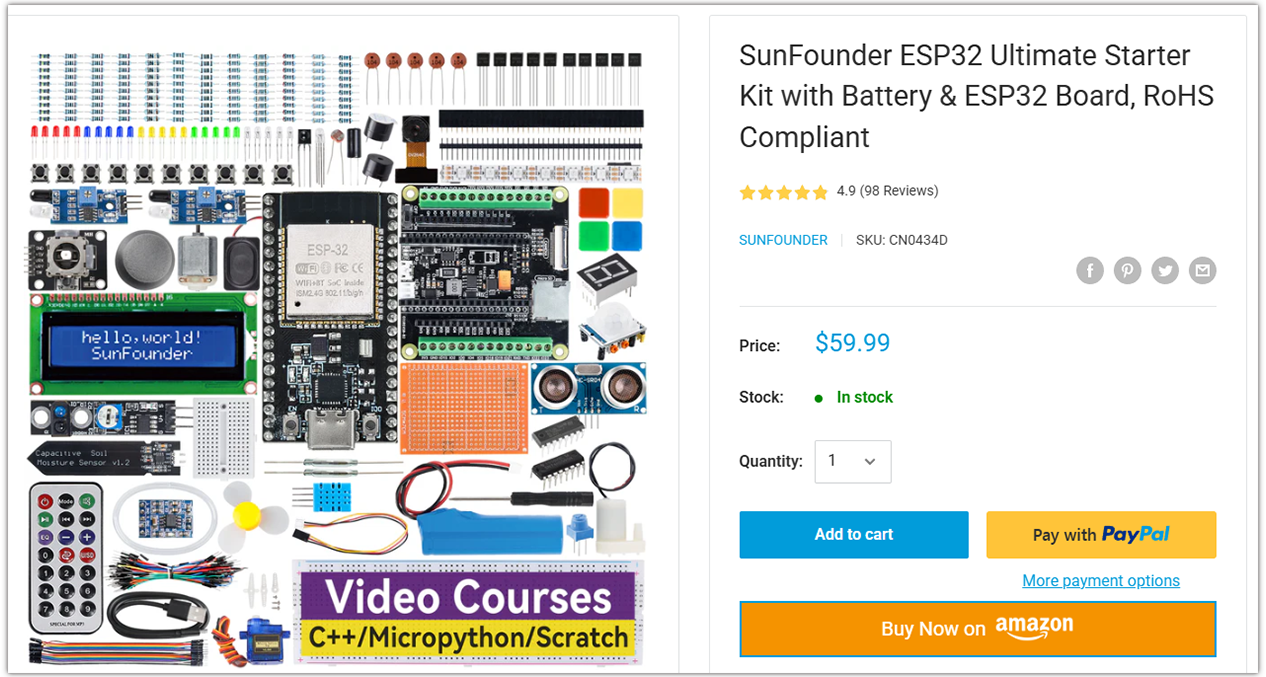
ESP32 Ultimate Starter Kit |
ESP32 WROOM 32E + |
|
Universal Maker Sensor Kit |
Course Introduction
In this lesson, you’ll learn how to use an OLED display, a button, and a buzzer with the Arduino Nano ESP32 to create a Slot Machine game.
The OLED shows spinning reels with custom icons, the button starts the spin, and the buzzer plays sound effects for spinning, winning, or losing.
Note
If this is your first time working with an Arduino project, we recommend downloading and reviewing the basic materials first.
Required Components
In this project, we need the following components:
SN |
COMPONENT INTRODUCTION |
QUANTITY |
PURCHASE LINK |
|---|---|---|---|
1 |
Arduino Nano ESP32 |
1 |
|
2 |
USB Type-C cable |
1 |
|
3 |
Breadboard |
1 |
|
4 |
Wires |
Several |
|
5 |
Button |
1 |
|
6 |
OLED Display Module |
1 |
|
7 |
Active Buzzer |
1 |
Wiring
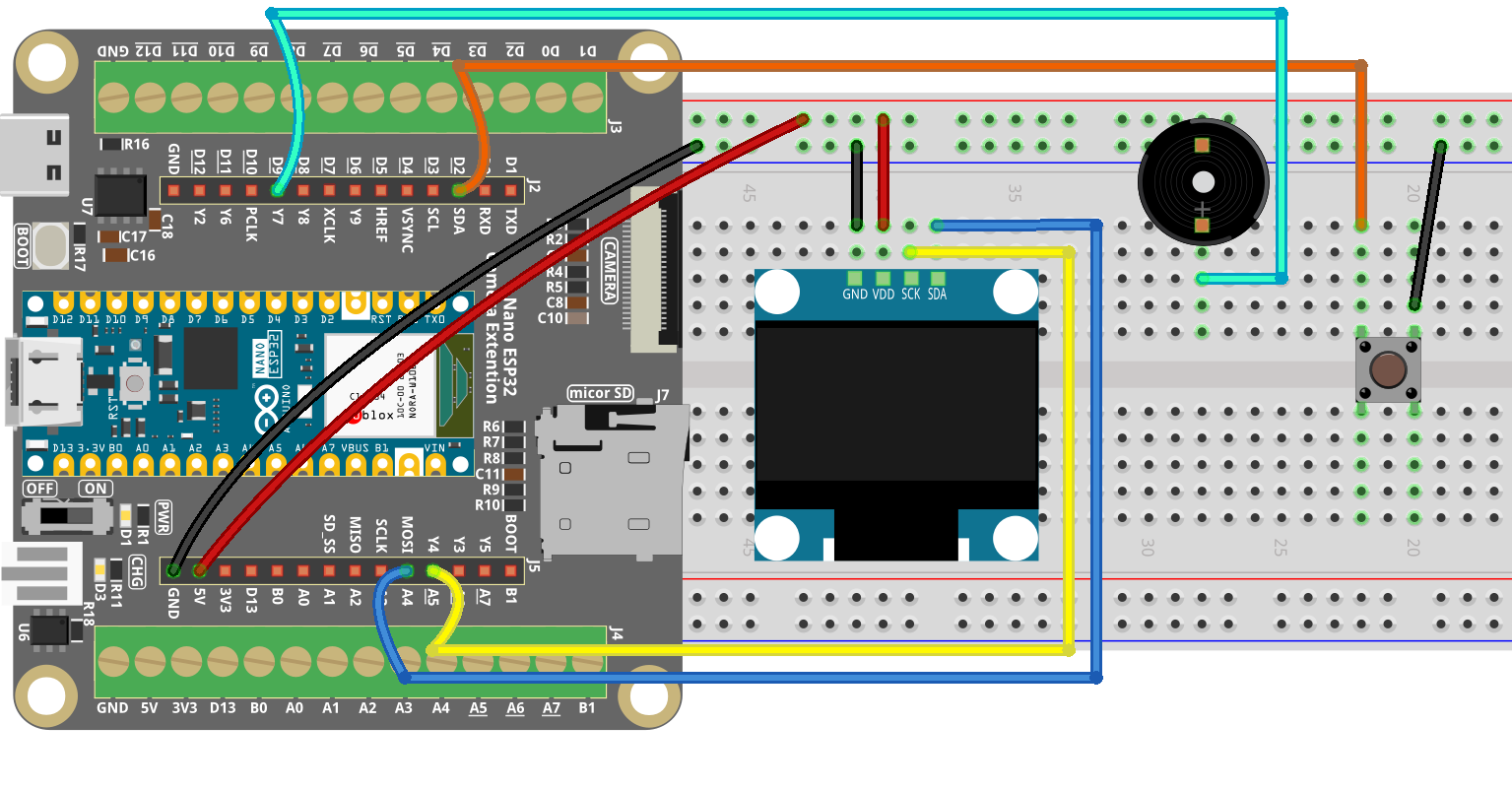
Common Connections:
OLED Display Module
SDA: Connect to A4 on the ESP32.
SCK: Connect to A5 on the ESP32.
GND: Connect to breadboard’s negative power bus.
VCC: Connect to breadboard’s red power bus.
Button
Connect to breadboard’s negative power bus.
Connect to D2 on the ESP32.
Active Buzzer
Connect to breadboard’s negative power bus.
Connect to D9 on the ESP32.
Writing the Code
Note
You can copy this code into Arduino IDE.
To install the library, use the Arduino Library Manager and search for Adafruit SSD1306 and Adafruit GFX and install it.
Don’t forget to select the board(Arduino Nano ESP32) and the correct port before clicking the Upload button.
#include <Wire.h>
#include <math.h>                // Needed for sin/cos on ESP32
#include <Adafruit_GFX.h>
#include <Adafruit_SSD1306.h>

#define SCREEN_WIDTH 128
#define SCREEN_HEIGHT 64
#define OLED_RESET   -1
#define OLED_ADDR    0x3C

// -------------------- Pins (Nano ESP32) --------------------
#define BTN_PIN     2
#define BUZZER_PIN  9

Adafruit_SSD1306 display(SCREEN_WIDTH, SCREEN_HEIGHT, &Wire, OLED_RESET);

// ===================== Three "slot" layout =====================
const int CELL_W = 34;
const int CELL_H = 34;
const int GAP    = 6;
const int AREA_W = CELL_W * 3 + GAP * 2;
const int START_X = (SCREEN_WIDTH - AREA_W) / 2;
const int START_Y = 16;

int reels[3] = {0, 1, 2};

enum Symbol { CHERRY=0, STAR=1, LEMON=2, HEART=3, SEVEN=4 };
const int ICON_COUNT = 5;

// ===================== Sound effects =====================
void playWinJingle() {
  int notes[] = { 784, 988, 1175, 1568 }; // G5, B5, D6, G6
  int durs[]  = { 120, 120, 120, 220 };
  for (int i = 0; i < 4; i++) {
    tone(BUZZER_PIN, notes[i], durs[i]);
    delay(durs[i] + 40);
  }
  noTone(BUZZER_PIN);
}

void playLoseBeep() {
  tone(BUZZER_PIN, 420, 100); delay(130);
  tone(BUZZER_PIN, 360, 100); delay(130);
  noTone(BUZZER_PIN);
}

// Start sound (right when spin starts)
void playStartChirp() {
  tone(BUZZER_PIN, 900, 80); delay(90);
  tone(BUZZER_PIN, 1200, 90); delay(110);
  noTone(BUZZER_PIN);
}

// Spin tick sound (very short beep)
void spinTick() {
  tone(BUZZER_PIN, 950, 18);
  // No delay here; main loop controls refresh timing
}

// ===================== Layout & drawing =====================
void drawSlotFrames() {
  for (int i = 0; i < 3; i++) {
    int x = START_X + i * (CELL_W + GAP);
    display.drawRoundRect(x, START_Y, CELL_W, CELL_H, 4, SSD1306_WHITE);
  }
}

void cellCenter(int cellIndex, int &cx, int &cy) {
  int x = START_X + cellIndex * (CELL_W + GAP);
  cx = x + CELL_W / 2;
  cy = START_Y + CELL_H / 2;
}

// ===================== Vector icons =====================
void drawCherry(int cx, int cy) {
  int r = 5;
  display.fillCircle(cx - 5, cy + 4, r, SSD1306_WHITE);
  display.fillCircle(cx + 5, cy + 4, r, SSD1306_WHITE);
  display.drawLine(cx - 2, cy - 6, cx - 6, cy + 0, SSD1306_WHITE);
  display.drawLine(cx + 2, cy - 6, cx + 6, cy + 0, SSD1306_WHITE);
  display.drawLine(cx - 2, cy - 6, cx + 2, cy - 10, SSD1306_WHITE);
}

void drawStar(int cx, int cy) {
  int r1 = 10, r2 = 4;
  int px[5], py[5];
  for (int i = 0; i < 5; i++) {
    float a = -90 + i * 72;
    float rad = a * 3.14159f / 180.0f;
    px[i] = cx + (int)(r1 * cosf(rad));
    py[i] = cy + (int)(r1 * sinf(rad));
  }
  for (int i = 0; i < 5; i++) {
    display.drawLine(px[i], py[i], px[(i + 2) % 5], py[(i + 2) % 5], SSD1306_WHITE);
  }
  display.fillCircle(cx, cy, r2, SSD1306_WHITE);
}

void drawLemon(int cx, int cy) {
  int w = 20, h = 12, r = 6;
  int x = cx - w / 2, y = cy - h / 2;
  display.fillRoundRect(x, y, w, h, r, SSD1306_WHITE);
  display.fillRoundRect(x + 2, y + 2, w - 4, h - 4, r - 3, SSD1306_BLACK);
  display.drawPixel(x - 1, cy, SSD1306_WHITE);
  display.drawPixel(x + w + 1, cy, SSD1306_WHITE);
}

void drawHeart(int cx, int cy) {
  int r = 6;
  display.fillCircle(cx - 5, cy - 2, r, SSD1306_WHITE);
  display.fillCircle(cx + 5, cy - 2, r, SSD1306_WHITE);
  display.fillTriangle(cx - 10, cy, cx + 10, cy, cx, cy + 12, SSD1306_WHITE);
}

void drawSeven(int cx, int cy) {
  int w = 18, th = 3;
  int x0 = cx - w / 2;
  display.fillRect(x0, cy - 9, w, th, SSD1306_WHITE);
  for (int i = 0; i < 10; i++) {
    display.drawLine(cx + (i / 2), cy - 9 + th + i,
                    cx + (i / 2) + 1, cy - 9 + th + i + 1,
                    SSD1306_WHITE);
  }
}

void drawIconInCell(int cellIndex, int symbol) {
  int cx, cy; cellCenter(cellIndex, cx, cy);
  switch (symbol) {
    case CHERRY: drawCherry(cx, cy); break;
    case STAR:   drawStar(cx, cy);   break;
    case LEMON:  drawLemon(cx, cy);  break;
    case HEART:  drawHeart(cx, cy);  break;
    case SEVEN:  drawSeven(cx, cy);  break;
  }
}

// ===================== Screen & logic =====================
bool isJackpot() {
  return (reels[0] == reels[1]) && (reels[1] == reels[2]);
}

void showIdle() {
  display.clearDisplay();
  display.setTextSize(2);
  display.setTextColor(SSD1306_WHITE);
  display.setCursor(20, 0);
  display.println("SLOT");

  drawSlotFrames();
  for (int i = 0; i < 3; i++) drawIconInCell(i, reels[i]);

  display.setTextSize(1);
  display.setCursor(18, SCREEN_HEIGHT - 10);
  display.println("Press button to spin");
  display.display();
}

void drawSpinScreen() {
  display.clearDisplay();
  display.setTextSize(1);
  display.setCursor(32, 2);
  display.println("SPINNING...");

  drawSlotFrames();
  for (int i = 0; i < 3; i++) drawIconInCell(i, reels[i]);

  display.display();
}

void spinAndStop() {
  playStartChirp();

  unsigned long start = millis();
  unsigned long stopAt[3] = { start + 700, start + 1100, start + 1500 };
  int stepDelay[3] = { 40, 55, 70 };
  bool stopped[3] = { false, false, false };

  unsigned long lastTickMs = 0;
  const unsigned long tickGapMs = 28;

  // Per-reel phase timers
  unsigned long lastPhase[3] = { 0, 0, 0 };

  while (!(stopped[0] && stopped[1] && stopped[2])) {
    unsigned long now = millis();
    bool anyStepChanged = false;

    for (int r = 0; r < 3; r++) {
      if (!stopped[r]) {
        if (now >= stopAt[r]) {
          stopped[r] = true;
          reels[r] = random(ICON_COUNT);
          anyStepChanged = true;
        } else {
          if (now - lastPhase[r] >= (unsigned long)stepDelay[r]) {
            lastPhase[r] = now;
            reels[r] = (reels[r] + 1) % ICON_COUNT;
            anyStepChanged = true;
          }
        }
      }
    }

    if (anyStepChanged && (now - lastTickMs >= tickGapMs)) {
      spinTick();
      lastTickMs = now;
    }

    drawSpinScreen();
    delay(8);
  }
}

void showResult() {
  display.clearDisplay();
  drawSlotFrames();
  for (int i = 0; i < 3; i++) drawIconInCell(i, reels[i]);

  display.setTextSize(1);
  display.setCursor(6, 2);

  if (isJackpot()) {
    display.println("JACKPOT! You win!");
    display.display();
    playWinJingle();
  } else {
    display.println("Try Again");
    display.display();
    playLoseBeep();
  }
}

void setup() {
  pinMode(BTN_PIN, INPUT_PULLUP);

  // tone() works without setting OUTPUT explicitly, but it's harmless to do so
  pinMode(BUZZER_PIN, OUTPUT);
  noTone(BUZZER_PIN);

  // Initialize OLED over I2C
  if (!display.begin(SSD1306_SWITCHCAPVCC, OLED_ADDR)) {
    while (true) { delay(1000); }
  }

  display.clearDisplay();
  display.display();

  // More reliable RNG seed on ESP32
  randomSeed((uint32_t)analogRead(A0) ^ (uint32_t)micros());

  showIdle();
}

void loop() {
  if (digitalRead(BTN_PIN) == LOW) {
    delay(25);
    if (digitalRead(BTN_PIN) == LOW) {
      spinAndStop();
      showResult();

      // Wait for button release
      while (digitalRead(BTN_PIN) == LOW) { delay(10); }
      delay(120);

      showIdle();
    }
  }
}