Auto Pump
Note
🌟 Welcome to the SunFounder Facebook Community! Whether you’re into Raspberry Pi, Arduino, or ESP32, you’ll find inspiration, help ideas here.
✅ Be the first to get free learning resources.
✅ Stay updated on new products & exclusive giveaways.
✅ Share your creations and get real feedback.
Kit purchase
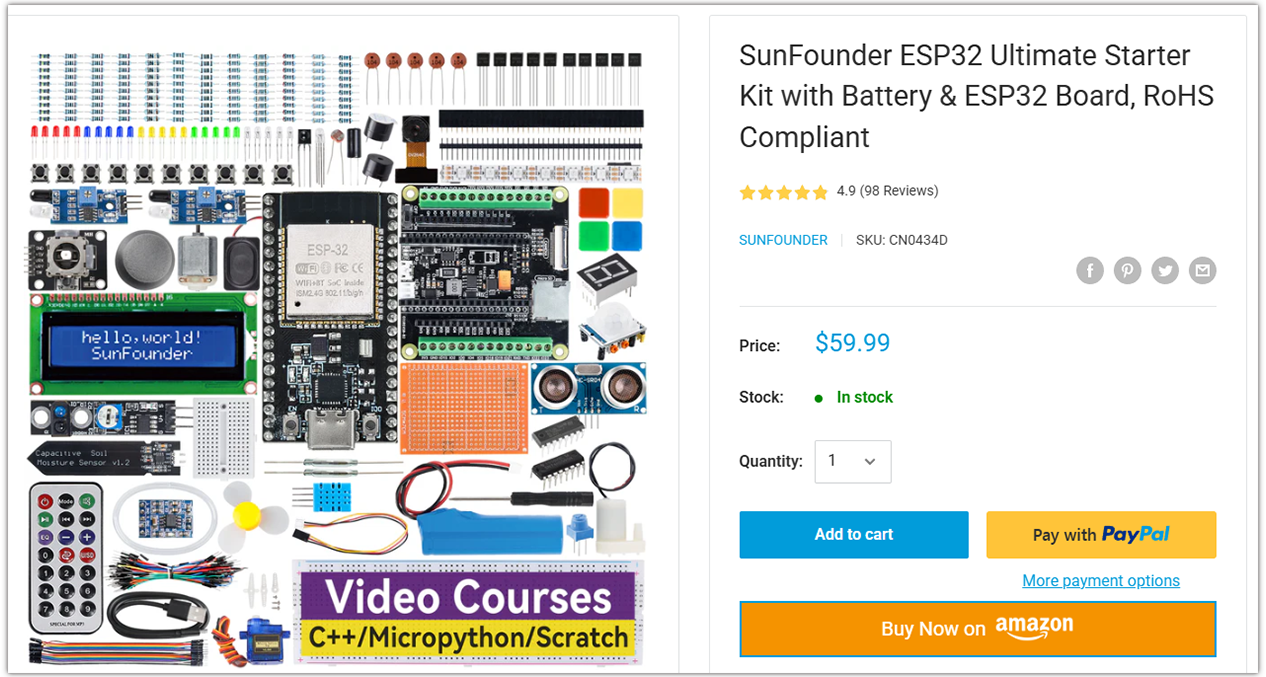
Looking for parts? Check out our all-in-one kits below — packed with components, beginner-friendly guides, and tons of fun.
Name |
Includes ESP32 board |
PURCHASE LINK |
|---|---|---|
ESP32 Ultimate Starter Kit |
ESP32 WROOM 32E + |
|
Universal Maker Sensor Kit |
Course Introduction
This program uses an Nano ESP32 board with Ultrasonic Sensor Module and a water pump.
The sensor is used to detect the presence of an object.
When an object is detected, the water pump is activated to dispense liquid .
Note
If this is your first time working with an ESP32 project, we recommend downloading and reviewing the basic materials first.
Required Components
In this project, we need the following components:
SN |
COMPONENT INTRODUCTION |
QUANTITY |
PURCHASE LINK |
|---|---|---|---|
1 |
Arduino Nano ESP32 |
1 |
|
2 |
USB Type-C cable |
1 |
|
3 |
Breadboard |
1 |
|
4 |
Wires |
Several |
|
5 |
Power Supply |
1 |
|
6 |
Ultrasonic Sensor Module |
1 |
|
7 |
TA6586 - Motor Driver Chip |
1 |
|
8 |
Centrifugal Pump |
1 |
Wiring
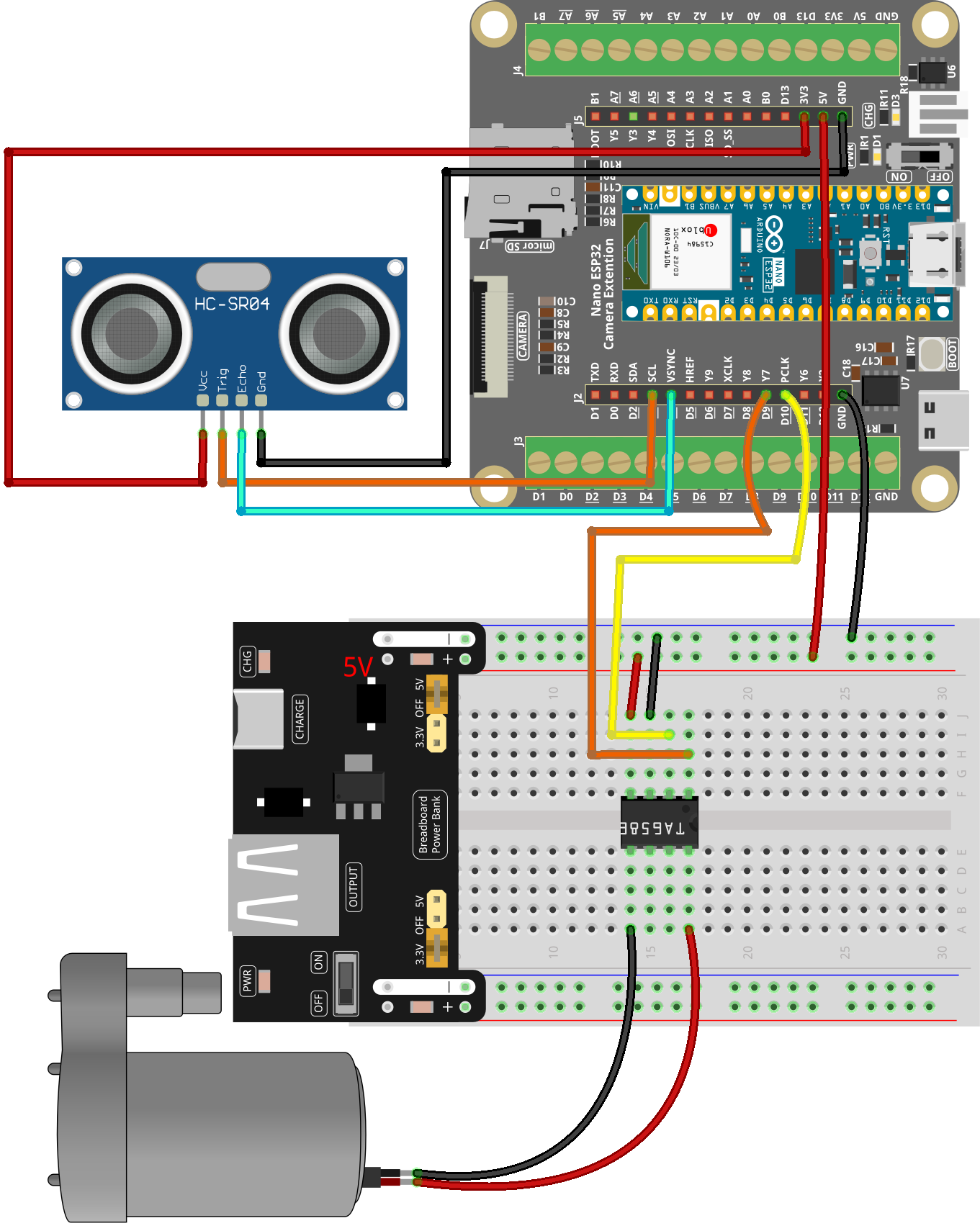
Common Connections:
Ultrasonic Sensor Module
Trig: Connect to D3 on the ESP32.
Echo: Connect to D4 on the ESP32.
GND: Connect to GND on the ESP32.
VCC: Connect to 3.3V on the ESP32.
TA6586 - Motor Driver Chip
BI: Connect to D9 on the ESP32.
FI: Connect to D10 on the ESP32.
GND: Connect to breadboard’s negative power bus.
VCC: Connect to breadboard’s red power bus.
Centrifugal Pump
Connect to TA6586 B0.
Connect to TA6586 F0.
Writing the Code
Note
You can copy this code into Arduino IDE.
Don’t forget to select the board(Arduino Nano ESP32) and the correct port before clicking the Upload button.
#include <Arduino.h>
#include <math.h>

/*
  Arduino Nano ESP32 + Ultrasonic (Echo=D4, Trig=D3) + TA6586 Pump Control

  Behavior:
    - Turn pump ON when distance < ON_THRESHOLD_CM
    - Turn pump OFF when distance > OFF_THRESHOLD_CM (hysteresis)
    - Median-of-5 sampling; pulseIn timeout
    - Min ON/OFF hold times to avoid chattering
*/

// -------- Pins --------
// Ultrasonic: Echo -> D4, Trig -> D3
const uint8_t ECHO_PIN = D4;
const uint8_t TRIG_PIN = D3;

// TA6586 motor driver pins (change if you wired differently)
const uint8_t MOTOR_BI = D9;    // IN1
const uint8_t MOTOR_FI = D10;   // IN2

// -------- Tuning --------
const float    ON_THRESHOLD_CM   = 10.0f;    // pump ON below this
const float    OFF_THRESHOLD_CM  = 12.0f;    // pump OFF above this (hysteresis)
const uint8_t  SAMPLES           = 5;        // median-of-5
const uint32_t PULSE_TIMEOUT_US  = 30000UL;  // 30ms timeout

// Minimum hold times to protect the pump from rapid toggling
const uint32_t MIN_ON_HOLD_MS    = 1500;
const uint32_t MIN_OFF_HOLD_MS   = 800;

// Optional: ambient temperature (°C) for speed-of-sound correction
const float AMBIENT_TEMP_C       = 20.0f;

// -------- State --------
enum PumpState { PUMP_OFF = 0, PUMP_ON = 1 };
PumpState pumpState = PUMP_OFF;
uint32_t lastToggleMs = 0;

// -------- Pump helpers --------
void pumpForward() {
  // Direction depends on your wiring; swap HIGH/LOW or use pumpReverse() if needed.
  digitalWrite(MOTOR_FI, LOW);
  digitalWrite(MOTOR_BI, HIGH);
}

void pumpReverse() {
  digitalWrite(MOTOR_BI, LOW);
  digitalWrite(MOTOR_FI, HIGH);
}

void pumpStop() {
  // Stop (coast). If your driver supports brake mode, follow its datasheet.
  digitalWrite(MOTOR_BI, LOW);
  digitalWrite(MOTOR_FI, LOW);
}

// -------- Ultrasonic helpers --------
float usPerCm() {
  // Speed of sound (m/s) ≈ 331.4 + 0.6*T(°C)
  float v = 331.4f + 0.6f * AMBIENT_TEMP_C; // m/s
  float us_per_m = 1e6f / v;                // µs per meter (one-way)
  return (us_per_m * 0.01f) * 2.0f;         // round-trip µs per cm
}

float measureOnceCm() {
  // Send 10us trigger pulse
  digitalWrite(TRIG_PIN, LOW);
  delayMicroseconds(2);
  digitalWrite(TRIG_PIN, HIGH);
  delayMicroseconds(10);
  digitalWrite(TRIG_PIN, LOW);

  // Read echo pulse width with timeout
  unsigned long dur = pulseIn(ECHO_PIN, HIGH, PULSE_TIMEOUT_US);
  if (dur == 0) return NAN; // timeout -> invalid reading

  return dur / usPerCm();   // convert to cm
}

float readDistanceMedianCm() {
  float vals[SAMPLES];

  for (uint8_t i = 0; i < SAMPLES; i++) {
    vals[i] = measureOnceCm();
    delay(5); // small gap between pings
  }

  // Insertion sort for small N; push NANs to the end
  for (uint8_t i = 1; i < SAMPLES; i++) {
    float key = vals[i];
    int j = i - 1;
    while (j >= 0 && (isnan(vals[j]) || vals[j] > key)) {
      vals[j + 1] = vals[j];
      j--;
    }
    vals[j + 1] = key;
  }

  return vals[SAMPLES / 2]; // median
}

// -------- Setup / Loop --------
void setup() {
  // Ultrasonic
  pinMode(ECHO_PIN, INPUT);
  pinMode(TRIG_PIN, OUTPUT);
  digitalWrite(TRIG_PIN, LOW);

  // Pump driver
  pinMode(MOTOR_BI, OUTPUT);
  pinMode(MOTOR_FI, OUTPUT);
  pumpStop(); // safe default

  // Debug serial
  Serial.begin(115200);
  delay(300);
  Serial.println("Nano ESP32: Ultrasonic + Pump (Echo=D4, Trig=D3) ready.");
}

void loop() {
  float d = readDistanceMedianCm();
  uint32_t now = millis();
  bool valid = !isnan(d);

  // State machine with hysteresis + min hold times
  switch (pumpState) {
    case PUMP_OFF:
      if (valid && d < ON_THRESHOLD_CM && (now - lastToggleMs >= MIN_OFF_HOLD_MS)) {
        pumpForward();   // switch to pumpReverse() if direction is wrong
        pumpState = PUMP_ON;
        lastToggleMs = now;
        Serial.println("Pump -> ON");
      }
      break;

    case PUMP_ON:
      if (valid && d > OFF_THRESHOLD_CM && (now - lastToggleMs >= MIN_ON_HOLD_MS)) {
        pumpStop();
        pumpState = PUMP_OFF;
        lastToggleMs = now;
        Serial.println("Pump -> OFF");
      }
      break;
  }

  // Debug print
  if (valid) {
    Serial.print("Distance(cm): ");
    Serial.print(d, 1);
    Serial.print(" | State: ");
    Serial.println(pumpState == PUMP_ON ? "ON" : "OFF");
  } else {
    Serial.println("Distance: INVALID (timeout)");
  }

  delay(60);
}