Note
Hello, welcome to the SunFounder Raspberry Pi & Arduino & ESP32 Enthusiasts Community on Facebook! Dive deeper into Raspberry Pi, Arduino, and ESP32 with fellow enthusiasts.
Why Join?
Expert Support: Solve post-sale issues and technical challenges with help from our community and team.
Learn & Share: Exchange tips and tutorials to enhance your skills.
Exclusive Previews: Get early access to new product announcements and sneak peeks.
Special Discounts: Enjoy exclusive discounts on our newest products.
Festive Promotions and Giveaways: Take part in giveaways and holiday promotions.
👉 Ready to explore and create with us? Click [here] and join today!
3.1.6 Motion Control
Introduction
In this lesson, we will make a simple motion sensing and controlling device. The MPU6050 is used as a sensor and the stepper motor as a controlled device. With the MPU6050 mounted on the glove, you can control the stepper motor by rotating your wrist.
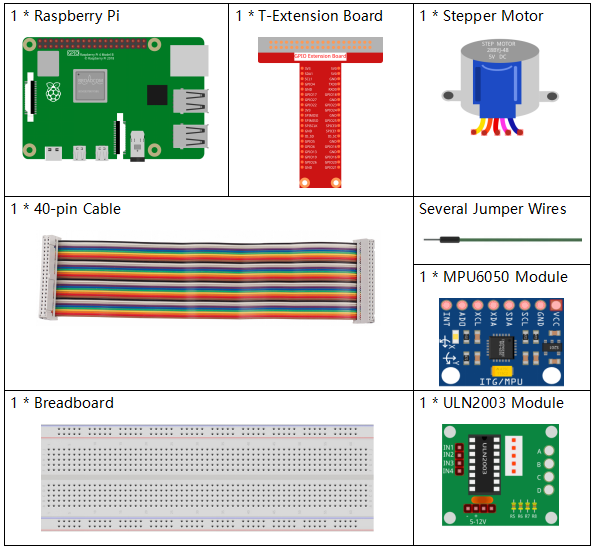
Components
Schematic Diagram
T-Board Name |
physical |
wiringPi |
BCM |
GPIO18 |
Pin 12 |
1 |
18 |
GPIO23 |
Pin 16 |
4 |
23 |
GPIO24 |
Pin 18 |
5 |
24 |
GPIO25 |
Pin 22 |
6 |
25 |
SDA1 |
Pin 3 |
||
SCL1 |
Pin 5 |

Experimental Procedures
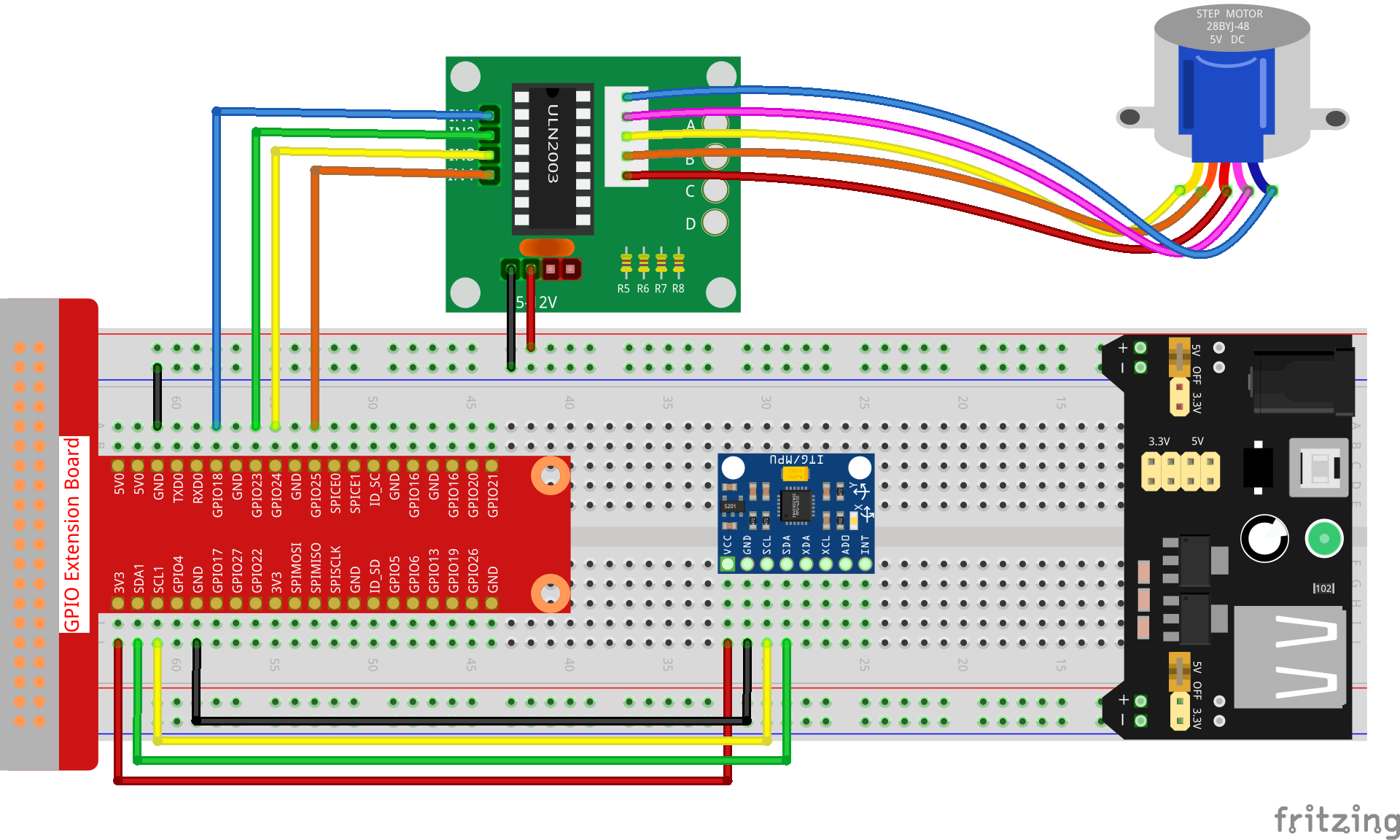
Step 1: Build the circuit.
Step 2: Go to the folder of the code.
cd ~/davinci-kit-for-raspberry-pi/c/3.1.6/
Step 3: Compile the code.
gcc 3.1.6_MotionControl.c -lwiringPi -lm
Step 4: Run the executable file.
sudo ./a.out
As the code runs, if the tilt angle of mpu6050 on the Y-axis is larger than 45 ℃, the stepper motor rotates anticlockwise; if less than -45 ℃, the stepper motor rotates clockwise.
Note
If it does not work after running, or there is an error prompt: "wiringPi.h: No such file or directory", please refer to Install and Check the WiringPi.
Code Explanation
double mpu6050(){
    acclX = read_word_2c(0x3B);
    acclY = read_word_2c(0x3D);
    acclZ = read_word_2c(0x3F);
    acclX_scaled = acclX / 16384.0;
    acclY_scaled = acclY / 16384.0;
    acclZ_scaled = acclZ / 16384.0;
    double angle=get_y_rotation(acclX_scaled, acclY_scaled, acclZ_scaled);
    return angle;
}
mpu6050 gets the tilt angle in the direction of the Y-axis.
void rotary(char direction){
    if(direction == 'c'){
        for(int j=0;j<4;j++){
            for(int i=0;i<4;i++)
                {digitalWrite(motorPin[i],0x99>>j & (0x08>>i));}
            delayMicroseconds(stepSpeed);
        }
    }
    else if(direction =='a'){
        for(int j=0;j<4;j++){
            for(int i=0;i<4;i++)
                {digitalWrite(motorPin[i],0x99<<j & (0x80>>i));}
            delayMicroseconds(stepSpeed);
        }
    }
}
If the received direction key is 'c', the stepper motor rotates clockwise; if the key is 'a', the motor rotates anticlockwise. Refer to 1.3.3 Stepper Motor for more details about the calculation of the rotating direction of the stepper motor.
int main()
{
    setup();
    double angle;
    while(1) {
        angle = mpu6050();
        if (angle >=45){rotary('a');}
        else if (angle<=-45){rotary('c');}
    }
    return 0;
}
The tilt angle in the direction of the Y-axis is read from mpu6050, and if it’s larger than 45 ℃, the stepper motor rotates anticlockwise; if less than -45 ℃, the stepper motor rotates clockwise.