Note
Hello, welcome to the SunFounder Raspberry Pi & Arduino & ESP32 Enthusiasts Community on Facebook! Dive deeper into Raspberry Pi, Arduino, and ESP32 with fellow enthusiasts.
Why Join?
Expert Support: Solve post-sale issues and technical challenges with help from our community and team.
Learn & Share: Exchange tips and tutorials to enhance your skills.
Exclusive Previews: Get early access to new product announcements and sneak peeks.
Special Discounts: Enjoy exclusive discounts on our newest products.
Festive Promotions and Giveaways: Take part in giveaways and holiday promotions.
👉 Ready to explore and create with us? Click [here] and join today!
3.1.4 Smart Fan
Note
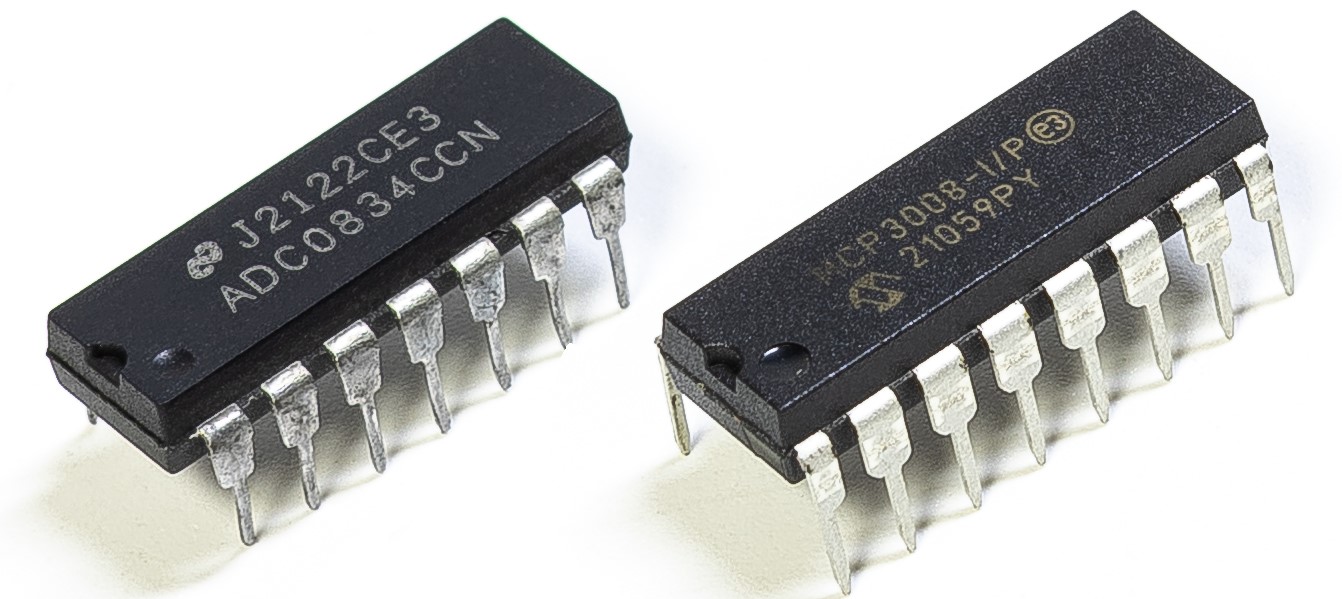
Depending on your kit version, please identify whether you have ADC0834 or MCP3008 and proceed with the matching section.
Introduction
In this course, we will use motors, buttons and thermistors to make a manual + automatic smart fan whose wind speed is adjustable.
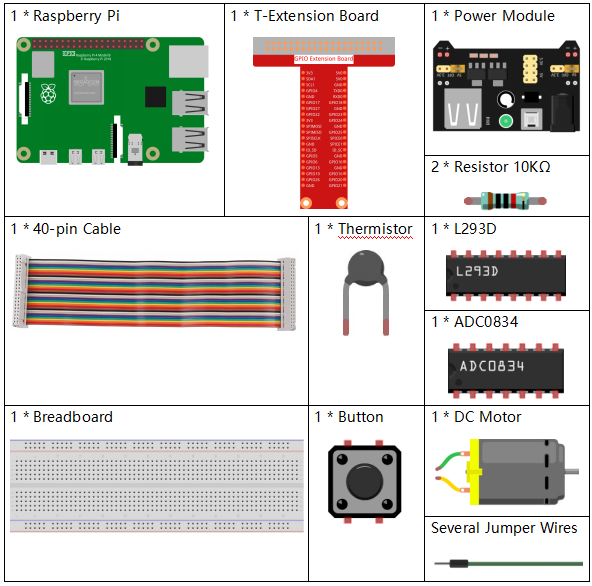
Components
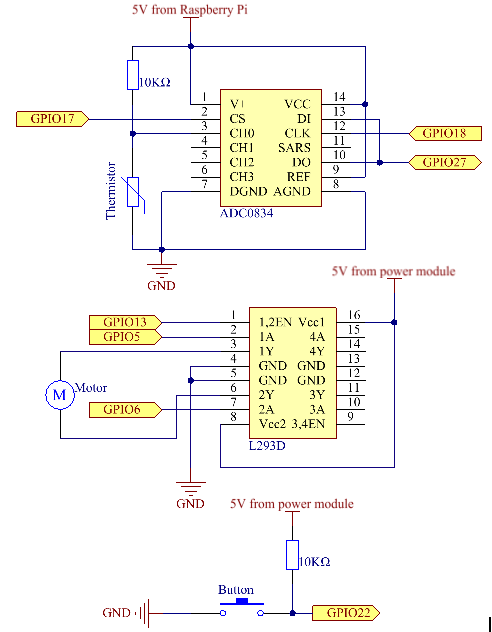
Schematic Diagram
T-Board Name |
physical |
wiringPi |
BCM |
GPIO17 |
Pin 11 |
0 |
17 |
GPIO18 |
Pin 12 |
1 |
18 |
GPIO27 |
Pin 13 |
2 |
27 |
GPIO22 |
Pin 15 |
3 |
22 |
GPIO5 |
Pin 29 |
21 |
5 |
GPIO6 |
Pin 31 |
22 |
6 |
GPIO13 |
Pin 33 |
23 |
13 |
Experimental Procedures
Step 1: Build the circuit.

Note
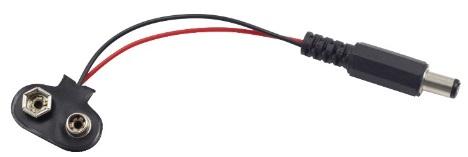
The power module can apply a 9V battery with the 9V Battery Buckle in the kit. Insert the jumper cap of the power module into the 5V bus strips of the breadboard.
For C Language Users
Step 2: Get into the folder of the code.
cd ~/davinci-kit-for-raspberry-pi/c/3.1.4/
Step 3: Compile.
gcc 3.1.4_SmartFan.c -lwiringPi -lm
Step 4: Run the executable file above.
sudo ./a.out
As the code runs, start the fan by pressing the button. Every time you press, 1 speed grade is adjusted up or down. There are 5 kinds of speed grades: 0~4. When set to the 4th speed grade and you press the button, the fan stops working with a 0 wind speed.
Note
If it does not work after running, or there is an error prompt: "wiringPi.h: No such file or directory", please refer to Install and Check the WiringPi.
Once the temperature goes up or down for more than 2℃, the speed automatically gets 1-grade faster or slower.
Code Explanation
int temperture(){
    unsigned char analogVal;
    double Vr, Rt, temp, cel, Fah;
    analogVal = get_ADC_Result(0);
    Vr = 5 * (double)(analogVal) / 255;
    Rt = 10000 * (double)(Vr) / (5 - (double)(Vr));
    temp = 1 / (((log(Rt/10000)) / 3950)+(1 / (273.15 + 25)));
    cel = temp - 273.15;
    Fah = cel * 1.8 +32;
    int t=cel;
    return t;
}
Temperture() works by converting thermistor values read by ADC0834 into temperature values. Refer to 2.2.2 Thermistor for more details.
int motor(int level){
    if(level==0){
        digitalWrite(MotorEnable,LOW);
        return 0;
    }
    if (level>=4){
        level =4;
    }
    digitalWrite(MotorEnable,HIGH);
    softPwmWrite(MotorPin1, level*25);
    return level;
}
This function controls the rotating speed of the motor. The range of the Level: 0-4 (level 0 stops the working motor). One level adjustment stands for a 25% change of the wind speed.
int main(void)
{
    setup();
    int currentState,lastState=0;
    int level = 0;
    int currentTemp,markTemp=0;
    while(1){
        currentState=digitalRead(BtnPin);
        currentTemp=temperture();
        if (currentTemp<=0){continue;}
        if (currentState==1&&lastState==0){
            level=(level+1)%5;
            markTemp=currentTemp;
            delay(500);
        }
        lastState=currentState;
        if (level!=0){
            if (currentTemp-markTemp<=-2){
                level=level-1;
                markTemp=currentTemp;
            }
            if (currentTemp-markTemp>=2){
                level=level+1;
                markTemp=currentTemp;
            }
        }
        level=motor(level);
    }
    return 0;
}
The function main() contains the whole program process as shown:
Constantly read the button state and the current temperature.
Every press makes level+1 and at the same time, the temperature is updated. The Level ranges 1~4.
As the fan works ( the level is not 0), the temperature is under detection. A 2℃+ change causes the up and down of the level.
The motor changes the rotating speed with the Level.