注釈
こんにちは、SunFounder Raspberry Pi & Arduino & ESP32 Enthusiast Community on Facebookへようこそ!他の愛好家と一緒に、Raspberry Pi、Arduino、ESP32の世界により深く入り込みましょう。
参加する理由
専門家サポート: 購入後の問題や技術的な課題を、コミュニティと私たちのチームの助けを借りて解決します。
学習と共有: ヒントやチュートリアルを交換して、スキルを向上させましょう。
限定プレビュー: 新製品の発表や先行プレビューに早期アクセスできます。
特別割引: 最新製品を特別割引でお楽しみいただけます。
季節限定キャンペーンとプレゼント: プレゼント企画やホリデーキャンペーンに参加しましょう。
👉 一緒に発見し、創造する準備はできましたか? [こちら] をクリックして、今すぐ参加しましょう!
(Example) スマート気象ステーション
はじめに
このプロジェクトでは、ローカル環境センサー、クラウドの気象データ、そして AI 分析を組み合わせた包括的な スマート気象ステーション を構築します。システムには次の機能が統合されています:
ローカルセンサーデータ:DHT11(温度/湿度)および LDR(光センサー)から取得
世界の天気予報データ:OpenWeather API から取得
AI 音声分析:OpenAI の GPT と TTS 機能を利用
視覚表示:128×64 OLED ディスプレイに表示
インタラクティブボタン:必要に応じて AI による天気分析を実行
この気象ステーションは、ローカル環境データと天気予報データを自動的に比較し、音声出力によってインテリジェントなアドバイスを提供します。これにより、総合的な環境モニタリングシステムを実現します。
また、他の LLM モジュールや TTS モジュールを利用して、自分だけのスマートデバイスを構築することもできます。 参照:
必要なもの
このプロジェクトに必要な部品は以下の通りです:
COMPONENT |
PURCHASE LINK |
|---|---|
- |
|
- |
|
Raspberry Pi |
- |
配線図
以下のようにコンポーネントを Fusion HAT+ に接続します:
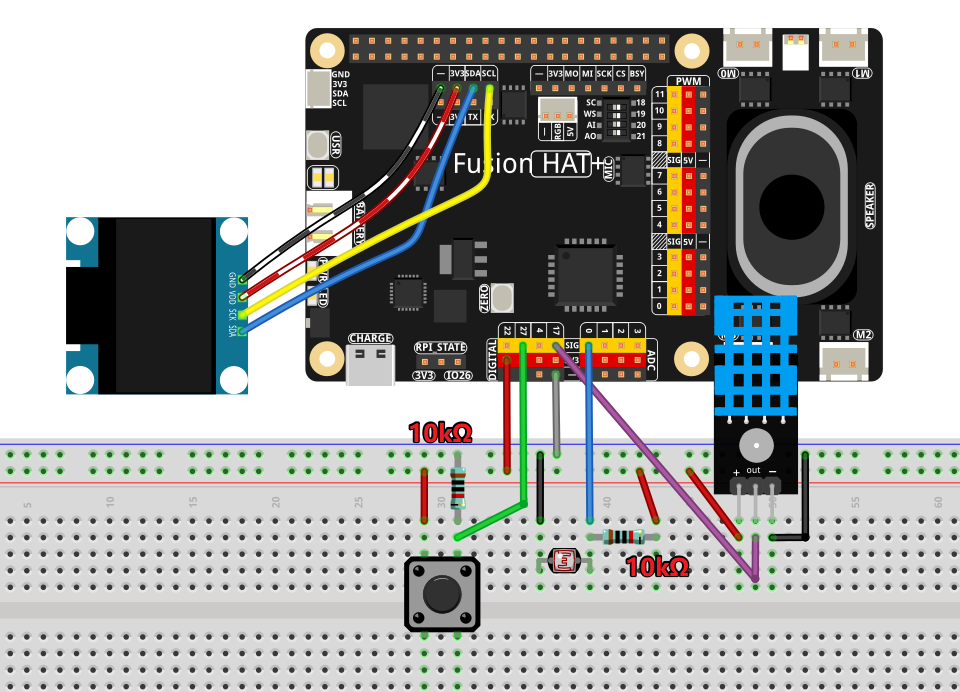
APIキーの取得と保存
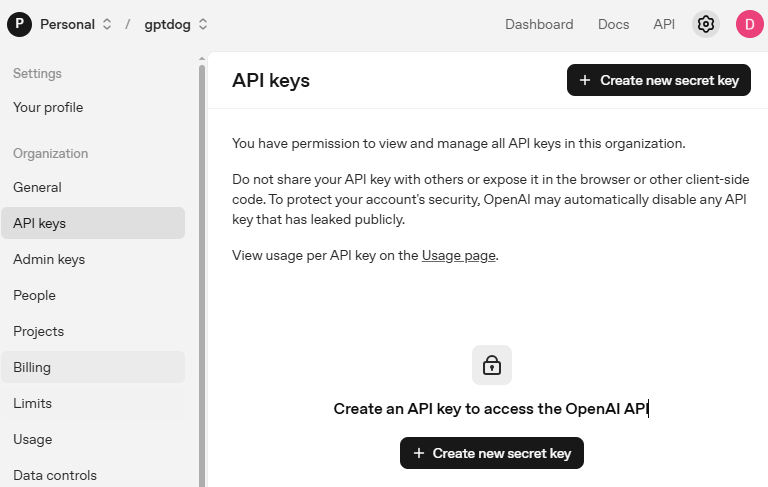
OpenAI Platform にアクセスしてログインします。 API keys ページで Create new secret key をクリックします。
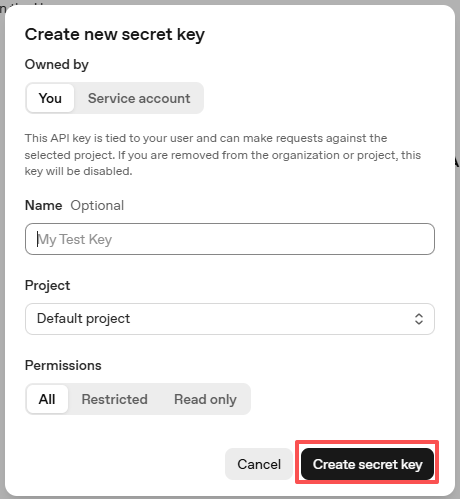
必要事項(Owner、Name、Project、必要に応じて権限)を入力し、 Create secret key をクリックします。
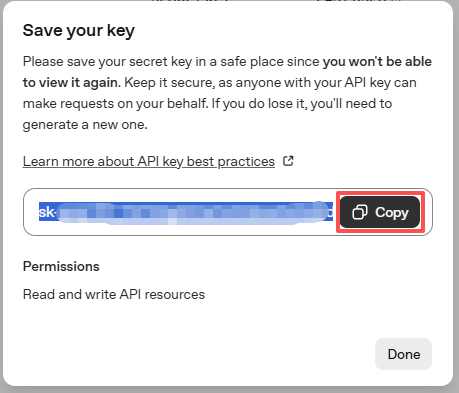
キーが作成されたら、すぐにコピーしてください。後から再表示できません。紛失した場合は新しく作成し直す必要があります。
プロジェクトフォルダ(例:
/)内にsecret.pyというファイルを作成します:cd ~/ai-lab-kit/llm sudo nano secret.py
ファイルにキーを次のように貼り付けます:
# secret.py
# Store secrets here. Never commit this file to Git.
OPENAI_API_KEY = "sk-xxx"
請求設定の有効化と利用可能モデルの確認
キーを使用する前に、OpenAI アカウントの Billing ページで支払い情報を追加し、少額のクレジットをチャージしてください。
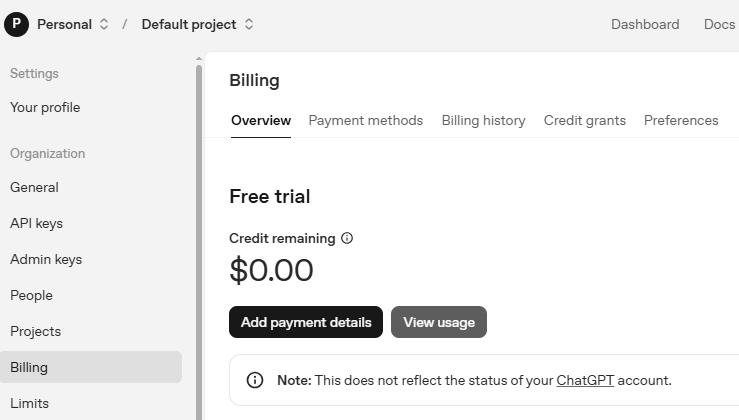
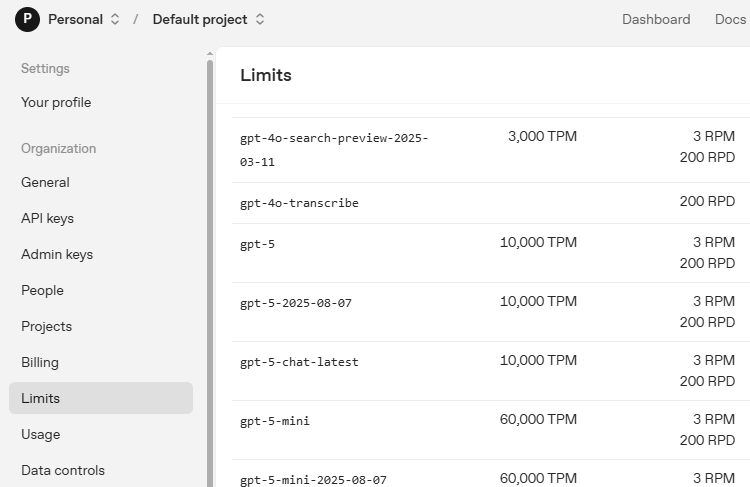
続いて Limits ページで、アカウントで利用可能なモデルを確認し、コードで使用する正確なモデルIDをコピーします。
OpenWeather API キーの取得
OpenWeather は OpenWeather Ltd が提供するオンラインサービスで、API を通じて世界中の天気データ(現在の天気、予報、ナウキャスト、過去の気象データなど)を取得できます。
OpenWeather にアクセスしてログイン、またはアカウントを作成します。

ナビゲーションバーから API ページを開きます。

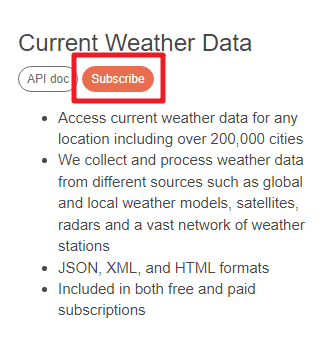
Current Weather Data を見つけて Subscribe をクリックします。
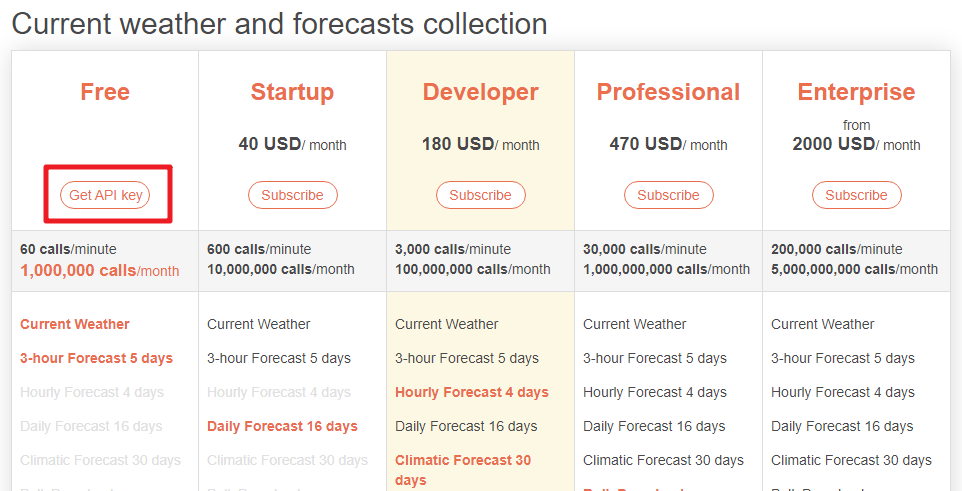
Current weather and forecasts collection の中から適切なサービスを購読します。 このプロジェクトでは Free プランで十分です。
API keys ページから Key をコピーします。
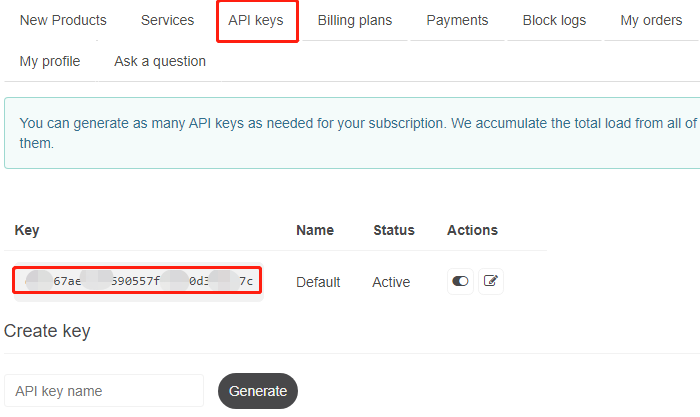
次のコマンドで
secret.pyファイルを開きます:cd ~/ai-lab-kit/llm sudo nano secret.py
コピーした API Key を追加します:
OPENWEATHER_API_KEY = "732exxxxxxxxxxxxxxxxxxxxx919b"Ctrl + X→Y→Enterの順に押して保存し、エディタを終了します。
サンプルの実行
コードを実行する
cd ~/ai-lab-kit/llm
sudo python3 llm_openai_weather.py
スクリプト起動後の表示
OLED が起動し、天気情報の表示を開始します。
ターミナルには起動情報(対象都市やボタンの GPIO ピンなど)が表示されます。
OLED は 10 秒ごと にページが自動切り替えされます(全 3 ページ):
ページ1:ローカルセンサー (DHT11 + LDR) 温度、湿度、光レベル(小さなライトバー付き)を表示します。
ページ2:天気予報 (OpenWeather) 現在の気温、天気の説明、最終更新時刻を表示します。
ページ3:AI インサイト ローカルセンサーと OpenWeather データの差分、および簡単な快適度(例:Comfortable / Warm / Cool / Humid / Dry)を表示します。
AI 音声分析の実行
GPIO 27 のボタンを押すと、AI が短い「気象レポーター風」の分析を生成します。
ターミナルには
AI Analysisセクションが表示され、以下の情報が出力されます:ローカル測定値(温度 / 湿度 / 光)
外部天気情報(OpenWeather の気温と説明)
AI が生成した簡単な要約
OLED には一時的に SPEAKING... と表示されます
分析結果は OpenAI TTS を使用してスピーカーから音声で読み上げられます
データ更新の動作
ローカルセンサーは 約2秒ごと に更新されます。
OpenWeather のデータは 約5分ごと に更新されます。
光センサーの値はちらつきを抑えるため自動的に平滑化されます。
プログラムの停止
ターミナルで
Ctrl+Cを押すと終了します。OLED がクリアされ、安全にプログラムが停止します。
コード
以下はスマート気象ステーションの Python スクリプト全体です:
#!/usr/bin/env python3
# -*- coding: utf-8 -*-

"""
Smart Weather Station with AI Assistant
- Reads local temperature & humidity from DHT11 on GPIO 17
- Reads light level from LDR on ADC A0 (0..4095)
- Fetches weather forecast from OpenWeather API
- Provides AI voice analysis using OpenAI (triggered by button)
- Displays all information on 128x64 SSD1306 OLED
"""

import time
import requests
from datetime import datetime
from statistics import mean
from fusion_hat.modules import DHT11
from fusion_hat.adc import ADC
from fusion_hat.pin import Pin, Mode, Pull
from PIL import Image, ImageDraw, ImageFont
import adafruit_ssd1306
import board
from sunfounder_voice_assistant.tts import OpenAI_TTS
from secret import OPENAI_API_KEY, OPENWEATHER_API_KEY
from signal import pause

# Configuration
DHT_PIN = 17          # DHT11 uses GPIO 17
LDR_CH = 0
I2C_ADDR = 0x3C

# OpenWeather API Configuration
CITY_NAME = "Shanghai"
COUNTRY_CODE = "CN"
LATITUDE = 31.2304
LONGITUDE = 121.4737
UNITS = "metric"

# Update intervals in seconds
WEATHER_UPDATE_INTERVAL = 300
SENSOR_UPDATE_INTERVAL = 2

# GPIO Pins
BUTTON_PIN = 27  # Button uses GPIO 27

# OLED Setup
WIDTH, HEIGHT = 128, 64
i2c = board.I2C()
oled = adafruit_ssd1306.SSD1306_I2C(WIDTH, HEIGHT, i2c, addr=I2C_ADDR)
oled.fill(0)
oled.show()

# Load fonts
try:
    font_small = ImageFont.truetype("/usr/share/fonts/truetype/dejavu/DejaVuSans.ttf", 10)
    font_medium = ImageFont.truetype("/usr/share/fonts/truetype/dejavu/DejaVuSans.ttf", 12)
    font_large = ImageFont.truetype("/usr/share/fonts/truetype/dejavu/DejaVuSans.ttf", 14)
except:
    print("Warning: Using default font")
    font_small = ImageFont.load_default()
    font_medium = ImageFont.load_default()
    font_large = ImageFont.load_default()

image = Image.new("1", (WIDTH, HEIGHT))
draw = ImageDraw.Draw(image)

# Sensors
dht = DHT11(pin=DHT_PIN)
ldr = ADC(LDR_CH)

# Button for triggering AI analysis
button = Pin(BUTTON_PIN, mode=Mode.IN, pull=Pull.DOWN)

# OpenWeather API Class
 class WeatherAPI:
     def __init__(self, api_key, city, country_code, lat=None, lon=None):
         self.api_key = api_key
         self.city = city
         self.country_code = country_code
         self.lat = lat
         self.lon = lon
         self.current_weather = None
         self.forecast = None
         self.last_update = 0

     def get_weather_url(self):
         if self.lat and self.lon:
             return f"https://api.openweathermap.org/data/2.5/weather?lat={self.lat}&lon={self.lon}&appid={self.api_key}&units={UNITS}"
         else:
             return f"https://api.openweathermap.org/data/2.5/weather?q={self.city},{self.country_code}&appid={self.api_key}&units={UNITS}"

     def get_forecast_url(self):
         if self.lat and self.lon:
             return f"https://api.openweathermap.org/data/2.5/forecast?lat={self.lat}&lon={self.lon}&appid={self.api_key}&units={UNITS}"
         else:
             return f"https://api.openweathermap.org/data/2.5/forecast?q={self.city},{self.country_code}&appid={self.api_key}&units={UNITS}"

     def update_weather(self):
         try:
             # Current weather
             response = requests.get(self.get_weather_url(), timeout=10)
             if response.status_code == 200:
                 self.current_weather = response.json()
                 print(f"Weather API success: {self.current_weather['weather'][0]['description']}")
             else:
                 print(f"Weather API error: {response.status_code}")
                 return False

             # Forecast
             response = requests.get(self.get_forecast_url(), timeout=10)
             if response.status_code == 200:
                 self.forecast = response.json()

             self.last_update = time.time()
             return True

         except Exception as e:
             print(f"Weather API error: {e}")
             return False

     def get_temperature(self):
         if self.current_weather:
             return self.current_weather['main']['temp']
         return None

     def get_humidity(self):
         if self.current_weather:
             return self.current_weather['main']['humidity']
         return None

     def get_weather_description(self):
         if self.current_weather:
             return self.current_weather['weather'][0]['description'].title()
         return None

     def get_weather_condition(self):
         if self.current_weather:
             weather_id = self.current_weather['weather'][0]['id']
             if weather_id < 300:
                 return "TSTORM"
             elif weather_id < 600:
                 return "RAIN"
             elif weather_id < 700:
                 return "SNOW"
             elif weather_id == 800:
                 return "CLEAR"
             elif weather_id < 900:
                 return "CLOUDS"
             else:
                 return "OTHER"
         return "N/A"

     def get_forecast_summary(self):
         if not self.forecast or 'list' not in self.forecast:
             return "No forecast"

         forecasts = self.forecast['list'][:8]
         temps = [f['main']['temp'] for f in forecasts]
         min_temp = min(temps)
         max_temp = max(temps)

         conditions = {}
         for f in forecasts:
             condition = f['weather'][0]['main']
             conditions[condition] = conditions.get(condition, 0) + 1

         most_common = max(conditions, key=conditions.get)

         return f"{min_temp:.0f}-{max_temp:.0f}C {most_common}"

# AI Weather Analyst Class
 class WeatherAI:
     def __init__(self, api_key):
         self.api_key = api_key
         self.tts = OpenAI_TTS(api_key=api_key)
         self.tts.set_voice(self.tts.Voice.ALLOY)
         self.is_speaking = False

     def analyze_weather(self, local_temp, local_hum, local_light, weather_data):
         temp_diff = abs(local_temp - weather_data.get('current_temp', local_temp)) if weather_data.get('current_temp') else 0

         if temp_diff > 3:
             accuracy = "significantly different from"
         elif temp_diff > 1:
             accuracy = "slightly different from"
         else:
             accuracy = "very close to"

         recommendations = []
         if local_hum > 80:
             recommendations.append("It's quite humid")
         elif local_hum < 30:
             recommendations.append("The air is dry")

         if local_light > 80:
             recommendations.append("It's bright here")
         elif local_light < 20:
             recommendations.append("It's quite dark")

         weather_desc = weather_data.get('weather_desc', '').lower()
         if 'rain' in weather_desc or 'drizzle' in weather_desc or 'thunderstorm' in weather_desc:
             recommendations.append("Don't forget an umbrella")
         elif 'clear' in weather_desc:
             recommendations.append("Great day to go outside")
         elif 'cloud' in weather_desc:
             recommendations.append("Partly cloudy today")

         rec_text = ". ".join(recommendations) + "." if recommendations else "Conditions are normal."

         analysis = f"Local sensors show {local_temp:.1f}C, which is {accuracy} the forecast. {rec_text}"
         return analysis

     def speak_analysis(self, analysis_text):
         if self.is_speaking:
             print("Already speaking, please wait...")
             return False

         try:
             self.is_speaking = True
             print(f"Speaking analysis: {analysis_text}")
             self.tts.say(analysis_text, instructions="speak clearly and professionally like a weather reporter")
             self.is_speaking = False
             return True
         except Exception as e:
             print(f"TTS error: {e}")
             self.is_speaking = False
             return False

# Light sensor helper
 _light_window = []

 def light_percent(raw, min_val=0, max_val=4095):
     global _light_window

     _light_window.append(raw)
     if len(_light_window) > 5:
         _light_window.pop(0)

     smooth_raw = int(mean(_light_window))
     pct = (smooth_raw - min_val) / (max_val - min_val) * 100 if max_val > min_val else 50
     pct = max(0, min(100, pct))

     return int(pct), smooth_raw

# Display Manager Class
 class DisplayManager:
     def __init__(self):
         self.current_page = 0
         self.num_pages = 3
         self.last_page_change = 0
         self.page_cycle_interval = 10

     def next_page(self):
         self.current_page = (self.current_page + 1) % self.num_pages
         self.last_page_change = time.time()

     def should_change_page(self):
         return time.time() - self.last_page_change > self.page_cycle_interval

     def draw_page(self, page_num, local_temp, local_hum, light_pct, weather_api, weather_ai):
         draw.rectangle((0, 0, WIDTH, HEIGHT), outline=0, fill=0)

         if page_num == 0:
             self._draw_local_sensors(local_temp, local_hum, light_pct)
         elif page_num == 1:
             self._draw_weather_forecast(weather_api)
         elif page_num == 2:
             self._draw_ai_insights(local_temp, local_hum, light_pct, weather_api)

        # Page indicator at bottom right
         indicator = f"{page_num+1}/{self.num_pages}"
         indicator_width = len(indicator) * 6
         draw.text((WIDTH - indicator_width - 2, HEIGHT - 10), indicator, font=font_small, fill=255)

     def _draw_local_sensors(self, temp, hum, light):
        # Title at top
         draw.text((2, 2), "LOCAL SENSORS", font=font_medium, fill=255)

        # Temperature - larger font on first line
         temp_text = f"Temp: {temp:.1f} C"
         draw.text((10, 18), temp_text, font=font_large, fill=255)

        # Humidity - second line
         hum_text = f"Humidity: {hum:.1f}%"
         draw.text((10, 38), hum_text, font=font_medium, fill=255)

        # Light with bar on same line
         light_text = f"Light: {light}%"
         draw.text((10, 53), light_text, font=font_small, fill=255)

        # Light bar positioned next to text, not overlapping
        bar_x = 60  # Position after "Light: XX%"
         bar_y = 55
         bar_width = 50
         bar_height = 4

        # Draw background bar
         draw.rectangle((bar_x, bar_y, bar_x + bar_width, bar_y + bar_height), outline=255, fill=0)

        # Draw filled portion
         fill_width = int(bar_width * light / 100)
         if fill_width > 0:
             draw.rectangle((bar_x, bar_y, bar_x + fill_width, bar_y + bar_height), outline=0, fill=255)

     def _draw_weather_forecast(self, weather_api):
         draw.text((2, 2), "WEATHER", font=font_medium, fill=255)

         if not weather_api.current_weather:
             draw.text((10, 25), "No weather data", font=font_medium, fill=255)
             draw.text((10, 45), "Check connection", font=font_small, fill=255)
             return

         current_temp = weather_api.get_temperature()
         weather_desc = weather_api.get_weather_description()
         weather_cond = weather_api.get_weather_condition()

        # Temperature - large font
         if current_temp is not None:
             draw.text((10, 18), f"{current_temp:.0f} C", font=font_large, fill=255)

        # Weather description
         if weather_desc:
             desc_text = weather_desc[:15]
             draw.text((10, 38), desc_text, font=font_medium, fill=255)

        # Weather condition
         if weather_cond:
             draw.text((10, 53), weather_cond, font=font_small, fill=255)

        # Update time at top right
         if weather_api.last_update > 0:
             update_time = datetime.fromtimestamp(weather_api.last_update).strftime("%H:%M")
             update_text = f"Up: {update_time}"
             update_width = len(update_text) * 6
             draw.text((WIDTH - update_width - 2, 2), update_text, font=font_small, fill=255)

     def _draw_ai_insights(self, local_temp, local_hum, light_pct, weather_api):
         draw.text((2, 2), "AI INSIGHTS", font=font_medium, fill=255)

         api_temp = weather_api.get_temperature() if weather_api.current_weather else None
         api_hum = weather_api.get_humidity() if weather_api.current_weather else None

         line_y = 18

        # Temperature difference
         if api_temp is not None:
             temp_diff = local_temp - api_temp
             temp_symbol = "+" if temp_diff > 0 else "" if temp_diff == 0 else ""
             diff_text = f"Temp: {temp_symbol}{temp_diff:.1f}C"
             draw.text((10, line_y), diff_text, font=font_medium, fill=255)
             line_y += 15

        # Humidity difference
         if api_hum is not None:
             hum_diff = local_hum - api_hum
             hum_symbol = "+" if hum_diff > 0 else "" if hum_diff == 0 else ""
             diff_text = f"Hum: {hum_symbol}{hum_diff:.1f}%"
             draw.text((10, line_y), diff_text, font=font_medium, fill=255)
             line_y += 15

        # Comfort level
         comfort = "Normal"
         comfort_color = 255

         if 20 <= local_temp <= 25 and 40 <= local_hum <= 60:
             comfort = "Comfortable"
             comfort_color = 255
         elif local_temp > 28:
             comfort = "Warm"
             comfort_color = 255
         elif local_temp < 16:
             comfort = "Cool"
             comfort_color = 255
         elif local_hum > 70:
             comfort = "Humid"
             comfort_color = 255
         elif local_hum < 30:
             comfort = "Dry"
             comfort_color = 255

         draw.text((10, line_y), f"Feel: {comfort}", font=font_small, fill=comfort_color)

        # Button hint at bottom left
         draw.text((2, HEIGHT - 10), "Press BTN for AI", font=font_small, fill=255)

# Main Application Class
 class SmartWeatherStation:
     def __init__(self):
         print("Initializing Smart Weather Station...")

         self.weather_api = WeatherAPI(OPENWEATHER_API_KEY, CITY_NAME, COUNTRY_CODE, LATITUDE, LONGITUDE)
         self.weather_ai = WeatherAI(OPENAI_API_KEY)
         self.display = DisplayManager()

         self.local_temp = 0.0
         self.local_hum = 0.0
         self.light_pct = 0
         self.raw_adc = 0

         self.last_weather_update = 0
         self.last_sensor_update = 0

        # Setup button callback
         button.when_activated = self._button_pressed

        # Initial readings
         self._update_sensors()
         self.weather_api.update_weather()

         print("Smart Weather Station ready!")
         print(f"City: {CITY_NAME}")
         print(f"Temperature unit: {UNITS}")
         print(f"Button on GPIO {BUTTON_PIN} for AI analysis")
         print("="*50)

     def _update_sensors(self):
         try:
             result = dht.read()
             if result:
                 hum, temp = result
                 self.local_hum = float(hum)
                 self.local_temp = float(temp)

             raw = ldr.read()
             self.light_pct, self.raw_adc = light_percent(raw)

             self.last_sensor_update = time.time()
             return True

         except Exception as e:
             print(f"Sensor error: {e}")
             return False

     def _update_weather(self):
         if time.time() - self.last_weather_update > WEATHER_UPDATE_INTERVAL:
             print("Updating weather data...")
             if self.weather_api.update_weather():
                 self.last_weather_update = time.time()
                 return True
         return False

     def _button_pressed(self):
        """Called when button is pressed"""
         print("\n" + "="*50)
         print("Button pressed! Triggering AI analysis...")
         print("="*50)

        # Update sensors first to get latest data
         self._update_sensors()

        # Get weather data
         api_temp = self.weather_api.get_temperature()

         if api_temp is None:
             print("No weather data available. Please wait for update.")
             return

        # Prepare weather data for analysis
         weather_data = {
             'current_temp': api_temp,
             'weather_desc': self.weather_api.get_weather_description(),
             'forecast_summary': self.weather_api.get_forecast_summary()
         }

        # Generate analysis
         analysis = self.weather_ai.analyze_weather(
             self.local_temp,
             self.local_hum,
             self.light_pct,
             weather_data
         )

         print(f"\nAI Analysis:")
         print(f"Local: {self.local_temp:.1f}C, {self.local_hum:.1f}%, Light: {self.light_pct}%")
         print(f"Remote: {api_temp}C, {self.weather_api.get_weather_description()}")
         print(f"Analysis: {analysis}")

        # Show "Speaking..." on display
         self._show_speaking_message()

        # Speak the analysis
         success = self.weather_ai.speak_analysis(analysis)

         if success:
             print("Analysis completed successfully!")
         else:
             print("Analysis failed or interrupted.")

         print("="*50)

     def _show_speaking_message(self):
        """Display a temporary "Speaking..." message"""
         draw.rectangle((0, 0, WIDTH, HEIGHT), outline=0, fill=0)
         draw.text((WIDTH//2 - 40, HEIGHT//2 - 10), "SPEAKING...", font=font_medium, fill=255)
         oled.image(image)
         oled.show()

     def run(self):
         print("\n" + "="*50)
         print("SMART WEATHER STATION")
         print("="*50)
         print("Display Pages:")
         print("1. Local Sensors (DHT11 + LDR)")
         print("2. Weather Forecast (OpenWeather)")
         print("3. AI Insights (Comparisons)")
         print("")
         print(f"Press button on GPIO {BUTTON_PIN} for AI voice analysis")
         print("Press Ctrl+C to exit")
         print("="*50 + "\n")

         try:
             while True:
                 current_time = time.time()

                # Update sensors periodically
                 if current_time - self.last_sensor_update > SENSOR_UPDATE_INTERVAL:
                     self._update_sensors()

                # Update weather data periodically
                 self._update_weather()

                # Auto-cycle display pages
                 if self.display.should_change_page():
                     self.display.next_page()

                # Draw current page
                 self.display.draw_page(
                     self.display.current_page,
                     self.local_temp,
                     self.local_hum,
                     self.light_pct,
                     self.weather_api,
                     self.weather_ai
                 )

                # Update OLED display
                 oled.image(image)
                 oled.show()

                # Small delay to prevent CPU overload
                 time.sleep(0.1)

         except KeyboardInterrupt:
             print("\nShutting down...")

         finally:
            # Cleanup
             oled.fill(0)
             oled.show()
             print("Smart Weather Station stopped.")

# Main Entry Point
 if __name__ == "__main__":
     if not OPENAI_API_KEY or OPENAI_API_KEY == "your-openai-api-key-here":
         print("ERROR: Please set your OpenAI API key in secret.py")
         exit(1)

     if not OPENWEATHER_API_KEY or OPENWEATHER_API_KEY == "your-openweather-api-key-here":
         print("ERROR: Please set your OpenWeather API key in secret.py")
         print("Get one at: https://openweathermap.org/api")
         exit(1)

     station = SmartWeatherStation()
     station.run()
コードの理解
センサー統合
このシステムは 2 種類のローカルセンサーから値を読み取ります:
# DHT11 for temperature and humidity
dht = DHT11(pin=DHT_PIN)
result = dht.read()  # Returns (humidity, temperature)

# LDR (Light Dependent Resistor) through ADC
ldr = ADC(LDR_CH)
raw = ldr.read()  # Returns 0-4095 value
OpenWeather API の統合
WeatherAPIクラスは、現在の天気と予報を取得するための OpenWeather 接続を管理します:class WeatherAPI: def update_weather(self): # Current weather endpoint response = requests.get(self.get_weather_url(), timeout=10) self.current_weather = response.json() # Forecast endpoint response = requests.get(self.get_forecast_url(), timeout=10) self.forecast = response.json()
AI 分析エンジン
WeatherAIクラスは、インテリジェントな天気分析を生成し、それを音声に変換します:class WeatherAI: def analyze_weather(self, local_temp, local_hum, local_light, weather_data): # Calculate temperature difference temp_diff = abs(local_temp - weather_data.get('current_temp', local_temp)) # Generate recommendations based on conditions recommendations = [] if local_hum > 80: recommendations.append("It's quite humid") # Combine into analysis text analysis = f"Local sensors show {local_temp:.1f}C..." return analysis def speak_analysis(self, analysis_text): self.tts.say(analysis_text, instructions="speak clearly...")
マルチページ表示システム
DisplayManagerは、自動切り替えされる 3 つの情報ページを管理します:class DisplayManager: def draw_page(self, page_num, ...): if page_num == 0: self._draw_local_sensors(...) elif page_num == 1: self._draw_weather_forecast(...) elif page_num == 2: self._draw_ai_insights(...) def _draw_local_sensors(self, temp, hum, light): # Draw temperature, humidity, and light level with progress bar
ボタンイベント処理
ボタンを押すと AI 音声分析が実行されます:
button = Pin(BUTTON_PIN, mode=Mode.IN, pull=Pull.DOWN)
button.when_activated = self._button_pressed

def _button_pressed(self):
    # Update sensors, generate analysis, and speak
    analysis = self.weather_ai.analyze_weather(...)
    self.weather_ai.speak_analysis(analysis)
光センサーのデータ平滑化
光センサーの値には移動平均を用いて、安定した読み取り値を得ています:
def light_percent(raw, min_val=0, max_val=4095):
    _light_window.append(raw)
    if len(_light_window) > 5:
        _light_window.pop(0)

    smooth_raw = int(mean(_light_window))  # Moving average
    pct = (smooth_raw - min_val) / (max_val - min_val) * 100
メインアプリケーションループ
SmartWeatherStationクラスは、適切なタイミングで全コンポーネントを連携させます:def run(self): while True: # Update sensors every 2 seconds if time.time() - self.last_sensor_update > SENSOR_UPDATE_INTERVAL: self._update_sensors() # Update weather every 5 minutes self._update_weather() # Auto-cycle pages every 10 seconds if self.display.should_change_page(): self.display.next_page() # Draw current page self.display.draw_page(...)
トラブルシューティング
"DHT11 read failed" エラー
配線を確認してください:VCC(3.3V)、DATA(GPIO 17)、GND
DATA と VCC の間に 10kΩ のプルアップ抵抗を追加してください
センサーを熱源から離してください(Raspberry Pi 本体も熱を持つことがあります)
読み取り間隔に少し待ち時間を入れてみてください:
time.sleep(2)
OpenWeather API エラー
API キーが正しく、有効期限切れでないことを確認してください
インターネット接続を確認してください:
ping 8.8.8.8都市名と国コードが正しいことを確認してください
Free プランにはレート制限があります(60 回/分、1,000,000 回/月)
OLED に何も表示されない
I2C 接続を確認してください:
sudo i2cdetect -y 1(0x3C が表示されるはずです)OLED に電源が供給されているか確認してください(モデルにより 3.3V または 5V)
I2C アドレスが正しいことを確認してください(0x3C または 0x3D)
TTS から音が出ない
音声出力設定を確認してください:
sudo raspi-config→ System Options → Audio音声テスト:
speaker-test -t sine -f 440OpenAI TTS API キーに十分なクレジットがあるか確認してください
API 呼び出しに必要なインターネット接続を確認してください
ボタンが反応しない
配線を確認してください:ボタンは GPIO 27 と GND の間に接続
コード内でプルダウン抵抗が設定されているか確認してください
簡単なテストスクリプトでボタン動作を確認してください
光センサーの値が不正確
light_percent()内のmin_valとmax_valを調整して LDR をキャリブレーションしてくださいLDR を完全に覆って最小値を確認してください
強い光を当てて最大値を確認してください
LDR が他の部品の影になっていないか確認してください
天気データが古い
WEATHER_UPDATE_INTERVALを短くして更新頻度を上げてくださいAPI 呼び出しが成功しているか確認してください(エラーメッセージを確認)
システム時刻が正しいか確認してください:
date
このスマート気象ステーションは、ローカルセンサーデータ、クラウドサービス、そして AI を組み合わせることで、実用的な洞察と知的な提案を提供する高度な環境モニタリングシステムを構築できることを示しています。