注釈
こんにちは、SunFounder Raspberry Pi & Arduino & ESP32 Enthusiast Community on Facebookへようこそ!他の愛好家と一緒に、Raspberry Pi、Arduino、ESP32の世界により深く入り込みましょう。
参加する理由
専門家サポート: 購入後の問題や技術的な課題を、コミュニティと私たちのチームの助けを借りて解決します。
学習と共有: ヒントやチュートリアルを交換して、スキルを向上させましょう。
限定プレビュー: 新製品の発表や先行プレビューに早期アクセスできます。
特別割引: 最新製品を特別割引でお楽しみいただけます。
季節限定キャンペーンとプレゼント: プレゼント企画やホリデーキャンペーンに参加しましょう。
👉 一緒に発見し、創造する準備はできましたか? [こちら] をクリックして、今すぐ参加しましょう!
(Example) 体温モニタリング付き AI ヘルスアシスタント
はじめに
このプロジェクトでは、体温センシングと音声インタラクションを組み合わせ、個別の健康アセスメントを提供するインテリジェントな AI ヘルスアシスタント を作成します。システムは次の機能を統合します:
体温を高精度に測定する サーミスタベースの温度センシング
ユーザーの症状や質問を理解するための 音声認識
OpenAI GPT を用いた医療的観点での AI 健康分析
健康に関する提案を音声で返す Text-to-Speech フィードバック
温度変換を継続実行する リアルタイム監視
ヘルスアシスタントはサーミスタ回路で体温を測定し、その値を AI で解析して、一般的な医学的体温レンジに基づいた適切なアドバイスを返します。
必要なもの
このプロジェクトに必要な部品は以下の通りです:
COMPONENT |
PURCHASE LINK |
|---|---|
購入 (10kΩ) |
|
- |
|
Raspberry Pi |
- |
配線図
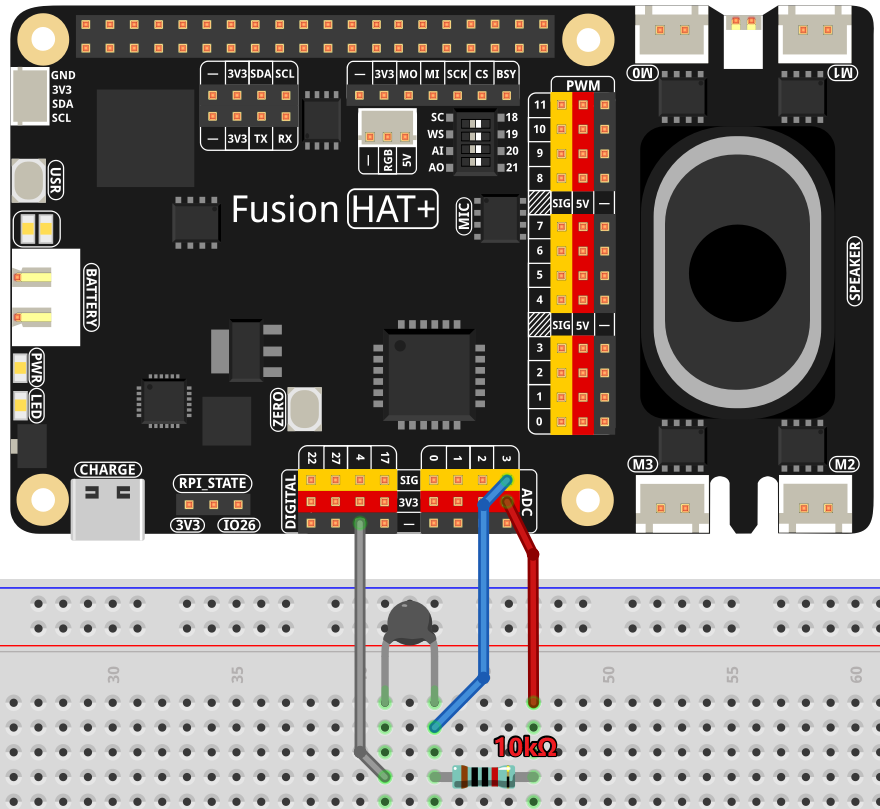
以下のように部品を Fusion HAT+ に接続します:
APIキーの取得と保存
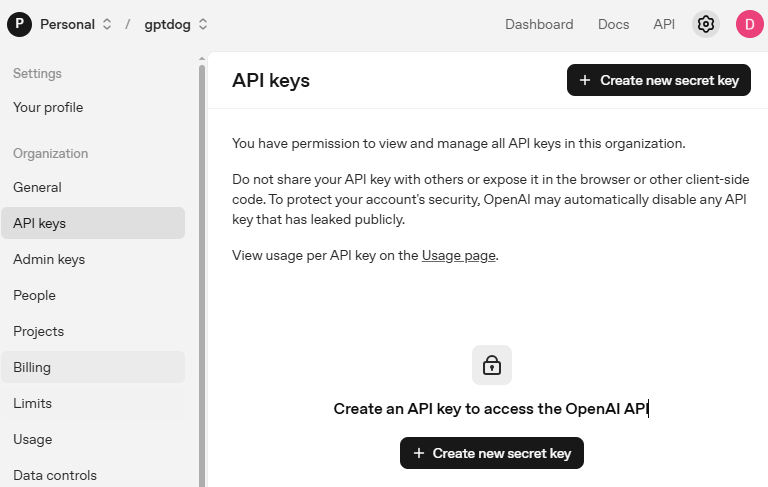
OpenAI Platform にアクセスしてログインします。 API keys ページで Create new secret key をクリックします。
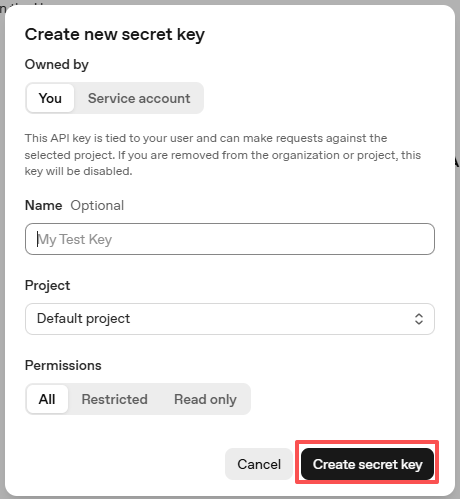
必要事項(Owner、Name、Project、必要に応じて権限)を入力し、 Create secret key をクリックします。
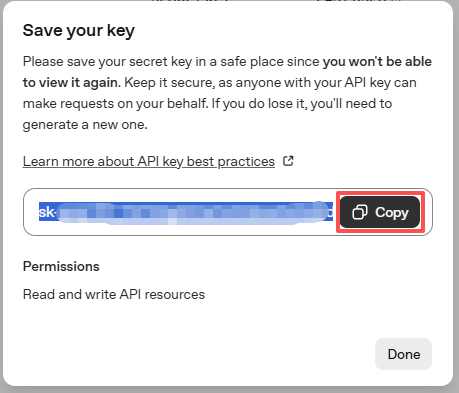
キーが作成されたら、すぐにコピーしてください。後から再表示できません。紛失した場合は新しく作成し直す必要があります。
プロジェクトフォルダ(例:
/)内にsecret.pyというファイルを作成します:cd ~/ai-lab-kit/llm sudo nano secret.py
ファイルにキーを次のように貼り付けます:
# secret.py
# Store secrets here. Never commit this file to Git.
OPENAI_API_KEY = "sk-xxx"
請求設定の有効化と利用可能モデルの確認
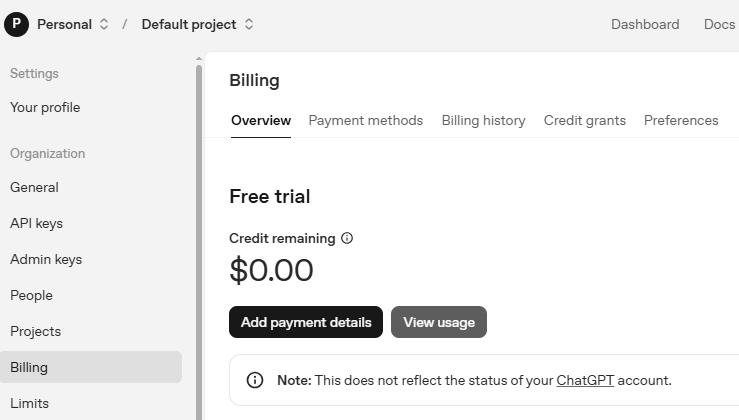
キーを使用する前に、OpenAI アカウントの Billing ページで支払い情報を追加し、少額のクレジットをチャージしてください。
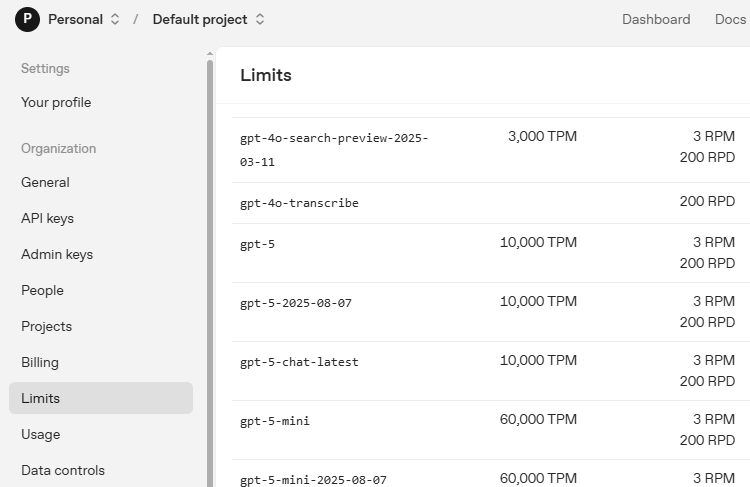
続いて Limits ページで、アカウントで利用可能なモデルを確認し、コードで使用する正確なモデルIDをコピーします。
サンプルの実行
コードを実行する
cd ~/ai-lab-kit/llm
sudo python3 llm_openai_health.py
結果を確認する
プログラムを起動すると、話しかけるよう促されます。その後、推定された体温を提示し、 それに基づいた健康アドバイスを返します。
典型的なコンソール出力:
Hello, I am a health assistant. Please hold your thermometer and I will assess your
body temperature based on the thermistor reading. If you feel unwell, please provide
your symptoms and I will provide appropriate health advice.

Say something
partial: I feel
partial: I feel very
partial: I feel very warm
final: I feel very warm and tired

Your body temperature is 38.7°C, which indicates a mild fever. Please rest, stay
hydrated, and monitor your symptoms. If the fever persists or worsens, consider
seeking medical attention.
シナリオ例
平熱(36.5°C):
User: "How's my temperature?"
AI: "Your body temperature is 36.5°C, which is within the normal range. You're
doing well, but continue to monitor how you feel."
高熱(39.2°C):
User: "I have a headache and feel hot"
AI: "Your body temperature is 39.2°C, indicating a high fever. Please rest
immediately, stay hydrated, and consider seeking medical advice as soon as possible."
低体温(34.2°C):
User: "I feel cold and shivering"
AI: "Your body temperature is 34.2°C, which is below normal and may indicate
hypothermia. Please warm up immediately with blankets and warm drinks."
コード
以下は AI ヘルスアシスタントの Python スクリプト全体です:
from fusion_hat.llm import OpenAI
from secret import OPENAI_API_KEY
import time
from fusion_hat.stt import STT
from fusion_hat.adc import ADC
import math
from fusion_hat.tts import Pico2Wave

# Setup Text-to-Speech and Speech-to-Text
tts = Pico2Wave()
tts.set_lang('en-US')
stt = STT(language="en-us")

# Register OpenAI API
# openai.com

# Export your openai api key with :LLM_API_KEY
# export LLM_API_KEY=sk-xxxxxxxxxxxxxxxxx

# Setup ADC for thermistor reading on channel A3
thermistor = ADC('A3')

# Setup LLM with health assessment instructions
INSTRUCTIONS = '''
You are a health assistant. Your task is to assess the user's body temperature based on the thermistor reading and provide appropriate health advice.

The thermistor reading represents body temperature in Celsius.

### Input Format:
"thermistor: [value], message: [user query]"

### Output Guidelines:
1. If temperature < 35.0°C, warn about hypothermia and suggest warming up.
2. If 35.0°C ≤ temperature ≤ 37.5°C, confirm normal temperature and reassure the user.
3. If 37.5°C < temperature ≤ 38.5°C, indicate mild fever and suggest rest and hydration.
4. If temperature > 38.5°C, alert about high fever and recommend medical attention.
5. Include the temperature value in your response to justify your assessment.
6. Your reply should be brief and concise, no more than two sentences.

### Example Input:
thermistor: 39.0, message: I feel unwell.

### Example Output:
Your body temperature is 39.0°C, which indicates a high fever. Please rest, stay hydrated, and consider seeking medical advice if symptoms persist.
'''

WELCOME = "Hello, I am a health assistant. Please hold your thermometer and I will assess your body temperature based on the thermistor reading. If you feel unwell, please provide your symptoms and I will provide appropriate health advice."

llm = OpenAI(
    api_key=OPENAI_API_KEY,
    model="gpt-4o",
)

# Set how many messages to keep
llm.set_max_messages(20)
# Set instructions
llm.set_instructions(INSTRUCTIONS)
# Set welcome message
llm.set_welcome(WELCOME)

print(WELCOME)

# Function to read and convert thermistor value to temperature
def temperature():
    while True:
        # Read analog value (0-4095)
        analogVal = thermistor.read()

        # Calculate voltage across thermistor
        Vr = 3.3 * float(analogVal) / 4095

        # Check for sensor issues
        if 3.3 - Vr < 0.1:
            print("Please check the sensor")
            continue

        # Calculate thermistor resistance
        Rt = 10000 * Vr / (3.3 - Vr)

        # Convert resistance to temperature using Steinhart-Hart equation
        # B = 3950 (thermistor coefficient), R0 = 10000Ω at 25°C
        temp = 1 / (((math.log(Rt / 10000)) / 3950) + (1 / (273.15 + 25)))

        # Convert from Kelvin to Celsius
        Cel = temp - 273.15

        return Cel

# Main loop for voice interaction
while True:
    print("Say something")

    # Listen for speech input
    for result in stt.listen(stream=True):
        if result["done"]:
            # Print final recognized text
            print(f"\r\x1b[Kfinal: {result['final']}")

            # Measure temperature and combine with user query
            current_temp = temperature()
            input_text = f"thermistor: {current_temp:.1f}, message: {result['final']}"

            # Get response from LLM with streaming
            response = llm.prompt(input_text, stream=True)

            # Collect the full response
            string = ""
            for next_word in response:
                if next_word:
                    print(next_word, end="", flush=True)
                    string += next_word

            # Speak the response
            tts.say(string)
            print("")  # New line after response

        else:
            # Print partial recognition results
            print(f"\r\x1b[Kpartial: {result['partial']}", end="", flush=True)
コードの理解
温度センサーの初期化
サーミスタは ADC の A3 チャンネルに接続されています:
thermistor = ADC('A3')
これにより、電圧レベルに対応する 0〜4095 のアナログ値を読み取ります。
Steinhart-Hart による温度変換
サーミスタは Steinhart-Hart 式を用いて温度を高精度に算出します:
# Read analog value (0-4095)
analogVal = thermistor.read()

# Convert to voltage (0-3.3V)
Vr = 3.3 * float(analogVal) / 4095

# Calculate thermistor resistance using voltage divider formula
Rt = 10000 * Vr / (3.3 - Vr)

# Steinhart-Hart equation: 1/T = 1/T0 + 1/B * ln(R/R0)
temp = 1 / (((math.log(Rt / 10000)) / 3950) + (1 / (273.15 + 25)))

# Convert Kelvin to Celsius
Cel = temp - 273.15
センサー異常のチェック
基本的なエラー検出を含んでいます:
if 3.3 - Vr < 0.1:
    print("Please check the sensor")
    continue
これはサーミスタが未接続、またはショートしている可能性を検出します。
音声認識の設定
STT と TTS の両方を英語向けに設定しています:
tts = Pico2Wave()
tts.set_lang('en-US')
stt = STT(language="en-us")
コンテキスト入力の構築
温度データとユーザーの質問を結合して送信します:
current_temp = temperature()
input_text = f"thermistor: {current_temp:.1f}, message: {result['final']}"
形式:
"thermistor: 37.2, message: I feel dizzy"医学的レンジの分類ロジック
AI への instructions で体温レンジを定義しています:
# Temperature ranges for medical assessment:
# < 35.0°C: Hypothermia warning
# 35.0-37.5°C: Normal range
# 37.5-38.5°C: Mild fever
# > 38.5°C: High fever
リアルタイム音声処理
途中経過(partial)を表示しながら処理します:
for result in stt.listen(stream=True):
    if result["done"]:
        # Final recognition
        print(f"final: {result['final']}")
    else:
        # Partial recognition
        print(f"partial: {result['partial']}", end="", flush=True)
AI 応答のストリーミング
AI 応答をストリームで受け取り、最後にまとめて読み上げます:
response = llm.prompt(input_text, stream=True)
string = ""

for next_word in response:
    if next_word:
        print(next_word, end="", flush=True)
        string += next_word

tts.say(string)  # Speak complete response
温度のフォーマット
温度は小数 1 桁に整形しています:
f"thermistor: {current_temp:.1f}"
これにより、表示の精度が揃います(例:36.512345°C ではなく 36.5°C)。
きれいなコンソール表示
ANSI エスケープコードで表示を整えます:
print(f"\r\x1b[Kpartial: {result['partial']}", end="", flush=True)
\r: 行頭に戻る\x1b[K: 行末まで消去ストリーミング時の文字の重なりを防ぎます
トラブルシューティング
体温の値が正確でない
サーミスタ配線を確認:正しい分圧回路になっているか
抵抗値を確認:サーミスタの公称抵抗に合っているか
既知の温度源でキャリブレーションしてください
ADC の基準電圧(3.3V)が安定しているか確認してください
音声認識が動作しない
マイクをテスト:
arecord --duration=3 test.wav && aplay test.wavSTT 初期化でのオーディオデバイス選択を確認してください
周囲のノイズを減らしてください
はっきり、適度な速さで話してください
AI が応答しない
インターネット接続を確認してください
secret.pyの OpenAI API キーを確認してくださいOpenAI アカウントで課金が有効になっているか確認してください
API のレート制限に達していないか確認してください
温度が不安定に跳ねる
ソフトウェアフィルタを追加(移動平均など)
接触不良がないか確認してください
ノイズ低減のためサーミスタ両端にコンデンサ(0.1µF)を追加してください
サーミスタがしっかり熱接触しているか確認してください
Text-to-Speech が動作しない
音声出力をテスト:
speaker-test -t sine -f 440言語設定を確認:
tts.set_lang('en-US')音量を確認:
alsamixerオーディオ設定スクリプトを再実行:
sudo /opt/setup_fusion_hat_audio.sh
センサー値が 0 または 4095 になる
配線を確認:ショート(0)または断線(4095)の可能性があります
分圧計算が正しいか確認してください
既知電圧で ADC をテストしてください
ADC チャンネルが A3 になっているか確認してください
安全上の注意と医療免責事項
警告
このプロジェクトは教育・デモ目的のみです。 医療機器ではありません 。実際の診断や治療目的で使用しないでください。
安全ガイドライン
医療用途不可:健康や治療に関する判断を本システムに依存しないでください。
緊急時:重い症状がある場合は、必ず医療機関に相談してください。
精度の限界:サーミスタの精度は医療用体温計に及びません。
キャリブレーション必須:医療用体温計との定期的な較正が必要です。
監督推奨:教育用途では成人の監督を推奨します。
受診の目安
次のいずれかに該当する場合は、医療機関への相談を検討してください:
成人で 39.5°C(103.1°F)を超える
生後 3 か月未満で 38.0°C(100.4°F)を超える
発熱が 3 日以上続く
呼吸困難または胸痛がある
強い頭痛や首のこわばりがある
意識混濁やけいれんがある
この AI ヘルスアシスタントは、センサー技術、音声インタラクション、人工知能を組み合わせることで、利用しやすい健康モニタリングツールを構築できることを示します。同時に、重い症状がある場合は専門家の医療判断が不可欠である点も強調しています。