注釈
こんにちは、SunFounder Raspberry Pi & Arduino & ESP32 Enthusiast Community on Facebookへようこそ!他の愛好家と一緒に、Raspberry Pi、Arduino、ESP32の世界により深く入り込みましょう。
参加する理由
専門家サポート: 購入後の問題や技術的な課題を、コミュニティと私たちのチームの助けを借りて解決します。
学習と共有: ヒントやチュートリアルを交換して、スキルを向上させましょう。
限定プレビュー: 新製品の発表や先行プレビューに早期アクセスできます。
特別割引: 最新製品を特別割引でお楽しみいただけます。
季節限定キャンペーンとプレゼント: プレゼント企画やホリデーキャンペーンに参加しましょう。
👉 一緒に発見し、創造する準備はできましたか? [こちら] をクリックして、今すぐ参加しましょう!
(Example) 目隠しスイカ割りゲーム
はじめに
このプロジェクトでは、インタラクティブな 目隠しスイカ割りゲーム を作成します。プレイヤーはジョイスティックで 20×20 メートルのグリッド上を移動し、AI アシスタントの音声ガイドだけを頼りに方向を判断します。システムは次の要素で構成されます:
X/Y 軸によるプレイヤー移動の ジョイスティック操作
OpenAI の GPT-4 による AIガイダンス
Pico2Wave による Text-to-Speech フィードバック
スイカ位置の ランダム生成
スマッシュ動作のための ボタン入力
プレイヤーは中心点 (0,0) からスタートし、AI アシスタントが音声で提示する方向情報だけを手がかりに、ランダムに配置されたスイカを探します。視覚を使わない没入型のゲーム体験を楽しめます。
さまざまな入力デバイスと LLM モジュールを組み合わせることで、インタラクティブな AI ゲームを作成できます。以下も参照してください:
必要なもの
このプロジェクトに必要な部品は以下の通りです:
COMPONENT |
PURCHASE LINK |
|---|---|
- |
|
- |
|
Raspberry Pi |
- |
配線図
以下のように部品を Fusion HAT+ に接続します:
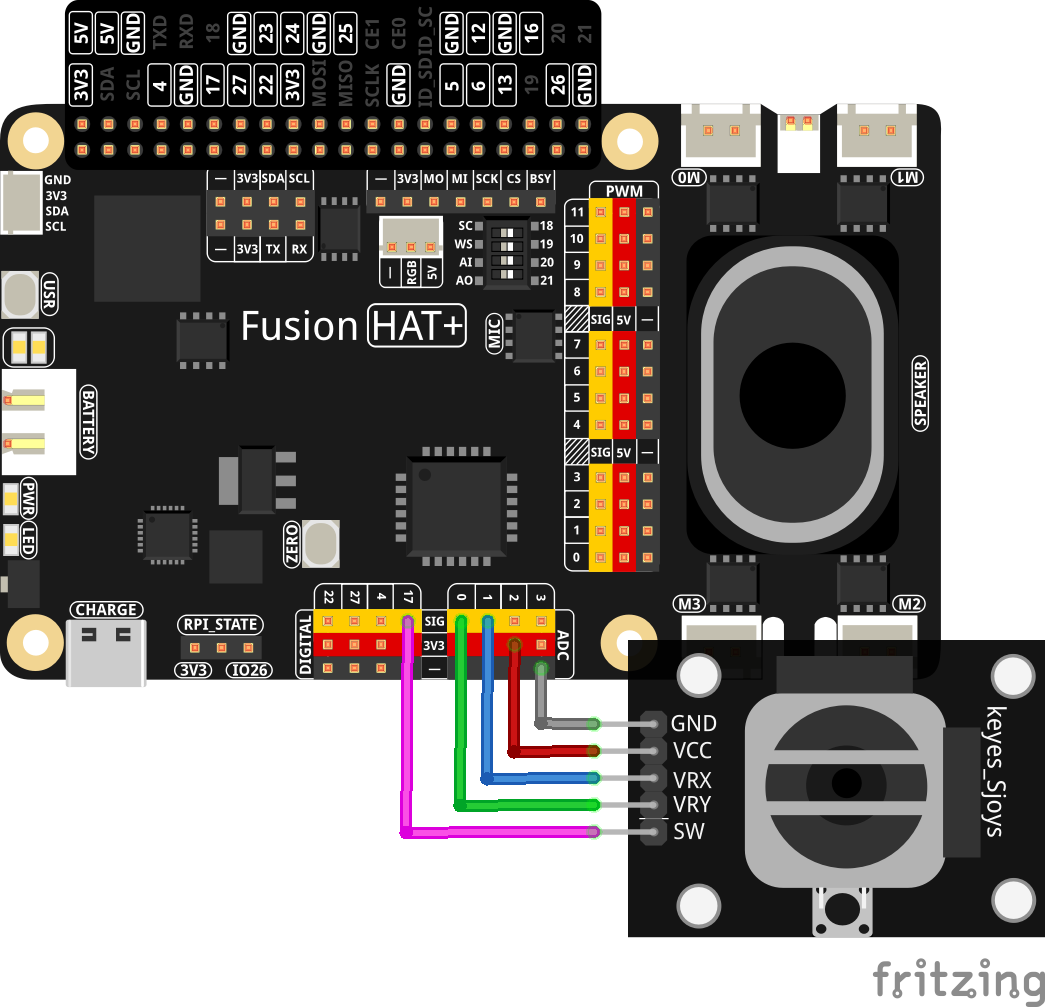
APIキーの取得と保存
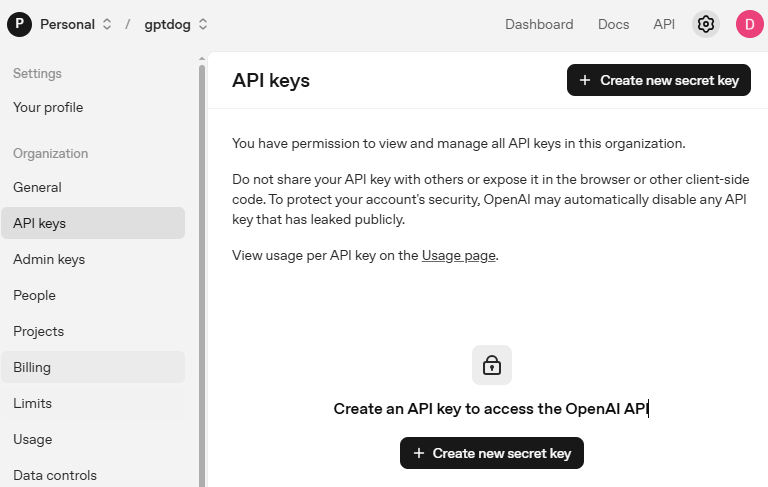
OpenAI Platform にアクセスしてログインします。 API keys ページで Create new secret key をクリックします。
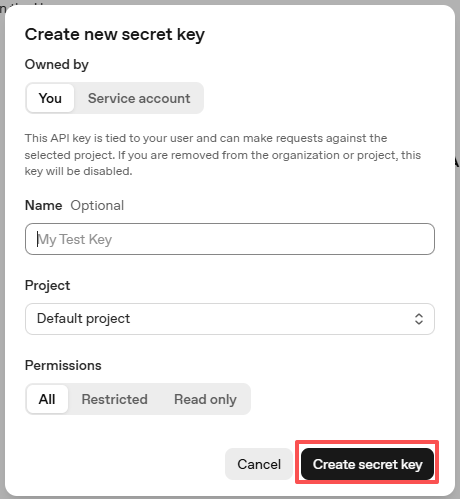
必要事項(Owner、Name、Project、必要に応じて権限)を入力し、 Create secret key をクリックします。
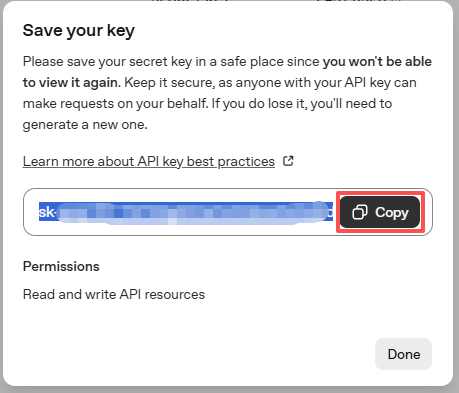
キーが作成されたら、すぐにコピーしてください。後から再表示できません。紛失した場合は新しく作成し直す必要があります。
プロジェクトフォルダ(例:
/)内にsecret.pyというファイルを作成します:cd ~/ai-lab-kit/llm sudo nano secret.py
ファイルにキーを次のように貼り付けます:
# secret.py
# Store secrets here. Never commit this file to Git.
OPENAI_API_KEY = "sk-xxx"
請求設定の有効化と利用可能モデルの確認
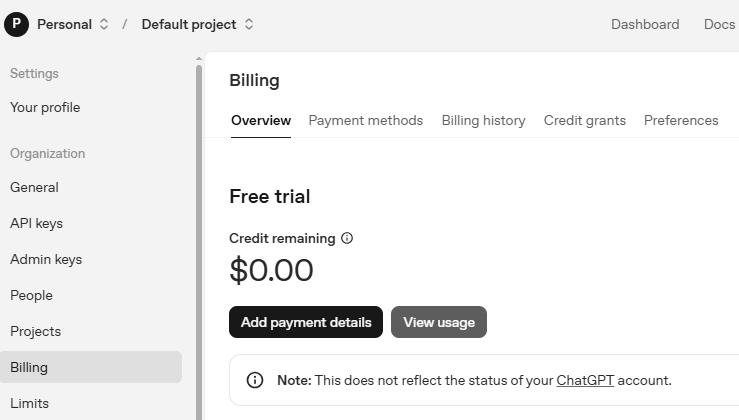
キーを使用する前に、OpenAI アカウントの Billing ページで支払い情報を追加し、少額のクレジットをチャージしてください。
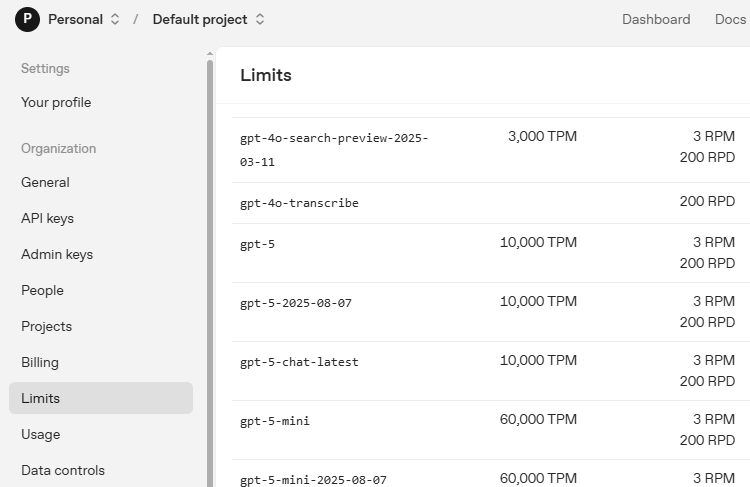
続いて Limits ページで、アカウントで利用可能なモデルを確認し、コードで使用する正確なモデルIDをコピーします。
サンプルの実行
コードを実行する
cd ~/ai-lab-kit/llm
sudo python3 llm_openai_blindfolded_game.py
ゲームをプレイする
スクリプトを起動すると、ゲームは 20×20 メートルのフィールド内にスイカをランダムに配置します。 ジョイスティックで 1 歩ずつ移動し、AI アシスタントの方向ガイダンスを聞きながら進めてください。
スイカの位置に到達したと思ったら、ボタンを押してスマッシュします。 現在座標がスイカ座標と完全一致していれば、ゲームに勝利します。
ゲームの仕組みを理解する
座標系:
ゲームフィールドは 20×20 メートルのグリッド
座標範囲は (-10,-10) から (10,10)
正の X = 東、負の X = 西
正の Y = 南、負の Y = 北(Y軸が反転)
中心点は (0,0)
移動ルール:
ジョイスティック右 → X+1(東)
ジョイスティック左 → X-1(西)
ジョイスティック上 → Y-1(北)
ジョイスティック下 → Y+1(南)
1 回の移動で 1 メートル進む
勝利条件:
プレイヤーがスイカ座標に完全一致している必要がある
ボタンを押して現在位置で「スマッシュ」する
完全一致で勝利メッセージを表示して終了
AI アシスタントの役割:
プレイヤー座標とスイカ座標の両方を受け取る
方角(N, NE, E, SE, S, SW, W, NW)で誘導する
距離の目安(メートル)を提示する
音声再生のため、回答は短く保つ
Code
Here is the full Python script for the Blindfolded Watermelon Smashing Game:
from fusion_hat.llm import OpenAI
from secret import OPENAI_API_KEY
from fusion_hat.adc import ADC
from fusion_hat.pin import Pin
from fusion_hat.tts import Pico2Wave
import random, time

# Register OpenAI API
# openai.com

# Export your openai api key with :LLM_API_KEY
# export LLM_API_KEY=sk-xxxxxxxxxxxxxxxxx

# Setup TTS
tts = Pico2Wave()
tts.set_lang('en-US')

# Setup Joystick
btn_pin = Pin(17, mode=Pin.IN, pull=Pin.PULL_UP, bounce_time=0.05)
x_axis = ADC('A1')
y_axis = ADC('A0')

def MAP(x, in_min, in_max, out_min, out_max):
    """
    Map a value from one range to another.
    """
    return (x - in_min) * (out_max - out_min) / (in_max - in_min) + out_min

def activate():
    global smash_tips
    smash_tips = True

btn_pin.when_activated = activate

# Setup LLM
INSTRUCTIONS = "This is a blindfolded watermelon-smashing game. A point representing a watermelon is randomly generated within a 20x20 meter area with coordinates ranging from (-10,-10) to (10,10). The player starts from the origin (0,0) and moves using a joystick. Even if the player can't see anything, they press a button to perform a smash action. After smashing, you will receive the watermelon's and player's coordinates. You need to advise the player on the direction of the watermelon, like 'The watermelon is ten meters to your northeast.' If the smash coordinates match, the game ends. Your responses will be converted into speech via TTS, so please keep them brief, ideally within two sentences."

WELCOME = "Hello, I am Blindfolded Watermelon Smashing Game Assistant. Use the joystick to move and press the button to smash. I will guide you to find the watermelon. Good luck!"


llm = OpenAI(
    api_key=OPENAI_API_KEY,
    model="gpt-4o",
)

# Set how many messages to keep
llm.set_max_messages(20)
# Set instructions
llm.set_instructions(INSTRUCTIONS)
# Set welcome message
llm.set_welcome(WELCOME)

print(WELCOME)

# Define the map size and the joystick pins
watermelon_x, watermelon_y = random.randint(-10, 10), random.randint(-10, 10)
player_x, player_y = 0, 0
smash_tips = False

while True:
    x_val = MAP(x_axis.read(), 0, 4095, -100, 100)
    y_val = MAP(y_axis.read(), 0, 4095, -100, 100)

    if x_val > 80:
        player_x += 1
    elif x_val < -80:
        player_x -= 1

    if y_val > 80:
        player_y -= 1
    elif y_val < -80:
        player_y += 1

    # Debug positions (commented out in actual game)
    # print('Watermelon position: %d, %d  ' % (watermelon_x, watermelon_y))
    # print('Player position: %d, %d  ' % (player_x, player_y))

    time.sleep(0.3)

    if smash_tips:
        smash_tips = False
        print("Smash!")

        if (player_x, player_y) == (watermelon_x, watermelon_y):
            print("Target hit!")
            tts.say("Target hit!")
            break
        else:
            input_text = f"Watermelon position: ({watermelon_x}, {watermelon_y}), Player position: ({player_x}, {player_y})"

            # Response with stream
            response = llm.prompt(input_text, stream=True)
            string = ""

            for next_word in response:
                if next_word:
                    # print(next_word, end="", flush=True)  # Uncomment for streaming display
                    string += next_word

            # print("")  # New line after streaming
            print("AI: " + string)
            tts.say(string)

print("Game over!")
コードの理解
Text-to-Speech の設定
ゲームでは Pico2Wave を音声フィードバックに使用します:
tts = Pico2Wave()
tts.set_lang('en-US')
これにより、AI のテキスト応答が英語音声の指示として読み上げられます。
ジョイスティック入力の処理
ジョイスティックは X/Y 軸の読み取りに 2 つの ADC チャンネルを使用します:
x_axis = ADC('A1')  # Horizontal movement
y_axis = ADC('A0')  # Vertical movement

def MAP(x, in_min, in_max, out_min, out_max):
    return (x - in_min) * (out_max - out_min) / (in_max - in_min) + out_min

# Convert 0-4095 ADC reading to -100 to 100 range
x_val = MAP(x_axis.read(), 0, 4095, -100, 100)
y_val = MAP(y_axis.read(), 0, 4095, -100, 100)
割り込みによるボタン設定
ボタンは割り込みコールバックにより即時反応します:
btn_pin = Pin(17, mode=Pin.IN, pull=Pin.PULL_UP, bounce_time=0.05)

def activate():
    global smash_tips
    smash_tips = True

btn_pin.when_activated = activate
押下されると
smash_tipsがTrueになり、メインループでスマッシュ動作が実行されます。OpenAI LLM の設定
AI アシスタントはゲーム用の指示文で構成されます:
INSTRUCTIONS = "This is a blindfolded watermelon-smashing game..."
WELCOME = "Hello, I am Blindfolded Watermelon Smashing Game Assistant..."

llm = OpenAI(
    api_key=OPENAI_API_KEY,
    model="gpt-4o",
)

llm.set_max_messages(20)       # Keep conversation history
llm.set_instructions(INSTRUCTIONS)  # Set game rules
llm.set_welcome(WELCOME)       # Set initial greeting
ゲーム状態の管理
ゲームはプレイヤー位置とターゲット位置を保持します:
# Random watermelon placement
watermelon_x, watermelon_y = random.randint(-10, 10), random.randint(-10, 10)

# Player starts at center
player_x, player_y = 0, 0

# Movement thresholds (80% joystick deflection)
if x_val > 80:
    player_x += 1      # Move right
elif x_val < -80:
    player_x -= 1      # Move left

if y_val > 80:
    player_y -= 1      # Move up (negative Y)
elif y_val < -80:
    player_y += 1      # Move down (positive Y)
スマッシュ動作と AI 応答
ボタンが押されると、命中判定を行い、外れた場合は AI へガイダンスを要求します:
if smash_tips:
    smash_tips = False
    print("Smash!")

    if (player_x, player_y) == (watermelon_x, watermelon_y):
        print("Target hit!")
        tts.say("Target hit!")
        break  # Game ends
    else:
        # Send positions to AI for guidance
        input_text = f"Watermelon position: ({watermelon_x}, {watermelon_y}), Player position: ({player_x}, {player_y})"

        # Get streaming response from AI
        response = llm.prompt(input_text, stream=True)
        string = ""

        for next_word in response:
            if next_word:
                string += next_word

        print("AI: " + string)
        tts.say(string)  # Speak the guidance
ストリーミング応答の処理
AI の応答は、リアルタイム表示に対応できるよう単語(トークン)単位で処理されます:
response = llm.prompt(input_text, stream=True)
string = ""

for next_word in response:
    if next_word:
        # Uncomment to display words as they arrive
        # print(next_word, end="", flush=True)
        string += next_word
デッドゾーン付きの移動ロジック
ジョイスティックには誤動作を防ぐため、80 ユニットのデッドゾーンがあります:
# Only move when joystick is pushed >80% in any direction
# This prevents drifting from center position
if x_val > 80:    # Right
elif x_val < -80: # Left

if y_val > 80:    # Up
elif y_val < -80: # Down
ゲームループの構造
メインループは継続的に次を実行します:
ジョイスティック位置の読み取り
ジョイスティックが押された場合の座標更新
スマッシュボタン押下の確認
必要に応じて AI 応答の取得と処理
TTS による音声フィードバック
トラブルシューティング
ジョイスティックが反応しない
ADC 配線を確認:Y 軸は A0、X 軸は A1
電源を確認:VCC は 3.3V、GND はグラウンドへ
ADC 読み取りテスト:
print(x_axis.read())が 0〜4095 を表示することジョイスティックが中央に戻っていること(~2048 付近になるはず)
TTS から音が出ない
音声出力を確認:
sudo raspi-config→ System Options → Audioスピーカーテスト:
speaker-test -t sine -f 440Pico2Wave のインストール確認:
pico2wave --help音量確認:
alsamixer音声セットアップスクリプトを再実行:
sudo /opt/setup_fusion_hat_audio.sh
OpenAI API エラー
secret.pyの API キーを確認ネット接続確認:
ping 8.8.8.8OpenAI アカウントで課金が有効になっていること
モデル "gpt-4o" がアカウントで利用可能であること
プレイヤーの移動が速すぎる/遅すぎる
移動しきい値(現在 80)を調整:大きいほど強く倒さないと移動しない
移動量(現在 1)を調整:0.5 にすればより細かい制御が可能
sleep 時間(現在 0.3s)を調整:長くすると反応が遅くなる
AI の回答が長すぎる
INSTRUCTIONS で短さを強調する
指示に "Respond in 10 words or less" を追加する
コード側で応答長をチェックする
この目隠しスイカ割りゲームは、物理入力、AI の誘導、音声フィードバックを組み合わせることで、空間認識と聴覚を頼りに挑戦する、感覚ベースの没入型ゲーム体験を実現できることを示しています!