注釈
こんにちは、SunFounder Raspberry Pi & Arduino & ESP32 Enthusiast Community on Facebookへようこそ!他の愛好家と一緒に、Raspberry Pi、Arduino、ESP32の世界により深く入り込みましょう。
参加する理由
専門家サポート: 購入後の問題や技術的な課題を、コミュニティと私たちのチームの助けを借りて解決します。
学習と共有: ヒントやチュートリアルを交換して、スキルを向上させましょう。
限定プレビュー: 新製品の発表や先行プレビューに早期アクセスできます。
特別割引: 最新製品を特別割引でお楽しみいただけます。
季節限定キャンペーンとプレゼント: プレゼント企画やホリデーキャンペーンに参加しましょう。
👉 一緒に発見し、創造する準備はできましたか? [こちら] をクリックして、今すぐ参加しましょう!
(Example) 音声操作スマートファン
はじめに
このプロジェクトでは、音声認識、AI処理、モーター制御を組み合わせたインテリジェントな 音声操作スマートファン を作成します。自然な音声コマンドでファンの回転速度を制御でき、複数の操作方法に対応します:
speech-to-text による 音声コマンド (ハンズフリー操作)
物理ボタン による手動の速度調整
OpenAI の GPT を用いた AI解釈 (自然言語理解)
ボタン操作を知らせる ブザーによる音声フィードバック
音声と物理操作の両方に対応する デュアル操作インターフェース
スマートファンは「make it faster」「slow down please」「turn off the fan」のような指示を理解し、適切な動作と音声での確認応答を返します。
さまざまな入出力モジュールを組み合わせることで、音声操作対応のスマートデバイスを作成できます。以下を参照してください:
必要なもの
このプロジェクトに必要な部品は以下の通りです:
COMPONENT |
PURCHASE LINK |
|---|---|
- |
|
- |
|
Raspberry Pi |
- |
配線図
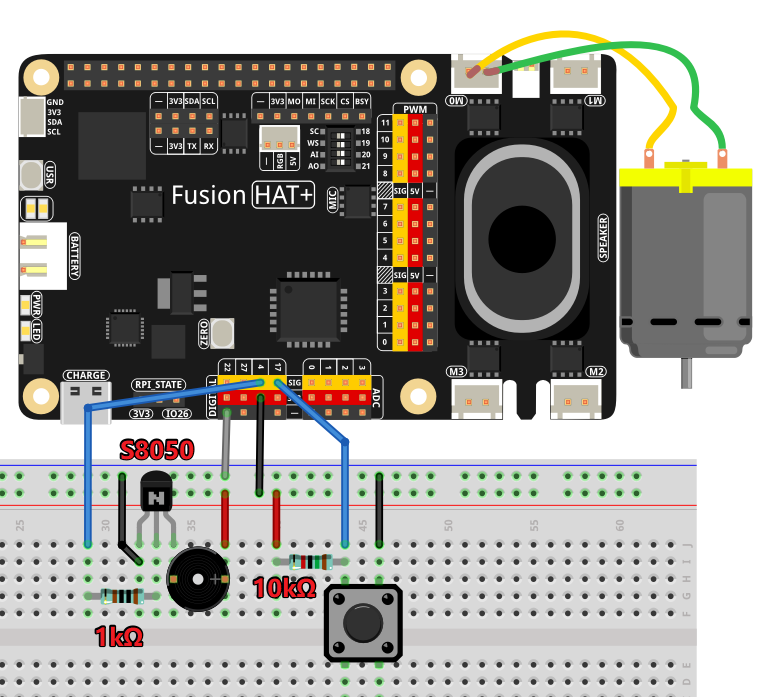
以下のように部品を Fusion HAT+ に接続します:
APIキーの取得と保存
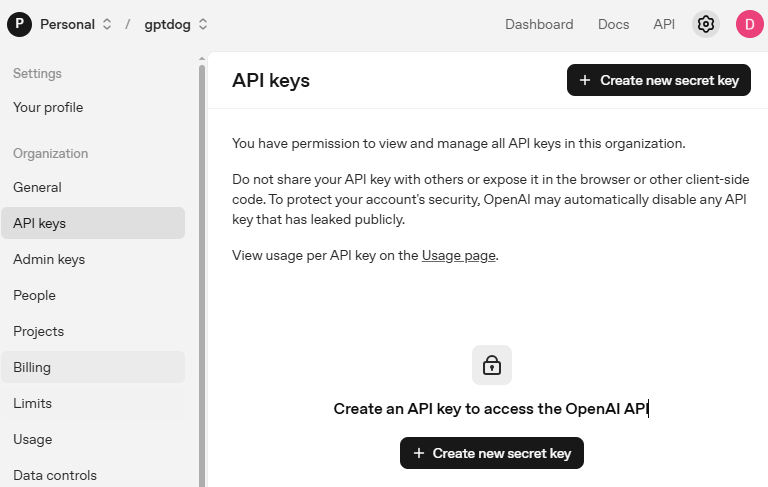
OpenAI Platform にアクセスしてログインします。 API keys ページで Create new secret key をクリックします。
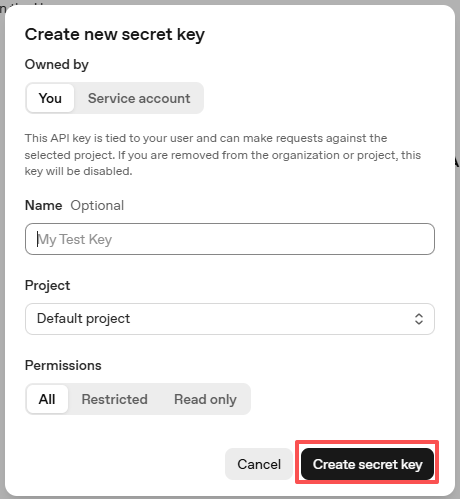
必要事項(Owner、Name、Project、必要に応じて権限)を入力し、 Create secret key をクリックします。
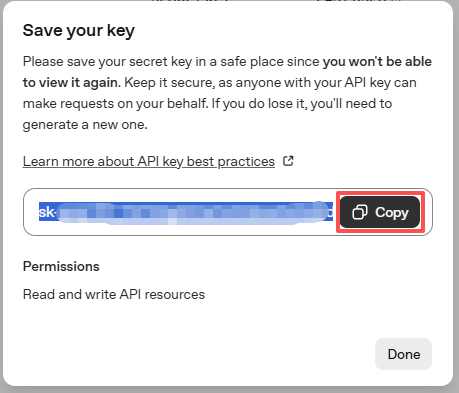
キーが作成されたら、すぐにコピーしてください。後から再表示できません。紛失した場合は新しく作成し直す必要があります。
プロジェクトフォルダ(例:
/)内にsecret.pyというファイルを作成します:cd ~/ai-lab-kit/llm sudo nano secret.py
ファイルにキーを次のように貼り付けます:
# secret.py
# Store secrets here. Never commit this file to Git.
OPENAI_API_KEY = "sk-xxx"
請求設定の有効化と利用可能モデルの確認
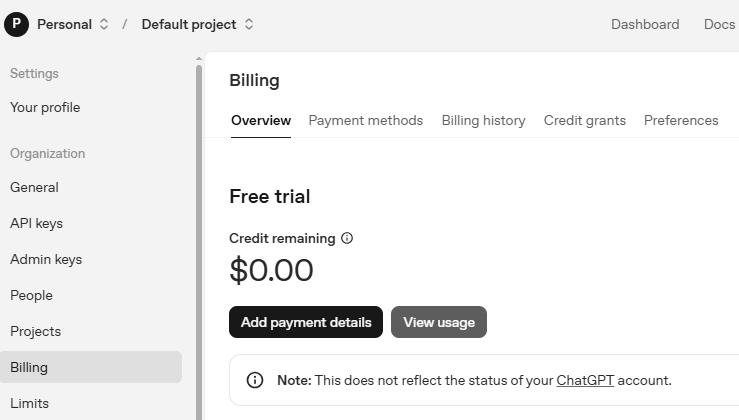
キーを使用する前に、OpenAI アカウントの Billing ページで支払い情報を追加し、少額のクレジットをチャージしてください。
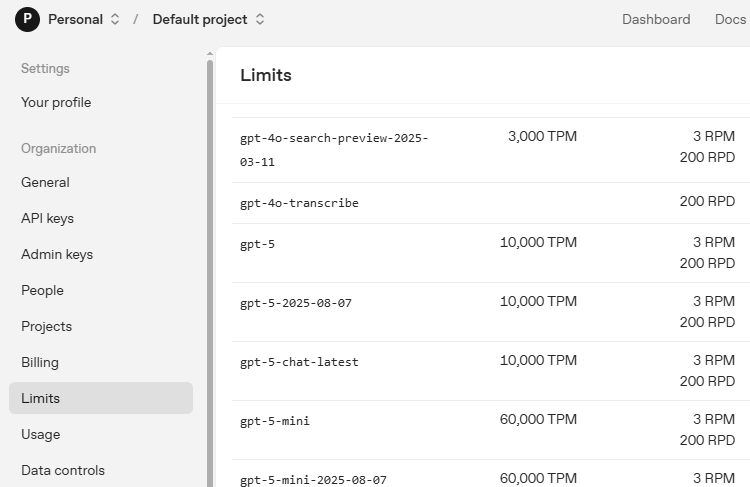
続いて Limits ページで、アカウントで利用可能なモデルを確認し、コードで使用する正確なモデルIDをコピーします。
サンプルの実行
コードを実行する
cd ~/ai-lab-kit/llm
sudo python3 llm_openai_fan.py
ファンを操作する
音声コマンド、ボタン、または自然言語でファンを制御できます。
音声コマンド:
"Make it faster" / "Increase speed" → 最大(100%)に設定
"Slow down" / "Reduce speed" → 低速(25%)に設定
"Medium speed please" → 中速(50%)に設定
"Turn off" / "Stop" → モーター停止(0%)
"What's the current speed?" → 現在の速度を報告
"Make it cooler" → より高速にしたい意図として解釈
ボタン操作:
押すたびに速度を 10% 上げる
100% の次は 0% に戻ってサイクルする
押下ごとにビープ音で確認できる
現在の速度(%)が画面に表示される
自然言語理解:
AI は次のような言い回しの違いも理解できます:
"I'm feeling hot, can you make it faster?"
"Could you please turn the fan down a bit?"
"It's too windy in here!"
"Set it to half speed"
コード
以下は音声操作スマートファンの Python スクリプト全体です:
from fusion_hat.llm import OpenAI
from secret import OPENAI_API_KEY
from fusion_hat.motor import Motor
from fusion_hat.modules import Buzzer
from fusion_hat.pin import Pin
import random, time
from fusion_hat.stt import STT

# Initialize Speech-to-Text with English language
stt = STT(language="en-us")

# Initialize motor on port M0
motor = Motor('M0')

# Initialize button on GPIO 17 with pull-up and debounce
button = Pin(17, mode=Pin.IN, pull=Pin.PULL_UP, bounce_time=0.05)

# Initialize buzzer on GPIO 4
buzzer = Buzzer(Pin(4))

# Global speed variable (0-100%)
speed = 0

# Function for auditory feedback
def beep():
    buzzer.on()
    time.sleep(0.1)
    buzzer.off()

# Debounce variables for button
last_triggered = 0

# Button callback function
def speed_up():
    global speed, last_triggered

    # Debounce: ignore if pressed within 500ms
    if time.time() - last_triggered < 0.5:
        return

    last_triggered = time.time()

    # Increase speed by 10%
    speed += 10

    # Wrap around at 100% (go back to 0)
    if speed > 100:
        motor.stop()
        speed = 0
    else:
        motor.power(speed)

    # Auditory feedback
    beep()

    # Print current speed
    print(f"Speed set to: {speed}%")

# Attach callback to button
button.when_activated = speed_up

# Function to parse natural language response and set appropriate speed
def parse_response_for_speed(text_response):
    """
    Parse the LLM's natural language response to determine speed setting.
    Looks for keywords related to different speed levels.
    Returns the speed level to set (100, 50, 25, or 0)
    """
    text_lower = text_response.lower()

    # Check for "stop" or "off" keywords - highest priority
    if any(word in text_lower for word in ['stop', 'off', 'zero', '0%', 'turn off', 'shut off', 'halt']):
        return 0

    # Check for "slow" or "low" keywords
    if any(word in text_lower for word in ['slow', 'low', '25%', 'quarter', 'minimum', 'gentle']):
        return 25

    # Check for "medium" or "half" keywords
    if any(word in text_lower for word in ['medium', 'half', '50%', 'moderate', 'normal']):
        return 50

    # Check for "fast" or "high" or "full" keywords
    if any(word in text_lower for word in ['fast', 'high', 'full', '100%', 'maximum', 'top']):
        return 100

    # If no specific keywords found, return -1 to indicate no speed change
    return -1

# Setup LLM with specific instructions for fan control
INSTRUCTIONS = '''
You are a fan control assistant. Your task is to interpret the user's speech input and respond with natural language.

### Input Format:
The user will speak their command for fan control.

### CRITICAL RULES:
1. **BE DECISIVE**: Always take clear action based on user requests. Do NOT ask follow-up questions.
2. **NO CLARIFICATION QUESTIONS**: Never ask "Would you like me to..." or "Should I..." questions.
3. **ASSUME INTENT**: If the user's request is ambiguous, make a reasonable assumption and take action.
4. **CONFIRM ACTION**: Always state what action you are taking in your response.

### Response Guidelines:
1. Respond naturally and conversationally to the user's request.
2. Acknowledge what the user asked for.
3. Use clear language about what action you're taking.
4. Use keywords in your response that indicate speed levels:
   - For maximum speed: use words like "fast", "high", "full speed", "maximum"
   - For medium speed: use words like "medium", "half speed", "50%"
   - For low speed: use words like "slow", "low", "quarter speed", "25%"
   - For stopping: use words like "stop", "off", "zero", "turning off"
5. If the user asks about current status, respond with helpful information.

### Example Responses:

**When asked to go fast:**
"I'll set the fan to maximum speed for you. Full speed activated!"

**When asked to slow down:**
"Reducing the fan speed to low. Enjoy the gentle breeze."

**When asked for medium speed:**
"Setting the fan to medium speed. This should be comfortable."

**When asked to stop:**
"Stopping the fan now. The motor is turned off."

**When asked about status:**
"Your fan is currently at 50% speed. Would you like me to adjust it?"

'''

WELCOME = "Hello, I am a fan control assistant. You can ask me to set the fan to fast, medium, slow, or stop it completely. You can also press the button to increase the speed by 10% or decrease it by 10%. If you ask about the current status, I will tell you the current speed. If you don't know what to do, you can ask me for instructions. Good luck!"

# Initialize OpenAI LLM
llm = OpenAI(
    api_key=OPENAI_API_KEY,
    model="gpt-4o",
)

# Set how many messages to keep
llm.set_max_messages(20)

# Set instructions
llm.set_instructions(INSTRUCTIONS)

# Set welcome message
llm.set_welcome(WELCOME)

print(WELCOME)

# Main loop for voice control
while True:
    print("Say something")

    # Listen for speech input
    for result in stt.listen(stream=True):
        if result["done"]:
            # Print final recognized text
            print(f"\r\x1b[Kfinal: {result['final']}")

            # Get the recognized speech
            input_text = result['final']

            # Add current speed context to the input
            contextual_input = f"Current speed is {speed}%. User says: {input_text}"

            # Get response from LLM
            response = llm.prompt(contextual_input, stream=True)

            # Collect the full response
            full_response = ""
            for next_word in response:
                if next_word:
                    print(next_word, end="", flush=True)
                    full_response += next_word

            print("\n")  # Add newline after response

            # Parse the response to determine speed setting
            new_speed = parse_response_for_speed(full_response)

            # Apply speed change if detected
            if new_speed >= 0:
                speed = new_speed
                motor.power(speed)
                print(f"Speed set to: {speed}%")
            else:
                print("No speed change detected in response")

        else:
            # Print partial recognition results
            print(f"\r\x1b[Kpartial: {result['partial']}", end="", flush=True)
コードの理解
Speech-to-Text の初期化
システムは音声認識に STT(Speech-to-Text)を使用します:
stt = STT(language="en-us")

for result in stt.listen(stream=True):
    if result["done"]:
        input_text = result['final']
    else:
        print(f"partial: {result['partial']}")
話している途中の partial 結果も返すため、リアルタイムの音声認識が可能です。
モーター制御の設定
ファンモーターは M0 ポートの PWM で制御します:
motor = Motor('M0')

# Set speed as percentage (0-100)
motor.power(speed)

# Stop the motor completely
motor.stop()
デバウンス付きボタン
ボタンは多重検出を防ぐデバウンスを実装しています:
button = Pin(17, mode=Pin.IN, pull=Pin.PULL_UP, bounce_time=0.05)
last_triggered = 0

def speed_up():
    global speed, last_triggered
    if time.time() - last_triggered < 0.5:  # 500ms debounce
        return
    last_triggered = time.time()
音によるフィードバック
ブザーで押下を音で確認できます:
buzzer = Buzzer(Pin(4))

def beep():
    buzzer.on()
    time.sleep(0.1)
    buzzer.off()
キーワード解析関数
AI の応答から速度指示を抽出します:
def parse_response_for_speed(text_response):
    text_lower = text_response.lower()

    # Check for "stop" or "off" keywords
    if any(word in text_lower for word in ['stop', 'off', 'zero']):
        return 0

    # Check for "slow" or "low" keywords
    if any(word in text_lower for word in ['slow', 'low', '25%']):
        return 25

    # Similar checks for medium and fast

    return -1  # No speed change
AI へのコンテキスト入力
現在速度をプロンプトに含め、状況に応じた返答を引き出します:
contextual_input = f"Current speed is {speed}%. User says: {input_text}"
response = llm.prompt(contextual_input, stream=True)
ストリーミング応答の処理
AI の応答は単語単位で受け取り、逐次処理します:
full_response = ""
for next_word in response:
    if next_word:
        print(next_word, end="", flush=True)
        full_response += next_word
デュアル操作ロジック
音声操作とボタン操作の両方をサポートします:
# Voice control in main loop
new_speed = parse_response_for_speed(full_response)
if new_speed >= 0:
    speed = new_speed
    motor.power(speed)

# Button control via callback
def speed_up():
    speed += 10
    if speed > 100:
        speed = 0
    motor.power(speed)
見やすいターミナル表示
ANSI エスケープコードでコンソール表示を整えています:
print(f"\r\x1b[Kpartial: {result['partial']}", end="", flush=True)
\r: 行頭に戻る(キャリッジリターン)\x1b[K: カーソル位置から行末まで消去end="": 改行しないflush=True: 即時表示
AI への明確な指示
AI には「即断即決」し、確認質問をしないように明示しています:
INSTRUCTIONS = '''
CRITICAL RULES:
1. BE DECISIVE: Always take clear action based on user requests.
2. NO CLARIFICATION QUESTIONS: Never ask "Would you like me to..." questions.
3. ASSUME INTENT: If ambiguous, make reasonable assumption and take action.
4. CONFIRM ACTION: Always state what action you are taking.
'''
トラブルシューティング
モーターが回らない
配線を確認:M0 ポート、極性が正しいか
直接テスト:
motor.power(50)で 50% 回転するはずですspeed 変数が 0〜100 の範囲で設定されているか確認してください
ボタンが反応しない
配線を確認:GPIO 17 → ボタン、もう片側 → 3.3V
pull-up 設定を確認してください
簡易スクリプトで状態変化時に print できるか確認してください
デバウンス時間を確認(0.5 秒は長すぎる場合があります)
ブザーが鳴らない
直接テスト:
buzzer.on()で連続音が出るはずですブザーがピエゾ(PWM が必要)か、アクティブ(DC で動作)かを確認してください
AI が指示を理解しない
secret.pyの API キーを確認してくださいインターネット接続を確認してください
AI の instructions が正しく整形されているか確認してください
まずは簡単な指示で動作確認してください
速度が意図せず変わる
ボタンのデバウンス:複数回トリガーされていないか
キーワード解析:特定フレーズが誤判定を起こしていないか
print を追加して speed 変更の経路を追跡してください
音声認識の精度が低い
周囲のノイズを減らしてください
はっきり、適度な速さで話してください
より高品質な外付け USB マイクの使用も検討してください
STT のパラメータを調整できる場合は調整してください
モーターが鳴るが回らない
モーターが物理的に詰まっていないか確認してください
電源電圧がモーターの要件に合っているか確認してください
モーターによっては端子間にコンデンサが必要な場合があります
この音声操作ファンは、自然言語処理、物理操作、インテリジェントな制御を組み合わせることで、人の意図に合わせて直感的に動作するスマートデバイスを実現できることを示しています。使いやすさとアクセシビリティを両立したスマートホームの一例として活用できます!