注釈
こんにちは、SunFounderのRaspberry Pi & Arduino & ESP32愛好家コミュニティへようこそ!Facebook上でRaspberry Pi、Arduino、ESP32についてもっと深く掘り下げ、他の愛好家と交流しましょう。
参加する理由は?
エキスパートサポート:コミュニティやチームの助けを借りて、販売後の問題や技術的な課題を解決します。
学び&共有:ヒントやチュートリアルを交換してスキルを向上させましょう。
独占的なプレビュー:新製品の発表や先行プレビューに早期アクセスしましょう。
特別割引:最新製品の独占割引をお楽しみください。
祭りのプロモーションとギフト:ギフトや祝日のプロモーションに参加しましょう。
👉 私たちと一緒に探索し、創造する準備はできていますか?[ ここ]をクリックして今すぐ参加しましょう!
スマートゴミ箱
これは、スマートゴミ箱を制御するために設計されたArduinoのコードです。 物体がゴミ箱の前面20センチメートル以内にあると、その蓋が自動的に開きます。 このプロジェクトでは、SG90サーボモーターとHC-SR04超音波距離センサーを利用しています。
必要なコンポーネント
このプロジェクトには以下のコンポーネントが必要です。
全体のキットを購入すると便利です。こちらがリンクです:
名称 |
このキットのアイテム数 |
リンク |
|---|---|---|
Elite Explorer Kit |
300+ |
以下のリンクから別々に購入することもできます。
コンポーネント紹介 |
購入リンク |
|---|---|
- |
|
配線図

回路図
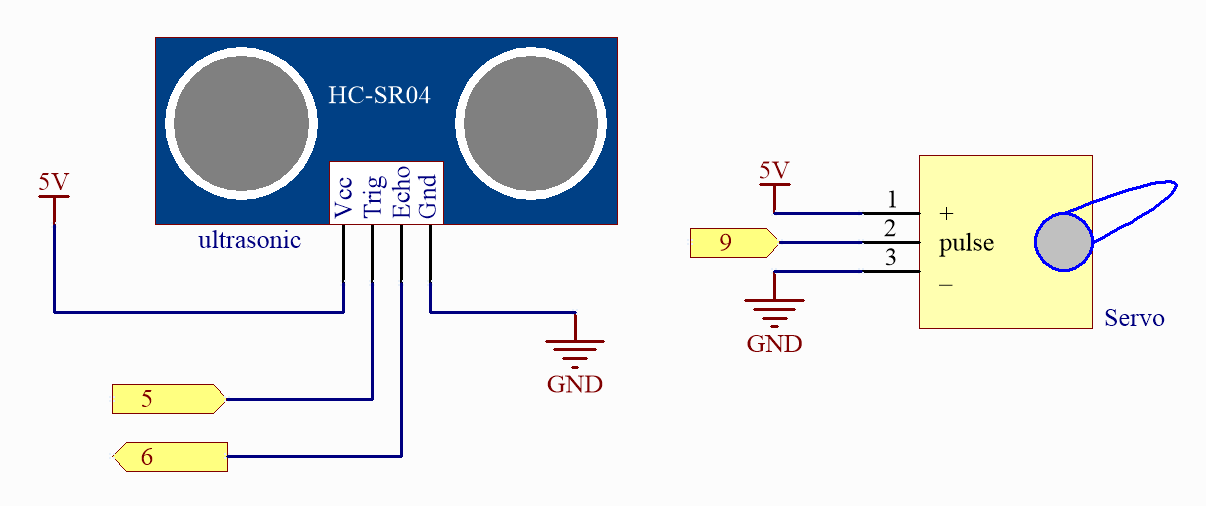
コード
注釈
ファイル
07_smart_trash_can.inoをelite-explorer-kit-main\fun_project\07_smart_trash_canのパスから直接開くことができます。または、このコードをArduino IDEにコピーしてください。
 1/*
 2  This is an Arduino code for a smart trash can that automatically opens its lid when an object comes within 30cm of it.
 3
 4  This Arduino code controls an SG90 servo motor based on readings from an ultrasonic distance sensor.
 5  The distance is measured three times, and the average is computed. If the averaged distance is less
 6  than or equal to 20, the servo rotates to an open angle of 180 degrees; otherwise, it returns to a
 7  closed position of 0 degrees after a one-second delay.
 8
 9  Board: Arduino Uno R4 (or R3)
10  Component: Servo motor and Ultrasonic distance Sensor
11*/
12
13#include <Servo.h>
14
15// Set up the servo motor parameters
16Servo servo;
17const int servoPin = 9;
18const int openAngle = 0;
19const int closeAngle = 90;
20
21// Set up the ultrasonic sensor parameters
22const int trigPin = 5;
23const int echoPin = 6;
24long distance, averageDistance;
25long averDist[3];
26
27// Distance threshold in centimeters
28const int distanceThreshold = 20;
29
30void setup() {
31  // Initialize serial communication with the computer at 9600 baud rate
32  Serial.begin(9600);
33
34  // Configure the trigger and echo pins of the ultrasonic sensor
35  pinMode(trigPin, OUTPUT);
36  pinMode(echoPin, INPUT);
37
38  // Attach the servo to its control pin and set its initial position
39  servo.attach(servoPin);
40  servo.write(closeAngle);
41  delay(100);
42  servo.detach();  // Detach the servo to save power when not in use
43}
44
45void loop() {
46  // Measure the distance three times
47  for (int i = 0; i <= 2; i++) {
48    distance = readDistance();
49    averDist[i] = distance;
50    delay(10);
51  }
52
53  // Calculate the average distance
54  averageDistance = (averDist[0] + averDist[1] + averDist[2]) / 3;
55  Serial.println(averageDistance);
56
57  // Control the servo based on the averaged distance
58  if (averageDistance <= distanceThreshold) {
59    servo.attach(servoPin);  // Reattach the servo before sending a command
60    delay(1);
61    servo.write(openAngle);  // Rotate the servo to the open position
62    delay(3500);
63  } else {
64    servo.write(closeAngle);  // Rotate the servo back to the closed position
65    delay(1000);
66    servo.detach();  // Detach the servo to save power when not in use
67  }
68}
69
70// Function to read the sensor data and calculate the distance
71float readDistance() {
72  // Send a pulse on the trigger pin of the ultrasonic sensor
73  digitalWrite(trigPin, LOW);
74  delayMicroseconds(2);
75  digitalWrite(trigPin, HIGH);
76  delayMicroseconds(10);
77  digitalWrite(trigPin, LOW);
78
79  // Measure the pulse width of the echo pin and calculate the distance value
80  float distance = pulseIn(echoPin, HIGH) / 58.00;  // Formula: (340m/s * 1us) / 2
81  return distance;
82}
どのように動作するのか?
以下はコードのステップバイステップの説明です:
ライブラリのインポートと定数/変数の定義:
SG90サーボモーターを制御するために
Servo.hライブラリをインポートします。 サーボモーター、超音波センサー、その他必要な定数や変数のパラメータを定義します。setup():コンピュータとのシリアル通信を9600ボーのボーレートで初期化します。 超音波センサーのトリガーピンとエコーピンを設定します。 サーボモーターを制御ピンに接続し、初期位置を閉じた角度に設定します。角度を設定した後、電力を節約するためにサーボモーターを取り外します。
loop():3回距離を測定し、各測定値を保存します。 3回の測定から平均距離を計算します。 平均距離が20センチメートル(定義された距離しきい値)以下の場合、サーボモーターは開角度(0度)に回転します。 それ以外の場合、1秒の遅延の後、サーボモーターは閉じた位置(90度)に戻ります。使用していないときは電力を節約するためにサーボモーターを取り外します。
readDistance():超音波センサーのトリガーピンにパルスを送信します。 エコーピンのパルス幅を測定し、距離値を計算します。 この計算では、空気中の音速を使用してパルス時間に基づいて距離を計算します。