Note
Hello, welcome to the SunFounder Raspberry Pi & Arduino & ESP32 Enthusiasts Community on Facebook! Dive deeper into Raspberry Pi, Arduino, and ESP32 with fellow enthusiasts.
Why Join?
Expert Support: Solve post-sale issues and technical challenges with help from our community and team.
Learn & Share: Exchange tips and tutorials to enhance your skills.
Exclusive Previews: Get early access to new product announcements and sneak peeks.
Special Discounts: Enjoy exclusive discounts on our newest products.
Festive Promotions and Giveaways: Take part in giveaways and holiday promotions.
👉 Ready to explore and create with us? Click [here] and join today!
Plant Monitor
This project automatically waters plants by activating a water pump when the soil humidity falls below a specific threshold. Additionally, it displays temperature, humidity, and soil moisture on an LCD screen, providing users with insights into the plant’s growth environment.
Required Components
In this project, we need the following components.
It’s definitely convenient to buy a whole kit, here’s the link:
Name |
ITEMS IN THIS KIT |
LINK |
|---|---|---|
Elite Explorer Kit |
300+ |
You can also buy them separately from the links below.
COMPONENT INTRODUCTION |
PURCHASE LINK |
|---|---|
- |
|
- |
|
- |
|
- |
Wiring
Note
To protect the Power Supply Module’s Power Pack, please fully charge it before using it for the first time.
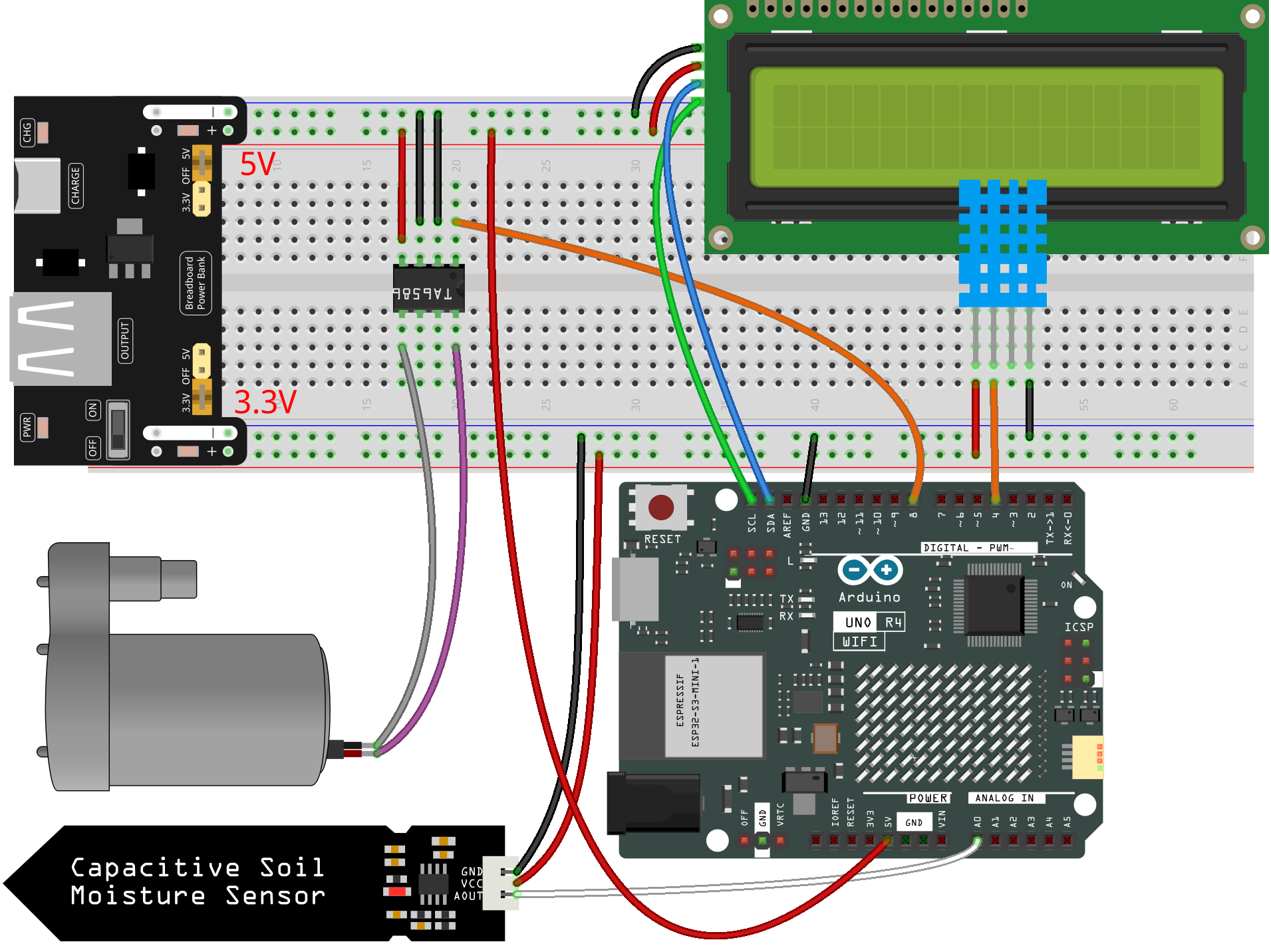
Schematic
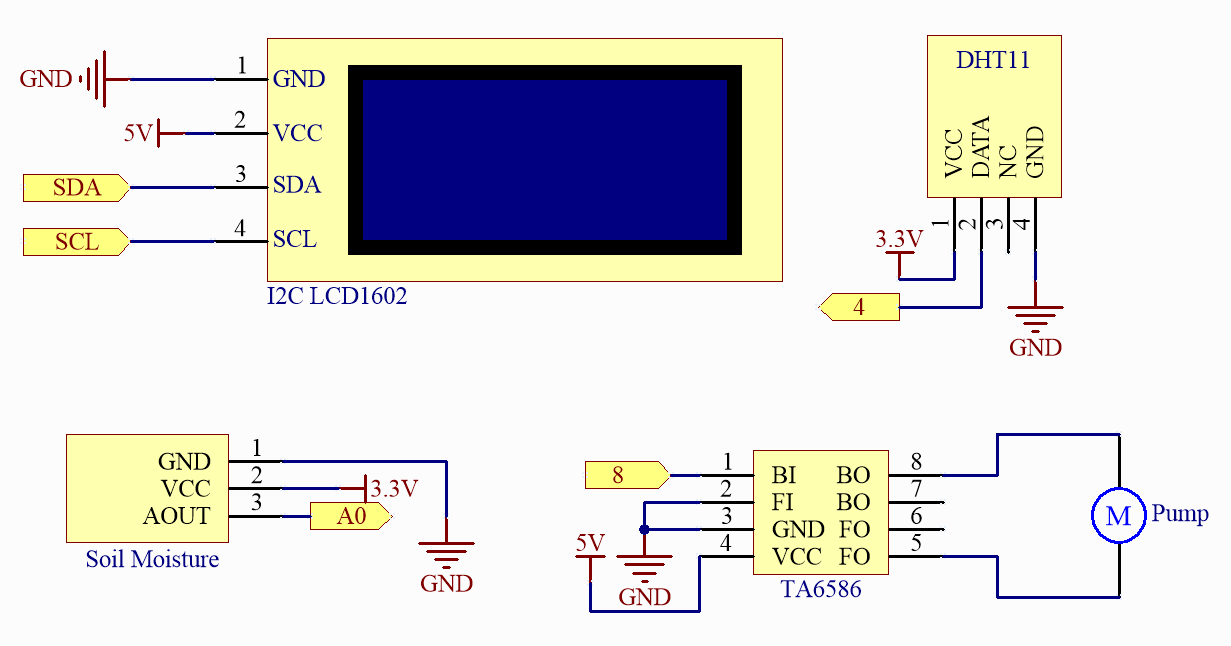
Code
Note
You can open the file
08_plant_monitor.inounder the path ofelite-explorer-kit-main\fun_project\08_plant_monitordirectly.Or copy this code into Arduino IDE.
Note
To install the library, use the Arduino Library Manager and search for “DHT sensor library” and “LiquidCrystal I2C” and install them.
 1/*
 2  Automatic watering system based on soil moisture, temperature, and humidity readings.
 3
 4  Board: Arduino Uno R4
 5  Component: I2C LCD1602, DC Water Pump with TA6586 Motor Driver Chip, Soil Moisture Module, and Humiture Sensor Module
 6  Library: https://www.arduino.cc/reference/en/libraries/liquidcrystal-i2c/ (LiquidCrystal I2C by Frank de Brabander)
 7           https://github.com/adafruit/DHT-sensor-library  (DHT sensor library by Adafruit)
 8*/
 9
10
11#include <Wire.h>
12#include <LiquidCrystal_I2C.h>
13#include <DHT.h>
14
15#define DHTPIN 4              // Digital pin for DHT11 sensor
16#define DHTTYPE DHT11         // DHT11 sensor type
17#define SOIL_MOISTURE_PIN A0  // Analog pin for soil moisture sensor
18#define WATER_PUMP_PIN 8      // Digital pin for water pump
19
20
21// Initialize sensor and LCD objects
22DHT dht(DHTPIN, DHTTYPE);
23LiquidCrystal_I2C lcd(0x27, 16, 2);
24
25void setup() {
26  // Set pin modes
27  pinMode(SOIL_MOISTURE_PIN, INPUT);
28  pinMode(WATER_PUMP_PIN, OUTPUT);
29
30  // Initialize water pump as off
31  digitalWrite(WATER_PUMP_PIN, LOW);
32
33  // Initialize LCD and backlight
34  lcd.init();
35  lcd.backlight();
36
37  // Start DHT sensor
38  dht.begin();
39}
40
41void loop() {
42  // Read humidity and temperature from DHT11
43  float humidity = dht.readHumidity();
44  float temperature = dht.readTemperature();
45
46  // Read soil moisture level
47  int soilMoisture = analogRead(SOIL_MOISTURE_PIN);
48
49  // Display temperature and humidity on LCD
50  lcd.clear();
51  lcd.setCursor(0, 0);
52  lcd.print("Temp: " + String(temperature) + "C");
53  lcd.setCursor(0, 1);
54  lcd.print("Humidity: " + String(humidity) + "%");
55
56  delay(2000);
57
58  // Display soil moisture on LCD
59  lcd.clear();
60  lcd.setCursor(0, 0);
61  lcd.print("Soil Moisture: ");
62  lcd.setCursor(0, 1);
63  lcd.print(String(soilMoisture));
64
65  // Activate water pump if soil is dry
66  if (soilMoisture > 580) {
67    digitalWrite(WATER_PUMP_PIN, HIGH);  // Turn on water pump
68    delay(1000);                         // Pump water for 1 second
69    digitalWrite(WATER_PUMP_PIN, LOW);   // Turn off water pump
70  }
71
72  delay(2000);  // Wait before next loop iteration
73}
How it works?
Here is a detailed explanation of the code:
Library Inclusions and Constants/Variables:
Import
Wire.h,LiquidCrystal_I2C.h, andDHT.hlibraries. Define pin numbers and other parameters related to DHT11, soil moisture sensor, and the water pump.setup():Initialize the pin modes related to the soil moisture sensor and the water pump. Turn off the water pump initially. Initialize the LCD display and turn on the backlight. Start the DHT sensor.
loop():Read humidity and temperature from the DHT sensor. Read soil moisture from the soil moisture sensor. Display temperature and humidity values on the LCD screen, then clear the screen and display the soil moisture value. Determine whether to activate the water pump based on soil moisture. If the soil moisture is below 500 (a configurable threshold), activate the water pump for 1 second.