Note
Hello, welcome to the SunFounder Raspberry Pi & Arduino & ESP32 Enthusiasts Community on Facebook! Dive deeper into Raspberry Pi, Arduino, and ESP32 with fellow enthusiasts.
Why Join?
Expert Support: Solve post-sale issues and technical challenges with help from our community and team.
Learn & Share: Exchange tips and tutorials to enhance your skills.
Exclusive Previews: Get early access to new product announcements and sneak peeks.
Special Discounts: Enjoy exclusive discounts on our newest products.
Festive Promotions and Giveaways: Take part in giveaways and holiday promotions.
👉 Ready to explore and create with us? Click [here] and join today!
Smart Can
This is an Arduino code designed to control a smart garbage can. When an object is within a 20-centimeter range in front of the garbage can, its lid automatically opens. This project utilizes an SG90 servo motor and an HC-SR04 ultrasonic distance sensor.
Required Components
In this project, we need the following components.
It’s definitely convenient to buy a whole kit, here’s the link:
Name |
ITEMS IN THIS KIT |
LINK |
|---|---|---|
Elite Explorer Kit |
300+ |
You can also buy them separately from the links below.
COMPONENT INTRODUCTION |
PURCHASE LINK |
|---|---|
- |
|
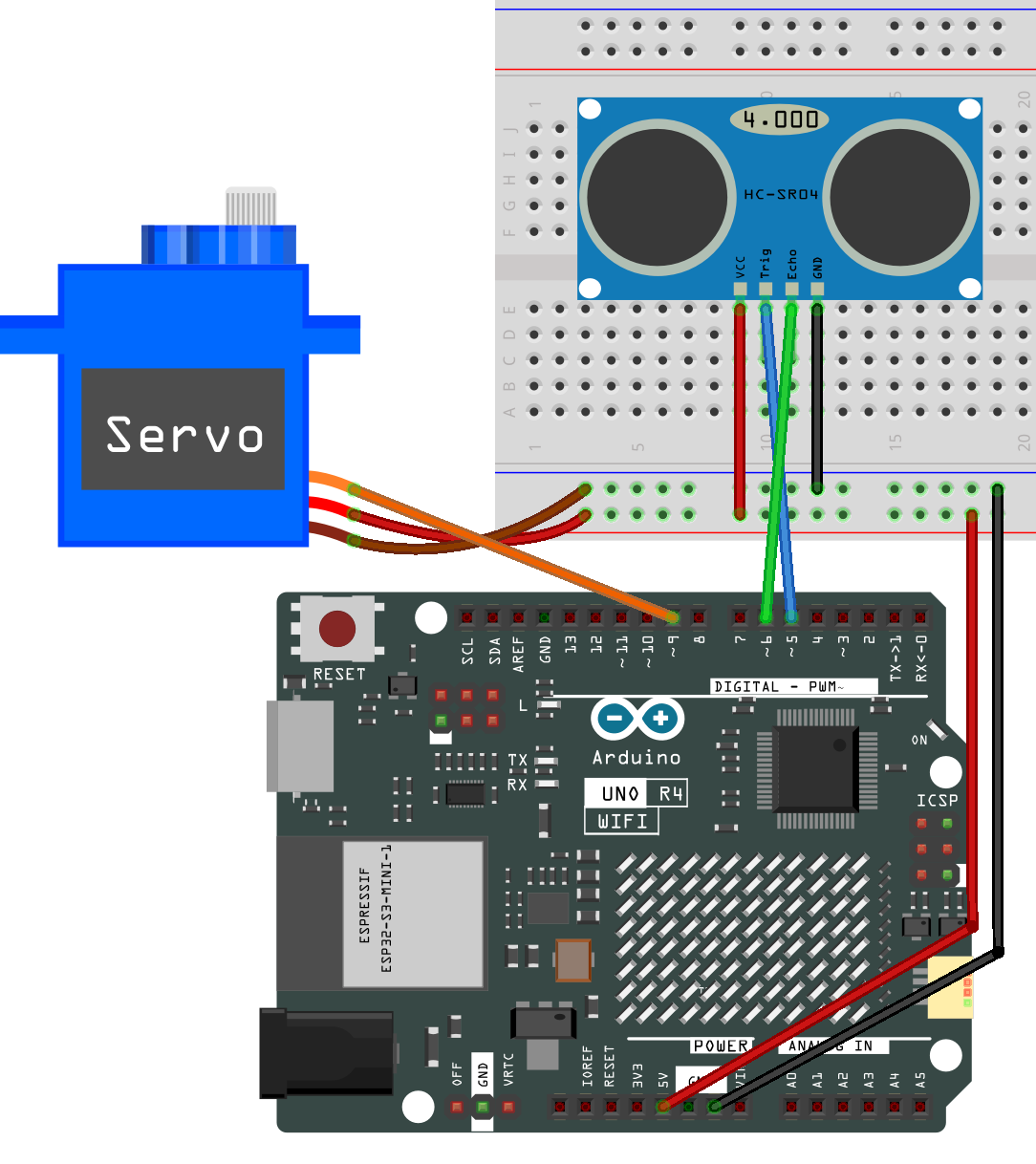
Wiring
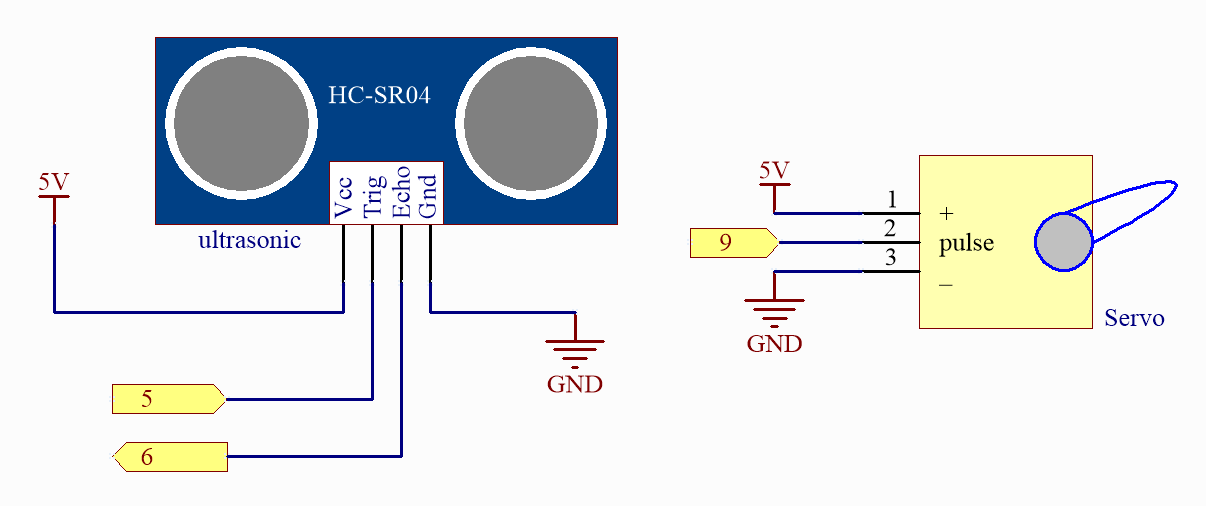
Schematic
Code
Note
You can open the file
07_smart_trash_can.inounder the path ofelite-explorer-kit-main\fun_project\07_smart_trash_candirectly.Or copy this code into Arduino IDE.
 1/*
 2  This is an Arduino code for a smart trash can that automatically opens its lid when an object comes within 30cm of it.
 3
 4  This Arduino code controls an SG90 servo motor based on readings from an ultrasonic distance sensor.
 5  The distance is measured three times, and the average is computed. If the averaged distance is less
 6  than or equal to 20, the servo rotates to an open angle of 180 degrees; otherwise, it returns to a
 7  closed position of 0 degrees after a one-second delay.
 8
 9  Board: Arduino Uno R4 (or R3)
10  Component: Servo motor and Ultrasonic distance Sensor
11*/
12
13#include <Servo.h>
14
15// Set up the servo motor parameters
16Servo servo;
17const int servoPin = 9;
18const int openAngle = 0;
19const int closeAngle = 90;
20
21// Set up the ultrasonic sensor parameters
22const int trigPin = 5;
23const int echoPin = 6;
24long distance, averageDistance;
25long averDist[3];
26
27// Distance threshold in centimeters
28const int distanceThreshold = 20;
29
30void setup() {
31  // Initialize serial communication with the computer at 9600 baud rate
32  Serial.begin(9600);
33
34  // Configure the trigger and echo pins of the ultrasonic sensor
35  pinMode(trigPin, OUTPUT);
36  pinMode(echoPin, INPUT);
37
38  // Attach the servo to its control pin and set its initial position
39  servo.attach(servoPin);
40  servo.write(closeAngle);
41  delay(100);
42  servo.detach();  // Detach the servo to save power when not in use
43}
44
45void loop() {
46  // Measure the distance three times
47  for (int i = 0; i <= 2; i++) {
48    distance = readDistance();
49    averDist[i] = distance;
50    delay(10);
51  }
52
53  // Calculate the average distance
54  averageDistance = (averDist[0] + averDist[1] + averDist[2]) / 3;
55  Serial.println(averageDistance);
56
57  // Control the servo based on the averaged distance
58  if (averageDistance <= distanceThreshold) {
59    servo.attach(servoPin);  // Reattach the servo before sending a command
60    delay(1);
61    servo.write(openAngle);  // Rotate the servo to the open position
62    delay(3500);
63  } else {
64    servo.write(closeAngle);  // Rotate the servo back to the closed position
65    delay(1000);
66    servo.detach();  // Detach the servo to save power when not in use
67  }
68}
69
70// Function to read the sensor data and calculate the distance
71float readDistance() {
72  // Send a pulse on the trigger pin of the ultrasonic sensor
73  digitalWrite(trigPin, LOW);
74  delayMicroseconds(2);
75  digitalWrite(trigPin, HIGH);
76  delayMicroseconds(10);
77  digitalWrite(trigPin, LOW);
78
79  // Measure the pulse width of the echo pin and calculate the distance value
80  float distance = pulseIn(echoPin, HIGH) / 58.00;  // Formula: (340m/s * 1us) / 2
81  return distance;
82}
How it works?
Here is a step-by-step explanation of the code:
Import Libraries and Define Constants/Variables:
The
Servo.hlibrary is imported for controlling the SG90 servo motor. Parameters for the servo motor, ultrasonic sensor, and other required constants and variables are defined.setup():Initialize serial communication with the computer at a baud rate of 9600. Configure the trigger and echo pins of the ultrasonic sensor. Attach the servo motor to its control pin and set its initial position to the closed angle. After setting the angle, the servo motor is detached to save power.
loop():Measure distance three times and store the values of each measurement. Calculate the average distance from the three measurements. If the average distance is less than or equal to 20 centimeters (defined distance threshold), the servo motor rotates to the open angle (0 degrees). Otherwise, the servo motor returns to the closed position (90 degrees) after a one-second delay. The servo motor is detached when not in use to conserve power.
readDistance():Send a pulse to the trigger pin of the ultrasonic sensor. Measure the pulse width of the echo pin and calculate the distance value. This calculation uses the speed of sound in the air to compute distance based on pulse time.