Note
Hello, welcome to the SunFounder Raspberry Pi & Arduino & ESP32 Enthusiasts Community on Facebook! Dive deeper into Raspberry Pi, Arduino, and ESP32 with fellow enthusiasts.
Why Join?
Expert Support: Solve post-sale issues and technical challenges with help from our community and team.
Learn & Share: Exchange tips and tutorials to enhance your skills.
Exclusive Previews: Get early access to new product announcements and sneak peeks.
Special Discounts: Enjoy exclusive discounts on our newest products.
Festive Promotions and Giveaways: Take part in giveaways and holiday promotions.
👉 Ready to explore and create with us? Click [here] and join today!
2.1.4 Potentiometer(MCP3008)
Note
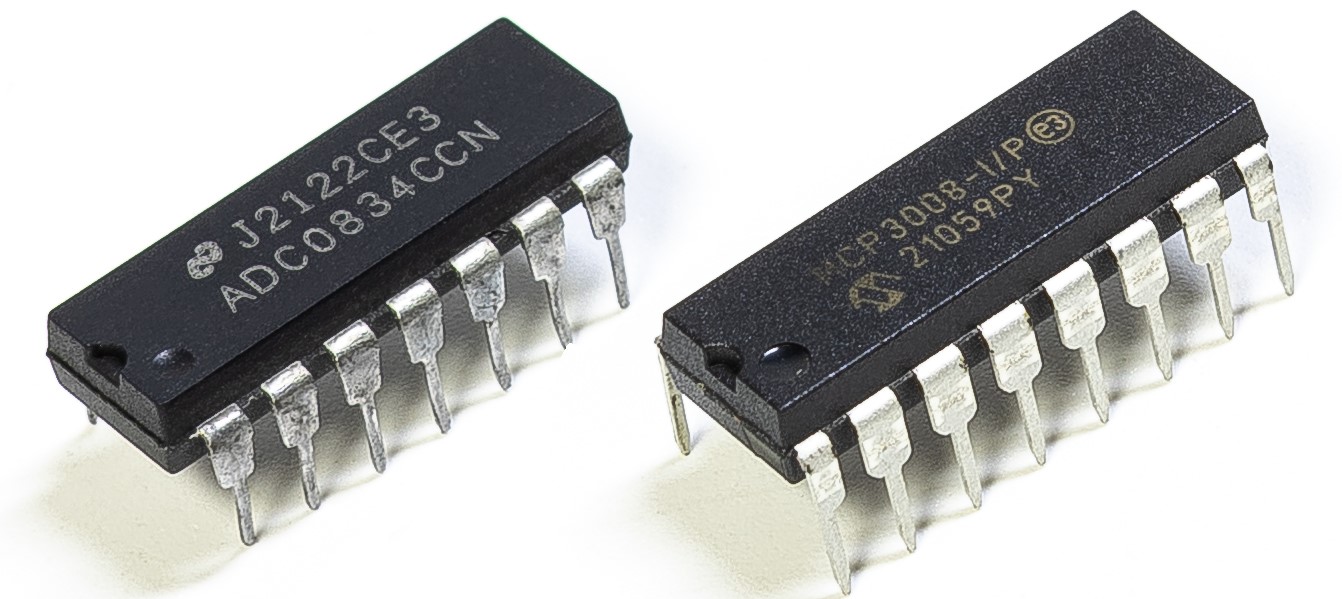
Depending on your kit version, please identify whether you have ADC0834 or MCP3008 and proceed with the matching section.
Introduction
The ADC function is used to convert analog signals into digital values. In this experiment, we use the MCP3008 ADC chip to perform this conversion. A potentiometer is used to generate a variable voltage, which changes the physical quantity. The MCP3008 then converts this analog voltage into a digital value that can be read and processed by the Raspberry Pi.
Required Components
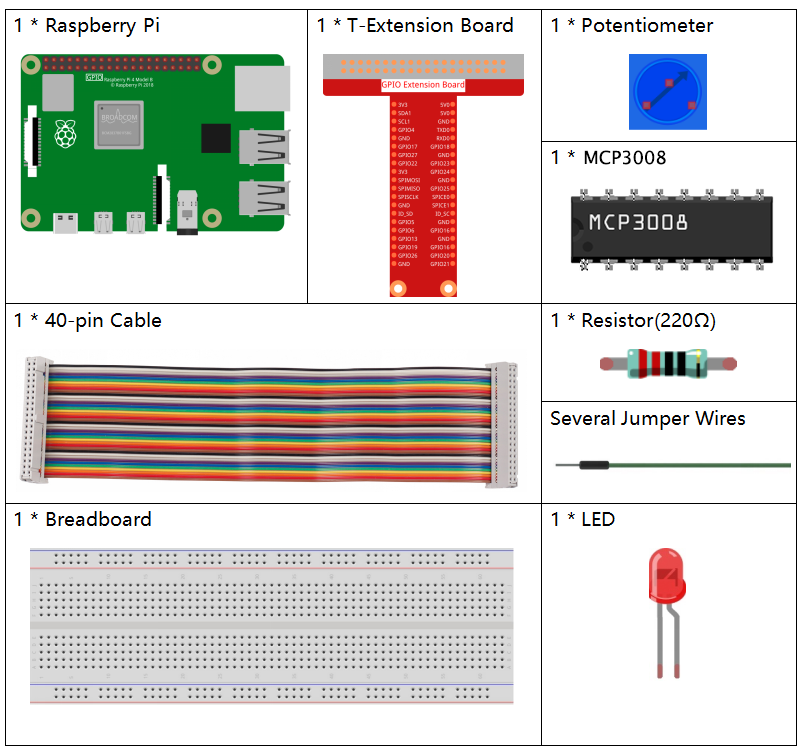
In this project, we need the following components.
Schematic Diagram
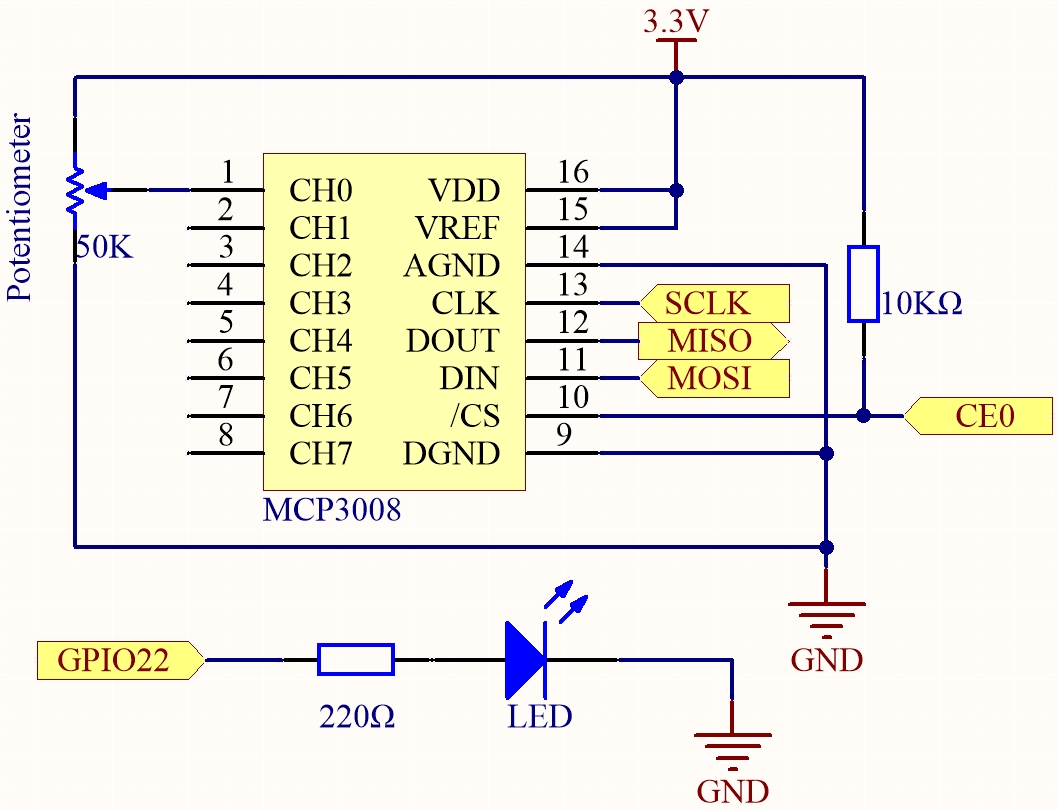
T-Board Name |
physical |
WiringPi |
BCM |
|---|---|---|---|
SPICE0 |
pin24 |
10 |
8 |
SPIMOSI |
pin19 |
12 |
10 |
SPIMISO |
pin21 |
13 |
9 |
SPISCLK |
pin23 |
14 |
11 |
GPIO22 |
pin15 |
3 |
22 |
Experimental Procedures
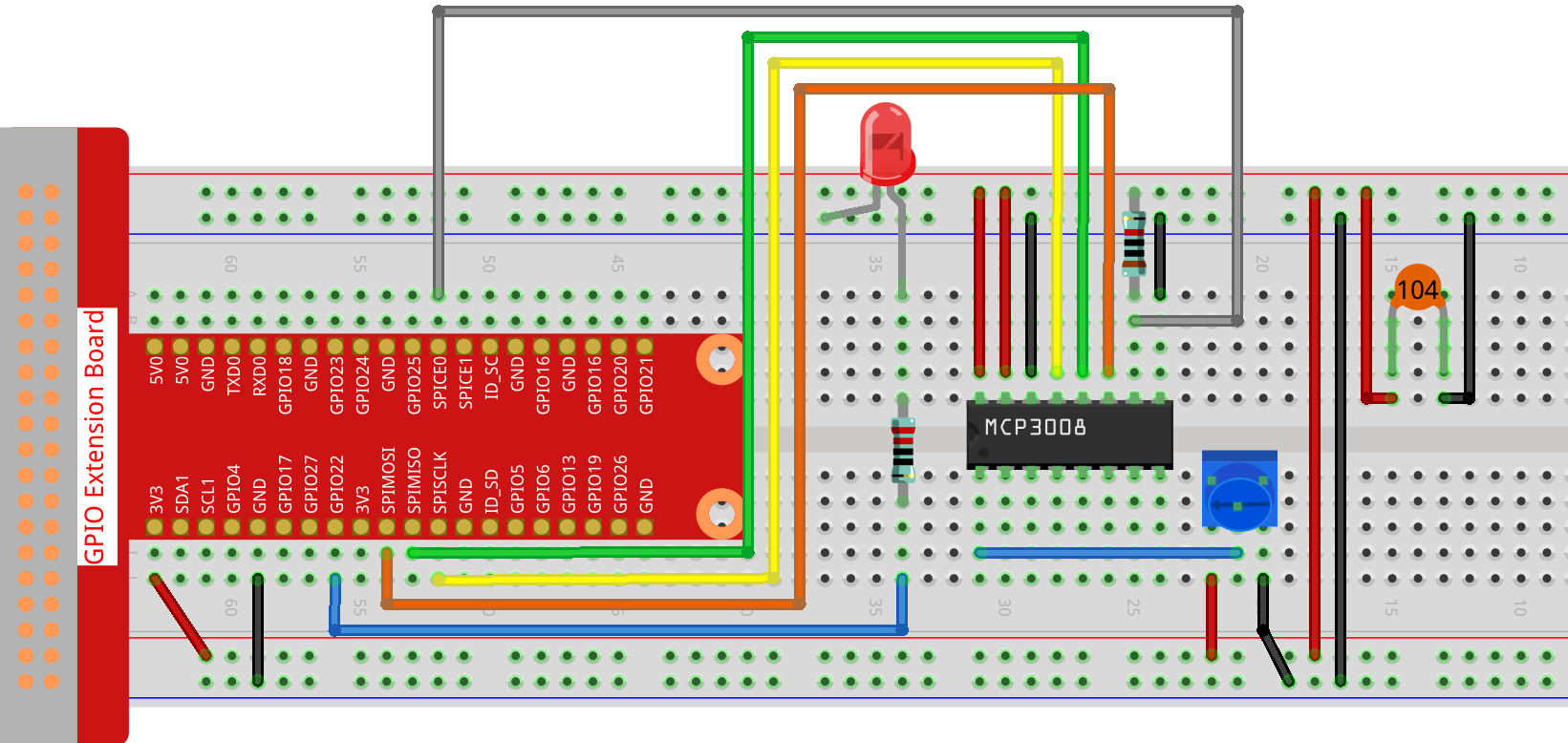
Step 1: Build the circuit.
Note
Please place the chip by referring to the corresponding position depicted in the picture. Note that the grooves on the chip should be on the left when it is placed.
Step 2: Open the code file.
cd ~/davinci-kit-for-raspberry-pi/nodejs/
Step 3: Run the code.
sudo node potentionmeter-2.js
After the code runs, rotate the knob on the potentiometer, the intensity of LED will change accordingly.
Code
const Gpio = require('pigpio').Gpio;
const mcpadc = require('mcp-spi-adc');

// Open MCP3008 channel 0 (analog input CH0)
const adc = mcpadc.openMcp3008(0, { speedHz: 1000000 }, (err) => {
if (err) {
    console.error("Failed to open ADC channel:", err);
    process.exit(1);
}

console.log("MCP3008 channel 0 opened successfully.");

// Initialize LED on GPIO22 with PWM output mode
const led = new Gpio(22, { mode: Gpio.OUTPUT });

// Read ADC value every 100ms and update LED brightness
setInterval(() => {
    adc.read((err, reading) => {
    if (err) {
        console.error("Error reading ADC:", err);
        return;
    }

    // Convert floating-point value (0.0鈥?.0) to PWM range (0鈥?55)
    const pwmVal = Math.round(reading.value * 255);

    console.log(`Current analogVal: ${pwmVal}`);

    // Update LED brightness using PWM
    led.pwmWrite(pwmVal);
    });
}, 100);
});
Code Explanation
const Gpio = require('pigpio').Gpio;
This line imports the pigpio module, which allows for precise PWM and GPIO control on the Raspberry Pi.
const mcpadc = require('mcp-spi-adc');
This line imports the mcp-spi-adc library, which enables communication with the MCP3008 ADC over the SPI interface.
const adc = mcpadc.openMcp3008(0, { speedHz: 1000000 }, (err) => {
    if (err) {
        console.error("Failed to open ADC channel:", err);
        process.exit(1);
    }
});
Initializes MCP3008 analog input channel 0. Sets the SPI communication speed to 1 MHz. If initialization fails, logs an error and exits the program.
const led = new Gpio(22, { mode: Gpio.OUTPUT });
Creates a GPIO object for pin 22 on the Raspberry Pi. This pin is configured as an output and will be used to control the brightness of an LED via PWM.
setInterval(() => {
    adc.read((err, reading) => {
        if (err) {
            console.error("Error reading ADC:", err);
            return;
        }

        const pwmVal = Math.round(reading.value * 255);
        console.log(`Current analogVal: ${pwmVal}`);
        led.pwmWrite(pwmVal);
    });
}, 100);
Every 100 milliseconds, this function reads the analog value from MCP3008 channel 0. The ADC returns a normalized floating-point number between 0.0 and 1.0. This value is scaled to the 0–255 range and written to GPIO22 using pwmWrite() to control the LED brightness. The PWM value is also printed to the console.