5. 连接在线 LLM
在本课程中,我们将学习如何将 Pironman 5 Pro MAX(或 Raspberry Pi)连接到不同的 在线大语言模型(LLMs)。 每个服务提供商都需要 API key,并提供不同的模型供您选择。
我们将介绍如何:
安全地创建并保存 API key。
选择适合您需求的模型。
运行示例代码与模型进行对话。
下面我们将逐步介绍各个服务提供商的配置方法。
OpenAI
OpenAI 提供了强大的模型,例如 GPT-4o 和 GPT-4.1,可用于文本和视觉任务。
以下是配置步骤:
获取并保存 API Key
访问 OpenAI 平台 并登录。在 API keys 页面点击 Create new secret key。
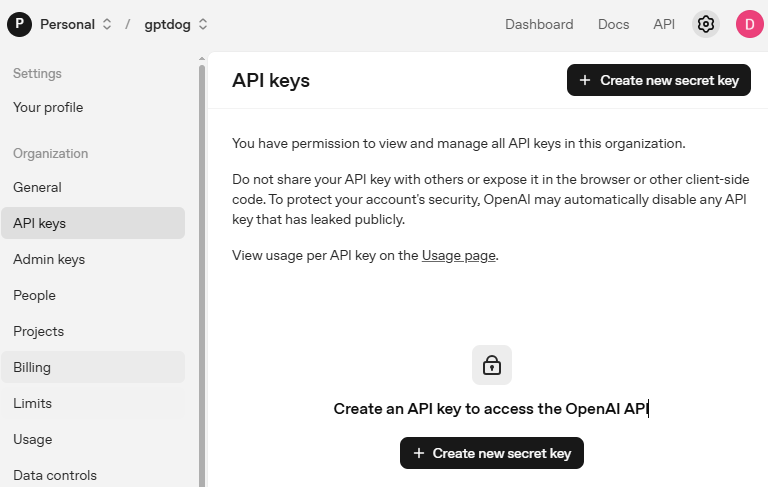
填写相关信息(Owner、Name、Project,以及必要时设置权限),然后点击 Create secret key。
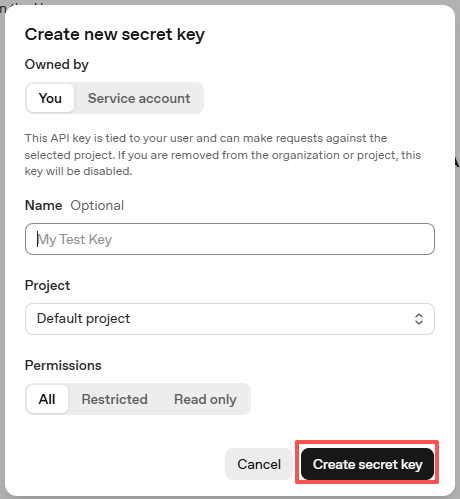
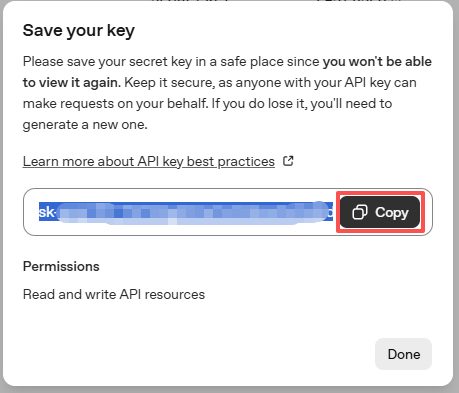
创建完成后,请立即复制该 key —— 之后将无法再次查看。如果遗失,需要重新生成新的 key。
在您的项目目录中(例如:
~/sunfounder-voice-assistant/examples),创建一个名为secret.py的文件:cd ~/sunfounder-voice-assistant/examples sudo nano secret.py
将您的 key 写入文件,例如:
# secret.py # Store secrets here. Never commit this file to Git. OPENAI_API_KEY = "sk-xxx"
启用计费并查看可用模型
在使用 API key 之前,请先进入 OpenAI 账户中的 Billing 页面,添加支付信息并充值少量额度。
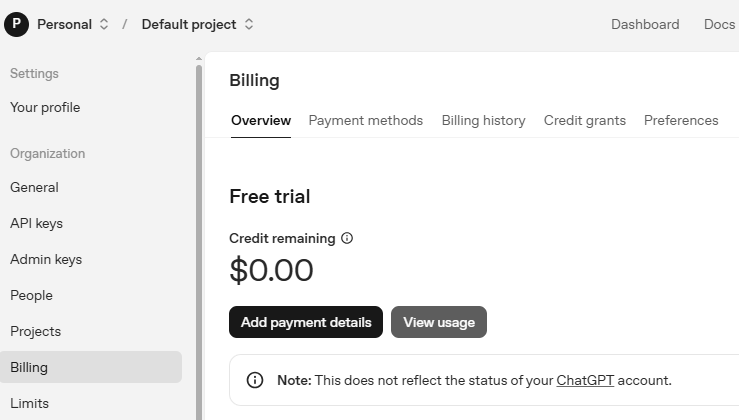
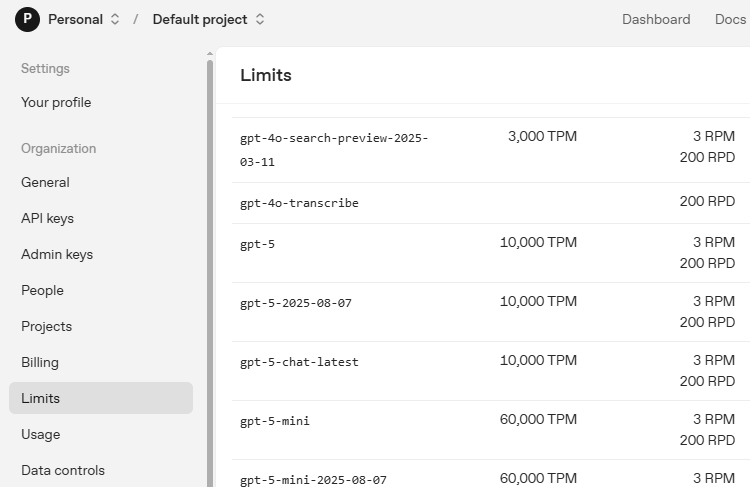
然后进入 Limits 页面,查看您的账户可以使用哪些模型,并复制对应的模型 ID,以便在代码中使用。
使用示例代码进行测试
打开示例代码:
cd ~/sunfounder-voice-assistant/examples sudo nano llm_openai.py
将内容替换为以下代码,并将
model="xxx"修改为您要使用的模型(例如gpt-4o):from sunfounder_voice_assistant.llm import OpenAI from secret import OPENAI_API_KEY INSTRUCTIONS = "You are a helpful assistant." WELCOME = "Hello, I am a helpful assistant. How can I help you?" llm = OpenAI( api_key=OPENAI_API_KEY, model="gpt-4o", )
保存并退出(
Ctrl+X,然后Y,最后按Enter)。最后,运行测试:
sudo python3 llm_openai.py
Gemini
Gemini 是 Google 的一系列 AI 模型,速度快,适用于各种通用任务。
获取并保存 API Key
登录 Google AI Studio,然后进入 API Keys 页面。
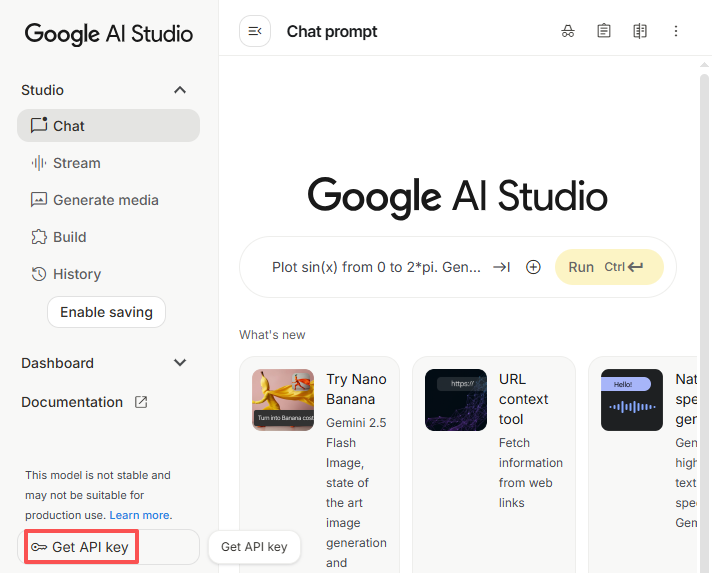
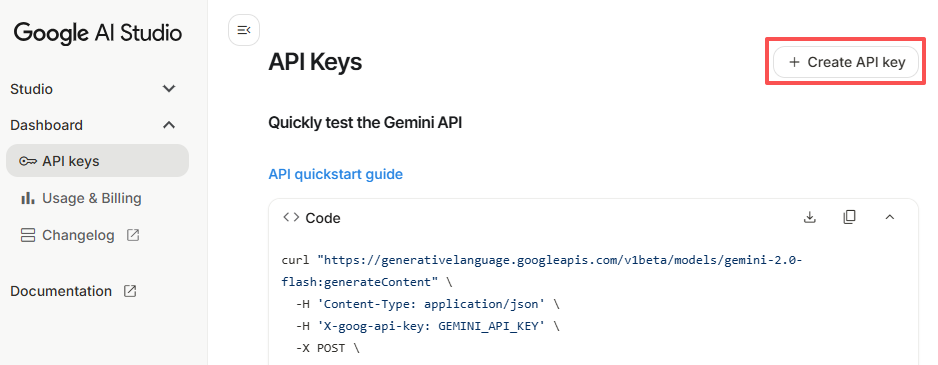
点击右上角的 Create API key 按钮。
您可以为现有项目创建 key,也可以新建一个项目。
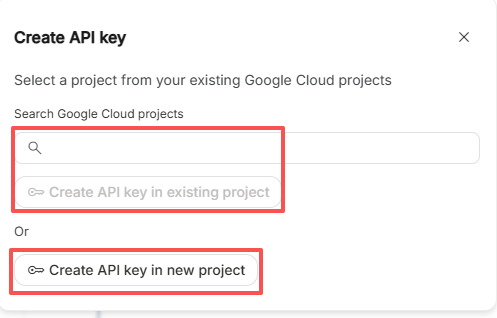
复制生成的 API key。
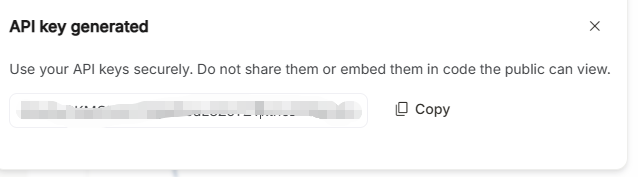
在您的项目目录中:
cd ~/sunfounder-voice-assistant/examples
sudo nano secret.py
将 key 粘贴到文件中:
# secret.py # Store secrets here. Never commit this file to Git. GEMINI_API_KEY = "AIxxx"
查看可用模型
访问官方 Gemini 模型 页面,在这里您可以看到模型列表、对应的 API ID,以及每个模型适合的使用场景。
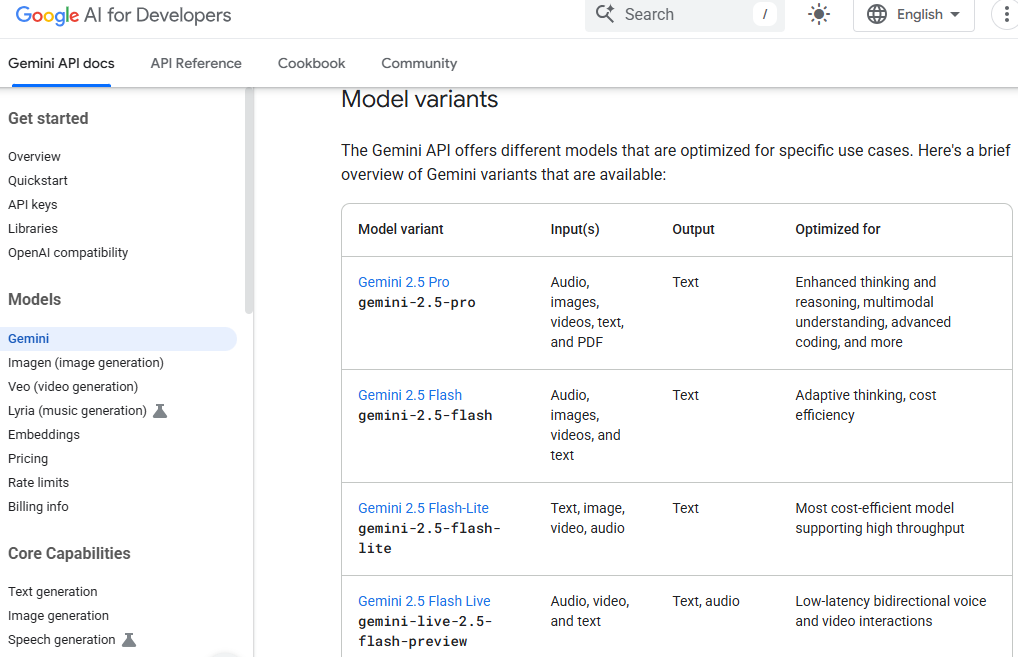
使用示例代码进行测试
打开测试文件:
cd ~/sunfounder-voice-assistant/examples sudo nano llm_gemini.py
将内容替换为以下代码,并将
model="xxx"修改为您要使用的模型(例如gemini-2.5-flash):from sunfounder_voice_assistant.llm import Gemini from secret import GEMINI_API_KEY INSTRUCTIONS = "You are a helpful assistant." WELCOME = "Hello, I am a helpful assistant. How can I help you?" llm = Gemini( api_key=GEMINI_API_KEY, model="gemini-2.5-flash", )
保存并运行:
sudo python3 llm_gemini.py
Qwen
Qwen 是阿里云提供的一系列大语言模型和多模态模型,支持文本生成、推理以及多模态理解(如图像分析)。 :contentReference[oaicite:0]{index=0}
获取 API Key
调用 Qwen 模型需要 API Key。 大多数国际用户应使用 DashScope International(Model Studio) 控制台;中国大陆用户则可使用 百炼(Bailian) 控制台。 :contentReference[oaicite:1]{index=1}
国际用户
访问阿里云官方 获取 API 密钥 页面。
登录或创建 Alibaba Cloud 账号。
进入 Model Studio (选择新加坡或北京区域)。
如果页面顶部出现 “Activate Now”,请点击激活 Model Studio 并领取免费额度(仅新加坡区域)。
激活是免费的,只有在免费额度用完后才会开始收费。
如果没有看到激活提示,则说明服务已启用。
进入 Key Management 页面,在 API Key 标签页点击 Create API Key。
创建完成后,复制 API Key 并妥善保存。

备注
港澳台地区用户同样建议选择 International(Model Studio)。
中国大陆用户
如果您位于中国大陆,可使用 阿里云百炼(Bailian) 控制台:
登录 百炼控制台 (百炼控制台)并完成账号认证。
点击 Create API Key。如果提示模型服务未激活,请先点击 Activate,同意相关条款并领取免费额度。激活后即可创建 API Key。
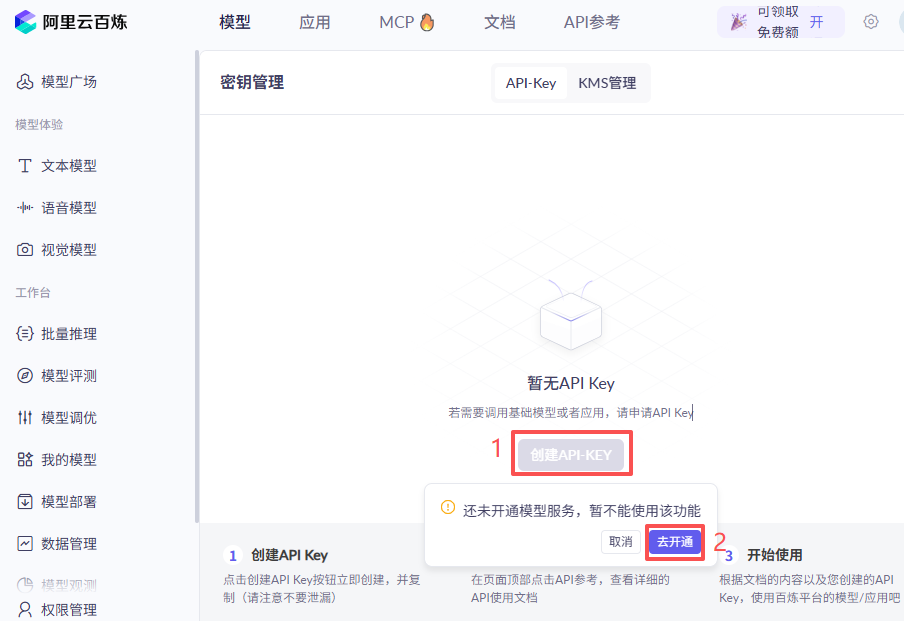
再次点击 Create API Key,确认账号信息后点击 Confirm。
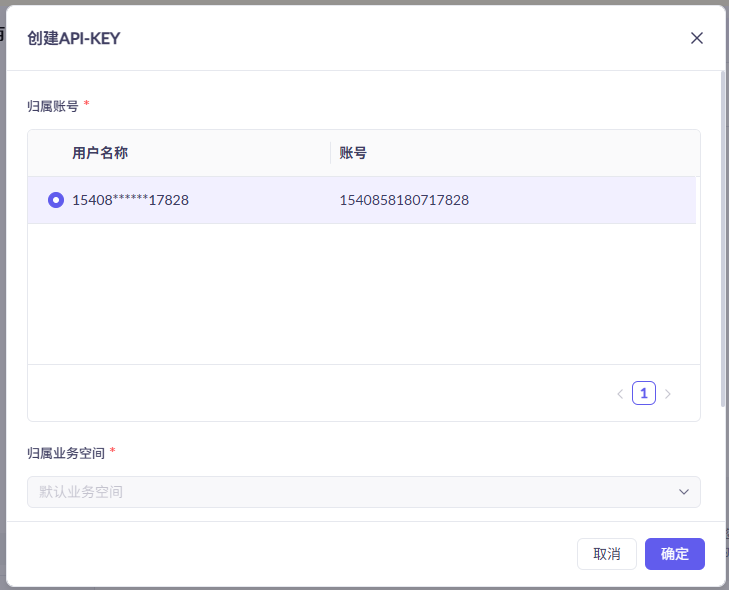
创建完成后,复制 API Key。
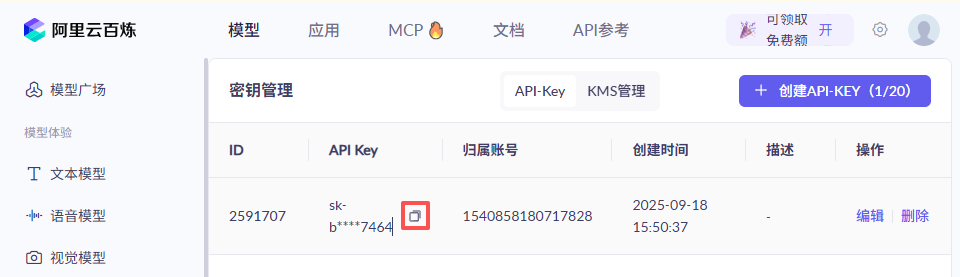
保存 API Key
在您的项目目录中:
cd ~/sunfounder-voice-assistant/examples
sudo nano secret.py
将 key 写入文件:
# secret.py # Store secrets here. Never commit this file to Git. QWEN_API_KEY = "sk-xxx"
使用示例代码进行测试
打开测试文件:
cd ~/sunfounder-voice-assistant/examples sudo nano llm_qwen.py
将内容替换为以下代码,并将
model="xxx"修改为您需要的模型(例如qwen-plus):from sunfounder_voice_assistant.llm import Qwen from secret import QWEN_API_KEY INSTRUCTIONS = "You are a helpful assistant." WELCOME = "Hello, I am a helpful assistant. How can I help you?" llm = Qwen( api_key=QWEN_API_KEY, model="qwen-plus", )
运行程序:
sudo python3 llm_qwen.py
Grok(xAI)
Grok 是由 Elon Musk 团队(xAI)开发的对话式 AI,可通过 xAI API 进行调用。 :contentReference[oaicite:2]{index=2}
获取并保存 API Key
在 xAI 云控制台 注册账号,并先充值一定额度,否则 API 无法使用。
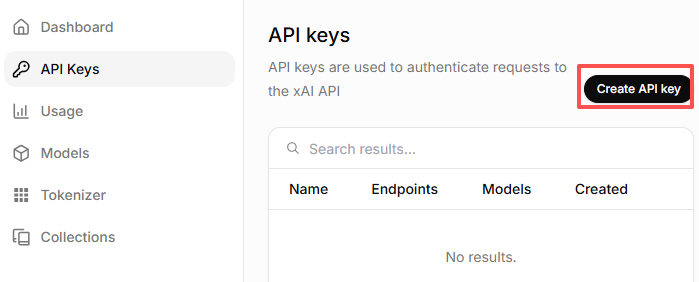
进入 API Keys 页面,点击 Create API key。
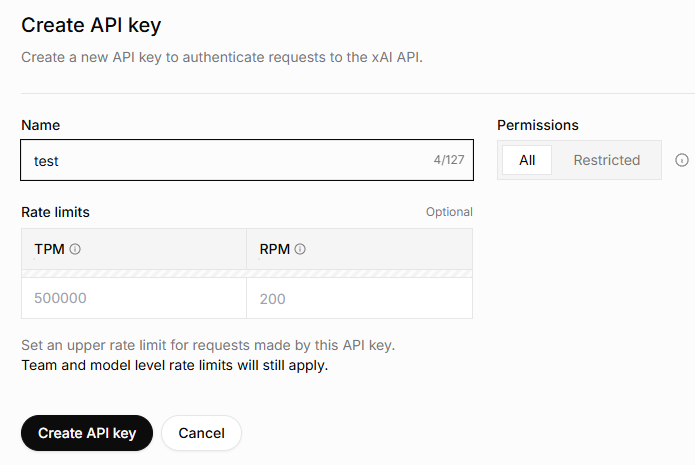
输入 key 名称,然后点击 Create API key。
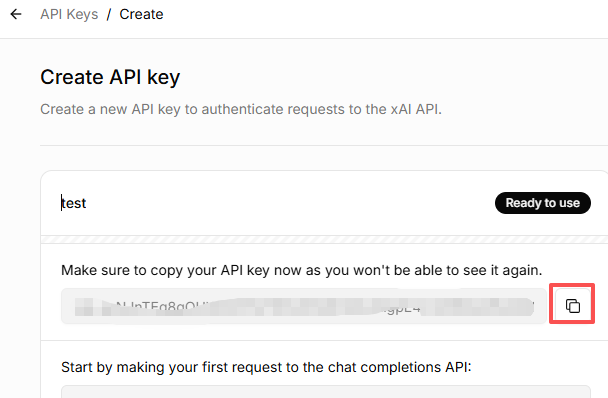
复制生成的 key 并妥善保存。
在您的项目目录中:
cd ~/sunfounder-voice-assistant/examples
sudo nano secret.py
将 key 写入文件:
# secret.py # Store secrets here. Never commit this file to Git. GROK_API_KEY = "xai-xxx"
查看可用模型
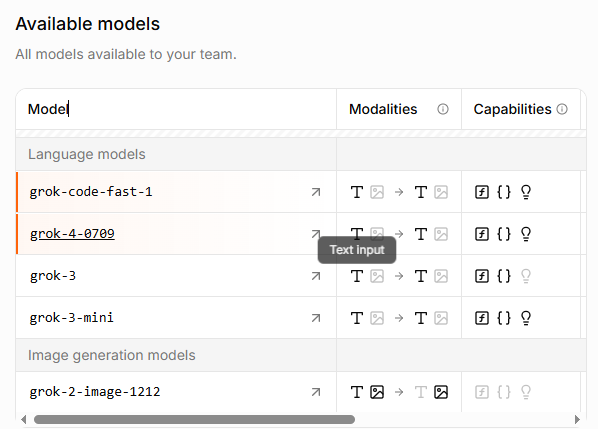
进入 xAI 控制台中的 Models 页面,在这里可以查看可用模型列表及其 API ID,在代码中需使用这些 ID。
使用示例代码进行测试
打开测试文件:
cd ~/sunfounder-voice-assistant/examples sudo nano llm_grok.py
将内容替换为以下代码,并将
model="xxx"修改为您需要的模型(例如grok-4-latest):from sunfounder_voice_assistant.llm import Grok from secret import GROK_API_KEY INSTRUCTIONS = "You are a helpful assistant." WELCOME = "Hello, I am a helpful assistant. How can I help you?" llm = Grok( api_key=GROK_API_KEY, model="grok-4-latest", )
运行程序:
sudo python3 llm_grok.py
DeepSeek
DeepSeek 是一家中国的大语言模型提供商,提供价格相对低廉且性能不错的模型。
获取并保存 API Key
登录 Deepseek 平台。
在右上角菜单中选择 API Keys → Create API Key。
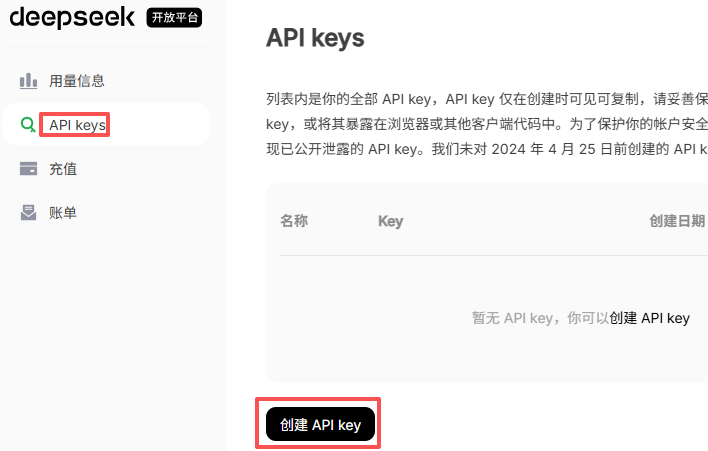
输入名称,点击 Create,然后复制生成的 key。
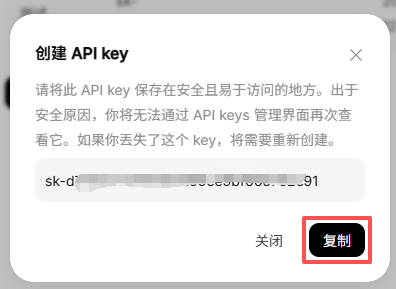
在您的项目目录中:
cd ~/sunfounder-voice-assistant/examples
sudo nano secret.py
添加您的 key:
# secret.py DEEPSEEK_API_KEY = "sk-xxx"
启用计费
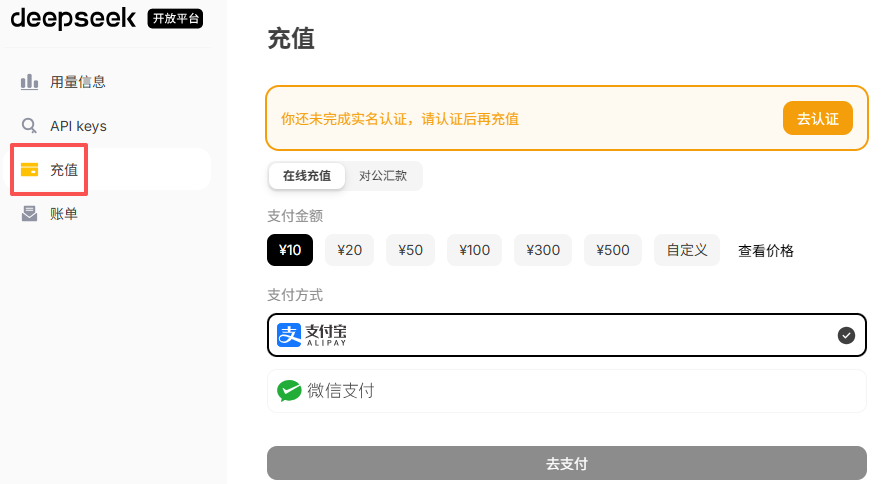
您需要先为账户充值。可以先充值一个较小金额(例如 ¥10 RMB)。
可用模型
在本文编写时(2025-09-12),DeepSeek 提供以下模型:
deepseek-chatdeepseek-reasoner
使用示例代码进行测试
打开测试文件:
cd ~/sunfounder-voice-assistant/examples sudo nano llm_deepseek.py
将内容替换为以下代码,并将
model="xxx"修改为您需要的模型(例如deepseek-chat):from sunfounder_voice_assistant.llm import Deepseek from secret import DEEPSEEK_API_KEY INSTRUCTIONS = "You are a helpful assistant." WELCOME = "Hello, I am a helpful assistant. How can I help you?" llm = Deepseek( api_key=DEEPSEEK_API_KEY, model="deepseek-chat", max_messages=20, )
运行:
sudo python3 llm_deepseek.py
Doubao
Doubao 是字节跳动推出的 AI 模型平台(Volcengine Ark)。
获取并保存 API Key
登录 火山引擎。
在左侧菜单中向下滚动到 API Key Management → Create API Key。
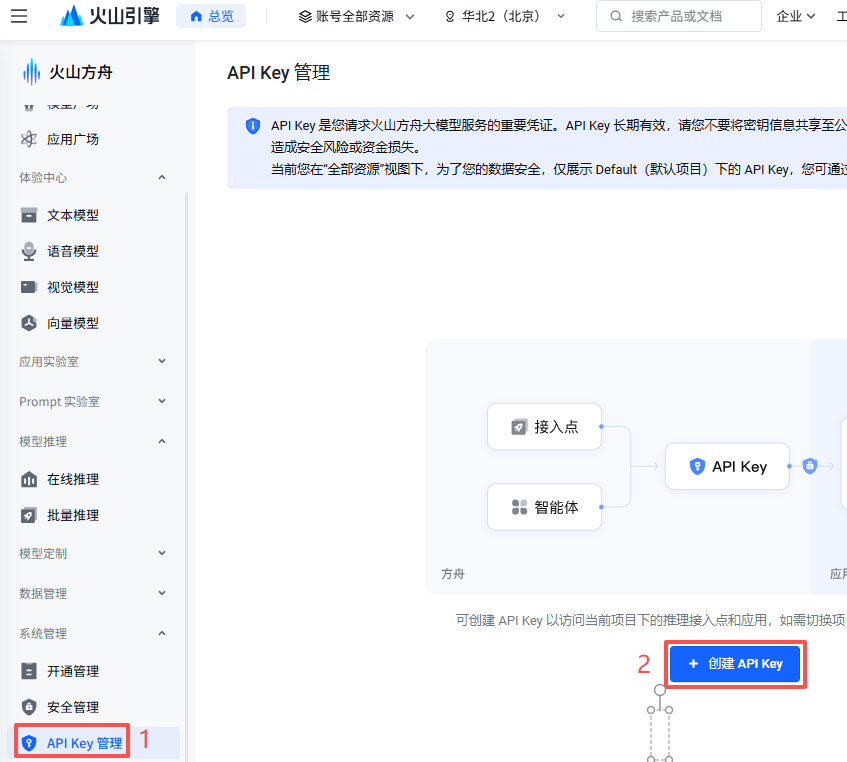
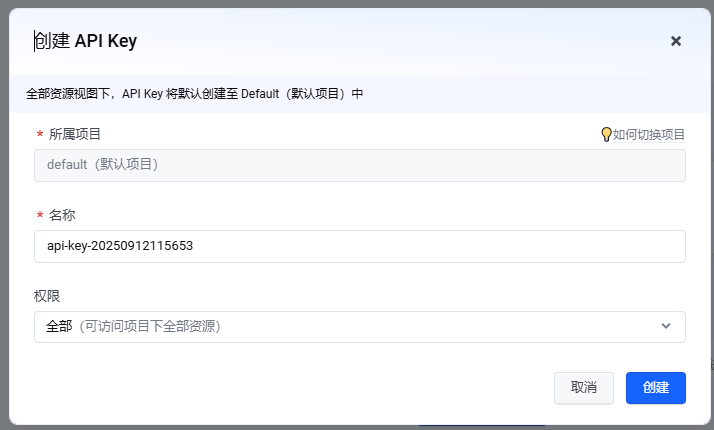
输入名称并点击 Create。
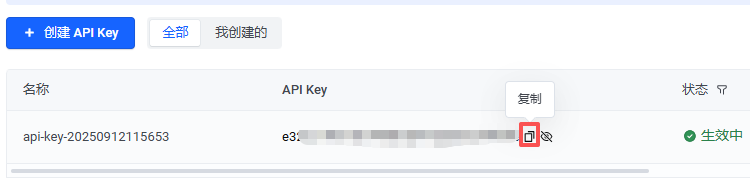
点击 Show API Key 图标并复制 key。
在您的项目目录中:
cd ~/sunfounder-voice-assistant/examples
sudo nano secret.py
添加您的 key:
# secret.py
DOUBAO_API_KEY = "xxx"
选择模型
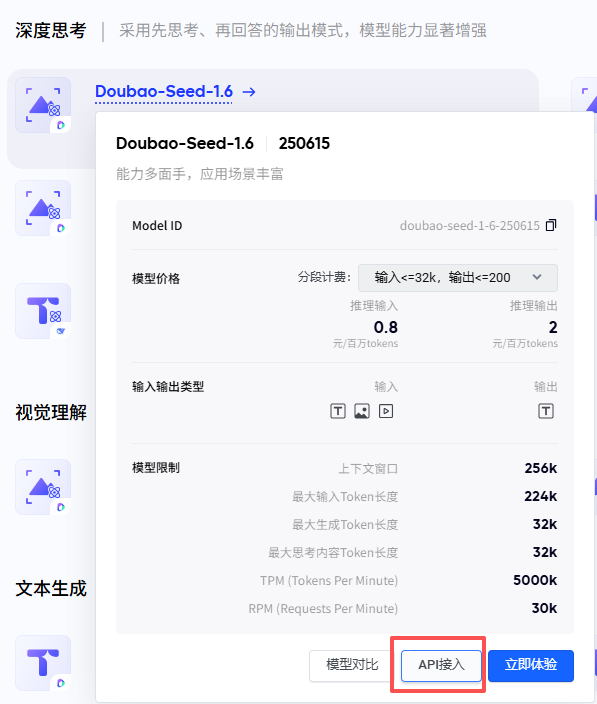
进入模型市场并选择一个模型。
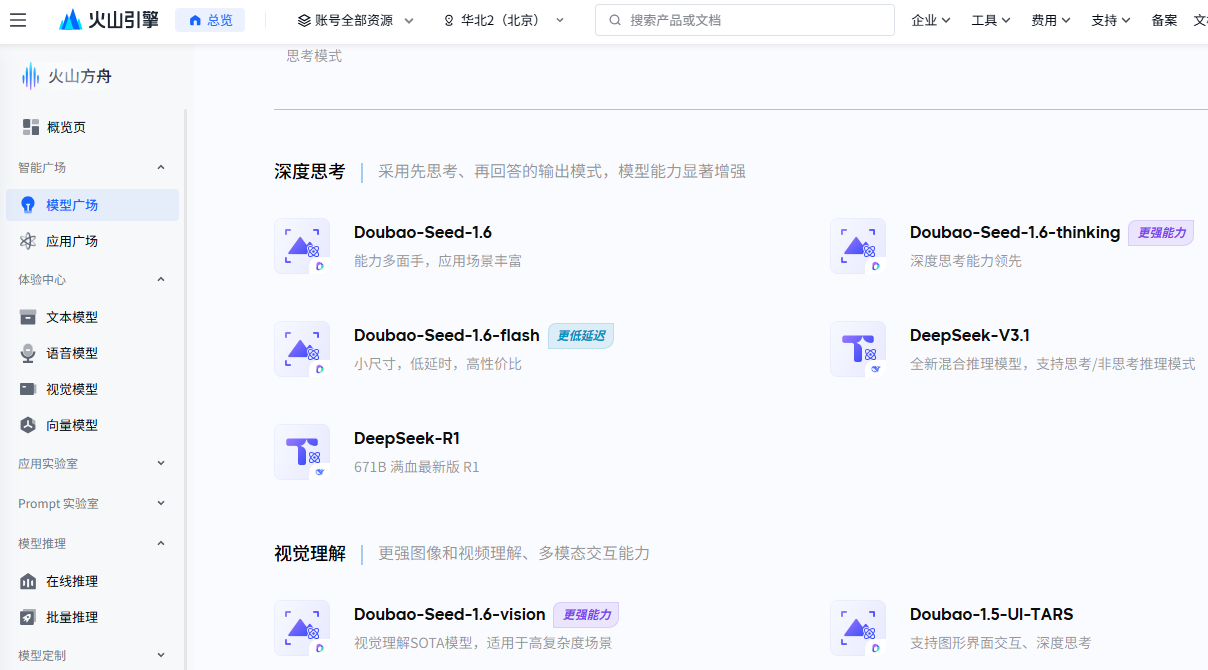
例如选择 Doubao-seed-1.6,然后点击 API 接入。
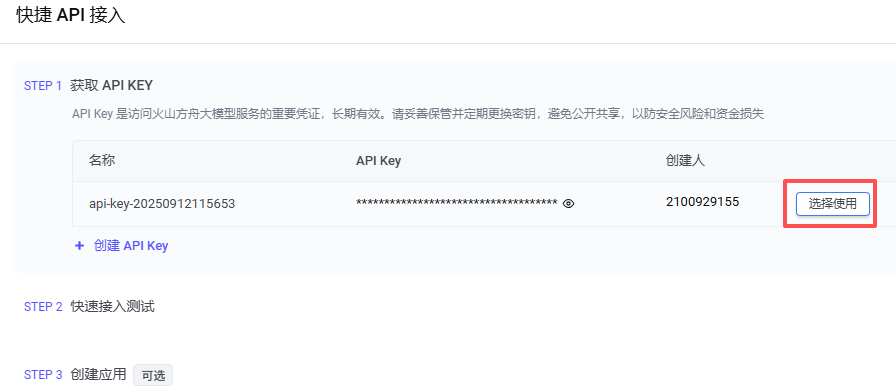
选择您的 API Key 并点击 Use API。
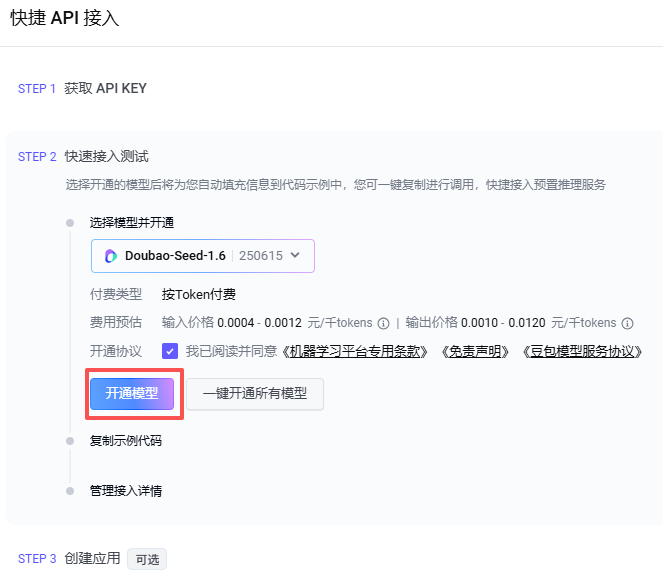
点击 Enable Model。
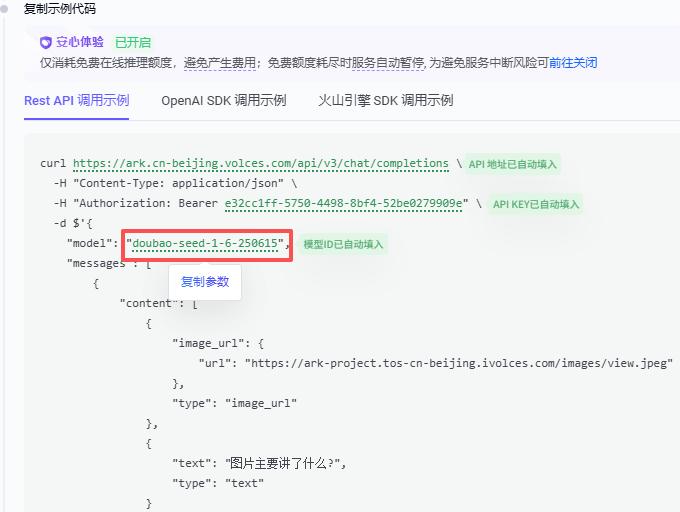
将鼠标悬停在模型 ID 上即可复制。
使用示例代码进行测试
打开测试文件:
cd ~/sunfounder-voice-assistant/examples
sudo nano llm_doubao.py
将内容替换为以下代码,并将
model="xxx"修改为您需要的模型(例如doubao-seed-1-6-250615):from sunfounder_voice_assistant.llm import Doubao from secret import DOUBAO_API_KEY INSTRUCTIONS = "You are a helpful assistant." WELCOME = "Hello, I am a helpful assistant. How can I help you?" llm = Doubao( api_key=DOUBAO_API_KEY, model="doubao-seed-1-6-250615", )
运行:
sudo python3 llm_doubao.py
General
本项目通过统一接口支持连接多个 LLM 平台。 目前已内置兼容以下平台:
OpenAI (ChatGPT / GPT-4o、GPT-4、GPT-3.5)
Gemini (Google AI Studio / Vertex AI)
Grok (xAI)
DeepSeek
Qwen(通义千问)
Doubao(豆包)
此外,您还可以连接 任何兼容 OpenAI API 格式的 LLM 服务。 对于这些平台,您需要自行获取 API Key 和对应的 base_url。
获取并保存 API Key
从您要使用的平台获取 API Key (具体步骤请参考各平台官方控制台)。
在项目目录中创建一个新文件:
cd ~/sunfounder-voice-assistant/examples/
nano secret.py
在
secret.py中添加您的 key:# secret.py API_KEY = "your_api_key_here"
警告
请妥善保管您的 API Key,不要将 secret.py 上传到公共代码仓库。
使用示例代码进行测试
打开测试文件:
cd ~/sunfounder-voice-assistant/examples/
sudo nano llm_others.py
将 Python 文件内容替换为以下示例代码,并填写正确的
base_url和model:备注
关于
base_url: 本项目支持 OpenAI API 格式 以及 与其兼容的 API。 不同服务提供商会使用不同的base_url,请参考其官方文档。from sunfounder_voice_assistant.llm import LLM from secret import API_KEY INSTRUCTIONS = "You are a helpful assistant." WELCOME = "Hello, I am a helpful assistant. How can I help you?" llm = LLM( base_url = f"", api_key=API_KEY, model="", )
运行程序:
sudo python3 llm_others.py