Note
Hello, welcome to the SunFounder Raspberry Pi & Arduino & ESP32 Enthusiasts Community on Facebook! Dive deeper into Raspberry Pi, Arduino, and ESP32 with fellow enthusiasts.
Why Join?
Expert Support: Solve post-sale issues and technical challenges with help from our community and team.
Learn & Share: Exchange tips and tutorials to enhance your skills.
Exclusive Previews: Get early access to new product announcements and sneak peeks.
Special Discounts: Enjoy exclusive discounts on our newest products.
Festive Promotions and Giveaways: Take part in giveaways and holiday promotions.
👉 Ready to explore and create with us? Click [here] and join today!
GPIO Output
Introduction
In this tutorial, we’ll connect an LED to a GPIO pin and write a Python program to make it blink. Let’s get started!
Circuit Diagram
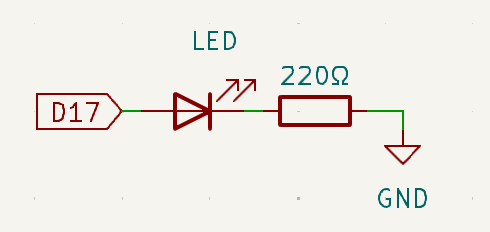
Here’s how the circuit should look:
GPIO Pin 17 connects to the anode (long pin) of the LED.
The cathode (short pin) of the LED connects to one leg of the resistor.
The other leg of the resistor connects to the GND (Ground) pin.
The resistor limits the current flowing through the LED, preventing it from burning out. Without a resistor, the LED may draw too much current, which can damage both the LED and the Raspberry Pi.
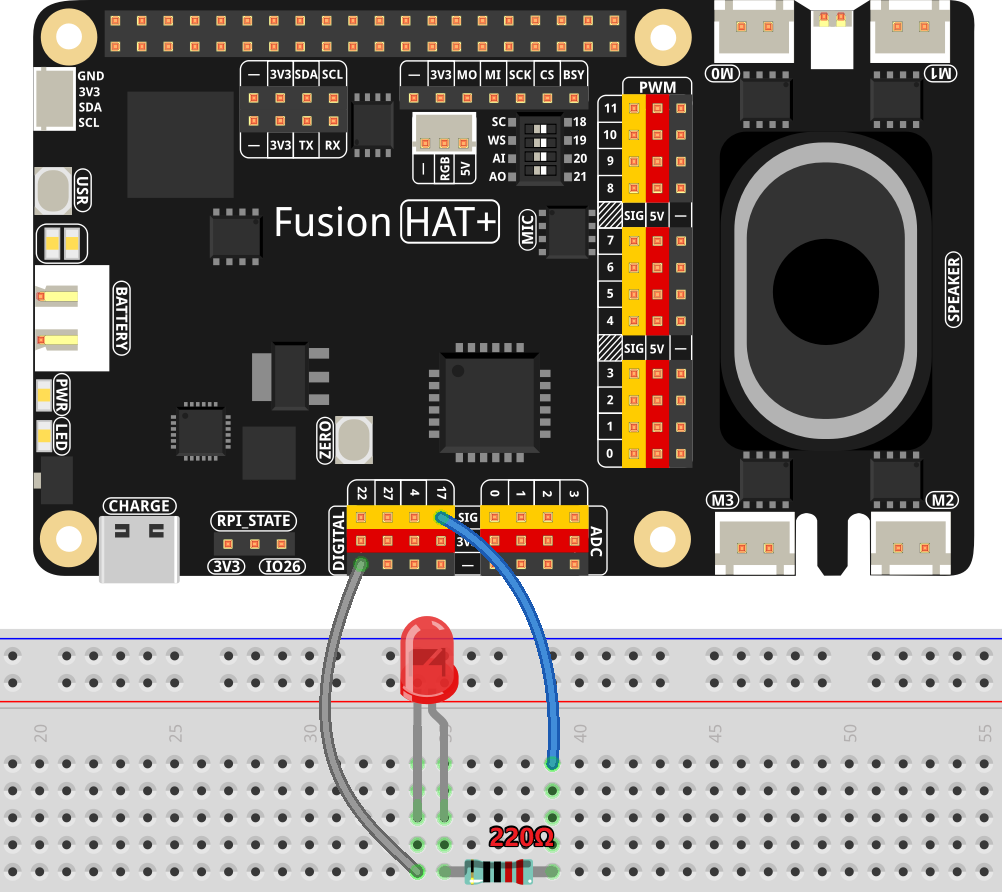
Wiring Diagram
Follow the wiring diagram below to connect your components:
Code
Let’s write the Python code to control the LED. You’ll create a script that turns the LED on and off at regular intervals.
Here’s the complete Python script for this project:
#!/usr/bin/env python3
from fusion_hat.pin import Pin, Mode
from time import sleep

# Initialize an LED connected to GPIO pin 17 as an output pin.
led = Pin(17,mode=Mode.OUT)

try:
   # Start an infinite loop to toggle the LED state.
   while True:
      # Turn on the LED and print a message to the console.
      led.high()
      print('...LED ON')

      # Wait for 0.5 seconds with the LED on.
      sleep(0.5)

      # Turn off the LED and print a message to the console.
      led.low()
      print('LED OFF...')

      # Wait for 0.5 seconds with the LED off.
      sleep(1)

except KeyboardInterrupt:
   # Gracefully handle a keyboard interrupt (Ctrl+C) by breaking the loop.
   pass
This Python script controls an LED connected to GPIO pin 17 of a Raspberry Pi. When executed, the LED alternates between turning on and off in half-second intervals. Simultaneously, the console prints “LED is ON” and “LED is OFF” to indicate the LED’s current state. The program runs indefinitely until interrupted by a user pressing Ctrl+C.