Note
Hello, welcome to the SunFounder Raspberry Pi & Arduino & ESP32 Enthusiasts Community on Facebook! Dive deeper into Raspberry Pi, Arduino, and ESP32 with fellow enthusiasts.
Why Join?
Expert Support: Solve post-sale issues and technical challenges with help from our community and team.
Learn & Share: Exchange tips and tutorials to enhance your skills.
Exclusive Previews: Get early access to new product announcements and sneak peeks.
Special Discounts: Enjoy exclusive discounts on our newest products.
Festive Promotions and Giveaways: Take part in giveaways and holiday promotions.
👉 Ready to explore and create with us? Click [here] and join today!
5.5 Use Internal Library
In the Arduino IDE, you can use many built-in libraries by adding the corresponding .h file directly to your code.
This project uses the Servo library to drive the Servo, so that it can rotate between 0° and 180°.
Required Components
In this project, we need the following components.
It’s definitely convenient to buy a whole kit, here’s the link:
Name |
ITEMS IN THIS KIT |
LINK |
|---|---|---|
3 in 1 Starter Kit |
380+ |
You can also buy them separately from the links below.
COMPONENT INTRODUCTION |
PURCHASE LINK |
|---|---|
Schematic
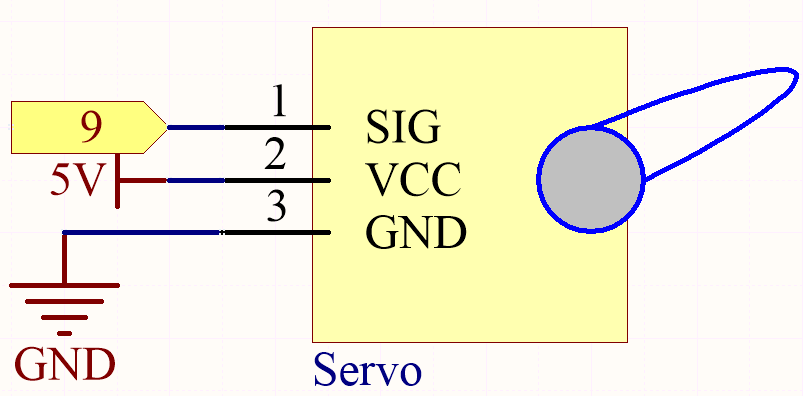
In this project, we use PWM pin 9 to drive the Servo, and get the orange wire of the servo connected to the PWM pin 9, the red one to 5V, and the brown one to GND.
Wiring

Code
Note
Open the
5.5.use_internal_library.inofile under the path of3in1-kit\basic_project\5.5.use_internal_library.Or copy this code into Arduino IDE.
Or upload the code through the Arduino Web Editor.
Once you finish uploading the codes to the R3 board, you can see the servo arm rotating in the range 0°~180°.
How it works?
By calling the library Servo.h, you can drive the servo easily.
#include <Servo.h>
Library Functions:
Servo
Create Servo object to control a servo.
uint8_t attach(int pin);
Call pinMode() to turn a pin into a servo driver and return 0 on failure.
void detach();
Release a pin from servo driving.
void write(int value);
Set the angle of the servo in degrees, 0 to 180.
int read();
Return that value set with the last write().
bool attached();
Return 1 if the servo is currently attached.